
1. Introduzione
The AOPUTTRIVER AP-5800M is a high-precision air quality monitor designed to detect fine particulate matter, specifically PM2.5, PM1.0, and PM10. Utilizing a laser PM2.5 sensor and single-chip microcomputer technology, this device provides accurate readings displayed on a 2.8-inch TFT color LCD. It is suitable for monitoring air quality in various environments, including indoor spaces, outdoor areas, bedrooms, factories, construction sites, and during travel.
This manual provides essential information for the safe and effective use of your AP-5800M air quality monitor. Please read it thoroughly before operation.
2. Informazioni sulla sicurezza
- Non tentare di smontare o modificare il dispositivo. Modifiche non autorizzate possono causare malfunzionamenti o lesioni.
- Keep the device away from water and high humidity to prevent electrical shock or damage.
- Evitare di esporre il dispositivo a temperature estreme, alla luce solare diretta o a sostanze corrosive.
- Use only the provided USB cable for charging. Ensure the charging voltage è compatibile con il dispositivo.
- Tenere fuori dalla portata dei bambini.
- Dispose of the device and its battery according to local environmental regulations.
3. Contenuto della confezione
Dopo aver aperto la confezione, verificare che tutti gli articoli elencati di seguito siano presenti e in buone condizioni:
- 1 x AOPUTTRIVER AP-5800M Air Quality Monitor
- 1 cavo di ricarica USB
- 1 x Custodia per il trasporto
- 1 x Manuale utente

This image displays the items included in the product package: the AP-5800M air quality monitor, a USB cable, a carrying case, and the user manual.
4. Prodotto finitoview
4.1 Layout e pulsanti del dispositivo
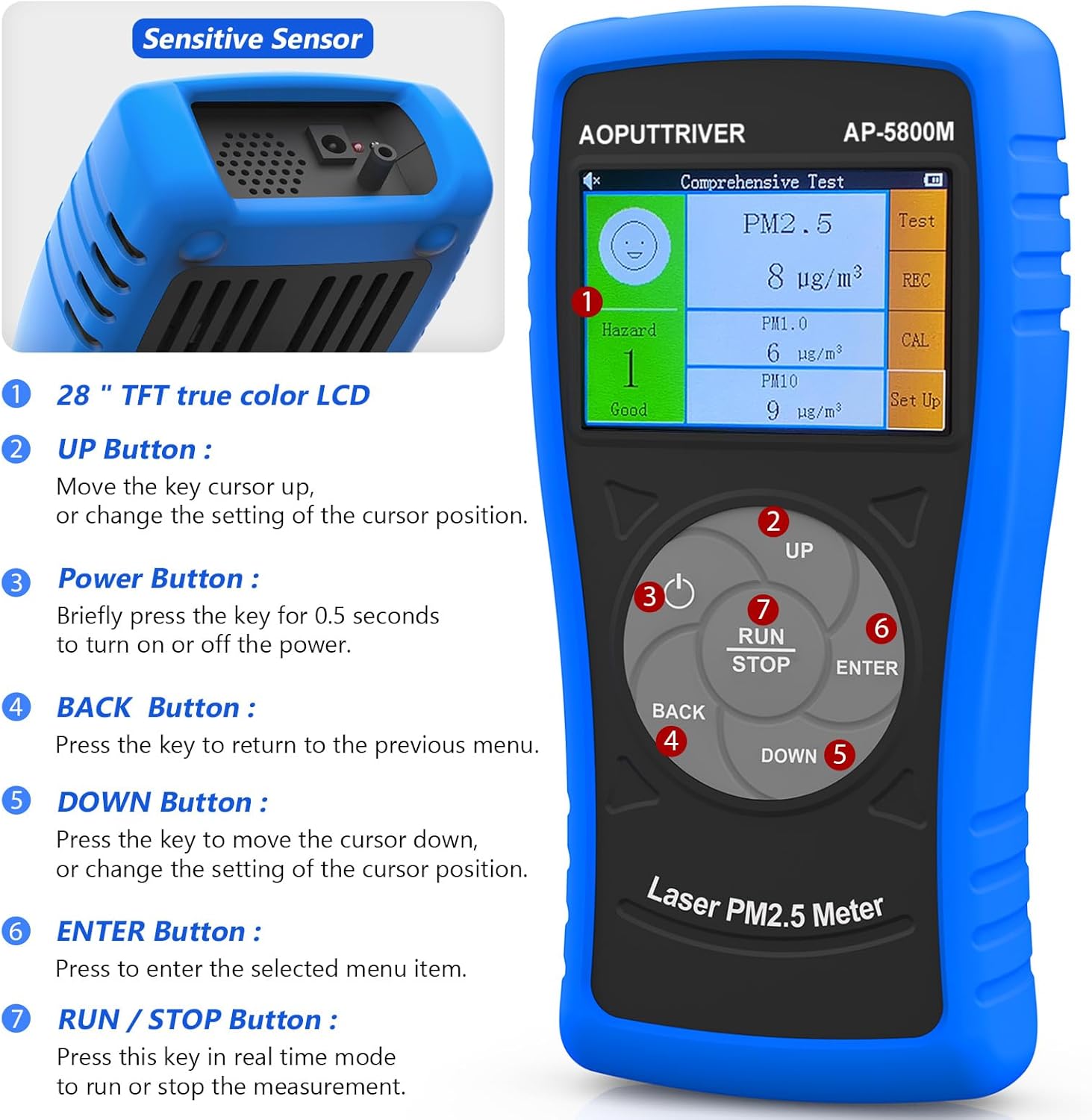
Questa immagine mostra la parte anteriore view of the AOPUTTRIVER AP-5800M Air Quality Monitor, highlighting the 2.8-inch TFT true color LCD, the sensitive sensor area, and the functions of the UP, Power, BACK, DOWN, ENTER, and RUN/STOP buttons.
- Sensore sensibile: Located at the top, responsible for detecting particulate matter.
- Pulsante SU: Moves the cursor up or changes the setting of the cursor position.
- Pulsante di accensione: Briefly press for 0.5 seconds to turn the device on or off.
- Tasto indietro: Premere per tornare al menu precedente.
- Pulsante GI: Moves the cursor down or changes the setting of the cursor position.
- Pulsante INVIO: Press to select the highlighted menu item.
- Pulsante RUN/STOP: Press this key in real-time mode to start or stop the measurement.
4.2 Display e indicatori
The device features a 2.8-inch TFT true color LCD, providing clear visibility even in low-light conditions. The display shows real-time readings for PM2.5, PM1.0, and PM10, along with a hazard index and battery indicator.

Questa immagine fornisce un primo piano view of the AP-5800M's colorful LCD display, showing the comprehensive test results for PM2.5, PM1.0, and PM10, along with the hazard index.
4.3 Componenti interni

This diagram shows the internal components of the AP-5800M, emphasizing the high-precision laser PM2.5 sensor and the 3rd generation particle sensor responsible for detecting PM2.5 and PM10 in air sampmeno.

Questa immagine fornisce un primo piano view of the air outlet and inlet on the device, illustrating how air samples are drawn in and expelled for particle detection.
5. Impostazione
5.1 Ricarica del dispositivo
The AP-5800M is equipped with a rechargeable battery. Before first use, or when the battery indicator shows low power, charge the device using the provided USB cable.
- Connect the USB cable to the device's charging port and to a standard USB power source (e.g., computer, USB wall adapter).
- Durante la ricarica si accenderà una spia rossa.
- The indicator light will turn green once the battery is fully charged.

This image depicts the charging process of the AP-5800M's 2000mAh rechargeable battery via a USB cable, with an indicator showing the battery level.
5.2 Accensione iniziale
After charging, press the Power Button briefly (for approximately 0.5 seconds) to turn on the device. The display will light up, and the device will begin its startup sequence.
6. Istruzioni per l'uso
6.1 Accensione/spegnimento
- Per accendere: Premere il tasto Pulsante di accensione (labeled '3' in the diagram) for approximately 0.5 seconds.
- Per spegnere: Premere il tasto Pulsante di accensione for approximately 0.5 seconds. The device also features an automatic power-off mode to conserve battery.
6.2 Navigazione nei menu
Use the following buttons for menu navigation:
- Pulsante SU: Move cursor up or increase values.
- Pulsante GI: Move cursor down or decrease values.
- Pulsante INVIO: Conferma la selezione o accedi a un sottomenu.
- Tasto indietro: Return to the previous menu or cancel an action.
6.3 Starting and Stopping Measurements
In real-time measurement mode, press the Pulsante RUN/STOP to initiate or pause the air quality measurement process.
6.4 Comprensione del display
The 2.8-inch TFT color LCD displays various parameters:
- PM2.5, PM1.0, PM10 Values: Real-time concentration in µg/m³.
- Hazard Index: A calculated risk value based on PM2.5, PM1.0, and PM10 levels. The formula used is: Hazard Value = PM2.5/6 + PM1.0/20 + PM10/20.
- Indicatore della batteria: Mostra il livello attuale della batteria.

This image illustrates the AP-5800M monitor on its stand, alongside a color-coded chart explaining PM2.5 and PM10 health concern levels, ranging from Good to Hazardous.

Questa immagine mostra un ingrandimento view of the hazard index chart displayed on the AP-5800M, detailing the color-coded levels of air quality from Good to Hazardous for PM2.5 and PM10.
6.5 Setting Parameters and Alarms
The AP-5800M allows for various settings adjustments, including:
- Impostazione dell'ora: Adjust the device's internal clock.
- Registrazione dei dati: Enable or disable the recording of measurement data.
- Data Hold: Freeze the current display readings.
- Hazard Index Alarm: Set thresholds for an audible alarm to activate when air quality levels exceed predefined limits. The device features an audible alarm.

This image highlights the audible alarm function of the AP-5800M, showing an alarm icon on the display and indicating that the device can emit sound alerts for high particle levels.
6.6 Ambienti di utilizzo
The AP-5800M is versatile and can be used in a variety of settings to monitor air quality:
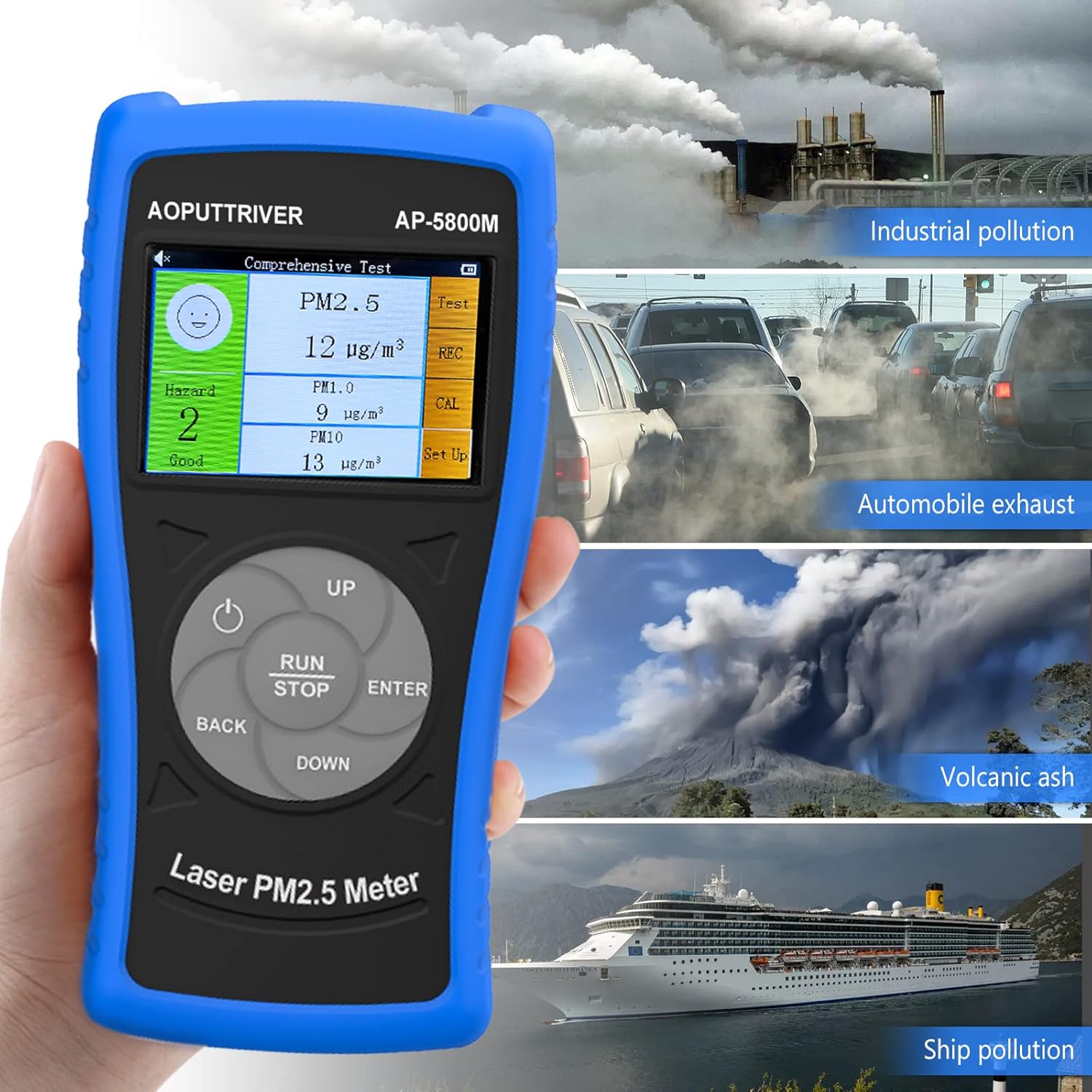
This image demonstrates the versatility of the AP-5800M, showing it in different scenarios such as industrial pollution, automobile exhaust, volcanic ash, and ship pollution, indicating its suitability for diverse testing environments.

This image combines a PM2.5/PM10 air quality level guide with illustrations of various suitable usage environments, including home, school, car, and office, demonstrating the monitor's versatility.
7. Manutenzione
7.1 Pulizia del dispositivo
- Pulire la parte esterna del dispositivo con un panno morbido e asciutto.
- Non utilizzare detergenti abrasivi, solventi o prodotti chimici aggressivi, poiché potrebbero danneggiare il casing o display.
- Ensure the air inlet and outlet are free from dust and obstructions for accurate readings.
7.2 Cura della batteria
- Per prolungare la durata della batteria, evitare di scaricarla completamente frequentemente.
- Se si conserva il dispositivo per un periodo prolungato, caricarlo a circa il 50% e ricaricarlo ogni pochi mesi.
7.3 Conservazione
Conservare il dispositivo nella sua custodia in un luogo fresco e asciutto, lontano dalla luce solare diretta e da temperature estreme.
8. Risoluzione Dei Problemi
If you encounter issues with your AP-5800M, refer to the following common problems and solutions:
| Problema | Possibile causa | Soluzione |
|---|---|---|
| Il dispositivo non si accende. | Batteria scarica o problema di alimentazione. | Charge the device using the provided USB cable. Ensure the charging indicator lights up. If the issue persists, contact customer support. |
| Letture imprecise o incoerenti. | Blocked air inlet/outlet, sensor contamination, or environmental interference. | Ensure the air inlet/outlet is clear. Clean the device exterior. Move the device away from strong air currents, dust sources, or chemical fumes. |
| Lo schermo è vuoto o bloccato. | Problema software o batteria scarica. | Try restarting the device by holding the Power Button. If unresponsive, charge the device. |
| L'allarme suona inaspettatamente. | High particulate levels detected or alarm threshold set too low. | Check the displayed PM values. If levels are high, ventilate the area. Adjust the alarm threshold in the settings if necessary. |
9. Specifiche
| Parametro | Valore |
|---|---|
| Numero di modello | UK-AP-5800M |
| Gamma di rilevamento PM2.5 | 0 ~ 999.9 µg/m³ |
| Risoluzione PM2.5 | 0.1 µg/m³ |
| Gamma di rilevamento PM10 | 0 ~ 999.9 µg/m³ |
| Risoluzione PM10 | 0.1 µg/m³ |
| Display | LCD a colori TFT da 2.8 pollici |
| Fonte di alimentazione | Rechargeable Battery (2000mAh), USB Powered |
| Allarme | Udibile |
| Dimensioni del prodotto | 196 mm (7.71 pollici) x 95 mm (3.74 pollici) x 46 mm (1.81 pollici) |
| Peso dell'articolo | 500 grammi |

Questa immagine fornisce una descrizione dettagliata view of the AP-5800M, showing its dimensions (196mm height, 95mm width, 46mm depth), the 90-degree support stand, the double protective shell, and the tripod hole for mounting.
10. Garanzia e supporto
AOPUTTRIVER offers a 2-year warranty for the AP-5800M Air Quality Monitor and provides lifetime customer service. If you encounter any issues with this product or require assistance, please do not hesitate to contact our customer support team. We are committed to ensuring your satisfaction.