
LENRUE A52
Manuale utente dell'altoparlante portatile Bluetooth LENRUE A52
Modello: A52
1. Introduzione
Thank you for choosing the LENRUE A52 Portable Bluetooth Speaker. This manual provides essential information for setting up, operating, and maintaining your speaker to ensure optimal performance and longevity. Please read it carefully before use.

Image 1.1: The LENRUE A52 Portable Bluetooth Speaker in Powder Blue.
2. Cosa c'è nella scatola
Dopo aver disimballato, assicurarsi che siano presenti tutti gli articoli elencati di seguito:
- 1 x LENRUE A52 Bluetooth Speaker
- 1 cavo di ricarica USB
- 1 x Manuale utente

Image 2.1: The LENRUE A52 speaker, charging cable, and user manual as included in the package.
3. Controlli e indicatori
Familiarize yourself with the speaker's buttons and ports for easy operation.
3.1 Top Panel Buttons
Image 3.1: Top panel buttons including Power, Volume Down, Volume Up, and Play/Pause/Answer Call.
- Pulsante di accensione (⏻): Long press to power on/off. Short press for other functions (e.g., mode switch).
- Volume basso (-): Premere brevemente per diminuire il volume. Premere a lungo per tornare alla traccia precedente.
- Volume su (+): Premere brevemente per aumentare il volume. Premere a lungo per passare alla traccia successiva.
- Play/Pause/Answer Call (▶/❚❚): Short press to play/pause music. Short press to answer/end a call. Long press to reject a call.
3.2 Porte posteriori
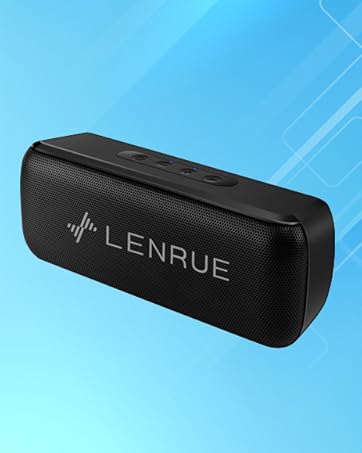
Image 3.2: Rear ports for USB, TF card, and DC 5V charging.
- Porta USB: Per la riproduzione tramite unità flash USB.
- Slot per schede TF: For Micro SD card playback (supports up to 32GB).
- Porta di ricarica DC 5V: For charging the speaker using the provided USB cable.
4. Impostazione
4.1 Ricarica dell'altoparlante
- Collegare l'estremità piccola del cavo di ricarica USB alla porta CC 5V sull'altoparlante.
- Collegare l'estremità più grande del cavo USB a un adattatore di alimentazione USB (non incluso) o alla porta USB di un computer.
- La spia di carica si illuminerà. Una volta completata la carica, la spia potrebbe cambiare colore o spegnersi, a seconda del modello.
- Una carica completa garantisce circa 16-24 ore di riproduzione.
4.2 Accensione/Spegnimento
- Per accendere: Long press the Power button (⏻) until you hear an audible prompt or see an indicator light.
- Per spegnere: Long press the Power button (⏻) again until you hear an audible prompt or the indicator light turns off.
5. Istruzioni per l'uso
5.1 Associazione Bluetooth
Per connettere l'altoparlante a un dispositivo abilitato Bluetooth:
- Ensure the speaker is powered on and in Bluetooth mode (it usually defaults to Bluetooth mode upon power-on). The indicator light will flash, indicating it's ready for pairing.
- Sul tuo dispositivo (smartphone, tablet, ecc.), attiva il Bluetooth e cerca i dispositivi disponibili.
- Selezionare "Soundmate" dall'elenco dei dispositivi trovati.
- Una volta effettuata la connessione, l'altoparlante emetterà un segnale acustico di conferma e la spia luminosa smetterà di lampeggiare e rimarrà fissa.
5.2 Connessione TWS (True Wireless Stereo)
You can pair two LENRUE A52 speakers together for a stereo sound experience.
Image 5.1: Visual representation of two speakers establishing a TWS connection.
- Turn on both LENRUE A52 speakers. Ensure they are not currently connected to any other Bluetooth devices.
- Double-click the Power button (⏻) on uno of the speakers. This speaker will initiate TWS pairing.
- The speakers will automatically connect to each other, indicated by an audible "beep" sound.
- Now, on your device, search for Bluetooth devices and select "Soundmate". Only one "Soundmate" will appear.
- Once connected, audio will play through both speakers in stereo.
5.3 Modalità di riproduzione multiple
L'altoparlante supporta diverse sorgenti audio:
- Modalità Bluetooth: Connect wirelessly to your device as described above.
- Riproduzione da unità flash USB: Insert a USB flash drive containing MP3 audio files nella porta USB. L'altoparlante passerà automaticamente alla modalità USB e inizierà la riproduzione.
- Riproduzione su scheda Micro SD: Insert a Micro SD card (up to 32GB) containing MP3 audio filenello slot per schede TF. L'altoparlante passerà automaticamente alla modalità scheda TF e inizierà la riproduzione.
5.4 Chiamate in vivavoce
Se connesso tramite Bluetooth allo smartphone, l'altoparlante può essere utilizzato per chiamate in vivavoce.
- Rispondi alla chiamata: When an incoming call rings, short press the Play/Pause/Answer Call button (▶/❚❚) to answer.
- Termina chiamata: During a call, short press the Play/Pause/Answer Call button (▶/❚❚) to end the call.
- Rifiuta chiamata: When an incoming call rings, long press the Play/Pause/Answer Call button (▶/❚❚) to reject the call.

Image 5.2: The LENRUE A52 speaker in an outdoor setting, demonstrating its portability.
6. Manutenzione
6.1 Pulizia
- Pulire l'altoparlante con un panno morbido e asciutto.
- Non utilizzare detergenti abrasivi, alcol o solventi chimici, poiché potrebbero danneggiare la superficie.
6.2 Cura della batteria
- Per prolungare la durata della batteria, caricare completamente l'altoparlante prima del primo utilizzo.
- Avoid exposing the speaker to extreme temperatures (hot or cold).
- Se l'altoparlante non verrà utilizzato per un periodo prolungato, caricarlo almeno una volta ogni tre mesi.
6.3 Conservazione
- Conservare l'altoparlante in un luogo fresco e asciutto, lontano dalla luce solare diretta e dall'umidità.
7. Risoluzione Dei Problemi
If you encounter issues with your LENRUE A52 speaker, refer to the following common problems and solutions:
Q1: How to use two speakers in Bluetooth mode at the same time (TWS)?
Risposta:
- Turn on both speakers and ensure they are disconnected from all other devices.
- Double-click the power button on either of the two speakers to initiate TWS pairing.
- TWS pairing will automatically complete after a "beep" sound.
- Select the device name "Soundmate" on your phone's Bluetooth settings to pair with your speakers.
- You can now play music with double surround stereo sound.
Q2: How does the microphone work?
Risposta: The microphone functions only in Bluetooth mode. When a call comes in, press the Play/Pause/Answer Call button (▶/❚❚) to answer the call through the speaker.
8. Specifiche
Detailed technical specifications for the LENRUE A52 Portable Bluetooth Speaker:
Image 8.1: Dimensions of the LENRUE A52 Portable Bluetooth Speaker.
| Caratteristica | Dettaglio |
|---|---|
| Nome del modello | A52 |
| Marca | LENRUE |
| Tecnologia di connettività | Bluetooth 5.0 |
| Tipo di altoparlante | Altoparlante Bluetooth portatile |
| Caratteristica speciale | Accoppiamento stereo (TWS) |
| Fonte di alimentazione | Alimentato a batteria |
| Capacità della batteria | 1500 mAh (1.6E+3 Milliamp Ore) |
| Tempo di gioco | 16-24 ore |
| Tempo di ricarica | Approximately 16 Hours (initial charge) |
| Potenza massima in uscita dell'altoparlante | 8 Watt |
| Risposta in frequenza | Frequenza 20 Hz |
| Dimensioni del prodotto | 1.7"P x 6"L x 2.25"A |
| Peso dell'articolo | 9.2 once |
| Dispositivi compatibili | Dispositivi iOS e Android |
| Modalità di riproduzione | Bluetooth, USB Flash Disk, Micro SD Card |
| Impermeabile | NO |
9. Garanzia
The LENRUE A52 Portable Bluetooth Speaker comes with a Limited Warranty. Please refer to the warranty card included in your package or contact customer support for details regarding warranty terms and conditions.
10. Supporto
For further assistance, technical support, or inquiries not covered in this manual, please contact LENRUE customer service through the retailer where you purchased the product or visit the official LENRUE websito.
Ask a question about this manual
Ask about setup, troubleshooting, compatibility, parts, safety, or missing instructions. Manuals+ will review the question and use this page’s manual context to help answer it.