
1. Introduzione
This manual provides detailed instructions for the safe and effective use of your Flashpoint Zoom Li-on III R2 TTL On-Camera Flash for Fujifilm cameras. Please read this manual thoroughly before operation to ensure proper functionality and to prevent damage to the unit or injury to yourself.
The Flashpoint Zoom Li-on III R2 is a high-performance speedlight designed for Fujifilm cameras, featuring a powerful 76Ws output, 2.4GHz wireless R2 system, 1/8000s High-Speed Sync (HSS), and a quick manual-TTL switch for versatile lighting control. It is powered by a 7.2V/2600mAh Li-ion battery, providing up to 450 full-power flashes with a rapid 1.5s recycle time.

Image: The Flashpoint Zoom Li-on III R2 TTL On-Camera Flash unit.
2. Informazioni sulla sicurezza
- Non smontare o modificare l'unità flash. Alta voltagsono presenti i componenti.
- Mantenere l'unità asciutta. Non esporre a pioggia o umidità.
- Do not touch the flash tube after firing, as it can be hot.
- Evitare l'esposizione diretta degli occhi al flash, soprattutto a distanza ravvicinata, poiché può compromettere la vista.
- Tenere fuori dalla portata dei bambini.
- Utilizzare solo la batteria e il caricabatterie specificati.
- Assicurarsi che il flash sia montato saldamente sulla fotocamera o sul supporto per evitare cadute accidentali.
3. Componenti del prodotto
The Flashpoint Zoom Li-on III R2 package typically includes the following items:
- Flashpoint Zoom Li-on III R2 TTL On-Camera Flash Unit
- Li-ion Battery (7.2V/2600mAh)
- Caricabatterie
- Cavo di ricarica USB
- Mini supporto
- Custodia protettiva
- Manuale di istruzioni (questo documento)

Image: Contents of the Flashpoint Zoom Li-on III R2 package, including the flash unit, battery, charger, cable, mini stand, and case.
4. Impostazione
4.1 Installazione e ricarica della batteria
- Aprire il coperchio del vano batteria dell'unità flash.
- Insert the 7.2V/2600mAh Li-ion battery, ensuring correct polarity.
- Chiudere saldamente il coperchio del vano batterie.
- To charge, connect the battery to the charger and plug the charger into a power outlet. The indicator light will show charging status.

Image: Close-up of the Flashpoint Zoom Li-on III R2 showing the battery compartment and the 2600mAh Li-ion battery.
4.2 Montaggio del Flash
- Slide the flash's mounting foot into your Fujifilm camera's hot shoe.
- Tighten the locking knob or lever on the flash unit to secure it firmly in place.
- Alternatively, mount the flash onto a light stand using the included mini stand or a compatible cold shoe adapter.

Image: The Flashpoint Zoom Li-on III R2 flash mounted on a camera hot shoe.
5. Utilizzo del flash
5.1 Accensione/spegnimento e interfaccia
Press and hold the power button to turn the flash on or off. The backlit matrix LCD provides clear information and settings. Use the multipurpose buttons and dial for navigation and adjustments.
Image: The control panel of the Flashpoint Zoom Li-on III R2, showing the backlit LCD and multipurpose buttons.
5.2 modalità flash
The flash supports various modes for different shooting scenarios:
- Modalità TTL (attraverso l'obiettivo): The flash automatically adjusts its output based on the camera's metering system. Use the Quick Manual-TTL switch for fast transitions.
- Modalità manuale (M): Consente di impostare manualmente la potenza del flash da 1/1 a 1/256.
- Modalità Multi (Stroboscopica): Emette una serie di rapidi lampi durante una singola esposizione per catturare più movimenti di un soggetto.
- Sincronizzazione ad alta velocità (HSS): Enables flash synchronization with shutter speeds up to 1/8000s, useful for overpowering ambient light or using wide apertures in bright conditions.

Image: Visual representation of different flash modes including TTL, Manual, Stroboscopic, and High-Speed Sync (HSS) capabilities.
5.3 Regolazione della testa del flash
The flash head offers flexible positioning for bounce flash or direct lighting:
- Rotazione orizzontale: The flash head rotates 0 to 330 degrees.
- Inclinazione verticale: The flash head tilts from -7 to 120 degrees.
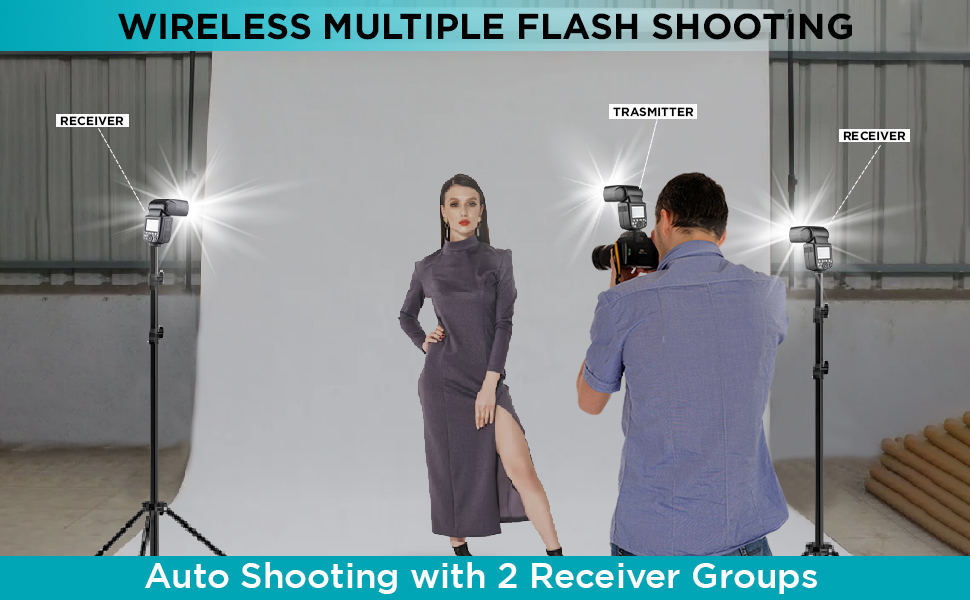
Image: Diagram illustrating the horizontal rotation (330 degrees) and vertical tilt (120 degrees) capabilities of the flash head.
6. Wireless Control (R2 System)
The Flashpoint Zoom Li-on III R2 features a built-in 2.4GHz R2 wireless system, allowing for reliable remote triggering and multi-flash setups.
6.1 Master and Slave Modes
- Modalità principale: The flash can act as a master unit to control other Fujifilm compatible flashes with built-in R2 receivers.
- Modalità schiava: The flash can be triggered wirelessly by a master unit or transmitter, allowing for off-camera lighting.

Image: Illustration of the flash operating in both Master and Slave modes for wireless multi-flash setups.
6.2 Trasmissione wireless
The 2.4GHz wireless transmission offers 32 channels and a range of up to 100 meters, providing robust connectivity for complex lighting arrangements.

Image: Diagram showing the 2.4GHz wireless transmission capabilities of the Flashpoint Zoom Li-on III R2, including channel and range information.
7. Manutenzione
- Pulire regolarmente l'unità flash con un panno morbido e asciutto. Non utilizzare solventi o detergenti abrasivi.
- Ensure the hot shoe contacts are clean and free of debris for proper communication with the camera.
- Quando non lo si utilizza, conservare il flash nella sua custodia protettiva per evitare polvere e danni.
- If storing for extended periods, remove the battery and store it separately in a cool, dry place.
8. Risoluzione Dei Problemi
| Problema | Possibile causa | Soluzione |
|---|---|---|
| Il flash non si attiva. | Battery low or depleted; incorrect mode; flash not securely mounted; camera settings incorrect. | Charge or replace battery; check flash mode (TTL/M); ensure flash is fully seated in hot shoe; verify camera flash settings. |
| L'emissione del flash non è uniforme. | Low battery; environmental interference (wireless); dirty contacts. | Ensure battery is fully charged; change wireless channel; clean hot shoe contacts. |
| L'attivazione wireless non funziona. | Incorrect channel/group settings; distance too far; obstructions; master/slave not properly set. | Verify matching channel and group settings on all units; reduce distance; ensure clear line of sight; confirm master/slave roles. |
| Il tempo di riciclo del flash è lento. | Battery is low; high power output setting. | Recharge battery; use lower power settings if possible. |
9. Specifiche
| Caratteristica | Dettaglio |
|---|---|
| Numero guida | 197ft/60m @ISO 100 |
| Potenza in uscita | 76W |
| Modalità flash | TTL, Manuale, Multi (Stroboscopico) |
| Sincronizzazione ad alta velocità (HSS) | Fino a 1/8000 |
| Riciclare il tempo | ca. 1.5 secondi |
| Flash a piena potenza | Circa. 450 |
| Batteria | Ioni di litio da 7.2 V / 2600 mAh |
| sistema senza fili | 2.4GHz R2 Wireless |
| canali wireless | 32 |
| wireless Range | Fino a 100 metri |
| Rotazione della testa del flash | 0 to 330 degrees (horizontal) |
| Inclinazione della testa del flash | -7 to 120 degrees (vertical) |
| Modellazione Lamp | 2W integrated |
| Dimensioni | 9 x 8.3 x 4 pollici |
10. Garanzia e supporto
Flashpoint products are designed for reliability and performance. For warranty information and technical support, please refer to the official Flashpoint webo contattare il rivenditore autorizzato. Conservare la ricevuta d'acquisto come prova d'acquisto per eventuali reclami in garanzia.
For further assistance, you may visit the Flashpoint store online: Flashpoint Store