
1. Introduzione
Grazie per l'acquistoasing the Mikado MD-W5 Bluetooth Speaker and Alarm Clock. This device combines a portable Bluetooth speaker with an alarm clock, offering versatile audio playback options via Bluetooth, TF card, and USB. This manual provides essential information for safe and efficient use of your new device. Please read it thoroughly before operation and retain it for future reference.
2. Informazioni sulla sicurezza
- Non esporre il dispositivo ad acqua, umidità o temperature estreme.
- Evitare di far cadere o sottoporre il dispositivo a forti impatti.
- Non tentare di smontare o riparare il dispositivo da soli. Contattare personale di assistenza qualificato.
- Tenere il dispositivo lontano da fonti di calore e dalla luce solare diretta.
- Utilizzare solo il cavo di ricarica e l'adattatore di alimentazione specificati.
3. Contenuto della confezione
Si prega di controllare la confezione per verificare la presenza dei seguenti elementi:
- Mikado MD-W5 Bluetooth Speaker and Alarm Clock
- Cavo di ricarica USB
- Manuale d'uso
4. Prodotto finitoview
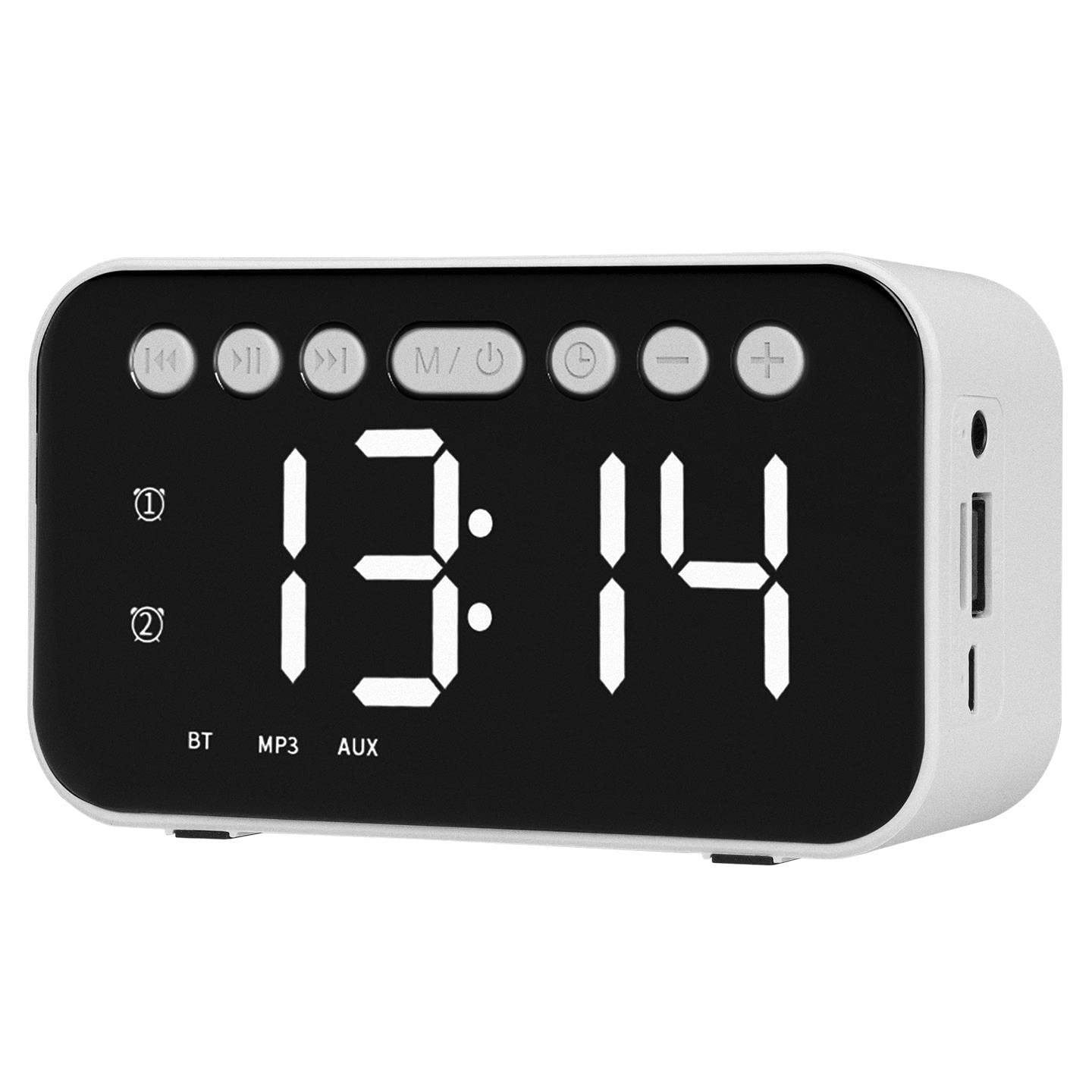
Figura 1: Fronte view of the Mikado MD-W5 Bluetooth Speaker.
The Mikado MD-W5 features a compact, rectangular design with a prominent circular speaker grille on the front. The device is equipped with a digital display for time and mode information, along with control buttons for various functions. Input ports for charging, TF card, and USB are located on the device's sides or rear, allowing for versatile connectivity.
5. Impostazione
5.1. Carica del dispositivo
The Mikado MD-W5 is powered by a built-in 500mAh rechargeable battery. Before first use, fully charge the device.
- Collegare l'estremità piccola del cavo di ricarica USB in dotazione alla porta di ricarica sull'altoparlante.
- Collegare l'estremità più grande del cavo USB a una fonte di alimentazione USB (ad esempio, una porta USB del computer, un adattatore da parete USB).
- La spia di carica si illumina, in genere in rosso, durante la ricarica. Si spegne o cambia colore (ad esempio, blu) quando la carica è completa.
5.2. Accensione/spegnimento
Per accendere l'altoparlante on, press and hold the power button for a few seconds until the display lights up and you hear an audible prompt. To turn the speaker spento, premere e tenere premuto nuovamente il pulsante di accensione finché il display non si spegne.
6. Istruzioni per l'uso
6.1. Accoppiamento Bluetooth
Per connettere il tuo dispositivo tramite Bluetooth:
- Ensure the speaker is powered on and in Bluetooth mode. If not, press the 'M' (Mode) button to switch to Bluetooth mode. The display will show 'BT' and a blinking Bluetooth icon, indicating it's ready for pairing.
- Sul tuo smartphone, tablet o altro dispositivo abilitato Bluetooth, vai alle impostazioni Bluetooth.
- Cercare available devices and select 'Mikado MD-W5' from the list.
- Once connected, the speaker will emit a confirmation sound, and the Bluetooth icon on the display will stop blinking.
6.2. Riproduzione della scheda TF
To play music from a TF (microSD) card:
- Insert a TF card (with MP3 audio files) into the designated TF card slot on the speaker.
- The speaker will automatically detect the card and switch to TF card playback mode. If not, press the 'M' (Mode) button to select TF card mode.
- Use the playback control buttons (e.g., Play/Pause, Next/Previous Track) to manage your music.
6.3. Riproduzione USB
Per riprodurre musica da un'unità flash USB:
- Inserire una chiavetta USB (con audio MP3) files) into the USB port on the speaker.
- The speaker will automatically detect the drive and switch to USB playback mode. If not, press the 'M' (Mode) button to select USB mode.
- Use the playback control buttons to manage your music.
6.4. Funzione sveglia
The Mikado MD-W5 includes an integrated alarm clock. Specific button functions for setting the alarm may vary, but generally involve:
- Pressing an 'Alarm' or 'Set' button to enter alarm setting mode.
- Using '+' and '-' buttons to adjust the hour and minute.
- Pressing the 'Alarm' or 'Set' button again to confirm and save the alarm time.
- Assicurarsi che l'allarme sia attivato (solitamente sul display compare un'icona di allarme).
6.5. Impostazione dell'ora
To set the current time on the digital display:
- Locate the 'Time Set' or 'Clock' button. Press and hold it to enter time setting mode.
- Use the '+' and '-' buttons to adjust the hour. Press the 'Time Set' button again to move to minute adjustment.
- Use the '+' and '-' buttons to adjust the minute. Press the 'Time Set' button one more time to confirm and exit time setting mode.
7. Manutenzione
- Pulizia: Utilizzare un panno morbido e asciutto per pulire la superficie dell'altoparlante. Non utilizzare detergenti abrasivi o solventi.
- Magazzinaggio: Conservare il dispositivo in un luogo fresco e asciutto quando non viene utilizzato per lunghi periodi.
- Cura della batteria: Per prolungare la durata della batteria, evitare di scaricarla completamente frequentemente. Caricare il dispositivo regolarmente, anche se non in uso.
8. Risoluzione Dei Problemi
| Problema | Possibile causa | Soluzione |
|---|---|---|
| Il dispositivo non si accende. | La batteria è scarica. | Carica il dispositivo utilizzando il cavo USB in dotazione. |
| Nessun suono dall'altoparlante. | Volume is too low; Incorrect mode selected; Device not properly connected. | Increase volume on both speaker and connected device. Press 'M' button to select correct mode (Bluetooth, TF, USB). Re-pair Bluetooth or re-insert TF/USB. |
| L'associazione Bluetooth non riesce. | Altoparlante non in modalità di associazione; Dispositivo troppo lontano; Interferenza. | Ensure speaker is in Bluetooth pairing mode (blinking 'BT'). Move devices closer. Turn off other Bluetooth devices. Forget 'Mikado MD-W5' on your device and try pairing again. |
| La riproduzione tramite scheda TF/USB non funziona. | Scheda/unità non inserita correttamente; Incompatibile file formato; danneggiato files. | Ensure TF card/USB drive is fully inserted. Check if audio files are in MP3 format. Try with a different TF card/USB drive. |
9. Specifiche
- Marca: Mikado
- Modello: MD-W5
- Colore: Bianco
- Capacità della batteria: 500mAh
- Potenza di uscita: 5W
- Tipo di visualizzazione: Digitale
- Connettività: Bluetooth, USB, scheda TF
- Fonte di energia: Battery Powered (Electric Operating Mode)
- Sveglia: SÌ
- Utilizzo: Al chiuso
- ASIN: B09M7CQPC1
10. Garanzia e supporto
Warranty information for the Mikado MD-W5 is not specified in the product details. For any product-related inquiries, technical support, or warranty claims, please contact the retailer from whom you purchased the device. Please retain your proof of purchase for any potential service needs.