
1. Introduzione
Grazie per l'acquistoasing the TURBOX Giantpeak Mechanical Feel RGB Gaming Keyboard. This manual provides essential information for setting up, operating, and maintaining your new keyboard. Please read this manual carefully before use to ensure optimal performance and longevity of your device.
2. Informazioni sulla sicurezza
- Keep the keyboard away from excessive heat, direct sunlight, and moisture.
- Although the keyboard is spill-resistant, avoid intentionally exposing it to large amounts of liquid. In case of spills, disconnect the keyboard immediately and allow it to dry completely before reconnecting.
- Non tentare di smontare o modificare la tastiera. Ciò invaliderà la garanzia e potrebbe causare danni.
- Utilizzare solo con dispositivi e fonti di alimentazione compatibili come specificato.
- Tenere fuori dalla portata dei bambini.
3. Contenuto della confezione
Si prega di controllare la confezione per verificare la presenza dei seguenti elementi:
- TURBOX Giantpeak Mechanical Feel RGB Gaming Keyboard
- Manuale dell'utente (questo documento)
4. Prodotto finitoview
The TURBOX Giantpeak keyboard is designed for gaming, featuring a mechanical feel, customizable RGB lighting, and macro capabilities. It also includes a convenient mobile device holder.
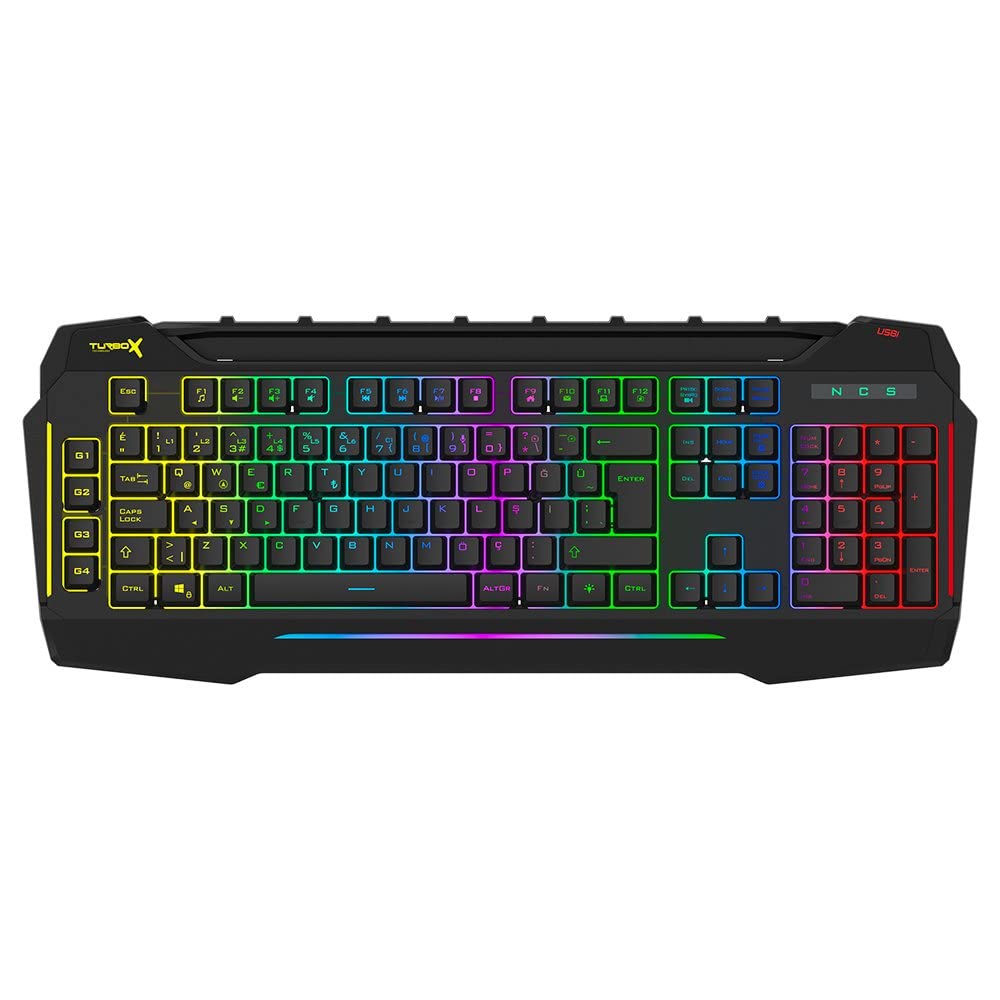
Figure 4.1: TURBOX Giantpeak keyboard with integrated mobile device stand.
This full-size keyboard offers a standard Q layout, providing a comfortable and responsive typing experience for both gaming and general use.

Figura 4.2: in alto view of the TURBOX Giantpeak keyboard.
The keyboard features vibrant RGB backlighting that can be customized to various effects, including sound-sensitive modes. Its spill-resistant design provides added durability.

Figura 4.3: Angolato view showing RGB lighting.
Dedicated macro keys (G1-G4) are located on the left side, allowing for quick execution of complex commands or sequences.

Figure 4.4: Close-up of programmable G-keys.
The keyboard also includes a full numeric keypad for data entry and additional functions.

Figure 4.5: Numeric keypad detail.
Connectivity is provided via a durable USB cable, ensuring a stable and responsive connection to your computer.

Figura 4.6: lato view con cavo USB.
5. Impostazione
Follow these steps to set up your TURBOX Giantpeak keyboard:
- Disimballare la tastiera: Carefully remove the keyboard and any packaging materials from the box.
- Connessione al computer: Plug the USB connector of the keyboard into an available USB port on your desktop or laptop computer.
- Installazione del driver: Your operating system (Windows, macOS, etc.) should automatically detect and install the necessary drivers. This process may take a few moments.
- Verifica funzionalità: Once drivers are installed, test the keyboard by typing in a text editor or browser to ensure all keys are functioning correctly. The RGB lighting should also illuminate.
6. Istruzioni per l'uso
6.1 Funzioni di base della tastiera
The TURBOX Giantpeak keyboard operates like a standard Q-layout keyboard. All standard keys (alphanumeric, function keys, numeric keypad, navigation keys) function as expected.
6.2 Controllo dell'illuminazione RGB
The keyboard features customizable RGB backlighting with 7 different color options and sound-sensitive modes. Specific key combinations are used to cycle through lighting effects and adjust brightness:
- Cambia modalità di illuminazione: Utilizzare il Fn + Blocco scorrimento keys to cycle through various lighting effects.
- Regola luminosità: Utilizzare il Fn + Pagina su (aumento) o Fn + Pagina giù (decrease) keys to adjust the brightness level of the backlighting.
- Sound-Sensitive Mode: The keyboard supports sound-sensitive lighting. Refer to specific software or key combinations (if available) for activation. (Note: Specific key combinations for sound-sensitive mode may vary or require software.)
6.3 Macro Programming (G1-G4 Keys)
The TURBOX Giantpeak keyboard includes 4 programmable macro keys (G1, G2, G3, G4) for executing custom commands or sequences. Follow these general steps for macro recording:
- Enter Macro Recording Mode: Premere il tasto MR key (Macro Record, usually near the G-keys). The keyboard's indicator light may flash to indicate recording mode.
- Select Macro Key: Press one of the G-keys (G1, G2, G3, or G4) where you want to save the macro.
- Sequenza di registrazione: Type the sequence of keys you wish to record. This can include multiple keystrokes, delays, and modifier keys.
- Exit Macro Recording Mode: Premere il tasto MR key again to save the macro and exit recording mode. The indicator light should stop flashing.
- Esegui macro: To use the recorded macro, simply press the assigned G-key.
Note: For advanced macro settings or specific software-based macro management, please check the manufacturer's website for any available utility software.
6.4 Mobile Device Holder
The integrated slot at the top of the keyboard is designed to hold smartphones or small tablets, providing a convenient viewing angle while gaming or working.
7. Manutenzione
Per garantire la longevità e le prestazioni della tastiera, seguire queste linee guida per la manutenzione:
- Pulizia: Utilizzare un panno morbido e asciutto per pulire la superficie della tastiera. Per lo sporco ostinato, leggermente dampPulire il panno con acqua o una soluzione detergente delicata. Evitare prodotti chimici aggressivi o materiali abrasivi.
- Rimozione della polvere: Utilizzare aria compressa per rimuovere polvere e detriti dagli spazi tra i tasti.
- Gestione delle fuoriuscite: In case of liquid spills, immediately disconnect the keyboard from your computer. Turn it upside down to drain any liquid and allow it to air dry completely for at least 24-48 hours before reconnecting.
- Magazzinaggio: Quando non si utilizza la tastiera per lunghi periodi, conservarla in un ambiente pulito e asciutto.
8. Risoluzione Dei Problemi
If you encounter issues with your TURBOX Giantpeak keyboard, refer to the following common problems and solutions:
| Problema | Possibile soluzione |
|---|---|
| La tastiera non risponde. |
|
| RGB lighting is not working or is stuck. |
|
| Macro keys (G1-G4) are not working. |
|
| I tasti sono bloccati o non rispondono. |
|
9. Specifiche
| Caratteristica | Dettaglio |
|---|---|
| Nome del modello | Giantpeak |
| Numero di parte | ID9923266 |
| Marca | TURBOX |
| Tecnologia di connettività | USB cablato |
| Dispositivi compatibili | Computer portatile, PC |
| Tipo di chiave | Mechanical Feel (Membrane) |
| Caratteristiche speciali | RGB Lighting, Macro Keys (4), Sound-Sensitive Lighting, Spill-Resistant, Mobile Device Holder |
| Numero di chiavi | 87 (Note: Visuals suggest a full-size layout, this number may refer to a specific key group or variant.) |
| Interfaccia Hardware | USB |
| Dimensioni del pacco | Dimensioni: 51.2 x 22.2 x 5.2 cm |
| Peso dell'articolo | 1 chilogrammo |
10. Garanzia e supporto
For warranty information and technical support, please refer to the warranty card included with your product or visit the official TURBOX websito. Conservare la prova d'acquisto per eventuali reclami in garanzia.
If you require further assistance, please contact TURBOX customer support through their official channels.