
Loluka JYAW12PROLA
Loluka Smart Watch JYAW12PROLA User Manual
Model: JYAW12PROLA
1. Introduzione
This manual provides detailed instructions for the setup, operation, and maintenance of your Loluka Smart Watch JYAW12PROLA. Please read this manual thoroughly to ensure proper use and to maximize the functionality of your device.
1.1 Contenuto della confezione
Dopo aver disimballato, verificare che siano presenti tutti gli elementi elencati di seguito:
- 1x Loluka Smart Watch
- 1x Watch Box
- 1x Manuale utente (questo documento)
- 1x cavo di ricarica magnetico
2. Impostazione
2.1 Ricarica dello Smart Watch
Before first use, fully charge your smart watch. Use the provided magnetic charging cable.
- Connect the magnetic end of the charging cable to the charging contacts on the back of the watch. Ensure a secure connection.
- Collegare l'estremità USB del cavo di ricarica a un adattatore di alimentazione USB standard (non incluso) o alla porta USB di un computer.
- Lo schermo dell'orologio indicherà lo stato di carica. Una carica completa richiede in genere circa 2-3 ore.
Nota: A full charge provides approximately 2-5 days of working time and up to 15 days of standby time, depending on usage.
2.2 Accensione/Spegnimento
- Per accendere: Tieni premuto il pulsante laterale finché lo schermo non si illumina.
- Per spegnere: Navigate to the 'Settings' menu on the watch, then select 'Power Off' or press and hold the side button and confirm power off.
2.3 Installazione dell'app e associazione del dispositivo
To unlock the full features of your Loluka Smart Watch, you need to install the companion application on your smartphone and pair the devices.
- Scarica l'App: Scan the QR code provided in the watch's quick start guide or search for the designated app (e.g., 'SZOS' or similar, as mentioned in some product descriptions) in your smartphone's app store (Apple App Store for iOS, Google Play Store for Android).
- Installa e apri: Installa l'app e aprila sul tuo smartphone.
- Abilita Bluetooth: Assicurati che il Bluetooth sia abilitato sul tuo smartphone.
- Accoppia dispositivo: Within the app, navigate to the 'Device' or 'Add Device' section. The app will search for available devices. Select 'JYAW12PROLA' or the corresponding device name when it appears.
- Conferma associazione: Segui le istruzioni visualizzate sullo schermo sia del telefono che dell'orologio per confermare l'associazione.
Compatibilità: The smart watch supports iOS 10.0 or above and Android 5.0 or above smartphones. It is not compatible with PCs, iPads, or tablets.
3. Istruzioni per l'uso
The Loluka Smart Watch features a 1.3-inch full touch screen for navigation and interaction.
3.1 Navigazione di base
- Scorri verso l'alto/il basso: Scorrere i menu o le notifiche.
- Scorri verso sinistra/destra: Accedi a diversi widget o impostazioni rapide.
- Rubinetto: Seleziona un elemento o conferma un'azione.
- Pulsante laterale: Typically used to return to the home screen or access the main menu.
3.2 Funzione di chiamata Bluetooth
Una volta associato allo smartphone, puoi effettuare e ricevere chiamate direttamente dall'orologio.
- Effettuare le chiamate: Accedi alla funzione "Componi" o "Contatti" sul tuo orologio per avviare una chiamata.
- Ricevere chiamate: Quando arriva una chiamata, l'orologio visualizza l'ID del chiamante. Puoi rispondere o rifiutare la chiamata direttamente dallo schermo dell'orologio.
3.3 Notifiche dei messaggi
The watch can display notifications from your smartphone, including SMS, social media alerts, and other app notifications.
- Ensure notification permissions are enabled for the companion app on your smartphone.
- Notifications will appear on the watch screen and the watch will vibrate.
3.4 Multi-Sports Modes
The watch includes multiple built-in exercise modes to track your physical activity.
- Access the 'Sports' or 'Workout' menu on your watch.
- Select the desired exercise mode (e.g., running, walking, cycling).
- The watch will track metrics such as steps, calories burned, and distance during your workout.
3.5 Monitoraggio del sonno
The watch monitors your sleep patterns to help you understand and improve your sleep quality.
- Wear the watch while sleeping. It will automatically detect and record different sleep stages, including deep sleep and periods of wakefulness.
- View detailed sleep data in the companion app, which provides a scientific evaluation of your sleep quality over a 7-day period.

Image: The smart watch screen showing sleep monitoring data, including sleep duration and quality metrics. A person is shown sleeping in the background.
3.6 Quadranti personalizzati
Personalize your watch face with various pre-installed dials or create custom ones.
- Long-press the watch face on the home screen to access dial options.
- Swipe left or right to browse available dials and tap to select.
- The companion app may offer additional custom dial options, allowing you to upload personal images or designs.
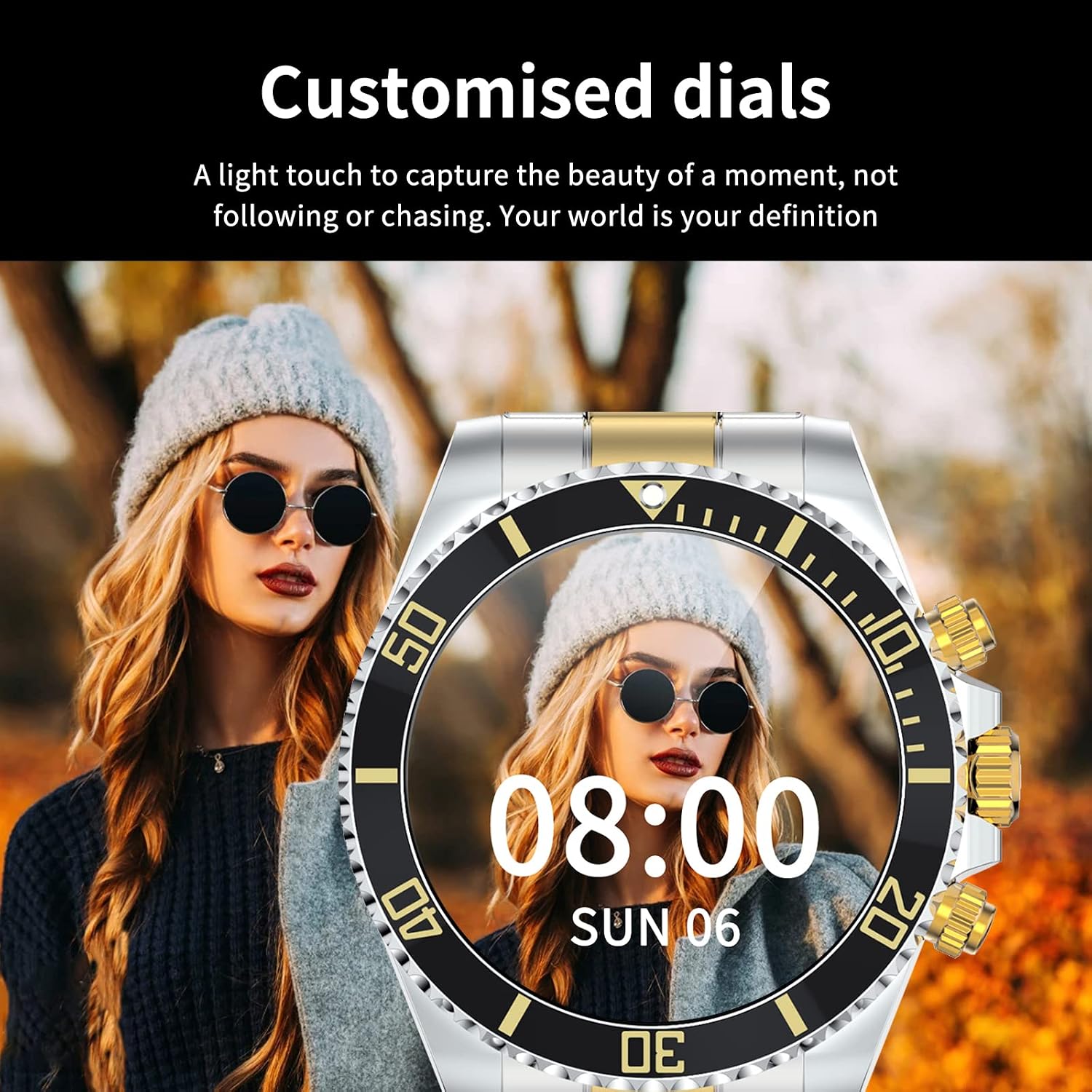
Image: A Loluka Smart Watch displaying a customized digital watch face with time and date, worn by a person.
3.7 funzioni aggiuntive
- Pedometro: Tiene traccia dei passi, delle calorie bruciate e della distanza percorsa durante il giorno.
- Alarm/Sedentary Reminder: Set alarms and receive reminders to move after periods of inactivity via the companion app.
- Controllo remoto della telecamera: Utilizza il tuo orologio come otturatore remoto per la fotocamera del tuo smartphone.
- Controllo della musica: Control music playback on your smartphone (play, pause, skip tracks, adjust volume) directly from the watch.

Image: The smart watch displaying music control options, with a smartphone showing a music playlist in the background.
4. Manutenzione
4.1 Resistenza all'acqua
The Loluka Smart Watch is rated IP67 waterproof.
- It can withstand splashes, hand washing, and rain.
- Importante: L'orologio è NON suitable for hot water bathing, diving, swimming, or water-related work where it would be submerged for extended periods or exposed to high-pressure water.

Image: A Loluka Smart Watch partially submerged in water, with text indicating 'IP67 life waterproof' and warnings about unsuitable activities.
4.2 Pulizia
Per mantenere l'aspetto e la funzionalità del tuo orologio:
- Wipe the watch and band regularly with a soft, dry, lint-free cloth.
- Se necessario, utilizzare una punta leggermente damp panno per lo sporco ostinato, quindi asciugare accuratamente.
- Evitare l'uso di prodotti chimici aggressivi, solventi o detergenti aggressivi, poiché potrebbero danneggiare la finitura e le guarnizioni dell'orologio.
4.3 Cura della batteria
- Evitare di scaricare completamente la batteria frequentemente.
- Conservare l'orologio in un luogo fresco e asciutto quando non lo si utilizza per lunghi periodi.
- Utilizzare solo il cavo di ricarica fornito.
5. Risoluzione Dei Problemi
If you encounter issues with your Loluka Smart Watch, refer to the following common solutions:
- L'orologio non si accende: Assicurati che l'orologio sia completamente carico. Collegalo al caricabatterie per almeno 30 minuti.
- Impossibile associare lo smartphone:
- Assicurati che il Bluetooth sia abilitato sul telefono e sull'orologio.
- Assicurati che l'orologio si trovi nel raggio di azione del Bluetooth del tuo telefono.
- Riavvia sia il telefono che l'orologio.
- Assicurati che l'app complementare sia aggiornata all'ultima versione.
- Elimina il dispositivo dalle impostazioni Bluetooth del telefono e riprova ad associarlo tramite l'app.
- Notifiche non visualizzate:
- Controlla le impostazioni di notifica dell'app sul tuo telefono e all'interno dell'app complementare.
- Assicurati che l'orologio sia connesso tramite Bluetooth.
- Monitoraggio impreciso delle attività: Assicurati che l'orologio sia ben aderente al polso. Se disponibile, calibra l'orologio tramite l'app.
- Breve durata della batteria: Ridurre la luminosità dello schermo, disattivare le funzioni non necessarie e assicurarsi che l'orologio non sia costantemente alla ricerca di connessioni Bluetooth.
Se questi passaggi non risolvono il problema, contatta l'assistenza clienti.
6. Specifiche
| Numero di modello | JYAW12PROLA |
| Dimensioni dello schermo | 1.3-inch full color screen |
| Risoluzione | 240*240 pixel |
| Bluetooth | Dual Bluetooth 3.0/4.0 |
| Capacità della batteria | 380 mAh (è richiesta 1 batteria al litio metallico) |
| Tipo operativo | Full Touch Screen |
| Tipo di ricarica | Ricarica magnetica |
| Tempo di carica completa | Circa 2-3 ore |
| Orario di lavoro | 2-5 giorni (utilizzo tipico) |
| Tempo di standby | Fino a 15 giorni |
| Grado di impermeabilità | Grado di protezione IP67 |
| Materiale della cassa | Lega |
| Materiale della fascia | Acciaio inossidabile |
| Tipo di chiusura | Fold Clasp |
| Diametro della cassa del quadrante | 46 mm (1.81") |
| Spessore della cassa del quadrante | 13 mm (0.51") |
| Larghezza di banda | 22 mm (0.86") |
| Lunghezza della banda | 230 mm (9.05") |
| Lingue supportate | English, French, Italian, Spanish, Arabic, German, Polish, Portuguese, Malay, Czech, Turkish, Russian, Greek, Persia, Hebrew |
| Compatibilità del sistema operativo | iOS 10.0 + / Android 5.0 + |
7. Garanzia e supporto
Your Loluka Smart Watch is designed for reliability and performance. While specific warranty details are not provided in this manual, we are committed to customer satisfaction.
If you have any questions, encounter issues, or require assistance with your product, please do not hesitate to contact our customer support team. We are dedicated to offering the best possible solution to you.
Si prega di fare riferimento alla documentazione di acquisto o al rivenditore website for contact information and any applicable warranty terms.
Ask a question about this manual
Ask about setup, troubleshooting, compatibility, parts, safety, or missing instructions. Manuals+ will review the question and use this page’s manual context to help answer it.