
Introduzione
Welcome to the VTech Bluey Ring Ring Phone user manual. This guide provides essential information for setting up, operating, and maintaining your new electronic learning toy. Designed for children aged 3-6 years, this interactive phone allows kids to engage in pretend play with characters from the popular Bluey series, fostering imaginative and educational experiences.

Immagine: Frontale view of the VTech Bluey Ring Ring Phone, displaying Bluey on the screen and various character buttons.
Impostare
1. Cosa c'è nella scatola
- Telefono ad anello blu
- Guida rapida
2. Installazione della batteria
The VTech Bluey Ring Ring Phone requires 2 AAA batteries. Batteries are included for demonstration purposes only. For regular use, new batteries are recommended.
- Individuare il vano batteria sul retro del telefono.
- Utilizzando un cacciavite, aprire il coperchio del vano batteria.
- Inserire 2 batterie AAA nuove, assicurandosi della corretta polarità (+/-).
- Riposizionare il coperchio del vano batteria e fissarlo con la vite.
Istruzioni per l'uso
1. Accensione/spegnimento
Press the power button (usually located on the top or side) to turn the phone on or off.
2. Funzioni di base
- Pulsanti dei personaggi: Press the buttons featuring pictures of Bluey, her family, and friends to hear phrases about each character.
- Pulsanti numerici: Use the number buttons for various activities, including playing music.
- Attivazione vocale: Engage in interactive pretend play with Bluey and Bingo using the voice-activated chat-and-reply feature.
- Impostazioni: Adjust the ringtone, brightness, and other phone-like features to customize the play experience.
3. Games and Activities
The phone includes four interactive games based on themes from different Bluey episodes:
- Cheer Up Bingo: If Bingo is in a bad mood, press the number buttons to play music she can dance to.
- Bingo's Handstand: Use the arrow buttons to help Bingo do a handstand.
- Bluey the Fruit Bat: When Bluey pretends to be a fruit bat, press the arrows to help her catch fruit to eat.
- Bluey's Bubbles: Help Bluey blow bubbles by blowing into the microphone.
Explore these games to watch character animations and listen to popular phrases from the show.
Video: Official VTech Bluey Ring Ring Phone Demo, showcasing various interactive features and games.
Caratteristiche
- Four interactive games featuring Bluey and Bingo.
- Animations of characters and popular phrases from the show.
- Buttons with character images for specific phrases.
- Voice-activated chat-and-reply for interactive conversations.
- Adjustable ringtone and brightness settings.
- Durable design for children aged 3-6 years.
Manutenzione
- Pulisci il telefono con un panno morbido eamp panno. Non immergere in acqua.
- Evitare di esporre il telefono a temperature estreme o alla luce solare diretta.
- Rimuovere le batterie se il giocattolo non verrà utilizzato per un lungo periodo per evitare perdite.
Risoluzione dei problemi
No Power or Intermittent Operation
- Assicurarsi che le batterie siano installate correttamente e con la giusta polarità.
- Sostituisci le vecchie batterie con nuove batterie AAA.
- Se il problema persiste, prova a spegnere e riaccendere l'unità.
Problemi audio
- Check if the volume setting is too low. While there isn't an explicit volume control button, some modes might have varying sound levels.
- Assicurarsi che l'altoparlante non sia ostruito.
Se i problemi persistono, consultare la sezione Garanzia e supporto per le informazioni di contatto.
Specifiche
- Dimensioni del prodotto: 0.98 x 3.27 x 6.69 pollici
- Peso dell'articolo: 4.8 once
- Numero modello articolo: 80-554600
- Età consigliata dal produttore: 36 mesi - 6 anni
- Batterie: 2 AAA batteries required (included for demo purposes)
- Produttore: VTech
- Data di rilascio: 1 dicembre 2021
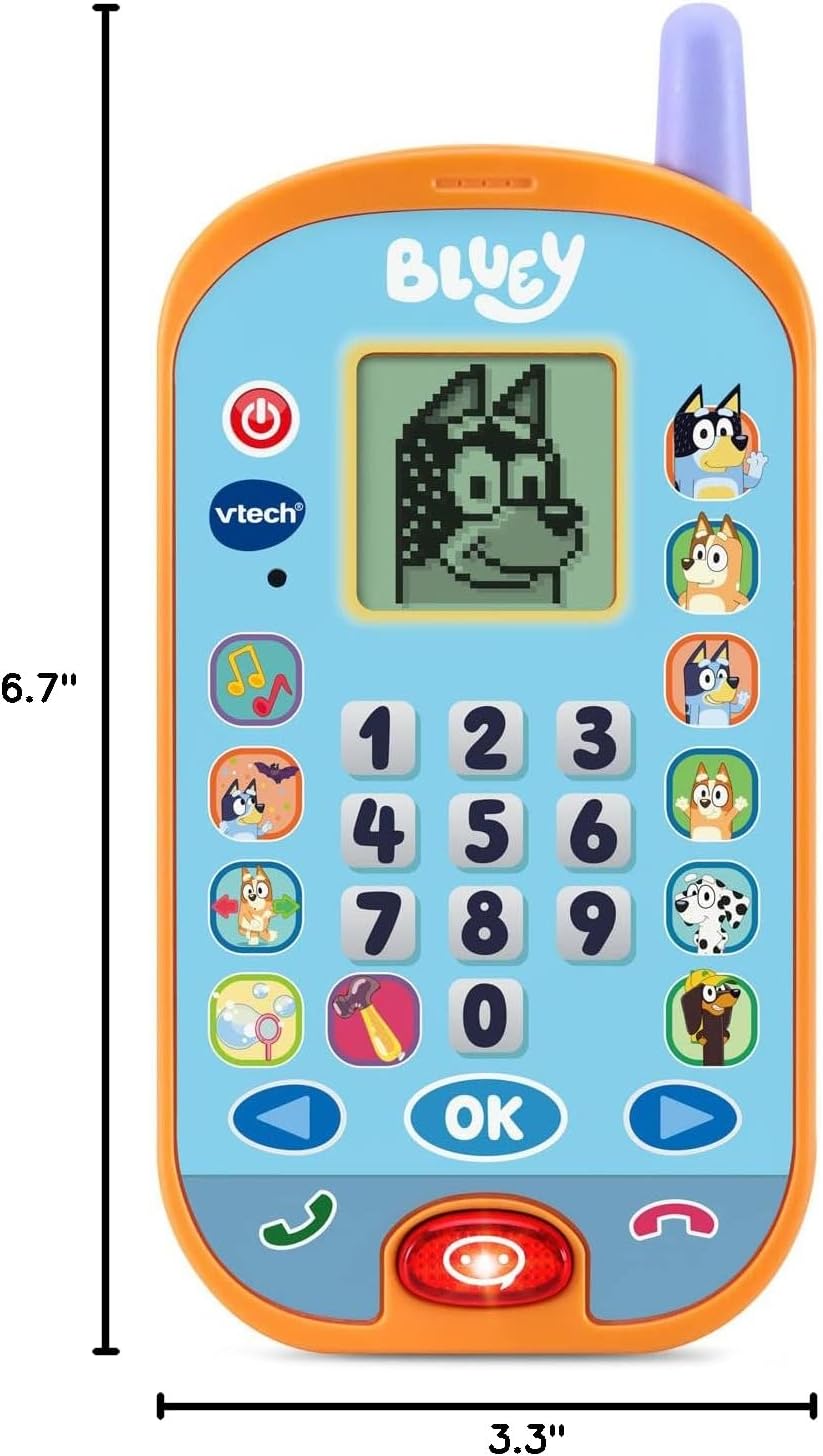
Image: VTech Bluey Ring Ring Phone with labeled dimensions.
Garanzia e supporto
This VTech product is covered by the manufacturer's standard warranty. For detailed warranty information, product support, or to inquire about replacement parts, please visit the official VTech website or contact their customer service department. Contact details can typically be found in the Quick Start Guide included with your product or on the VTech brand store page.
Negozio VTech: Visita il negozio VTech su Amazon