
Introduzione
This manual provides essential instructions for the safe operation and maintenance of your Pyle PSBV40BT Bluetooth Audio Soundbar. Please read this manual thoroughly before using the device and retain it for future reference.
Istruzioni di sicurezza
- Non esporre la soundbar alla pioggia o all'umidità.
- Non ostruire le aperture di ventilazione.
- Garantire una corretta alimentazione voltage as indicated on the power adapter.
- Tenere la soundbar lontana da fonti di calore come termosifoni, bocchette di ventilazione, stufe o altri apparecchi che producono calore.
- Utilizzare solo gli accessori specificati dal produttore.
- Scollegare la soundbar durante i temporali o quando non viene utilizzata per lunghi periodi.
Contenuto della confezione
Verificare che tutti gli articoli siano presenti nel pacco:
- Main Soundbar Unit
- Adattatore di alimentazione
- Telecomando
- Cavo coassiale
- RCA Cable (Audio Cable)

Image: Contents of the Pyle PSBV40BT Soundbar package, showing the main unit, remote control, power adapter, coaxial cable, and RCA audio cable.
Prodotto finitoview
The Pyle PSBV40BT is a 2.1 channel soundbar designed to enhance your audio experience. It features multiple input options and Bluetooth connectivity for versatile use.
Front and Top Panel Controls
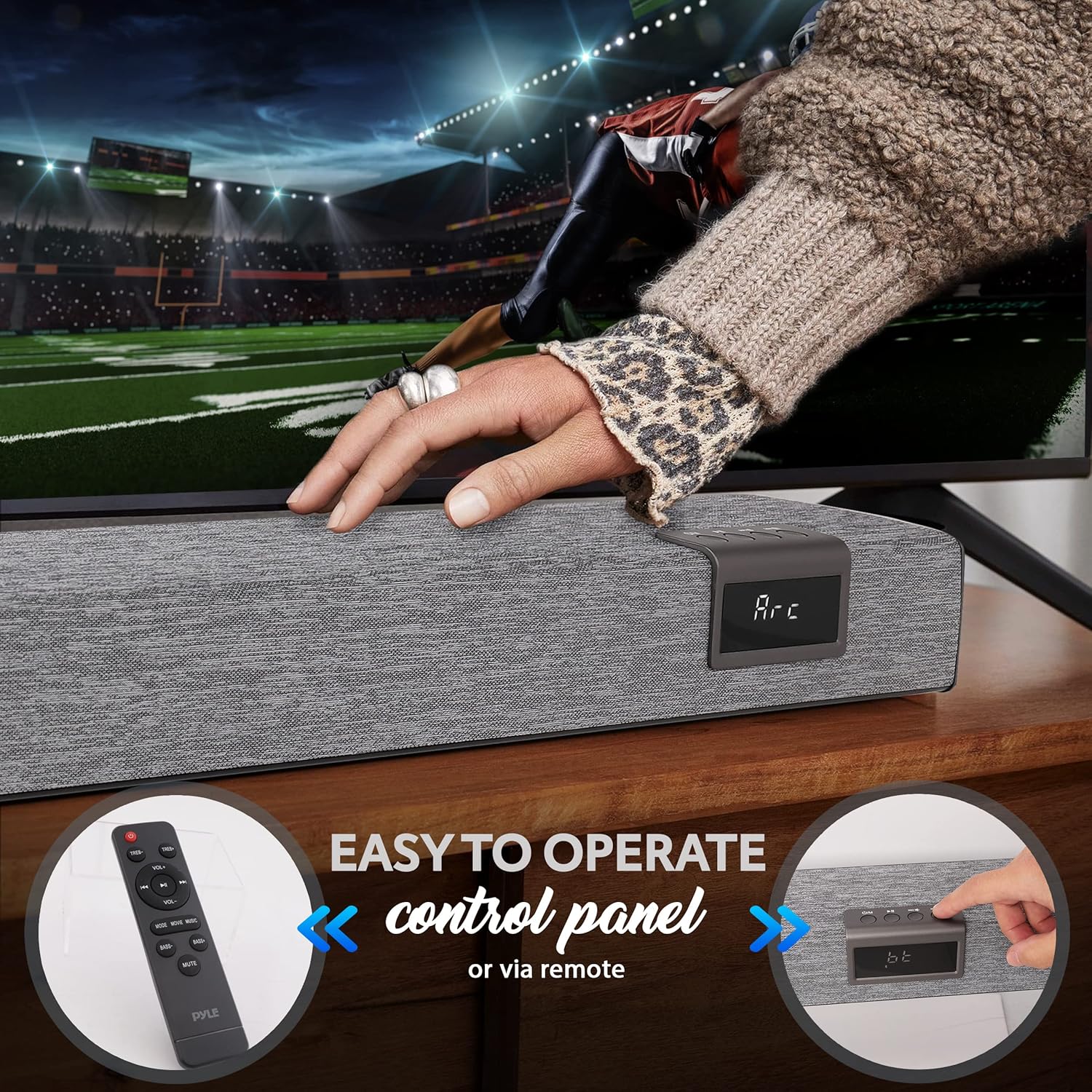
Image: The front of the Pyle PSBV40BT Soundbar showing the digital display and control buttons, alongside the included remote control.
- Pulsante di accensione: Attiva o disattiva la soundbar.
- Pulsante Input/Modalità: Switches between input sources (Bluetooth, Optical, HDMI ARC, AUX, USB/TF).
- Pulsanti volume su / giù: Regola il livello del volume.
- Display a LED: Mostra la modalità di input corrente e il livello del volume.
Collegamenti del pannello posteriore

Immagine: Posteriore view of the Pyle PSBV40BT Soundbar, highlighting the various input ports: USB, AUX, Coaxial, Optical, and HDMI ARC.
- USB/TF Card Input: Per riprodurre l'audio files from USB drives or TF cards.
- Ingresso AUX (3.5 mm): Collegare dispositivi audio esterni tramite un cavo audio da 3.5 mm.
- Ingresso COASSIALE: Connect to devices with a coaxial digital audio output.
- Ingresso OTTICO: Connect to devices with an optical digital audio output.
- Ingresso HDMI ARC: Connect to a TV's HDMI ARC port for audio and control.
- DC IN: Porta di collegamento dell'adattatore di alimentazione.
Impostare
1. Posizionamento
Place the soundbar on a stable, flat surface directly in front of your television. Ensure there are no obstructions blocking the soundbar's speakers or the remote control sensor.

Image: The Pyle PSBV40BT Soundbar positioned horizontally on a media console, directly beneath a television screen.
2. Collegamento elettrico
- Collegare l'adattatore di alimentazione alla porta DC IN sul retro della soundbar.
- Collegare l'altra estremità dell'alimentatore a una presa a muro.
3. Collegamenti audio
Choose one of the following connection methods based on your television or audio source:
- HDMI ARC (consigliato):
Connect an HDMI cable (not included) from the HDMI ARC port on the soundbar to the HDMI ARC port on your TV. This allows your TV remote to control the soundbar's volume and power.

Image: Detail of the HDMI ARC input port on the Pyle PSBV40BT Soundbar.
- Ottico:
Connect an optical cable (not included) from the OPTICAL port on the soundbar to the optical digital audio output on your TV or other audio source. Ensure your TV's audio output is set to "PCM" if you experience no sound.
- Coassiale:
Connect the included coaxial cable from the COAXIAL port on the soundbar to the coaxial digital audio output on your TV or other audio source.
- AUX (3.5 mm):
Connect the included RCA cable (or a 3.5mm to 3.5mm cable, not included) from the AUX port on the soundbar to the 3.5mm headphone jack or RCA audio output on your TV or audio source.
Operazione
Accensione/spegnimento
Premere il pulsante di accensione sulla soundbar o sul telecomando per accendere o spegnere l'unità.
Selezione dell'input
Press the "Input" or "Mode" button on the soundbar or remote control repeatedly to cycle through the available input sources: Bluetooth (BT), Optical (OPT), HDMI ARC (ARC), AUX, USB/TF.
Controllo del volume
Utilizzare i pulsanti Volume su (+) e Volume giù (-) sulla soundbar o sul telecomando per regolare il livello audio.
Accoppiamento Bluetooth
- Turn on the soundbar and select "BT" mode using the Input/Mode button. The LED display will show "BT" and flash, indicating it's in pairing mode.
- Abilita il Bluetooth sul tuo dispositivo mobile (smartphone, tablet, ecc.).
- Cercare "PyleUSA" in your device's Bluetooth settings and select it to pair.
- Once paired, the "BT" indicator on the soundbar will stop flashing, and you can play audio from your device.

Image: A user holding a smartphone, demonstrating the process of connecting to the Pyle PSBV40BT Soundbar via Bluetooth for wireless audio streaming.
Riproduzione USB/scheda TF
Inserire un'unità USB o una scheda TF (con audio MP3 files) into the corresponding port. The soundbar will automatically switch to USB/TF mode and begin playback. Use the remote control for playback functions (play/pause, skip tracks).
Funzioni del telecomando
The included remote control provides full functionality for the soundbar, including power, input selection, volume, mute, and playback controls for USB/TF and Bluetooth modes.
Manutenzione
- Pulizia: Utilizzare un panno morbido e asciutto per pulire la superficie della soundbar. Non utilizzare detergenti liquidi o materiali abrasivi.
- Magazzinaggio: Se si conserva la soundbar per un periodo prolungato, scollegarla dalla presa di corrente e conservarla in un luogo fresco e asciutto.
Risoluzione dei problemi
| Problema | Possibile soluzione |
|---|---|
| Nessun potere | Assicurarsi che l'adattatore di alimentazione sia collegato saldamente alla soundbar e a una presa di corrente funzionante. |
| Nessun suono |
|
| L'associazione Bluetooth non riesce |
|
| Il telecomando non funziona |
|
Specifiche
| Caratteristica | Dettaglio |
|---|---|
| Modello | PSBV40BT |
| Massima potenza | 60W |
| Potenza RMS | 30W |
| Autisti | (2) 3" Full-range, (2) 3" Subwoofer |
| Versione Bluetooth | 5.0 |
| Nome della rete Bluetooth | Pyle USA |
| wireless Range | 32.8 piedi |
| Ingressi | 3.5mm AUX, Optical, USB/TF, HDMI ARC, Coaxial |
| Supporti multimediali Files | Formato audio MP3 |
| Impedenza | 4 Ohm |
| Frequency Response (Bass) | Frequenza |
| Frequency Response (Soundbar) | Da 120 Hz a 20 kHz |
| Dimensioni del prodotto (L x P x A) | 35.4'' x 2.4'' x 2.4'' pollici |
| Peso dell'articolo | 9.08 libbre |
Garanzia e supporto
This Pyle PSBV40BT Soundbar comes with a limited warranty. For detailed warranty information, technical support, or service inquiries, please visit the official Pyle websito o contattare il loro servizio clienti.
Ufficiale Pyle Websito: www.pyleusa.com