
1. Introduzione
This manual provides detailed instructions for the BoxWave SlimKeys Bluetooth Keyboard with Trackpad, designed for use with the Apple iPhone 13 mini. Please read this manual thoroughly before using the product to ensure proper operation and to maximize its lifespan.
The SlimKeys Bluetooth Keyboard integrates responsive chiclet-style keys and a full-functioning trackpad, transforming your iPhone 13 mini into a portable workstation. Its ultra-thin and lightweight design makes it an ideal travel companion.
2. Contenuto della confezione
- BoxWave SlimKeys Bluetooth Keyboard with Trackpad
- Cavo di ricarica USB
- Manuale d'uso
3. Caratteristiche del prodotto
- Integrated Keyboard and Trackpad: Combines a full QWERTY keyboard with a responsive trackpad for enhanced navigation.
- Design sottile e leggero: At approximately 3/16 inch thick, it is highly portable without compromising key size for comfortable typing.
- Bluetooth versione 3.0: Ensures fast pairing and seamless wireless communication with your device.
- Conservazione della batteria: Features an on/off switch to extend battery life when not in use.
- Portatile: Designed for easy transport in bags or luggage.

Figura 3.1: Dall'alto verso il basso view of the SlimKeys Bluetooth Keyboard, showing the full keyboard layout and integrated trackpad.
4. Impostazione
4.1 Ricarica della tastiera
- Locate the charging port on the side of the keyboard.
- Connect the small end of the provided USB charging cable to the keyboard's charging port.
- Collegare l'estremità più grande del cavo USB a una fonte di alimentazione USB (ad esempio, una porta USB del computer, un adattatore da parete USB).
- The charging indicator light will illuminate. Once fully charged, the light will typically change color or turn off.
4.2 Accensione/Spegnimento
- To power on the keyboard, slide the 'ON/OFF' switch, usually located on the side or back, to the 'ON' position. A power indicator light will briefly illuminate.
- To power off the keyboard, slide the 'ON/OFF' switch to the 'OFF' position. This conserves battery life when the keyboard is not in use.
4.3 Associazione Bluetooth
Follow these steps to pair your BoxWave SlimKeys Bluetooth Keyboard with your Apple iPhone 13 mini:
- Assicurarsi che la tastiera sia completamente carica e accesa.
- On your iPhone 13 mini, go to Impostazioni > Bluetooth.
- Turn on Bluetooth. Your iPhone will begin searching for nearby Bluetooth devices.
- On the keyboard, press the Bluetooth pairing button (often labeled 'Connect' or with a Bluetooth symbol). The Bluetooth indicator light on the keyboard will start blinking, indicating it is in pairing mode.
- On your iPhone, locate 'BoxWave Keyboard' or a similar name in the list of 'Other Devices' and tap on it.
- If prompted, enter the pairing code displayed on your iPhone screen using the keyboard, then press Enter.
- Once paired, the Bluetooth indicator light on the keyboard will stop blinking and remain solid or turn off, and your iPhone will show the keyboard as 'Connected'.

Figure 4.1: Keyboard with highlighted power switch and Bluetooth pairing button locations.
5. Istruzioni per l'uso
5.1 Utilizzo della tastiera
Once paired, the keyboard functions like a standard computer keyboard. Simply open any application on your iPhone that requires text input (e.g., Messages, Notes, Safari) and begin typing. The on-screen keyboard will automatically disappear, allowing you to use the physical keyboard.
5.2 Utilizzo del trackpad
The integrated trackpad allows for precise cursor control and navigation on your iPhone 13 mini. Basic gestures include:
- Tocco con un solo dito: Functions as a left-click to select items or activate buttons.
- Scorrimento con due dita: Drag two fingers up or down on the trackpad to scroll through content.
- Movimento del cursore: Move a single finger across the trackpad to move the cursor on your iPhone screen.
5.3 Tasti funzione speciali
The keyboard may include function keys (F1-F12) or dedicated media control keys. These keys often require pressing the 'Fn' key simultaneously with the desired function key to activate their secondary functions (e.g., volume control, play/pause, screen lock).
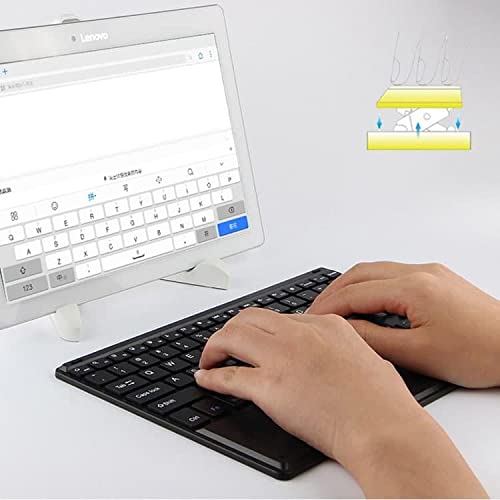
Figure 5.1: User demonstrating typing on the SlimKeys Bluetooth Keyboard.
6. Manutenzione
6.1 Pulizia
- Prima di procedere alla pulizia, assicurarsi che la tastiera sia spenta.
- Utilizzare un panno morbido e privo di lanugine leggermente dampened with water or a mild electronics cleaner to wipe the surface.
- Evitare l'uso di prodotti chimici aggressivi, detergenti abrasivi o umidità eccessiva, poiché potrebbero danneggiare la tastiera.
- For dust or debris between keys, use compressed air.
6.2 Cura della batteria
- To prolong battery life, power off the keyboard when not in use.
- Avoid fully discharging the battery frequently. Recharge when the low battery indicator appears.
- Se non si utilizza la tastiera per lunghi periodi, conservarla in un luogo fresco e asciutto.
7. Risoluzione Dei Problemi
If you encounter issues with your BoxWave SlimKeys Bluetooth Keyboard, refer to the following common solutions:
- La tastiera non si accende: Assicurarsi che la batteria sia carica. Collegare il cavo di ricarica e lasciarlo caricare per almeno 30 minuti prima di riprovare ad accenderlo.
- La tastiera non si associa:
- Ensure the keyboard is in pairing mode (Bluetooth indicator blinking).
- Make sure Bluetooth is enabled on your iPhone 13 mini.
- Move the keyboard closer to your iPhone.
- Forget the device from your iPhone's Bluetooth settings and attempt to pair again.
- Restart both the keyboard and your iPhone.
- I tasti non rispondono:
- Check if the keyboard is still connected via Bluetooth.
- Assicurarsi che la batteria non sia eccessivamente scarica.
- Try reconnecting the keyboard by turning it off and on, or by re-pairing.
- Il trackpad non funziona:
- Assicurarsi che la tastiera sia collegata.
- Check for any settings on your iPhone that might disable external trackpads.
- Pulisci la superficie del trackpad per rimuovere eventuali detriti.
8. Specifiche
| Caratteristica | Specificazione |
|---|---|
| Marca | ScatolaWave |
| Numero di modello | numero di telefono bw-1977-29861-11782 |
| Interfaccia Hardware | Bluetooth |
| Versione Bluetooth | 3.0 |
| Dispositivi compatibili | Apple iPhone 13 mini, Smartphones, Laptops |
| Descrizione della tastiera | Senza fili |
| Caratteristiche speciali | Portable, Integrated Trackpad |
| Fonte di alimentazione | Alimentato a batteria |
| Dimensioni (circa) | Dimensioni: 257 mm x 172 mm x 5 mm |

Figure 8.1: Dimensions and operating system compatibility of the SlimKeys Bluetooth Keyboard.
9. Garanzia e supporto
9.1 Informazioni sulla garanzia
For specific warranty details, please refer to the warranty card included with your product or visit the official BoxWave websito. Conservare la prova d'acquisto per eventuali reclami in garanzia.
9.2 Assistenza clienti
If you require further assistance or have questions not covered in this manual, please contact BoxWave customer support through their official websito o le informazioni di contatto fornite con la documentazione di acquisto.