
Introduzione
Thank you for choosing the MageGee GT860 96-Key Wired RGB Backlit Gaming Keyboard. This keyboard is designed for both gaming and daily use, featuring a compact layout, ergonomic design, and customizable RGB backlighting. This manual will guide you through the setup, operation, and maintenance of your new keyboard to ensure optimal performance and user experience.
Contenuto della confezione
- MageGee GT860 96-Key Wired RGB Backlit Gaming Keyboard
- Manuale d'uso
Prodotto finitoview
Disposizione della tastiera
The MageGee GT860 features a 92% compact layout, retaining essential keys while offering a space-saving design. It includes a full numeric keypad and function keys.

Image: The MageGee GT860 keyboard showcasing its 96-key layout with RGB backlighting and black and yellow keycaps.

Immagine: Un dettaglio view of the standard 96-key layout with full RGB backlighting, highlighting the compact yet functional design.
Caratteristiche principali
- Layout compatto al 92%: Offers a balance between full functionality and a space-saving design.
- Membrana con sensazione meccanica: Utilizes advanced imitation mechanical technology for a tactile typing experience.
- Design ergonomico: Key layout is engineered for comfortable use during extended periods, reducing fatigue.
- Retroilluminazione RGB: Features multiple lighting modes and colors, with adjustable brightness and breathing speed.
- Collega e usa: Per le funzionalità di base non sono richiesti driver.
- Ampia compatibilità: Supports Windows 10, 8, 7, XP, VISTA, and Mac OS.
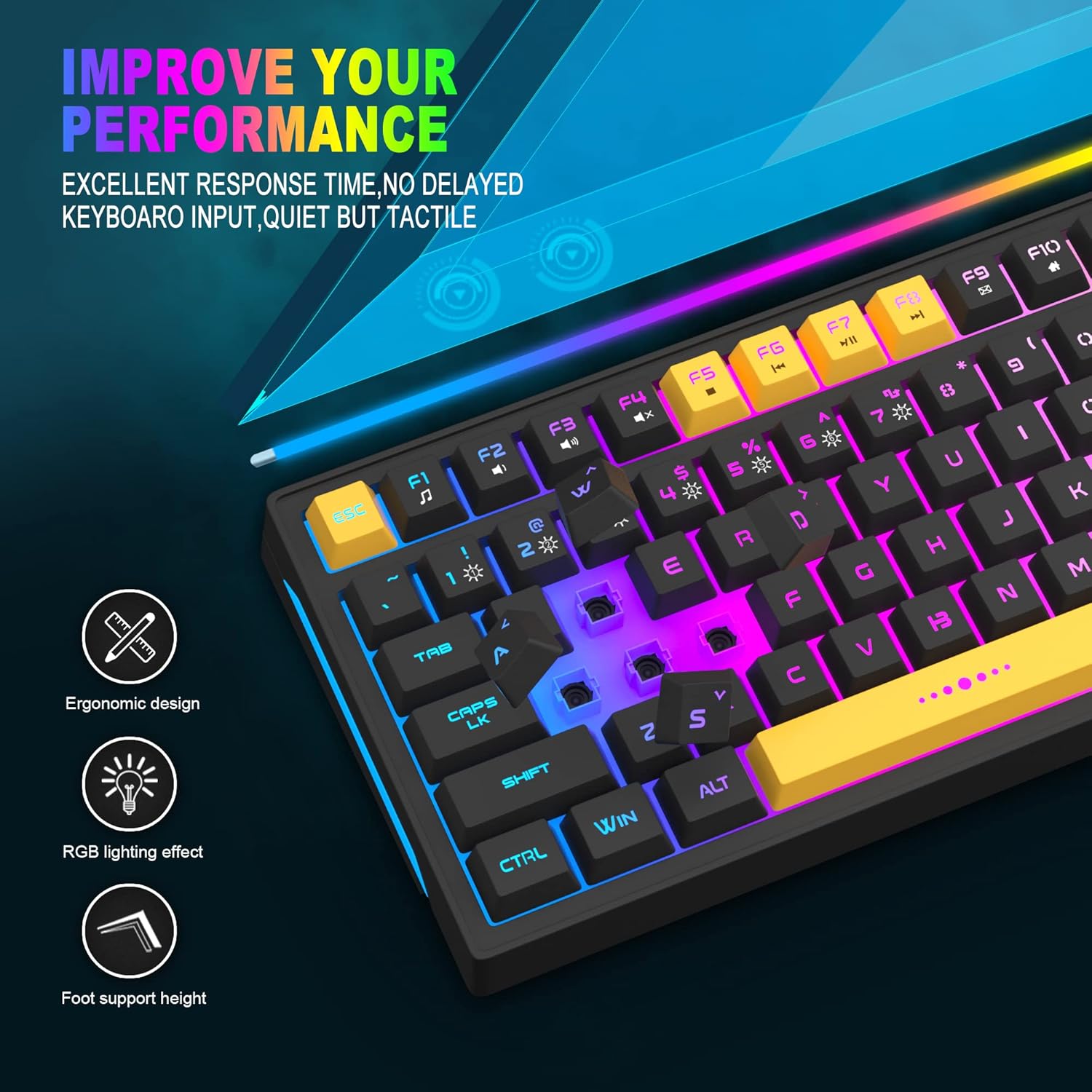
Image: Close-up showing the ergonomic design and RGB lighting effect of the keyboard, emphasizing comfort and visual appeal.

Immagine: Lato A view of the keyboard illustrating its thoughtful ergonomic design with a 7-degree tilt for improved typing posture.
Istruzioni di installazione
- Unpack the keyboard and ensure all package contents are present.
- Collegare il cavo USB dalla tastiera a una porta USB disponibile sul computer.
- The keyboard is plug-and-play and should be automatically recognized by your operating system (Windows, Mac OS). No additional drivers are typically required for basic functionality.
- Once connected, the RGB backlighting will illuminate, indicating the keyboard is powered on and ready for use.
Istruzioni per l'uso
Controllo della retroilluminazione RGB
The MageGee GT860 keyboard features customizable RGB backlighting with various modes and effects.
- Modifica delle modalità di illuminazione: Premere il tasto FN key combined with keys 1 Attraverso 6 to cycle through different RGB lighting effects and colors.
- Regolazione della luminosità: Use specific key combinations (refer to keyboard legends or experiment with FN + Arrow keys if not explicitly labeled) to increase or decrease backlight brightness.
- Adjusting Breathing Speed: Some modes allow adjustment of the breathing or animation speed.

Image: The keyboard displaying various RGB backlit lighting modes, illustrating the range of color options available.

Immagine: Una dinamica view della tastiera mostrataasing its 18 RGB LED light effects, highlighting the vibrant backlighting.
Tasti multimediali e funzione
The keyboard includes dedicated function keys (F1-F12) that can be accessed by pressing the FN tasto contemporaneamente al tasto F desiderato.
| Combinazione di tasti | Funzione |
|---|---|
| Tasto F1 | Lettore multimediale |
| Tasto F2 | Abbassa il volume |
| Tasto F3 | Alza il volume |
| Tasto F4 | Muto |
| Tasto F5 | Traccia precedente |
| Tasto F6 | Traccia successiva |
| Tasto F7 | Riproduci/Pausa |
| Tasto F8 | Fermare |
| Tasto F9 | |
| Tasto F10 | Pagina iniziale |
| Tasto F11 | Blocco scorrimento |
| Tasto F12 | Calcolatrice |

Image: Diagram illustrating the various multimedia and function key combinations using the FN key (FN + F1-F12).
Manutenzione
To ensure the longevity and optimal performance of your MageGee GT860 keyboard, follow these maintenance guidelines:
- Pulizia: Regularly clean the keyboard with a soft, dry cloth. For deeper cleaning, use compressed air to remove dust and debris from between the keys. A slightly damp cloth (not wet) can be used for keycap surfaces.
- Evitare i liquidi: Non rovesciare liquidi sulla tastiera. In caso di versamento, scollegare immediatamente la tastiera dal computer e lasciarla asciugare completamente prima di ricollegarla.
- Magazzinaggio: Quando non viene utilizzata per lunghi periodi, conservare la tastiera in un luogo fresco e asciutto, lontano dalla luce solare diretta e da temperature estreme.
- Cura del cavo: Evitare di piegare o torcere eccessivamente il cavo USB per evitare danni interni.

Immagine: un primo piano view of the keyboard with some keycaps removed, showing the underlying switches. This illustrates the internal structure for cleaning purposes.
Risoluzione dei problemi
If you encounter issues with your MageGee GT860 keyboard, please refer to the following common troubleshooting steps:
- La tastiera non risponde:
- Assicurati che il cavo USB sia collegato saldamente sia alla tastiera sia alla porta USB del computer.
- Prova a collegare la tastiera a una porta USB diversa del computer.
- Prova la tastiera su un altro computer per determinare se il problema riguarda la tastiera o il sistema.
- Retroilluminazione non funzionante o errata:
- Verificare che la tastiera sia collegata correttamente e riceva alimentazione.
- Cycle through the RGB lighting modes using NV + 1-6 per garantire che sia selezionata una modalità.
- Adjust the brightness settings.
- Chiavi non registrate:
- Clean the affected keys to remove any debris that might be obstructing the switch.
- Ensure no software conflicts are present (e.g., other keyboard drivers or gaming software).
- Comportamento inaspettato:
- Riavvia il computer.
- If the issue persists, contact MageGee customer support for further assistance.
Specifiche
| Caratteristica | Dettaglio |
|---|---|
| Marca | MageGee |
| Modello | La GT860 |
| Disposizione | 96 tasti (92% compatto) |
| Connettività | USB cablato |
| Retroilluminazione | RGB Backlit (Multiple modes) |
| Tipo di chiave | Membrane with Mechanical Feeling |
| Ergonomia | Design ergonomico |
| Sistema operativo compatibile | Windows 10, 8, 7, XP, VISTA, Mac OS |
| Dimensioni del prodotto | 35.56 x 10.16 x 5.08 cm (14 x 4 x 2 pollici) |
| Peso | 744 g (1.64 libbre) |
| Voltage | 5 Volt |
| Colore | Nero Giallo |
Garanzia e supporto
For warranty information or technical support, please refer to the documentation provided with your purchase or contact MageGee customer service directly. Contact details can typically be found on the manufacturer's official websito o sulla confezione del prodotto.
Si prega di conservare la prova d'acquisto per eventuali reclami in garanzia.