
1. Introduzione
Thank you for choosing the HISTTON Fanless Mini PC J4125. This compact and robust industrial-grade mini computer is designed for stable and efficient operation in various environments. Featuring a fanless design for silent performance and dust protection, it is equipped with an Intel Celeron J4125 processor, ample RAM, and versatile connectivity options. This manual provides essential information for setting up, operating, maintaining, and troubleshooting your device.

Image 1.1: The HISTTON Fanless Mini PC J4125, a compact black device with a ribbed top for heat dissipation, featuring various ports on its front and back panels.
2. Contenuto della confezione
Si prega di selezionare la casella per i seguenti elementi:
- 1 x HISTTON Mini PC (J4125)
- 1 x adattatore di alimentazione
- 1 x Manuale utente
- 1 cavo HDMI
- 1 supporto VESA
- 1 x set di viti
- 1 x cavo SATA
3. Prodotto finitoview
3.1 Caratteristiche principali
- Processore: Intel Celeron J4125 (4 Cores 4 Threads, 2.00GHz Base, 2.70GHz Turbo)
- Grafica: Grafica Intel UHD 600
- Sistema operativo: Pre-installed Windows 11 Pro (64-bit, activated)
- Memoria: DDR4 RAM (Single SODIMM slot, up to 32GB supported)
- Magazzinaggio: 1x mSATA SSD slot, 1x SATA 3.0 for 2.5-inch HDD/SSD
- Connettività: Dual Gigabit RJ45 LAN, Dual-band Wi-Fi (2.4G+5.0G), Bluetooth 4.0
- Uscita video: 1x HDMI, 1x VGA (Dual display support)
- Porte: 2x USB 3.0, 2x USB 2.0, 2x RS232 COM, 1x 3.5mm Mic/SPK out
- Caratteristiche speciali: Fanless design, RTC wake up, Wake on LAN, Auto Power on (BIOS setting), Network boot
3.2 Pannelli anteriore e posteriore
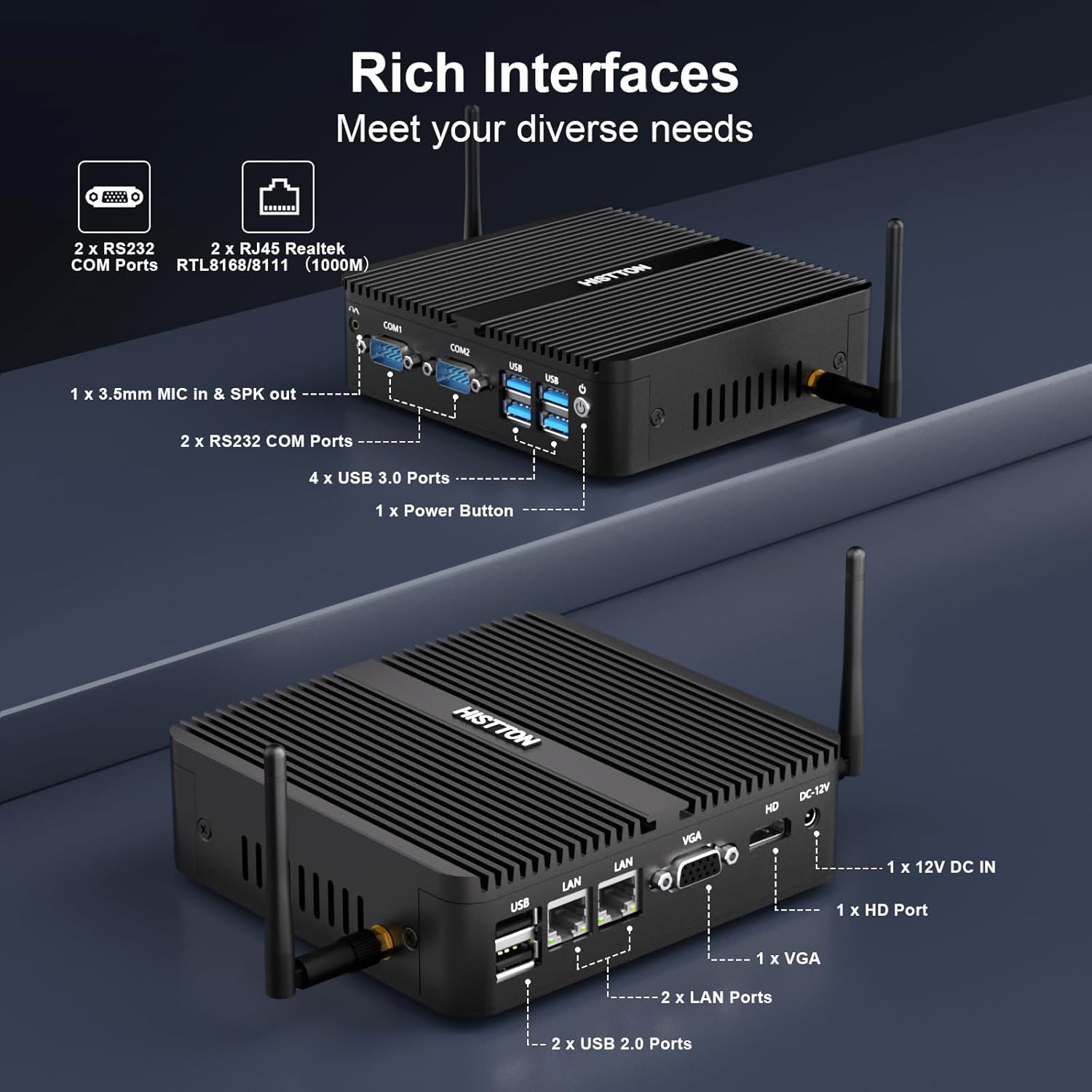
Immagine 3.1: Dettagliata view of the HISTTON Mini PC's front and rear panels, highlighting the various input/output ports including USB, COM, LAN, HDMI, and VGA.
- Pannello frontale: Power button, 2x USB 3.0 ports, 2x USB 2.0 ports, 2x RS232 COM ports (COM1, COM2), 3.5mm audio jack (Mic/SPK out).
- Pannello posteriore: DC-12V power input, 1x HDMI port, 1x VGA port, 2x Gigabit RJ45 LAN ports, Wi-Fi antenna connectors.
3.3 Internal Components and Expandability
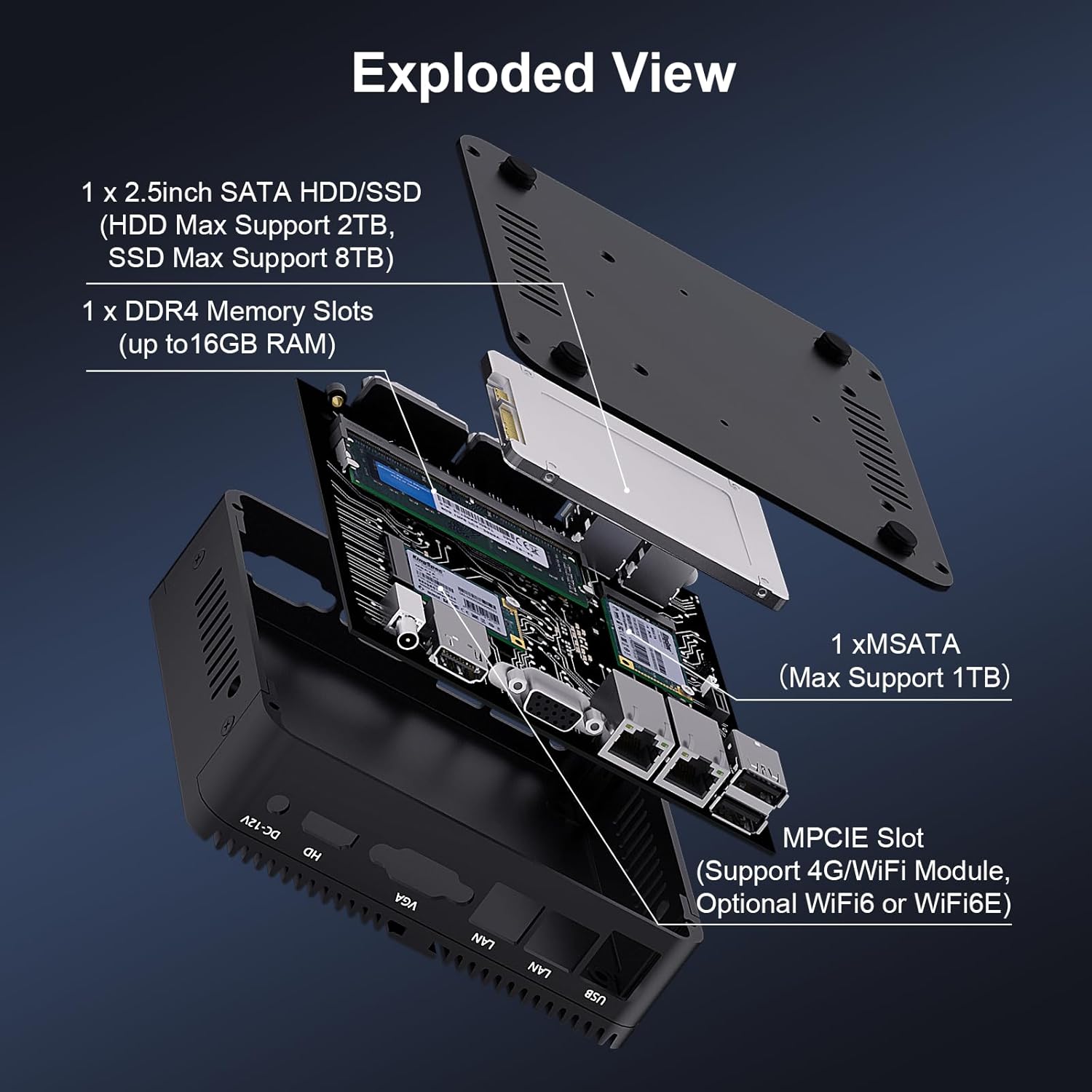
Immagine 3.2: Un esploso view of the HISTTON Mini PC, showing the internal layout including the mSATA SSD slot, DDR4 memory slot, and space for a 2.5-inch SATA drive.
- Memoria RAM: Single SODIMM slot for DDR4 memory, supporting up to 32GB.
- SSD: 1x mSATA slot (Max Support 1TB).
- Disco rigido/SSD: 1x SATA 3.0 port for a 2.5-inch HDD (Max Support 2TB) or SSD (Max Support 8TB).
- Senza fili: MPCIE slot for 4G/WiFi module (Optional WiFi6 or WiFi6E).
4. Istruzioni per l'installazione
4.1 Collegamento delle periferiche
- Connect your monitor(s) to the HDMI and/or VGA ports on the rear panel.
- Connect your keyboard and mouse to the USB ports on the front panel.
- Attach the Wi-Fi antennas to the connectors on the rear panel.
- For wired network access, connect an Ethernet cable to one of the RJ45 LAN ports.
- Connect the power adapter to the DC-12V input port on the rear panel, then plug it into a power outlet.
4.2 Accensione
Press the power button on the front panel to turn on the Mini PC. The power indicator light will illuminate.
4.3 Installazione con montaggio VESA (opzionale)
The Mini PC supports VESA mounting, allowing you to attach it to the back of a compatible monitor or to a wall mount. Use the provided VESA mount and screws to secure the Mini PC. Ensure the monitor's VESA holes are compatible with the mount.
Video 4.1: An official product video demonstrating the physical features of the HISTTON Fanless Mini PC and its VESA mounting process.
5. Istruzioni per l'uso
5.1 Installazione iniziale di Windows
Upon first boot, follow the on-screen instructions to complete the Windows 11 Pro setup, including language, region, network connection, and user account creation.
5.2 Configurazione del doppio display
The Mini PC supports dual display output via its HDMI and VGA ports. Connect two monitors and configure display settings within Windows (Right-click on desktop > Display settings) to extend or duplicate your desktop.

Image 5.1: The HISTTON Mini PC connected to two monitors, demonstrating its dual display capability via HDMI and VGA ports.
5.3 Impostazioni del BIOS
To access the BIOS, press the DEL key repeatedly during startup. The BIOS allows configuration of advanced features such as:
- RTC Wake Up: Schedule the PC to power on at a specific time.
- Riattivazione LAN: Power on the PC remotely via a network signal.
- Accensione automatica: Automatically power on the PC when power is restored after an outage.
- Avvio di rete: Boot the PC from a network server.
6. Manutenzione
6.1 Pulizia
Regularly clean the exterior of the Mini PC with a soft, dry cloth. Avoid using liquid cleaners or abrasive materials. As it is fanless, internal dust accumulation is minimized, but ensure the ribbed chassis remains clear of obstructions for optimal heat dissipation.
6.2 Aggiornamenti software
Mantieni aggiornati il sistema operativo Windows e i driver per garantire prestazioni e sicurezza ottimali. Puoi accedere a Windows Update tramite Impostazioni > Windows Update.
7. Risoluzione Dei Problemi
| Problema | Possibile causa | Soluzione |
|---|---|---|
| Il mini PC non si accende. | Nessuna alimentazione, adattatore di alimentazione difettoso, collegamento allentato. | Controllare il collegamento del cavo di alimentazione. Assicurarsi che l'adattatore di alimentazione funzioni. Provare una presa di corrente diversa. |
| Nessuna visualizzazione sul monitor. | Loose video cable, incorrect input source on monitor, monitor off. | Ensure video cables (HDMI/VGA) are securely connected. Select correct input source on monitor. Turn on monitor. |
| Nessuna connettività di rete. | Loose Ethernet cable, Wi-Fi disabled, driver issue. | Check Ethernet cable connection. Ensure Wi-Fi is enabled and connected to a network. Reinstall network drivers if necessary. |
| Prestazioni lente. | Troppe applicazioni in esecuzione, poco spazio di archiviazione, driver obsoleti. | Chiudere le applicazioni non necessarie. Liberare spazio su disco. Aggiornare i driver e Windows. |
8. Specifiche
| Caratteristica | Dettaglio |
|---|---|
| Marca | STORIA |
| Numero di modello | J4125 |
| Sistema operativo | Windows 11 Pro |
| Modello CPU | Celeron J4125 |
| Velocità della CPU | 2 GHz (fino a 2.7 GHz Turbo) |
| Coprocessore grafico | Grafica Intel UHD 600 |
| Memoria RAM installata | 16 GB DDR4 (massimo 32 GB) |
| Capacità di archiviazione della memoria | SSD da 512 GB |
| Descrizione del disco rigido | HDD, SSD (1x mSATA, 1x 2.5-inch SATA) |
| Interfaccia di uscita video | HDMI, VGA |
| Tecnologia di connettività | Ethernet, HDMI, LAN, Wi-Fi, Bluetooth |
| Tecnologia senza fili | Bluetooth 4.0, Dual-band Wi-Fi (2.4G+5.0G) |
| Dimensioni dell'articolo | 5.31 x 5 x 1.54 pollici (13.5 x 12.6 x 4.0 cm) |
| Peso dell'articolo | 0.6 chilogrammi |
| Porte USB totali | 4 (2x USB 3.0, 2x USB 2.0) |
| Porte COM | 2x RS232 |
| Porte LAN | 2x Gigabit RJ45 |
9. Garanzia e supporto
HISTTON provides customer support for your Mini PC. If you encounter any issues or have questions, please refer to the following contact methods:
- Assistenza Amazon: Log in to your Amazon account, navigate to "Your Orders," and select "Ask Product Question" for assistance.
- Supporto post-vendita: For direct technical assistance, you may send an email to the HISTTON After-Sales Team at minipc_service@yeah.net.
Conservare la prova d'acquisto per eventuali richieste di garanzia.