
Tecno BD4i
Manuale utente Tecno Pop 5 LTE
Model: BD4i
Introduzione
This manual provides comprehensive instructions for setting up, operating, and maintaining your new Tecno Pop 5 LTE smartphone. Designed for seamless performance and a vibrant user experience, your device comes equipped with advanced features to keep you connected and entertained.

Figure 1: Tecno Pop 5 LTE - Front and Back View
Prodotto finitoview Video
Guarda questo video ufficiale per una rapida panoramicaview of the Tecno Pop 5 LTE's main features and design.
Video 1: Tecno Pop 5 LTE Product Overview
Contenuto della confezione
Upon unboxing your Tecno Pop 5 LTE, please ensure all the following items are present:
- Tecno Pop 5 LTE Smartphone
- Adattatore di alimentazione
- Cavo Micro USB
- Strumento di espulsione della SIM
Guida all'installazione
SIM and SD Card Installation
Your Tecno Pop 5 LTE supports dual Nano SIM cards and expandable memory via a microSD card.
- Individuare il vassoio della SIM sul lato del dispositivo.
- Inserire lo strumento di espulsione della SIM nel piccolo foro accanto al vassoio e spingere delicatamente finché il vassoio non fuoriesce.
- Inserire la/le scheda/e Nano SIM e/o la scheda microSD negli appositi slot sul vassoio, assicurandosi che siano orientati correttamente.
- Spingere con cautela il vassoio nel dispositivo finché non è a filo con il lato.
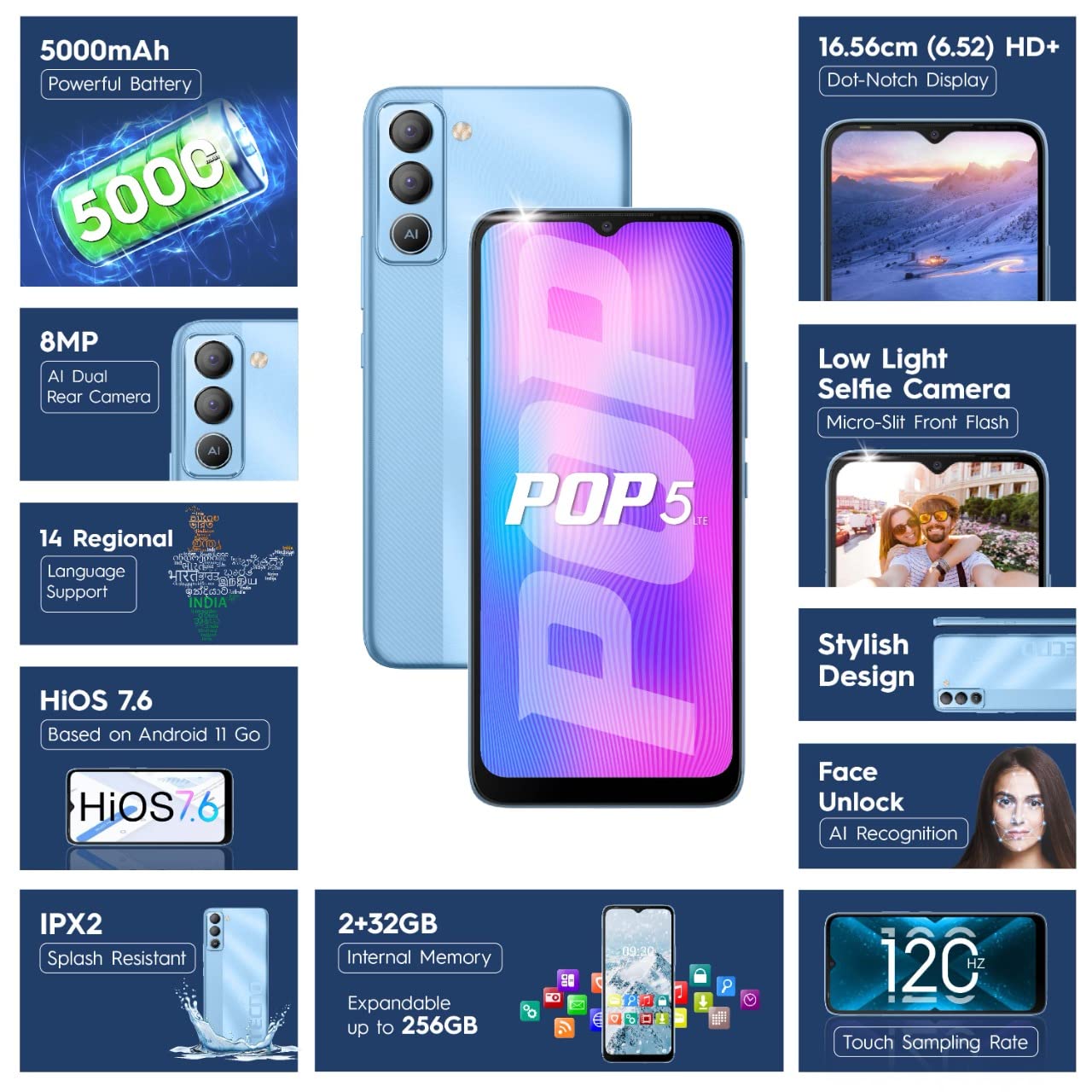
Figure 2: SIM Tray Insertion
Accensione iniziale e configurazione
Press and hold the power button located on the side of the device until the Tecno logo appears. Follow the on-screen prompts to select your language, connect to Wi-Fi, and set up your Google account.
Caratteristiche principali finiteview
Display vivace
The Tecno Pop 5 LTE features a vibrant 6.52-inch Dot Notch HD+ display with a 90% screen-to-body ratio, offering an immersive viewing experience. With up to 480 nits maximum brightness, content remains clear even in bright conditions.

Figure 3: Immersive Dot Notch Display
Batteria a lunga durata
Dotato di un potente Batteria da 5000 mAh, the Tecno Pop 5 LTE provides extended usage times, including up to 48 hours of video playback and 31 days of standby time. The Ultra Power Saving Mode further optimizes battery life.
Sistema di telecamere avanzato
Capture clear and detailed images with the 8MP Portrait Dual rear Camera, featuring excellent image processing and a dual flashlight for enhanced low-light photography. For selfies, the 5MP F2.0 Aperture Front Camera includes a Micro Slit Front Flash with adjustable brightness for brighter night selfies.

Figura 4: Modulo telecamera posteriore
Prestazioni e archiviazione
The device runs on a 2 GB di RAM and is powered by a MediaTek Helio A22 2GHz Quad-core processor, ensuring smooth daily operations. It comes with 32 GB di memoria interna, expandable up to 256GB, providing ampspazio per le tue app e i tuoi contenuti multimediali.
Software e sicurezza
Your smartphone operates on HiOS 7.6 based on Android 11, offering a user-friendly interface and various localized features. Security features include Sblocco facciale with closed eye protection for instant and secure access. Additional features like Kids Mode, Anti-Theft Alarm, Vault 2.0, and Voice Changer enhance usability and safety.
Maggiore durata
The Tecno Pop 5 LTE is Splash Resistant up to IPX2 rating, providing protection against water splashes.
Utilizzo del dispositivo
Navigazione di base
Navigate your device using intuitive touch gestures. The Touch screen a 120 Hzamptasso di ling ensures a smoother and more responsive touch experience.
Using Face Unlock
Per impostare Face Unlock, vai su Impostazioni > Sicurezza > Sblocco facciale and follow the instructions. Once set up, simply look at your phone to unlock it instantly.
Funzioni della fotocamera
Open the Camera app to access various modes like AI Portrait, HDR, AI Beauty, and Filters. Tap the shutter button to capture photos or switch to video mode for 1080P video recording.
Modalità di risparmio energetico
To extend battery life, activate Ultra Power Saving Mode via the quick settings panel or in Settings > Battery Lab.
Regional Language Support
The device supports 14 regional languages. To change your device language, go to Impostazioni > Sistema > Lingue e input > Lingue.
Phone Cloner
Easily migrate your data from an old device to your new Tecno Pop 5 LTE using the Phone Cloner feature, which allows one-tap data migration without using mobile data.
Manutenzione e cura
Cura della batteria
To maximize battery lifespan, avoid extreme temperatures and try to keep the battery charge between 20% and 80%. Use only the provided adaptor and Micro USB cable for charging.
Pulizia del dispositivo
Utilizzare un panno morbido e privo di lanugine per pulire delicatamente lo schermo e il corpo del telefono. Evitare l'uso di prodotti chimici aggressivi o materiali abrasivi.
Aggiornamenti software
Regularly check for and install software updates to ensure your device has the latest features, security patches, and performance improvements. You can find updates in Impostazioni > Sistema > Aggiornamento di sistema.
Risoluzione dei problemi
Problemi comuni e soluzioni
- Il dispositivo non si accende: Assicurarsi che la batteria sia carica. Collegare il telefono al caricabatterie per almeno 15 minuti prima di provare ad accenderlo.
- Schermo non reattivo: Try restarting the device by holding the power button for 10-15 seconds. If the issue persists, a factory reset might be necessary (Nota: questa operazione cancellerà tutti i dati).
- Segnale di rete scarso: Controlla l'inserimento della scheda SIM. Spostati in una zona con una migliore copertura di rete.
- App che si bloccano: Cancella la cache dell'app problematica (Impostazioni > App e notifiche > Informazioni app > [Nome app] > Archiviazione e cache > Cancella cache). Se il problema persiste, reinstalla l'app.
Specifiche tecniche
Caratteristiche dettagliate
| Caratteristica | Dettaglio |
|---|---|
| Numero di modello | BD4i |
| Sistema operativo | HiOS 7.6 based on Android 11 |
| Memoria RAM | 2 GB |
| Memoria interna | 32 GB (espandibile fino a 256 GB) |
| Processore | MediaTek Helio A22, 2 GHz Quad-core |
| Display | 6.52" Dot Notch HD+ (720p), 480 nits max. brightness, 120Hz Touch Samptasso di ling |
| Telecamera posteriore | 8MP + AI Lens, Dual Flashlight, F2.0 Aperture, AI Portrait, HDR, AI Beauty, Filters, 16 AI Scene Detection, 4X Zoom, 1080P Video |
| Fotocamera frontale | 5MP F2.0 Aperture, Micro Slit Front Flash |
| Batteria | Polimero di litio da 5000 mAh |
| Connettività | Cellular (LTE), Bluetooth, Wi-Fi, USB, GPS/GNSS/BEIDOU/Galileo |
| Presa audio | 3.5 millimetri |
| Dimensioni | Dimensioni: 16.5 x 7.6 x 0.9 cm |
| Peso | 195 grammi |
| Colore | Blu ghiaccio |
| Caratteristiche speciali | Enhanced Regional Language Supports (14 languages), Kids Mode, Anti Theft Alarm, Vault 2.0, Voice Changer, Splash Resistant (IPX2), Face Unlock (0.93 Sec Instant Unlock) |
Garanzia e supporto
Supporto prodotto
Your Tecno Pop 5 LTE comes with a Garanzia di 1 anni from the manufacturer, G Mobiles India.
For any technical assistance, service, or warranty claims, please contact Tecno customer support. You can find more information on their official website or visit one of their 950+ Service Centers across India.
Manufacturer: G Mobiles India, Ismartu India Private Limited, D-197 and 198, Sector 63, Noida, Gautam Buddha nagar, Uttar Pradesh 201301.
Importer: G-Mobile Devices Private Limited, Unit No. B 301, Third Floor Tower B Plot no 7, Sec - 142, Noida, Uttar Pradesh PIN - 201301.
For further information, you may also visit the product detail page on Amazon.it.
Ask a question about this manual
Ask about setup, troubleshooting, compatibility, parts, safety, or missing instructions. Manuals+ will review the question and use this page’s manual context to help answer it.