1. Introduzione
This manual provides instructions for the proper use and maintenance of your SADES Wings 100 Pro Wireless Gaming Earbuds. Please read this manual thoroughly before using the product to ensure optimal performance and longevity.

Image 1.1: SADES Wings 100 Pro Wireless Gaming Earbuds and Charging Case. The image displays the black earbuds with blue LED accents and their matching black charging case, also featuring blue LED lighting.
2. Contenuto della confezione
Assicurarsi che tutti gli articoli siano presenti nel pacco:
- SADES Wings 100 Pro Wireless Gaming Earbuds (Left and Right)
- Custodia di ricarica
- Cavo di ricarica USB di tipo C.
- Additional Ear Tips (Small, Medium, Large)
- Manuale dell'utente (questo documento)

Image 2.1: Package contents including the SADES Wings 100 Pro earbuds, charging case, USB-C cable, and various ear tip sizes. The image also highlights the immersive 3D sound experience with dynamic bass and crystal-clear highs.
3. Configurazione e utilizzo iniziale
3.1 Ricarica degli auricolari e della custodia
Prima del primo utilizzo, caricare completamente gli auricolari e la custodia di ricarica.
- Posiziona entrambi gli auricolari nella custodia di ricarica.
- Connect the USB Type-C charging cable to the charging port on the case and the other end to a USB power source (e.g., computer, wall adapter).
- The LED indicators on the case and earbuds will illuminate to show charging status.
- A full charge for the earbuds takes approximately 1 hour, and the charging case takes approximately 2 hours.

Image 3.1: The charging case with earbuds inside, highlighting the USB Type-C charging port. The image indicates a 400mAh battery capacity for the case and fast charging capabilities.
The charging case features futuristic blue LED indicators that show the battery level. Observe the flash intervals to determine the charging status of both the earbuds and the case.
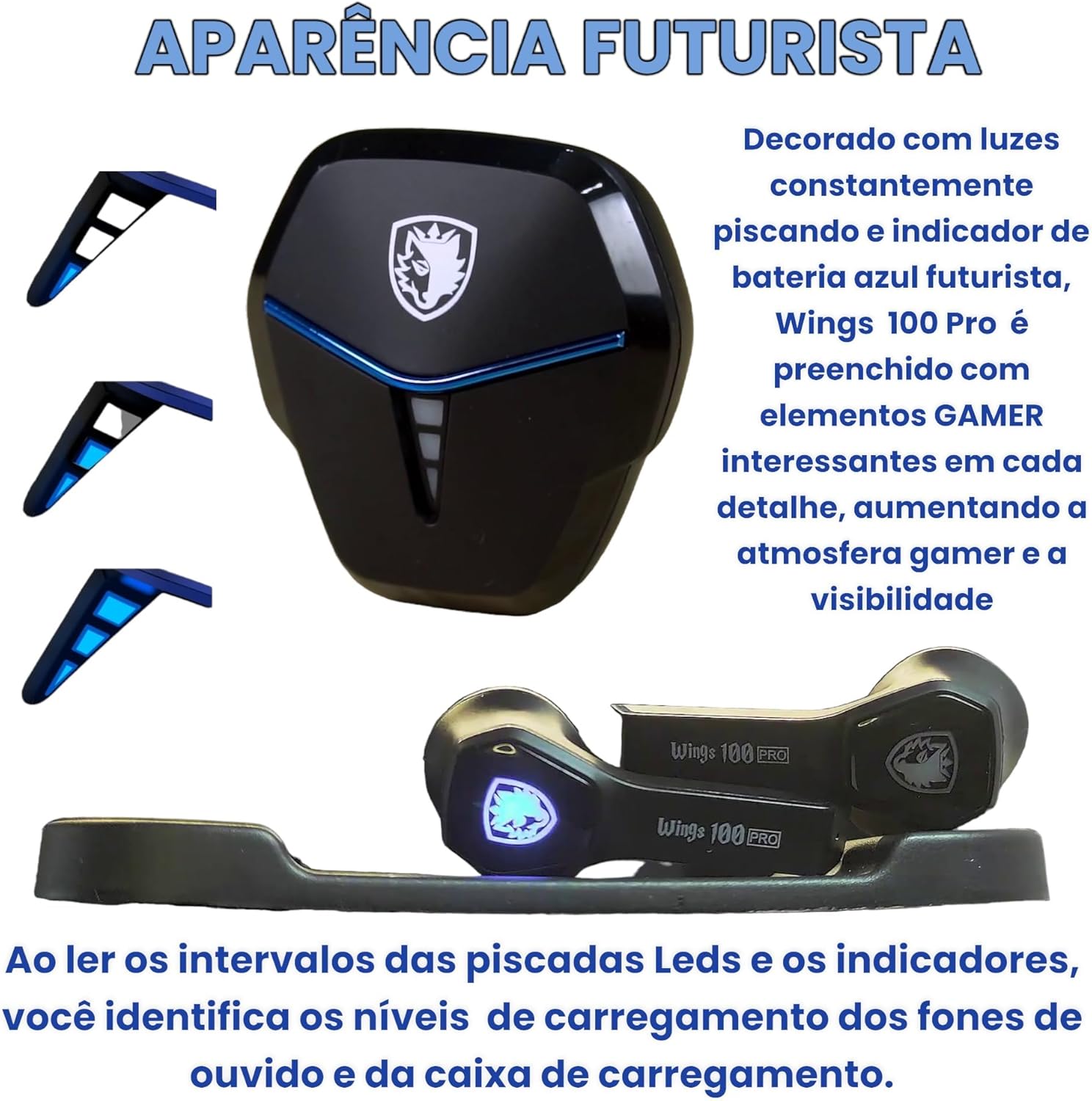
Image 3.2: Close-up of the SADES Wings 100 Pro charging case and earbuds, showcasing the blue LED lights that indicate charging status and battery levels.
3.2 Associazione con un dispositivo
For initial pairing, or if you are connecting to a new device:
- Aprire la custodia di ricarica. Gli auricolari entreranno automaticamente in modalità di associazione.
- Sul tuo dispositivo (smartphone, tablet, computer), attiva il Bluetooth.
- Cercare "Wings 100 Pro" in the list of available Bluetooth devices.
- Select "Wings 100 Pro" to connect. Once connected, you will hear an audible confirmation.
- The earbuds will automatically connect to the last paired device when the case is opened.

Image 3.3: Demonstrates opening the charging case to automatically connect the earbuds to a previously paired device, and closing the case to initiate charging.

Image 3.4: Illustrates the Bluetooth 5.0 pairing process on a smartphone, showing "Wings 100 Pro" as an available device for connection.
3.3 Adjusting Fit and Comfort
For optimal sound quality and comfort, choose the ear tips that best fit your ears. The package includes small, medium, and large sizes.
- Estrarre delicatamente i gommini auricolari preinstallati.
- Select a new pair of ear tips and push them onto the earbud nozzles until securely attached.
- Test different sizes to find the most comfortable and secure fit.
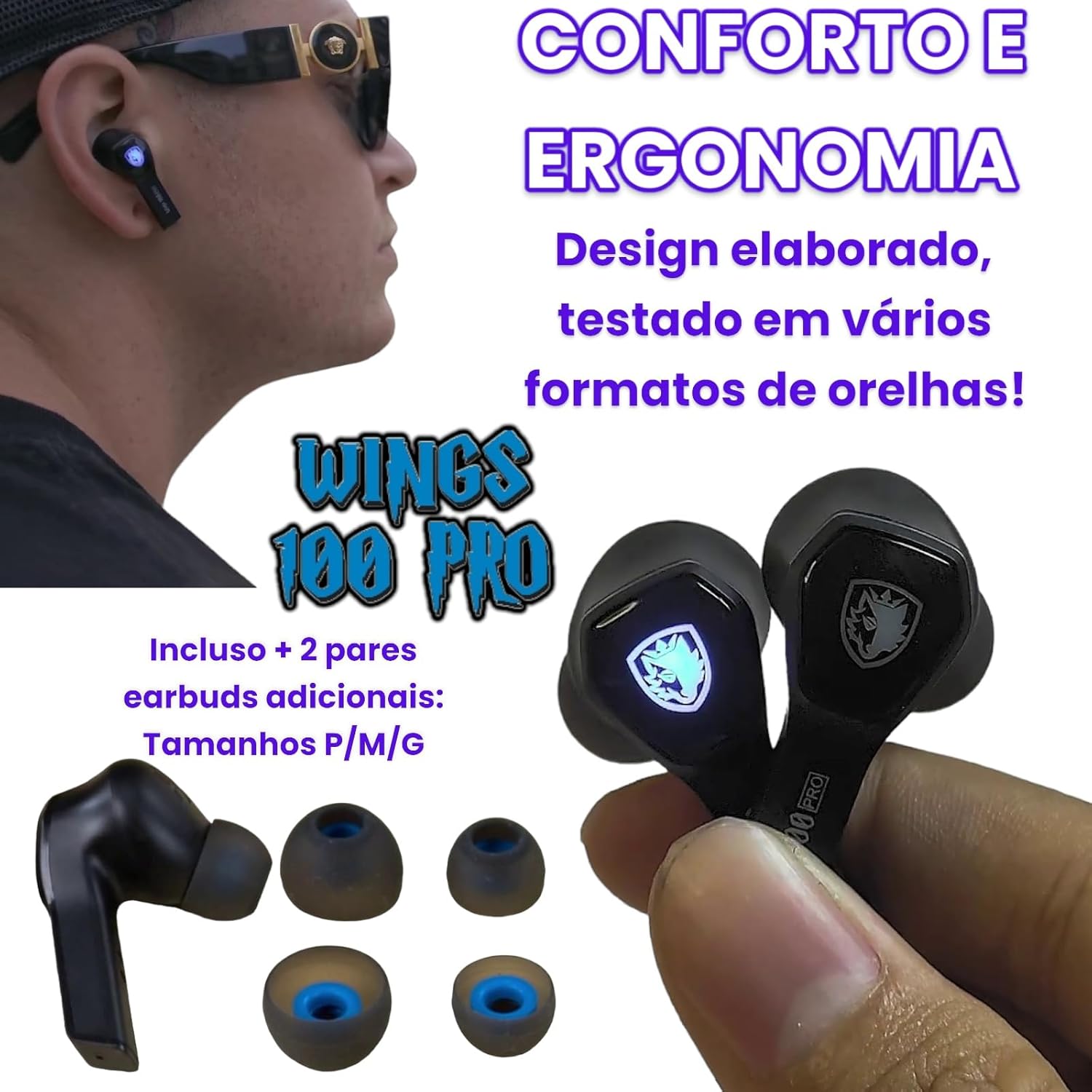
Image 3.5: Shows the SADES Wings 100 Pro earbuds and the included additional ear tip sizes (S, M, L) for personalized comfort and ergonomic fit.
4. Istruzioni per l'uso
4.1 Controlli Smart Touch
The SADES Wings 100 Pro earbuds feature touch-sensitive controls on each earbud for managing audio playback, calls, and game mode.
| Azione | Auricolare sinistro (L) | Auricolare destro (R) |
|---|---|---|
| Riproduzione musicale: | ||
| Riproduci/Pausa | Singolo tocco | Singolo tocco |
| Traccia precedente | Tap and Hold (2 seconds) | N / A |
| Traccia successiva | N / A | Tap and Hold (2 seconds) |
| Abbassa il volume | Doppio tocco | N / A |
| Alza il volume | N / A | Doppio tocco |
| Telefonate: | ||
| Rispondere/riagganciare la chiamata | Singolo tocco | Singolo tocco |
| Rifiuta chiamata | Tap and Hold (2 seconds) | Tap and Hold (2 seconds) |
| Modalità di gioco: | ||
| Attiva/disattiva la modalità di gioco | Doppio tocco | Doppio tocco |
Image 4.1: Diagram illustrating the smart touch control functions for music, phone calls, and game mode on the SADES Wings 100 Pro earbuds.
4.2 Game Mode and Low Latency
The SADES Wings 100 Pro earbuds are designed for an immersive gaming experience with a dedicated Game Mode that offers low latency.
- Attivazione della modalità di gioco: Double-tap the touch control on either the left or right earbud.
- Vantaggi: In Game Mode, you will experience authentic 3D audio with surround sound. Shot and footstep effects are amplified for enhanced precision.
- Bassa latenza: Game Mode provides a low latency of approximately 40ms, ensuring perfect synchronization between video and audio for an immersive 3D experience.

Image 4.2: Depicts a user playing a mobile game with the SADES Wings 100 Pro earbuds, illustrating the activation of Game Mode via double-tap for high-performance audio.

Image 4.3: A user enjoying a game on a mobile device while connected to a laptop, demonstrating the low latency feature (40ms) of the SADES Wings 100 Pro for synchronized audio and video.
5. Manutenzione
- Pulizia: Pulisci regolarmente gli auricolari e la custodia di ricarica con un panno morbido, asciutto e privo di lanugine. Non utilizzare prodotti chimici aggressivi o materiali abrasivi.
- Suggerimenti per le orecchie: Rimuovere e pulire periodicamente i gommini auricolari con acqua e sapone neutro. Assicurarsi che siano completamente asciutti prima di riapplicarli.
- Porta di ricarica: Mantenere la porta di ricarica USB Type-C libera da polvere e detriti.
- Magazzinaggio: Quando non li usi, riponi gli auricolari nella custodia di ricarica per proteggerli e mantenerli carichi.
- Resistenza all'acqua: Gli auricolari sono non impermeabileEvitare l'esposizione all'acqua, alla pioggia o all'umidità eccessiva.
6. Risoluzione Dei Problemi
- Gli auricolari non si caricano:
- Assicurarsi che il cavo di ricarica sia collegato saldamente sia alla custodia sia alla fonte di alimentazione.
- Verificare che gli auricolari siano posizionati correttamente nella custodia di ricarica.
- Verify that the charging case has sufficient battery power.
- Gli auricolari non si associano:
- Assicurati che il Bluetooth sia abilitato sul tuo dispositivo.
- Ensure the earbuds are out of the charging case and in pairing mode (LEDs flashing).
- Prova a disattivare e riattivare il Bluetooth sul tuo dispositivo.
- Se è già stato associato, prova a "dimenticare" il dispositivo nelle impostazioni Bluetooth e ad associarlo nuovamente.
- Nessun suono o volume basso:
- Controlla i livelli del volume sia sul dispositivo che sugli auricolari.
- Assicurati che gli auricolari siano collegati correttamente al tuo dispositivo.
- Try resetting the earbuds by placing them back in the case and closing the lid, then reopening.
- Connessione intermittente:
- Assicurati che non ci siano ostacoli tra gli auricolari e il dispositivo.
- Avoid using the earbuds in environments with strong electromagnetic interference.
- Keep your device within the effective Bluetooth range.
7. Specifiche
| Specifiche generali | |
|---|---|
| Numero di modello | TWS01-PRO |
| Marca | SADE |
| Peso | 50 grammi (totale) |
| Fattore di forma | In-ear (auricolare) |
| Resistenza all'acqua | Non impermeabile |
| Caratteristiche speciali | With microphone, wireless, low latency Game Mode |
| Cancellazione del rumore | Active Noise Suppression (as per product spec, specific ANC features not detailed) |
| Specifiche audio | |
|---|---|
| Dimensioni del conducente | 10 mm dynamic with neodymium magnets |
| Sensibilità | 106 ± 3 dB / 1 kHz |
| Risposta in frequenza | Frequenza |
| Impedenza | 32 Ω ± 15 % / 1 kHz |
| microfono Specifiche | |
|---|---|
| Direzione | Omnidirezionale |
| Sensibilità | -41 ± 1 dB / 1 kHz |
| Gamma di frequenza | 100Hz ~ 8kHz |
| Impedenza | 400Ω/1kHz |
| Batteria e ricarica | |
|---|---|
| Batteria per auricolari | DC 5 V 30 mAh |
| Custodia di ricarica Batteria | DC 5 V 400 mAh |
| Versione Bluetooth | 5.0 |
| Protocolli Bluetooth | HFP V1.7, A2DP V1.3, AVRCP V1.6, HID V1.0 |
| Tempo di ricarica degli auricolari | 1 ora |
| Tempo di ricarica della cassa | 2 ore |
| Porta di ricarica | USB di tipo C |
| Battery Life (50% volume, single earbud) | 18 ore (33 ore con custodia di ricarica) |
| Battery Life (50% volume, stereo earbuds) | 12 ore (20 ore con custodia di ricarica) |
| Tempo di standby | > 200 ore |
8. Garanzia e supporto
For warranty information and technical support, please refer to the warranty card included in your product package or visit the official SADES websito.
Si prega di conservare la prova d'acquisto per eventuali reclami in garanzia.