
Inateck KB01101
Manuale utente della tastiera Bluetooth con touchpad Inateck KB01101
Modello: KB01101
Introduzione
The Inateck KB01101 is an ultra-thin Bluetooth keyboard designed for seamless compatibility with Android and Windows devices, including tablets, smartphones, and PCs. This keyboard combines portability with robust functionality, making it easy to carry and use anywhere. It features a responsive touchpad and dedicated shortcut keys to enhance productivity.
Note on macOS/iOS Compatibility: While primarily designed for Android and Windows, this keyboard offers partial compatibility with iOS/iPadOS/macOS. All characters are supported. The CMD+option function can be executed, though not printed on the keys. Some quick buttons in the top row may not function, and certain key combinations might not perform desired actions. The trackpad supports basic tap and drag functions like a mouse but does not support multi-touch gestures on these operating systems. A fully compatible version for iOS/iPadOS is expected to be released soon.
Impostare
1. Ricarica della tastiera
Before initial use, ensure the keyboard is fully charged. Connect the provided USB cable to the keyboard's charging port and to a power source (e.g., computer USB port, USB wall adapter). The charging indicator light will show the charging status.
The keyboard includes one Lithium-ion battery.
2. Accoppiamento Bluetooth
- Accendi la tastiera utilizzando l'interruttore di alimentazione.
- Premere e tenere premuto il tasto Fn key and the Bluetooth pairing key (often indicated by a Bluetooth icon or a specific F-key) simultaneously for a few seconds until the Bluetooth indicator light starts blinking. This indicates the keyboard is in pairing mode.
- On your device (Android tablet, smartphone, or Windows PC), go to the Bluetooth settings.
- Cercare available Bluetooth devices. The keyboard should appear as "Inateck KB01101" or a similar name.
- Seleziona la tastiera dall'elenco per avviare l'associazione. Segui le istruzioni sullo schermo, ad esempio inserendo un codice di associazione.
- Una volta completata l'associazione, la spia Bluetooth sulla tastiera smetterà di lampeggiare e rimarrà fissa oppure si spegnerà, a seconda del modello.
After successful Bluetooth pairing, the keyboard automatically detects your device's operating system (Android or Windows) for optimal functionality.

Image: The Inateck KB01101 keyboard is perfectly compatible with Android and Windows, featuring automatic operating system detection and full support for touch gestures and key combinations.
Utilizzo della tastiera
Keyboard Layout and Special Keys
The KB01101 features a standard QWERTY layout with additional function keys and a touchpad. The top row includes shortcut keys specifically designed for Android and Windows operating systems, allowing for quick execution of common functions.

Immagine: dettagliata view of the Inateck KB01101 keyboard layout, illustrating the dedicated shortcut keys for Android and Windows operating systems.
Shortcut Key Functions (Android/Windows):
- Fn+Esc: Lock FN keys
- Fn+F1: Switch to Home page
- Fn+F2: Open search field
- Fn+F3: Adjust screen brightness down
- Fn+F4: Adjust screen brightness up
- Fn+F5: Take screenshot of current screen
- Fn+F6: Open multitasking panel
- Fn+F7: Traccia precedente
- Fn+F8: Riproduci/Pausa
- Fn+F9: Traccia successiva
- Fn+F10: Suono muto
- Fn+F11: Abbassa il volume
- Fn+F12: Alza il volume
- Fn + Bluetooth Icon: Avvia l'accoppiamento Bluetooth
- Fn + icona di blocco: Schermata di blocco
Gesti del touchpad
The integrated touchpad supports various multi-touch gestures for both Android and Windows operating systems, enhancing navigation and control.

Image: Visual guide to touchpad gestures, showing specific actions for Android (click, drag and drop, right-click, scroll window) and Windows (scroll, swipe, return to home screen, open Action Center).
Gesti del touchpad Android:
- Clic: Tocco con un solo dito.
- Trascina e rilascia: Tap and hold, then drag.
- Clic destro: Two-finger tap.
- Scroll Window: Two-finger swipe up/down.
- Ingrandisci: Pinch with two fingers (on supported Android devices).
Note: Android itself may not support as many touch gestures as Windows.
Windows Touchpad Gestures:
- Scorrere: Two-finger swipe up/down.
- Scorri: Two-finger swipe left/right.
- Ritorna alla schermata principale: Scorri verso il basso con tre dita.
- Apri Centro operativo: Tocco con quattro dita.
Note: Four-finger gestures are only compatible with Windows 10/11.
Esperienza di digitazione
The Inateck KB01101 is designed to provide a comfortable typing experience similar to a laptop. It offers excellent tactile feedback and a perfect rebound with each key press, ensuring fast and accurate input.
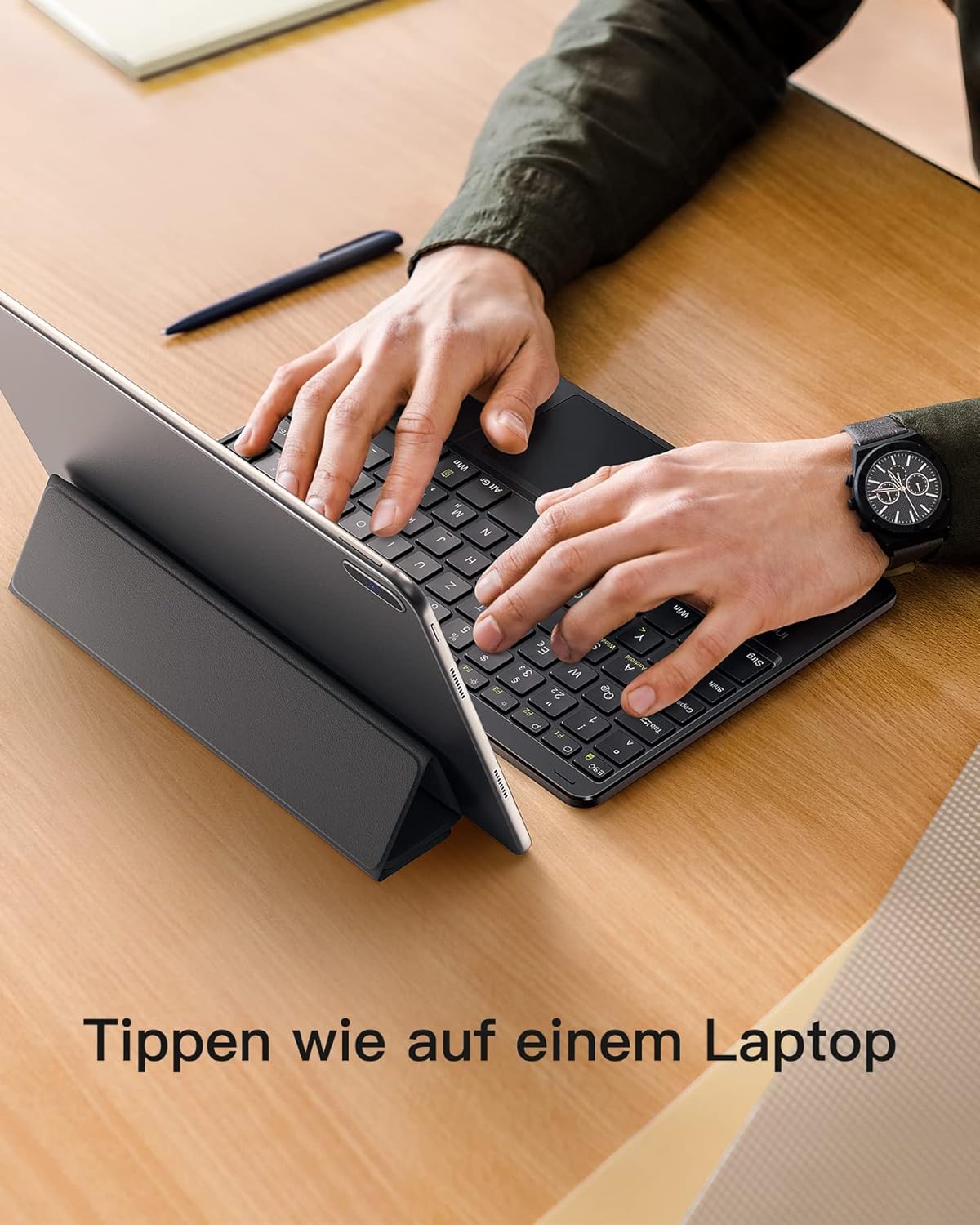
Image: A user typing on the Inateck KB01101 keyboard, which is connected to a tablet, illustrating the comfortable and efficient typing experience.
Manutenzione
Per garantire la longevità e le prestazioni ottimali della tastiera Inateck KB01101, seguire queste linee guida per la manutenzione:
- Pulizia: Use a soft, dry, lint-free cloth to clean the keyboard surface and keys. For stubborn dirt, slightly dampInumidire il panno con acqua o un detergente delicato per dispositivi elettronici. Evitare l'eccessiva umidità.
- Magazzinaggio: Quando non viene utilizzata, conservare la tastiera in un luogo fresco e asciutto, lontano dalla luce solare diretta e da temperature estreme.
- Cura della batteria: The keyboard contains a built-in Lithium-ion battery. Avoid fully discharging the battery frequently. For long-term storage, charge the battery to about 50% to prolong its lifespan.
- Protezione: The KB01101 is equipped with anti-slip pads to prevent accidental sliding. Ensure these pads are clean and intact for stable use.
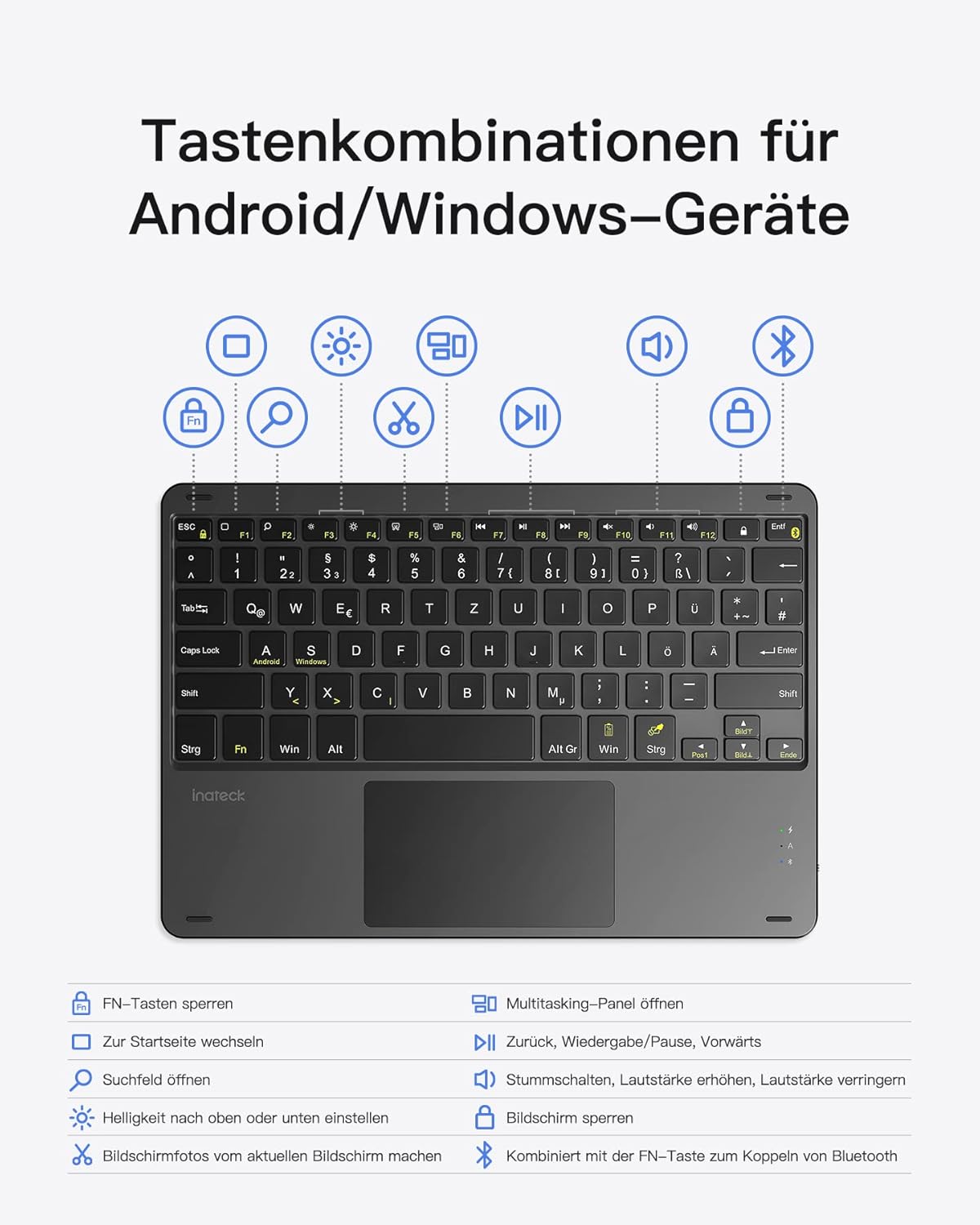
Image: Comparison highlighting the integrated anti-slip pads on the Inateck KB01101, designed to prevent movement during use, versus other keyboards lacking this feature.
Risoluzione dei problemi
If you encounter issues with your Inateck KB01101 keyboard, refer to the following common problems and solutions:
1. Incorrect Key Output or Layout Issues
If the keys are producing incorrect characters or the layout seems wrong (e.g., QWERTZ instead of QWERTY), you may need to adjust your device's keyboard settings.
- Soluzione: Go to the keyboard settings on your device and select the correct language/layout (e.g., English (US) QWERTY). For a Samsung tablet, for example, navigate to Settings > General Management > Language and input > Physical keyboard, then select the appropriate layout.
- Operating System Mismatch: The keyboard automatically detects your device's OS. If incorrect key output persists, the keyboard's detected OS might not match your device's actual OS. To manually switch the system, press Fn + LA for Android or Fn+S for Windows. The blue light will blink three times once the system is switched.
2. Keyboard Fails to Connect via Bluetooth
If the Bluetooth connection cannot be established or is unstable:
- Soluzione: Delete any existing pairing entries for the keyboard on your device. Then, press and hold Fn+C for 5 seconds to restore factory settings on the keyboard. Repeat the pairing steps outlined in the "Bluetooth Pairing" section to reconnect your device with the keyboard.
- Controllare la batteria: Assicurarsi che la batteria della tastiera abbia una carica sufficiente.
- Dispositivo Bluetooth: Assicurati che il Bluetooth sia abilitato sul tuo dispositivo e che sia rilevabile.
- Prossimità: Ensure the keyboard is within the effective range of your device (typically 10 meters).

Image: Frequently Asked Questions (FAQ) section, providing solutions for common keyboard issues such as incorrect key output due to language settings and troubleshooting steps for Bluetooth connection failures.
Specifiche
| Numero di modello | KB01101 |
| Marca | Inattivo |
| Tecnologia di connettività | Bluetooth |
| Dispositivi compatibili | Tablets, Smartphones, PCs (Android, Windows) |
| Caratteristica speciale | Touchpad integrato |
| Descrizione della tastiera | Senza fili |
| Usi consigliati | Office, Portable use |
| Colore | Nero |
| Materiale | Plastica, Metallo |
| Peso dell'articolo | 327 grammi |
| Numero di chiavi | 84 |
| Numero di pulsanti | 78 |
| Batteria | 1 agli ioni di litio (inclusa) |
| Componenti inclusi | Cavo USB |
| ASIN | B09RV84RZZ |
Garanzia e supporto
For warranty information, please refer to the documentation included with your purchase or visit the official Inateck websito. Al momento non sono disponibili informazioni sulla disponibilità dei pezzi di ricambio e sugli aggiornamenti software garantiti.
If you require further assistance or have questions not covered in this manual, please contact Inateck customer support through their official channels.
Ask a question about this manual
Ask about setup, troubleshooting, compatibility, parts, safety, or missing instructions. Manuals+ will review the question and use this page’s manual context to help answer it.