
Introduzione
This manual provides detailed instructions for the setup, operation, and maintenance of your TOMLOV DM201 HDMI Digital Microscope. Please read this manual thoroughly before using the device to ensure proper function and longevity.
Prodotto finitoview
The TOMLOV DM201 is a versatile digital microscope featuring a 7-inch HD screen, 16MP camera, and dual HDMI/USB output. It is designed for various applications including coin inspection, soldering, and general observation.
Caratteristiche principali:
- Schermo IPS HD da 7 pollici: Provides clear and vivid images with a wide viewangolo di ing.
- Fotocamera HD da 16 MP: Cattura foto e video ad alta risoluzione.
- Ingrandimento 2-1200X: Adjustable magnification for observing fine details.
- Doppio sistema di illuminazione: Equipped with 6 LED lights around the lens and 2 adjustable side lights for optimal lighting.
- Uscita HDMI/USB: Connects to external monitors (HDMI) or computers (Windows/Mac via USB) for larger viewing.
- Tubo di prolunga: Included for increased working distance, ideal for viewmonete intere.
- Controllo remoto intelligente: Allows for hands-free operation, photo/video capture, and settings adjustment.
- Supporto e monitor regolabili: Ergonomic design for flexible positioning and comfortable viewing.
- 32GB Micro-SD Card: Included for saving captured images and videos.
Contenuto della confezione:

Immagine: Contents of the TOMLOV DM201 package, including the microscope unit, bracket, base plate, extension tube, remote control, user manual, HDMI cable, USB cable, lens cleaning cloth, 5V charger, and light barrier.
Si prega di verificare che tutti gli articoli elencati di seguito siano presenti nel pacco:
- Unità microscopio DM201
- Staffa regolabile
- Piastra di base
- Tubo di prolunga
- Telecomando
- Manuale d'uso
- Cavo HDMI
- Cavo USB
- Panno per la pulizia delle lenti
- 5V Charger
- Barriera sottile
- 32GB Micro-SD Card (pre-installed or separate)
Istruzioni di installazione
1. Montaggio:
Follow these steps to assemble your TOMLOV DM201 Digital Microscope:
- Attach the adjustable bracket to the base plate using the provided screws.
- Slide the microscope unit onto the vertical rod of the bracket. Secure it at the desired height using the locking knob.
- Connect the two flexible side LED lights to the designated ports on the base plate. Position them to illuminate your observation area.
- If observing larger objects like entire coins, insert the extension tube between the microscope lens and the main unit to increase the working distance.

Immagine: Fully assembled TOMLOV DM201 Digital Microscope with the 7-inch screen, main lens, flexible side lights, and remote control. An extension tube and 32GB Micro-SD card are also shown separately.
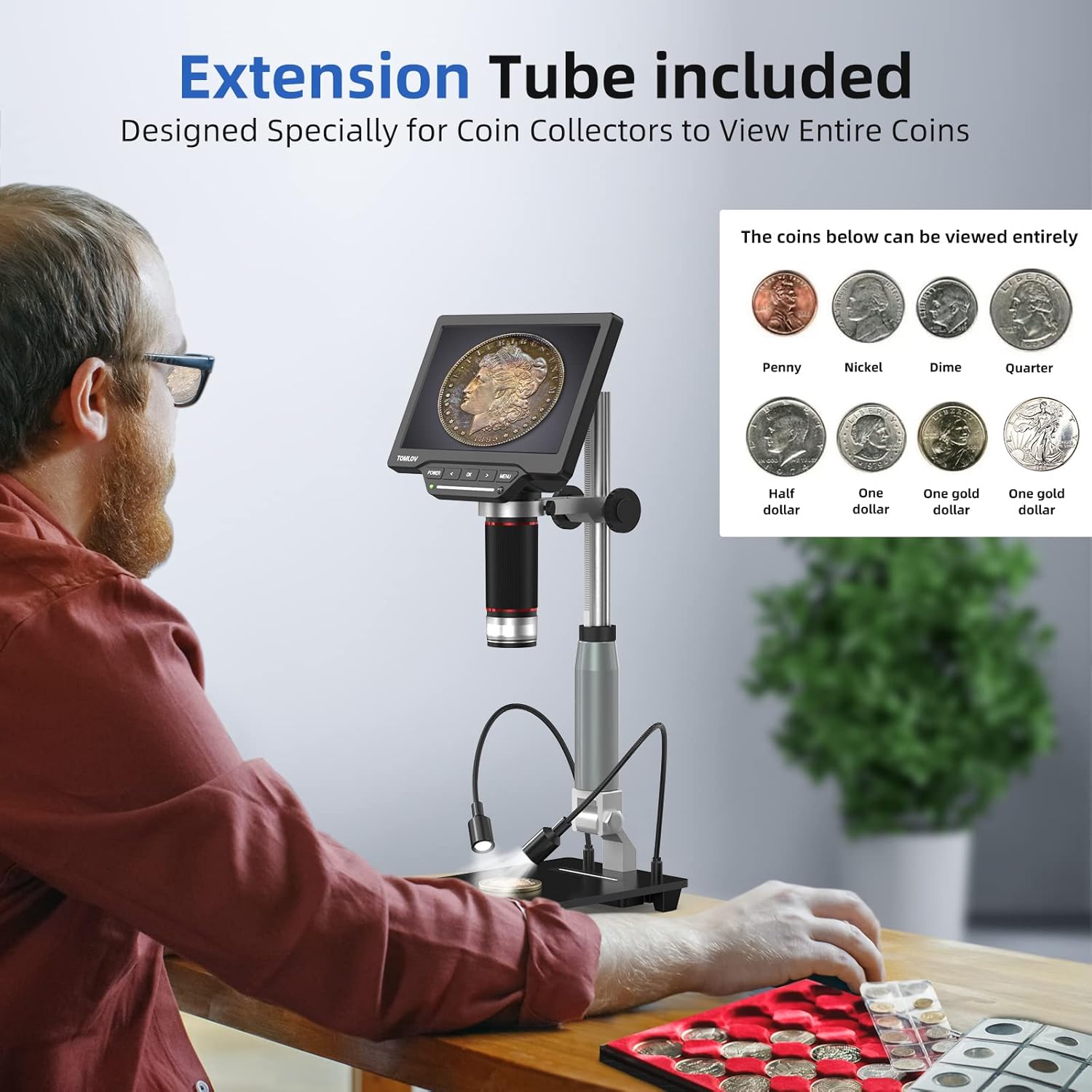
Immagine: A user observing a coin using the TOMLOV DM201 microscope with the extension tube installed, demonstrating its capability to view entire coins.
2. Accensione:
Connect the 5V charger to the microscope's power input and plug it into a power outlet. Press and hold the ENERGIA button on the microscope unit to turn it on. The screen will illuminate.
3. External Display Connection (Optional):
The DM201 supports output to external displays via HDMI or USB.
- Uscita HDMI: Connect the provided HDMI cable from the microscope's HDMI port to an HDMI-enabled TV or monitor. The microscope display will automatically switch to the external screen.
- USB Output (PC/Mac): Connect the provided USB cable from the microscope's USB port to your computer.
- Finestre 10: Open the default "Windows Camera" application.
- Mac OS: Open the "Photo Booth" application.

Immagine: The TOMLOV DM201 microscope connected to a large external monitor via HDMI, showcasing its dual output capability for a larger viewesperienza di acquisizione.
Istruzioni per l'uso
1. Operazioni di base:
- Accensione/spegnimento: Premere e tenere premuto il tasto ENERGIA pulsante.
- Regolazione della messa a fuoco: Rotate the large focusing knob on the microscope unit to achieve a clear image.
- Magnification (Zoom): The DM201 offers 2X to 1200X magnification. Adjust the distance between the lens and the object, and fine-tune with the focusing knob.
- Navigazione nel menu: Utilizzare il MENU button to access settings. Use the SINISTRA E GIUSTO pulsanti freccia per navigare e OK per confermare le selezioni.

Immagine: A user demonstrating the 2X-1200X zoom capability of the TOMLOV DM201 microscope, observing a peacock feather on the screen.
2. Regolazione dell'illuminazione:
The microscope features a dual illumination system:
- Luci LED principali: 6 LEDs surround the main lens. Their brightness can be adjusted via the microscope's controls or remote.
- Side Flexible Lights: 2 adjustable gooseneck lights provide additional illumination. These can be positioned to reduce shadows and highlight specific features of the object.

Immagine: Diagram illustrating the dual illumination system of the TOMLOV DM201, showing both the top LED lights and the two flexible side lights, highlighting their versatility.
3. Cattura di foto e video:
The DM201 can capture images up to 16MP and record videos at 1080p 30fps or 720p 60fps. All captures are saved to the included 32GB Micro-SD card.
- Fare una foto: In diretta view modalità, premere il tasto OK button on the microscope or the camera button on the remote control.
- Registra video: In diretta view modalità, premere il tasto MENU button to switch to video mode (indicated by a video icon). Then, press OK or the video button on the remote to start/stop recording.
- Riproduzione: Access the gallery/playback mode via the MENU pulsante per riview supporti catturati.

Immagine: A collage of images and video frames captured by the TOMLOV DM201, demonstrating its capability to record various subjects like coins, insects, electronic components, and plants.
4. Utilizzando il telecomando:
The remote control provides convenient access to functions without touching the microscope, minimizing vibrations during capture.
- Energia: Turn the microscope on/off.
- Foto/Video: Switch between photo and video modes, and trigger capture.
- Navigazione: Control menu navigation and settings adjustments.
- Luminosità: Regola l'intensità delle luci LED.
Manutenzione
- Pulizia della lente: Use the provided lens cleaning cloth or a soft, lint-free cloth specifically designed for optics. Do not use abrasive materials or harsh chemicals.
- Pulizia dello schermo: Wipe the screen gently with a microfiber cloth. Avoid excessive pressure.
- Pulizia generale: Use a soft, dry cloth to wipe the microscope body and stand.
- Magazzinaggio: Store the microscope in a clean, dry, and dust-free environment when not in use. Avoid extreme temperatures and direct sunlight.
- Cura della batteria: The microscope contains a Lithium Polymer battery. For optimal battery life, avoid fully discharging the battery frequently and store it with a partial charge if not used for extended periods.
Risoluzione dei problemi
| Problema | Possibile causa | Soluzione |
|---|---|---|
| Il microscopio non si accende. | Problema con la batteria scarica o con l'adattatore di alimentazione. | Ensure the microscope is fully charged or connected to a working power outlet. Check the power adapter and cable. |
| L'immagine è sfocata. | Messa a fuoco o distanza di lavoro errate. | Rotate the focusing knob to adjust focus. Adjust the height of the microscope unit on the stand. Ensure the object is within the working distance. |
| No image on external monitor/PC. | Incorrect cable connection or software issue. | Verify HDMI/USB cable connections. For PC/Mac, ensure the correct application ("Windows Camera" or "Photo Booth") is open and selected the microscope as the input device. |
| Impossibile salvare foto/video. | SD card full, not inserted, or corrupted. | Check if the 32GB Micro-SD card is properly inserted. Ensure there is sufficient space. Format the SD card (this will erase all data) or replace it if corrupted. |
| Telecomando non funzionante. | Battery depleted or line of sight blocked. | Replace the remote control battery. Ensure there is a clear line of sight between the remote and the microscope's IR receiver. |
Specifiche
| Nome del modello | Modello DM201 |
| Marca | TOMLOV |
| Dimensioni dello schermo | Schermo IPS HD da 7 pollici |
| Risoluzione della fotocamera | 16 Megapixel |
| Gamma di ingrandimento | 2X a 1200X |
| Porte di uscita | HDMI, USB |
| Dispositivi compatibili | HDMI Projector & Monitor, Laptop, Personal Computer, Television |
| Magazzinaggio | Scheda Micro-SD da 32 GB (inclusa) |
| Sorgente luminosa | LED (6 top, 2 flexible side) |
| Fonte di alimentazione | Alimentato a batteria (1 batteria ai polimeri di litio inclusa) |
| Materiale | Metallo |
| Colore | Argento |
| Dimensioni dell'articolo | Dimensioni: 28.1 x 26.9 x 9.8 cm |
| Peso dell'articolo | 1.64 kg |
Garanzia e supporto
TOMLOV products are designed for reliability and performance. For warranty information and technical support, please refer to the official TOMLOV webo contattare direttamente il servizio clienti. Conservare la ricevuta d'acquisto come prova d'acquisto per eventuali reclami in garanzia.
Per ulteriore assistenza, visitare: www.tomlov.com