
Introduzione
This manual provides comprehensive instructions for the OHLPRO TQ80-P5-R Universal Tablet Car Mount. This versatile mount is designed to securely hold 6-11 inch tablets, including various Apple iPad and Samsung Galaxy Tab models, in your vehicle. It offers multiple installation options for dashboards, windshields, and air vents, ensuring optimal viewing angles and accessibility during travel. Please read these instructions carefully before installation and use to ensure proper function and safety.

Figure 1: OHLPRO Tablet Car Mount with various components and usage scenarios.
Cosa c'è nella scatola
Verificare che tutti i componenti siano presenti prima di procedere con l'installazione:
- 1x Tablet Holder for Car
- 1x clip di sfiato
- 1x Manuale d'uso (questo documento)

Figure 2: All included components of the OHLPRO Tablet Car Mount.
Istruzioni di installazione
The OHLPRO Tablet Car Mount offers three primary installation methods: dashboard, windshield, and air vent.
1. Dashboard/Windshield Mounting (Suction Cup)
- Preparare la superficie: Clean the desired dashboard or windshield area thoroughly and ensure it is completely dry. A flat, clean surface is crucial for strong suction.
- Fissare la ventosa: Place the suction cup base firmly on the cleaned surface. Press down on the suction cup and then push the locking lever down to create a secure vacuum seal.
- Fissare il supporto per tablet: Connect the tablet holder arm to the suction cup base. Tighten the adjustment knob to secure it in place.
- Regola la posizione: Use the adjustable arm and 360-degree rotatable ball joint to position the tablet holder for optimal viewsenza ostacolare la guida view.

Figure 3: Visual guide for windshield, dashboard, and air vent mounting options.
2. Air Vent Mounting (Vent Clip)
- Fissare la clip di sfiato: Securely attach the provided vent clip to a suitable air vent blade in your vehicle. Ensure it is tightly locked to prevent movement.
- Connect Tablet Holder: Attach the tablet holder arm to the vent clip. Tighten the adjustment knob.
- Posizionamento: Adjust the tablet holder to your preferred viewangolo di ing.

Figure 4: Close-up of the air vent clip installation.
Video: Installation and Usage Demonstration
Video 1: A demonstration of the OHLPRO Tablet Holder's installation on a dashboard and windshield, showcasing its versatility and secure attachment. This video also illustrates how to adjust the holder and insert a tablet.
Istruzioni per l'uso
1. Inserimento del tablet
Tirare delicatamente la parte superiore e inferiore del clamps of the tablet holder apart to create enough space for your tablet. Insert your 6-11 inch tablet, ensuring it sits securely within the soft rubber pads. The flexible arm clip accommodates tablets with normal protective cases (thickness below 15mm).
2. Regolazione Viewangolo di ing
The mount features a 360-degree rotatable ball joint and a 270-degree adjustable arm, allowing you to easily switch between portrait and landscape views and find the perfect angle for navigation or entertainment.

Figure 5: Key features such as rotation, adjustment, and charging port access.
3. Removing Your Tablet
To remove your tablet, simply pull the top clamp upwards to release the tablet from the holder.
Video: Product Features and Usage
Video 2: This video highlights the various features of the tablet mount, including its adjustability and how it securely holds a tablet in different orientations within a vehicle.
Manutenzione
To maintain the strong adhesion of the suction cup, rinse it with warm water and allow it to air dry completely whenever it loses stickiness. This will reactivate the adhesive properties.
Risoluzione dei problemi
- La ventosa non tiene: Ensure the mounting surface is clean, dry, and flat. Rinse the suction cup with warm water and air dry to restore stickiness. Press firmly and engage the locking lever.
- Tablet Does Not Fit with Case: The holder is designed for tablets with normal protective cases (thickness below 15mm). If your case is thicker, it may need to be removed for proper fit.
- Holder Feels Unstable: Verify that all adjustment knobs are tightened securely after positioning. For dashboard mounting, ensure the suction cup is on a flat, smooth surface.
Specifiche
| Caratteristica | Dettaglio |
|---|---|
| Numero di modello | TQ80-P5-R |
| Dimensioni dei tablet compatibili | 6 - 11 pollici |
| Tipi di montaggio | Cruscotto, parabrezza, bocchetta dell'aria |
| Rotazione | 360° (ball joint), 270° (arm) |
| Colore | Nero |
| Peso dell'articolo | 7.1 once |
| Dimensioni del prodotto | 4 x 3.5 x 2 pollici |
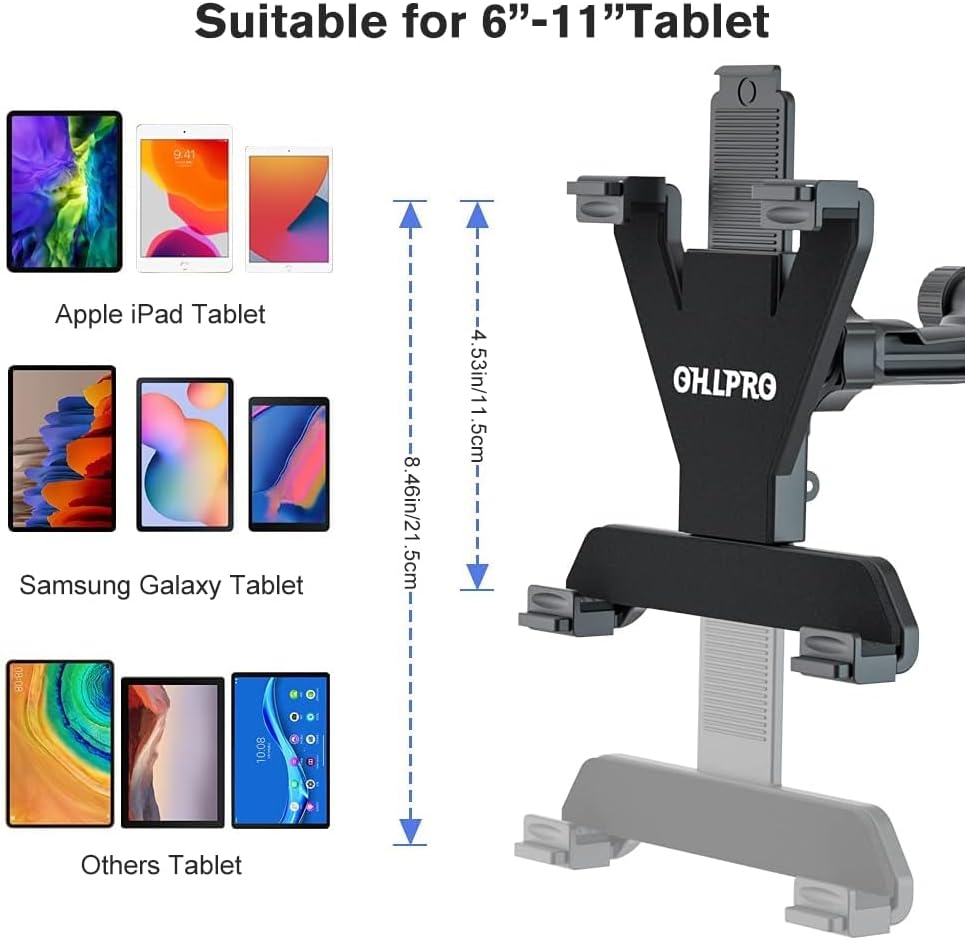
Figure 6: Tablet size compatibility details.
Garanzia e supporto
OHLPRO offers a 36-month care plan for this product. For any questions, technical assistance, or warranty claims, please refer to the contact information provided with your purchase or visit the official OHLPRO support channels.