
1. Introduzione
This manual provides essential information for the safe and efficient use of your Getac V110 Rugged Convertible Laptop/Tablet PC. Please read this manual thoroughly before operating the device and retain it for future reference. The Getac V110 is designed for durability and performance in challenging environments, offering versatility as both a laptop and a tablet.
2. Informazioni sulla sicurezza
Per evitare danni al dispositivo o lesioni personali, osservare le seguenti precauzioni di sicurezza:
- Non esporre il dispositivo a temperature estreme, alla luce solare diretta o a umidità eccessiva.
- Use only Getac-approved power adapters and accessories.
- Nonostante il design robusto, evitare di far cadere o sottoporre il dispositivo a urti violenti.
- Non tentare di smontare o riparare il dispositivo da soli. Rivolgersi a personale qualificato.
- Mantenere le aperture di ventilazione libere per evitare il surriscaldamento.
3. Fisico oltreview
The Getac V110 is a versatile device designed for rugged use. It features a convertible design, allowing it to function as both a traditional laptop and a tablet. Key components include a durable chassis, an 11.6-inch touchscreen display, a full-sized keyboard, and various ports for connectivity.

Figura 3.1: Esploso view illustrating the internal structure and ruggedized layers of the Getac V110.
3.1. Tastiera e touchpad
The device includes a backlit keyboard for typing in various lighting conditions and a precision touchpad for navigation.
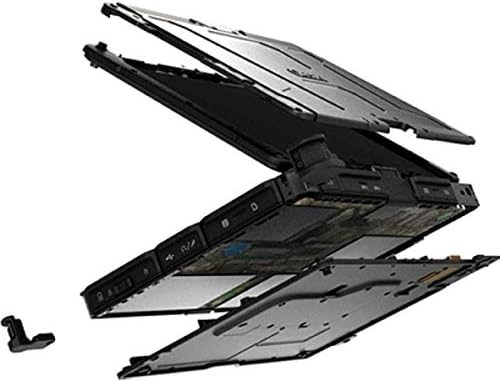
Figura 3.2: Dall'alto verso il basso view of the Getac V110 keyboard and integrated touchpad.
3.2. Design convertibile
The V110 can be easily converted between laptop and tablet modes by rotating the screen. This flexibility allows for optimal use in different scenarios.

Figure 3.3: The Getac V110 configured in laptop mode, displaying the screen and keyboard.

Figure 3.4: The Getac V110 in tablet mode, showcasing the touchscreen interface.
4. Impostazione
4.1. Accensione iniziale
- Collega l'alimentatore al dispositivo e a una presa di corrente.
- Press the power button located on the side or front of the device.
- Follow the on-screen prompts to complete the initial Windows 8.1 setup, including language, region, and user account creation.
4.2. Connettività di rete
The Getac V110 supports both Wi-Fi and Ethernet for internet access.
- Wifi: Access the network settings in Windows 8.1, select your desired Wi-Fi network, and enter the password if required.
- Collegamento Ethernet: Connect an Ethernet cable from your network router or switch to the Ethernet port on the device.
4.3. Accoppiamento Bluetooth
Per connettere i dispositivi Bluetooth:
- Assicurati che il dispositivo Bluetooth sia in modalità di accoppiamento.
- On the Getac V110, navigate to PC Settings > PC and devices > Bluetooth.
- Turn Bluetooth on and select the device from the list to pair.
5. Utilizzo del dispositivo
5.1. Passaggio dalla modalità laptop a quella tablet
To convert the device:
- Gently rotate the screen 180 degrees clockwise or counter-clockwise.
- Fold the screen back over the keyboard to enter tablet mode.
- Unfold the screen and rotate it back to the original position for laptop mode.
5.2. Utilizzo del touchscreen
The 11.6-inch LED touchscreen supports multi-touch gestures. Use your fingers or a compatible stylus for navigation, selection, and input.
5.3. Gestione energetica
To conserve battery life, adjust power settings in Windows 8.1. You can configure sleep mode, display brightness, and other power-saving options.
- Modalità risparmio: Premere brevemente il pulsante di accensione per mettere il dispositivo in modalità sospensione.
- Fermare: Go to the Charms bar (swipe from right edge or move mouse to top-right corner), select Settings > Power > Shut down.
- Ricomincia: Go to the Charms bar, select Settings > Power > Restart.
6. Manutenzione
6.1. Pulizia del dispositivo
Regular cleaning helps maintain performance and appearance.
- Utilizzare un panno morbido e privo di lanugine leggermente dampened with water or a mild, non-abrasive cleaner for the screen and exterior.
- Evitare di spruzzare liquidi direttamente sul dispositivo.
- Non utilizzare prodotti chimici aggressivi, solventi o materiali abrasivi.
6.2. Cura della batteria
Per massimizzare la durata della batteria:
- Evitare di scaricare completamente la batteria frequentemente.
- Se non utilizzato per lunghi periodi, conservare il dispositivo in un luogo fresco e asciutto.
- If the device has removable batteries, ensure they are properly seated.
6.3. Aggiornamenti software
Regularly check for and install operating system and driver updates to ensure optimal performance and security. Access Windows Update through PC Settings.
7. Risoluzione Dei Problemi
This section addresses common issues you might encounter with your Getac V110.
7.1. Il dispositivo non si accende
- Assicurarsi che l'adattatore di corrente sia collegato saldamente e che la presa elettrica sia funzionante.
- Check if the battery is charged. If not, allow it to charge for at least 30 minutes before attempting to power on again.
- If the battery is removable, ensure it is correctly installed.
7.2. Problemi di connettività Wi-Fi
- Verificare che il Wi-Fi sia abilitato nelle impostazioni di Windows.
- Restart your router and the Getac V110.
- Ensure you are within range of the Wi-Fi network and have the correct password.
- Verificare la presenza di driver Wi-Fi aggiornati.
7.3. Il touchscreen non risponde
- Riavviare il dispositivo.
- Assicurarsi che lo schermo sia pulito e privo di detriti.
- Check for any recent software updates or driver issues.
7.4. Prestazioni lente
- Chiudere le applicazioni non necessarie in esecuzione in background.
- Controlla lo spazio di archiviazione disponibile.
- Esegui una scansione antivirus.
- Assicurarsi che Windows e i driver siano aggiornati.
8. Specifiche
| Caratteristica | Dettaglio |
|---|---|
| Marca | Getac |
| Numero di modello | V110 |
| Processore | Intel Core i5-6300U (2.6 GHz) |
| Memoria RAM | 8 GB di memoria DDR4 SDRAM |
| Capacità di archiviazione | 128 GB |
| Dimensioni dello schermo | 11.6 pollici |
| Risoluzione dello schermo | 1366 x 768 pixel |
| Tipo di visualizzazione | GUIDATO |
| Input dell'interfaccia umana | Schermo tattile |
| Sistema operativo | Finestre 8.1 |
| Coprocessore grafico | Grafica Intel HD 520 |
| Tecnologia di connettività | Bluetooth, Ethernet, HDMI, USB, Wi-Fi |
| Peso dell'articolo | 4.4 libbre |
| Item Dimensions (L x W x Th) | 11.99" x 18.9" x 3.9" |
| Tipo di cella della batteria | Lithium Ion (23 Watt Hours) |
9. Informazioni sulla garanzia
The Getac V110 Rugged Convertible Laptop/Tablet PC comes with a Garanzia limitata di 90 giorni. This warranty covers manufacturing defects and malfunctions under normal use. It does not cover damage caused by misuse, accidents, unauthorized repairs, or modifications. Please retain your proof of purchase for warranty claims.
For detailed terms and conditions, refer to the warranty documentation provided with your device or contact Getac customer support.
10. Supporto
If you require further assistance or encounter issues not covered in this manual, please contact Getac customer support. You can typically find support contact information on the manufacturer's official website or within the device's pre-installed documentation.
When contacting support, please have your device's model number (V110) and serial number ready.