
1. Introduzione
Grazie per l'acquistoasing the Aogamb D3000 Kids Alarm Clock. This device combines a digital alarm clock, Bluetooth speaker, wake-up light, and sleep sound machine to create a versatile and engaging experience for children's bedrooms. Please read this manual carefully to ensure proper use and maintenance of your device.
Contenuto della confezione:
- Aogamb D3000 Alarm Clock
- Cavo di ricarica USB
- Manuale d'uso

Image: The Aogamb D3000 Alarm Clock, USB charging cable, and user manual are shown as included items.
2. Informazioni sulla sicurezza
- Non esporre il dispositivo a temperature estreme, alla luce solare diretta o a elevata umidità.
- Tenere il dispositivo lontano da acqua o altri liquidi.
- Non tentare di smontare o riparare da soli il dispositivo. Contatta l'assistenza clienti per assistenza.
- Utilizzare solo il cavo di ricarica USB fornito o un equivalente certificato.
- Ensure the device is placed on a stable surface to prevent falling.
3. Impostazione
Carica iniziale
Before first use, fully charge the alarm clock using the provided USB cable. Connect the USB cable to the charging port on the back of the device and to a suitable USB power adapter (not included). The charging indicator light will be red during charging and turn blue when fully charged.
Immagine: un primo piano view of the USB charging interface located on the back of the alarm clock.
Protective Film Removal
Before operating the device, gently remove the transparent protective film from the black display lens.
Image: A hand is shown peeling off a transparent protective film from the black display area of the alarm clock.
4. Istruzioni per l'uso
Controlli finitiview
Familiarize yourself with the buttons located on the top of the alarm clock:
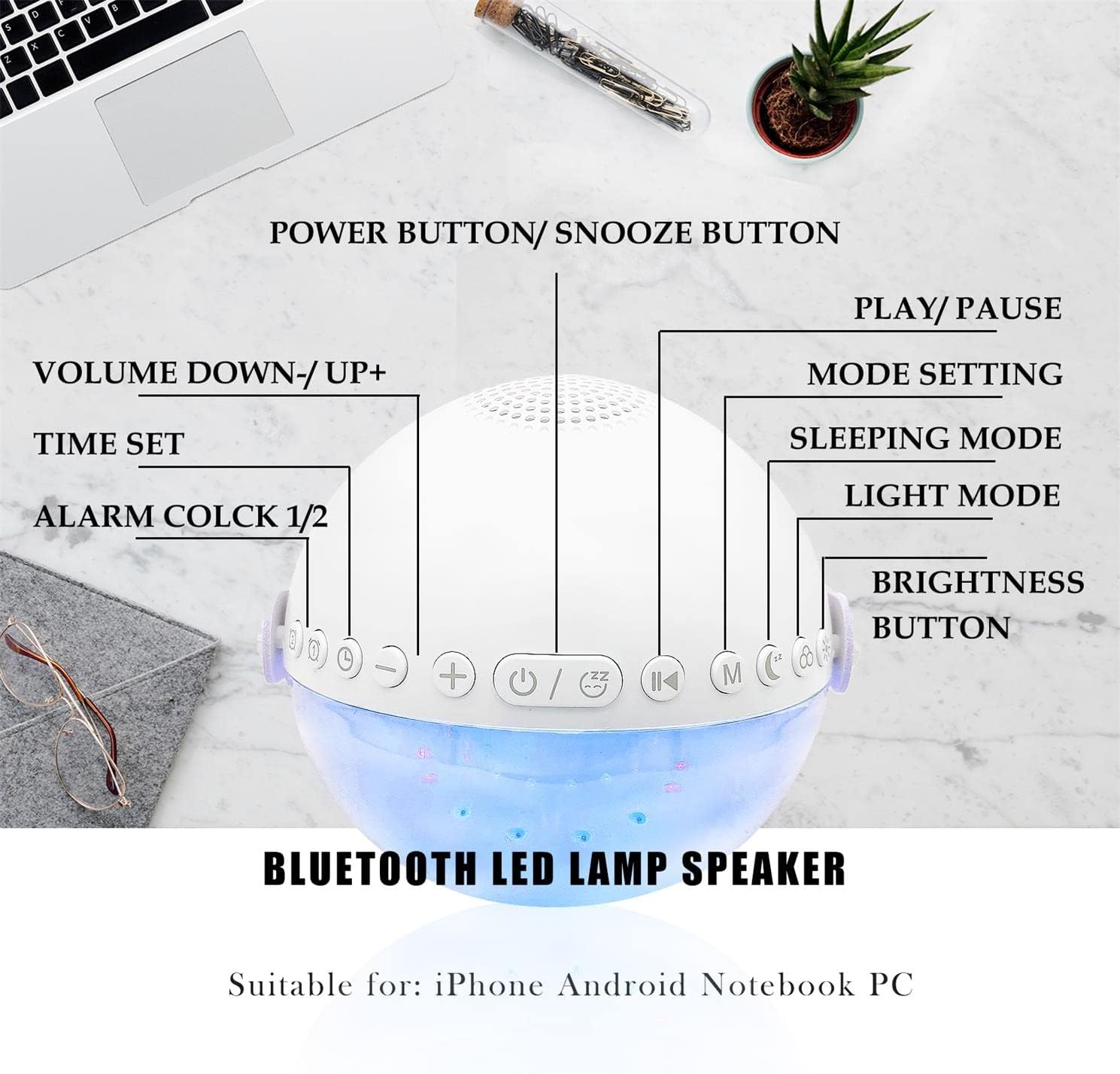
Immagine: una vista dall'alto view of the alarm clock with labels pointing to each button: Power/Snooze, Volume Down/Up, Time Set, Alarm 1/2, Play/Pause, Mode Setting, Sleeping Mode, Light Mode, and Brightness Button.
- Power Button / Snooze Button: Press to power on/off. Short press during an alarm to activate snooze.
- Volume giù (-) / Volume su (+): Premere brevemente per regolare il volume.
- Impostazione dell'ora: Premere per accedere alla modalità di impostazione dell'ora.
- Allarme 1 / Allarme 2: Press to set or activate/deactivate Alarm 1 or Alarm 2.
- Riproduci / Pausa: Controls media playback in Bluetooth or Sound Machine mode.
- Mode Setting (M): Press to cycle through modes (Bluetooth, Sound Machine).
- Modalità sonno: Activates sleep mode features.
- Modalità luce: Cycles through light colors and effects.
- Pulsante luminosità: Adjusts display and light brightness.
Impostazione dell'ora
- Premere il tasto Ora impostata pulsante. L'indicazione dell'ora lampeggerà.
- Utilizzare il Volume su (+) or Volume basso (-) pulsanti per regolare l'ora.
- Premere Ora impostata di nuovo per confermare l'ora e passare all'impostazione dei minuti.
- Utilizzare il Volume su (+) or Volume basso (-) pulsanti per regolare i minuti.
- Premere Ora impostata ancora una volta per confermare e uscire dall'impostazione dell'ora.
- The clock supports a 24-hour format.
Impostazione sveglia (doppi allarmi)
The device features two independent alarms. You can customize ringtones, alarm volume, and light color/brightness for each.
- Premere il tasto Allarme 1 or Allarme 2 button to select an alarm. The alarm icon will flash.
- Follow the time setting steps to set the desired alarm time.
- After setting the time, you can customize the alarm sound, volume, and wake-up light settings using the respective buttons (e.g., Modalità luce, Volume +/-).
- Premere il tasto Allarme 1 or Allarme 2 button again to activate/deactivate the alarm. The alarm icon will appear/disappear on the display.
Image: Two panels illustrate customized alarm times: one for waking up at 7:30 AM and another for going to sleep at 10:00 PM, both for Monday to Friday.
Funzione snooze
Quando suona un allarme, premere il tasto Power Button / Snooze Button to activate the snooze function. The alarm will pause for 5 minutes and then sound again. This can be repeated up to three times, after which the alarm will turn off automatically.
Image: The alarm clock is displayed with a clear indication of its snooze function.
Modalità altoparlante Bluetooth
The alarm clock features advanced Bluetooth 5.0 technology for wireless audio streaming.
- Premere il tasto Mode Setting (M) button repeatedly until the Bluetooth icon appears on the display.
- On your smartphone or Bluetooth-enabled device, search for "Aogamb D3000" in the Bluetooth settings and pair.
- Once connected, you can play music or audio from your device through the alarm clock speaker.
- Utilizzare il Riproduci / Pausa pulsante per controllare la riproduzione.
- Utilizzare il Volume su (+) or Volume basso (-) Pulsanti per regolare il volume.

Image: A child and adult are shown with the alarm clock, which is wirelessly connected to a smartphone via Bluetooth, playing music.
Macchina del suono del sonno
The alarm clock offers 8 soothing natural sounds to aid sleep or relaxation.
- Premere il tasto Mode Setting (M) button repeatedly until the Sound Machine icon appears on the display.
- Premere brevemente il tasto Volume su (+) or Volume basso (-) buttons to cycle through the 8 available sounds: Rain, Ocean Waves, Birds, Water Stream, White Noise, Cicada, Bonfire, Tick-Tock.
- Premere a lungo il tasto Volume su (+) or Volume basso (-) buttons to adjust the volume of the sleep sounds.
- Premere il tasto Riproduci / Pausa button to start or stop the sound.

Image: A child and adult are shown sleeping, with the alarm clock nearby. Icons for 8 natural sounds (Rain, Water Stream, Cicadas, Birds, Ocean Waves, White Noise, Bonfire, Tick-Tock) are displayed, indicating the sleep sound feature.
Wake-up Light / Night Light
The alarm clock features a touch-activated backlight and adjustable colored lights.
- Touch-Activated Backlight: Gently tap the device to activate the backlight for checking the time in the dark.
- Modalità luce: Premere il tasto Modalità luce button to cycle through various light colors (Warm White, Green, Red, Blue, Orange, Yellow) and lighting effects (e.g., breathing lights, flashing light).
- Regola luminosità: Premere il tasto Pulsante luminosità to adjust the intensity of the light (3 levels: Low, Middle, High).

Image: The alarm clock is shown displaying various colorful night light options, including 9 different colors, 3 breathing light effects, and 1 flashing light, with adjustable brightness levels (Low, Middle, High).

Image: The alarm clock is shown with various light colors and brightness settings, illustrating its wake-up light functionality.
Sleep Trainer Function (Sun & Moon Icons)
The alarm clock features sun and moon icons on the LED display to help children understand day and night cycles, promoting better sleep habits. The sun icon indicates daytime, and the moon icon indicates nighttime.
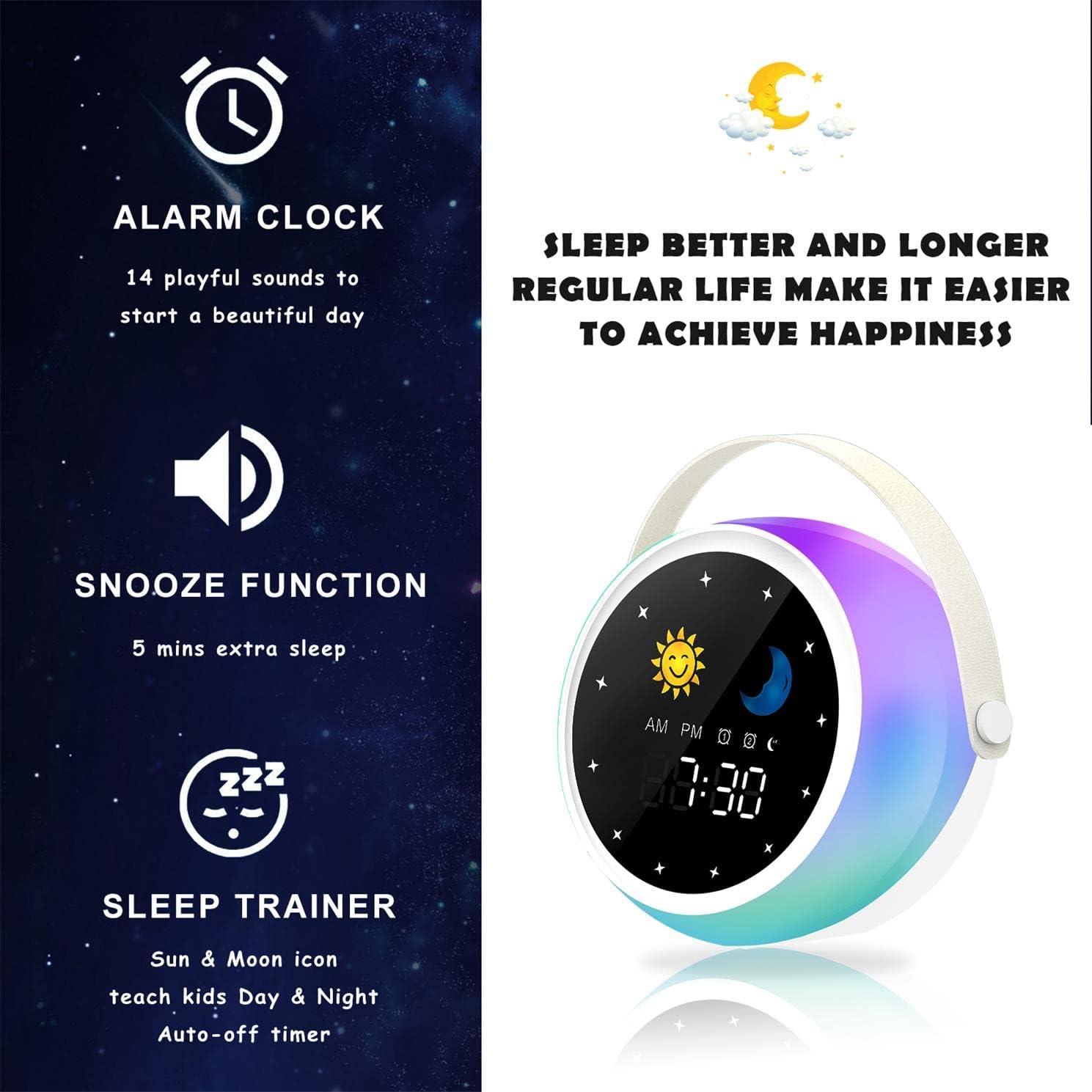
Image: A visual representation of the alarm clock's key features: alarm, snooze, and sleep trainer, with the sun and moon icons visible on the display to teach day and night.

Image: Two panels show the alarm clock display: one for sleep time (10:30 PM with moon icon) and one for wake-up time (7:00 AM with sun icon), illustrating the sleep trainer function.
5. Manutenzione
- Pulire il dispositivo con un panno morbido e asciutto. Non utilizzare detergenti abrasivi o solventi.
- Assicurarsi che la porta di ricarica sia priva di polvere e detriti.
- Conservare il dispositivo in un luogo fresco e asciutto quando non viene utilizzato per lunghi periodi.
6. Risoluzione Dei Problemi
Dispositivo non si accende:
- Assicurati che il dispositivo sia completamente carico. Collegalo a una fonte di alimentazione tramite il cavo USB.
- Premere e tenere premuto il pulsante di accensione per alcuni secondi.
Problemi di accoppiamento Bluetooth:
- Make sure the alarm clock is in Bluetooth mode (Bluetooth icon visible).
- Ensure your smartphone or device's Bluetooth is enabled and within range.
- Try restarting both the alarm clock and your Bluetooth device.
- Elimina il dispositivo dall'elenco Bluetooth del telefono e riprova ad associarlo.
L'allarme non suona:
- Verificare che l'allarme sia attivato (icona di allarme visibile sul display).
- Check the alarm volume settings.
- Assicurarsi che l'orario della sveglia sia impostato correttamente.
7. Specifiche
| Marca | Agam |
| Numero di modello | D3000 |
| Colore | Bianco |
| Dimensioni (L x P x A) | Dimensioni: 12 x 12.1 x 10.5 cm |
| Peso | 430 grammi |
| Materiale | Cristallo |
| Tipo di visualizzazione | Digitale |
| Fonte di alimentazione | Cavo elettrico |
| Caratteristiche speciali | Alarm, Charging Port, Snooze, Bluetooth Speaker, Wake-up Light, Sleep Sound Machine |
| Batterie incluse | NO |
8. Garanzia e supporto
This product comes with a standard manufacturer's warranty. For detailed warranty information, please refer to the product packaging or contact Aogamb customer support. If you encounter any issues or have questions not covered in this manual, please reach out to our support team for assistance.
Contatto dell'assistenza clienti: Please refer to the contact information provided on the product packaging or the official Aogamb websito.