
1. Introduzione
This manual provides detailed instructions for the installation, operation, and maintenance of your DEKCO Solar Security Camera and Wireless Doorbell Camera system. Please read this manual thoroughly before using the product to ensure proper function and safety. Keep this manual for future reference.
2. Contenuto della confezione
Verificare che tutti i componenti siano presenti e in buone condizioni al momento del disimballaggio.
- DEKCO Solar Security Camera
- Telecamera campanello senza fili
- Unità suoneria interna
- Solar Panel (integrated with camera)
- Staffe di montaggio e viti
- Cavo di ricarica USB
- Manuale dell'utente (questo documento)
3. Prodotto finitoview
The DEKCO security system combines a solar-powered outdoor camera with a wireless doorbell camera to provide comprehensive home surveillance.
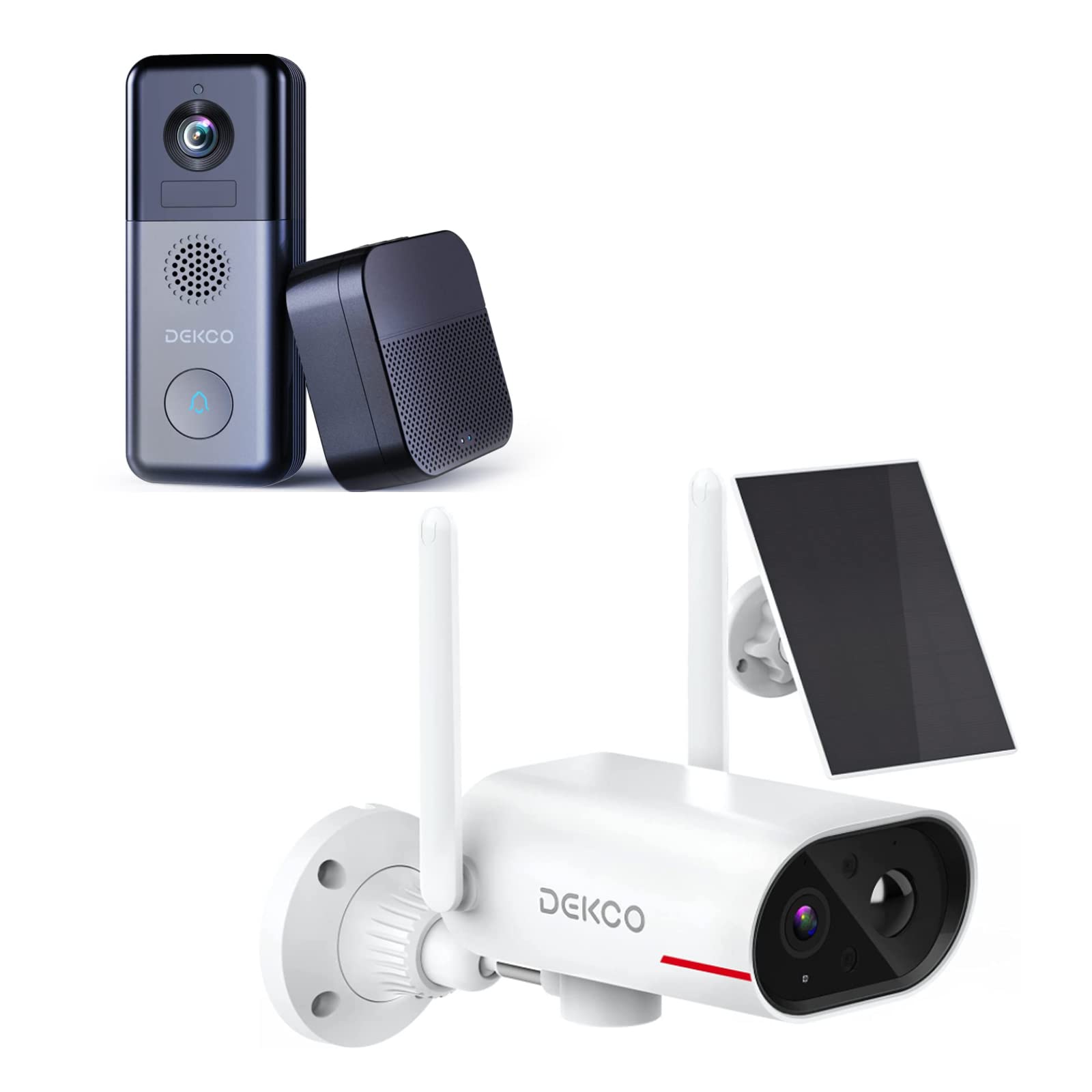
An image showing the DEKCO solar-powered security camera, the wireless doorbell camera, and its indoor chime unit. The security camera is white with two antennas and a solar panel, while the doorbell is dark grey with a camera lens and a call button. The chime is a compact black box.
3.1 Solar Security Camera Features
- 260° ViewIntervallo: Achieved through a 170° rotating design.
- 100% senza fili: Flexible installation without power cables.
- Alimentato ad energia solare: Integrated solar panel for continuous power with adequate sunlight.
- Visione notturna: Features color night vision for clear images in low light.
- Magazzinaggio: Supports Micro SD card and cloud storage (no monthly fees).
- Grado di impermeabilità: IP65 per uso esterno.
3.2 Wireless Doorbell Camera Features
- Durata della batteria di 180 giorni: Batteria ricaricabile integrata da 10000 mAh per un utilizzo prolungato.
- Audio bidirezionale: Comunicare con i visitatori da remoto.
- Rilevamento del movimento: Receive alerts for activity at your door.
- Campanello senza fili: Connects to an indoor chime unit.
- Grado di impermeabilità: IP65 per uso esterno.
4. Guida all'installazione
Follow these steps to set up your DEKCO security system.
4.1 Installazione dell'app
- Download the DEKCO app from your smartphone's app store (available for Android and iOS).
- Registrati per un nuovo account o accedi se ne hai già uno.
4.2 Solar Security Camera Setup
- Carica iniziale: Prima dell'installazione, caricare completamente la telecamera utilizzando il cavo USB in dotazione.
- Montaggio: Choose a location with good Wi-Fi signal and direct sunlight exposure for the solar panel. Use the mounting bracket and screws to securely attach the camera to a wall. Ensure the camera has a clear view dell'area di monitoraggio desiderata.
- Abbinamento: Open the DEKCO app, select 'Add Device', and follow the on-screen instructions to connect the camera to your Wi-Fi network.
4.3 Wireless Doorbell Camera Setup
- Carica iniziale: Fully charge the doorbell camera using the provided USB cable.
- Montaggio: Install the doorbell camera at your desired location near your front door using the provided mounting hardware. Ensure it has a clear view e un buon segnale Wi-Fi.
- Abbinamento: In the DEKCO app, select 'Add Device' and follow the instructions to connect the doorbell camera to your Wi-Fi network.
- Impostazione del carillon: Plug the indoor chime unit into a power outlet. Follow the app's instructions to pair the chime with the doorbell camera. You can select different chime tones and adjust the volume through the app.
5. Istruzioni per l'uso
Learn how to use the features of your DEKCO security system.
5.1 Solar Security Camera Operation
- Vivere View: Open the DEKCO app and select your camera to view cibo vivotage. You can manually pan/tilt the camera within its 260° range.
- Rilevamento del movimento: The camera is configured for motion-only alerts. Adjust sensitivity settings in the app to optimize detection and minimize false alarms.
- Registrazione: Motion-triggered events are recorded and stored on the Micro SD card (if installed) or in the cloud. Access recordings via the app's playback feature.
- Visione notturna: The camera automatically switches to color night vision in low-light conditions.
5.2 Wireless Doorbell Camera Operation
- Rispondere alle chiamate: When a visitor presses the doorbell button, your smartphone will receive a notification. Tap the notification to answer and engage in two-way audio communication.
- Rilevamento del movimento: The doorbell camera detects motion and sends alerts to your phone. Review motion events in the app.
- Vivere View: Puoi avviare una diretta view of your front door at any time through the DEKCO app.
- Funzione suoneria: The indoor chime will sound when the doorbell button is pressed. Adjust settings in the app.
6. Manutenzione
Regular maintenance ensures optimal performance and longevity of your devices.
- Pulizia delle lenti: Periodically wipe the camera lenses and solar panel with a soft, damp panno per rimuovere polvere e sporco. Evitare detergenti abrasivi.
- Efficienza del pannello solare: Ensure the solar panel is free from obstructions (leaves, snow, etc.) to maximize charging efficiency.
- Stato della batteria: While solar-powered, ensure the security camera receives sufficient sunlight. For the doorbell, monitor battery levels via the app and recharge when necessary.
- Aggiornamenti del firmware: Check the DEKCO app regularly for firmware updates. Install updates to ensure your devices have the latest features and security enhancements.
7. Risoluzione Dei Problemi
Fare riferimento a questa sezione per trovare soluzioni ai problemi più comuni.
- Il dispositivo non si connette al Wi-Fi:
- Assicurati che la tua rete Wi-Fi sia a 2.4 GHz (la frequenza a 5 GHz non è supportata).
- Controlla l'accuratezza della password Wi-Fi.
- Avvicina il dispositivo al router Wi-Fi.
- Restart your router and the device.
- Nessun avviso di rilevamento del movimento:
- Verificare che il rilevamento del movimento sia abilitato nelle impostazioni dell'app.
- Regola la sensibilità al movimento.
- Assicurarsi che il dispositivo abbia uno spazio libero view e non è ostruito.
- Scarsa qualità video:
- Controlla la potenza del segnale Wi-Fi.
- Pulisci l'obiettivo della fotocamera.
- La batteria del campanello si scarica rapidamente:
- Ridurre la sensibilità o la frequenza del rilevamento del movimento.
- Assicurarsi che il dispositivo sia completamente carico prima dell'uso.
- Solar Camera Not Charging:
- Ensure the solar panel receives at least 1 hour of direct sunlight daily.
- Pulisci la superficie del pannello solare.
8. Specifiche
| Caratteristica | Specificazione |
|---|---|
| Marca | DEKCO |
| Numero di modello | B09TF8K2W8 |
| Tecnologia di connettività | Senza fili (Wi-Fi) |
| Fonte di alimentazione | Solar Powered (Camera), Battery (Doorbell) |
| Doorbell Battery Capacity | 10000 mAh |
| Viewing Angle (Camera) | 260° (170° rotating design) |
| Visione notturna | Visione notturna a colori |
| Grado di impermeabilità | Grado di protezione IP65 |
| Dispositivi compatibili | Smartphone (androide) |
| Tipo di avviso | Solo movimento |
| Tipo di montaggio | Montaggio a parete |
| Formato di acquisizione video | Formato MPEG-4 |
9. Garanzia e supporto
For warranty information, technical support, or further assistance, please refer to the DEKCO official website or contact DEKCO customer service directly. Keep your purchase receipt as proof of purchase.