
1. Introduzione
The symcode HX-6600 is an omnidirectional, hands-free 1D and 2D desktop barcode scanner designed for efficient and reliable barcode reading in various environments such as supermarkets, libraries, and retail stores. It features automatic sensing capabilities and can capture barcodes from mobile phone screens, making it a versatile tool for point-of-sale and inventory management.

Figure 1: symcode HX-6600 Desktop Barcode Scanner. This image shows the compact, black desktop barcode scanner with its adjustable stand, ready for use.
2. Impostazione
The HX-6600 barcode scanner is designed for simple plug-and-play operation, requiring no driver or software installation. Follow these steps to set up your scanner:
- Disimballare lo scanner: Carefully remove the scanner and its USB cable from the packaging.
- Connessione al computer: Insert the USB cable into the designated port on the scanner and then connect the other end of the USB cable to an available USB port on your computer (laptop, PC, or POS system).
- Riconoscimento del sistema: The operating system (Windows XP/7/8/10, Mac OS, Linux) will automatically detect and configure the scanner. No additional drivers are needed.
- Pronto per l'uso: Una volta riconosciuto, lo scanner è pronto per iniziare la scansione dei codici a barre.

Figure 2: Connecting the scanner via USB. This image illustrates the simple USB cable connection from the scanner to a laptop, highlighting its plug-and-play functionality.
3. Istruzioni per l'uso
The symcode HX-6600 offers versatile scanning capabilities and modes for various operational needs.
3.1 Hands-Free and Auto-Sensing Operation
The scanner features a hands-free design, allowing for continuous operation without needing to hold the device. Its auto-sensing capability ensures efficient power management and quick scanning:
- When not in use, the scanner automatically enters a sleep mode to conserve energy.
- When a barcode is presented near the scan window, the scanner automatically wakes up and activates for immediate scanning.

Figure 3: Self-sensing multi-angle barcode reading. This image shows the scanner on a desk, indicating its ability to read barcodes from various angles automatically.
3.2 Modalità di scansione
The HX-6600 supports two primary scanning modes:
- Modalità di attivazione chiave: Scanning is initiated by pressing a physical button on the scanner.
- Modalità di auto-rilevamento: The scanner automatically detects and scans barcodes when they are placed within its scanning field.

Figure 4: Illustration of Key Trigger Mode and Self-sensing Mode. This image visually distinguishes between manual trigger scanning and automatic detection scanning.
3.3 Capacità di decodifica
This scanner boasts a super decoding ability, capable of reading a wide range of 1D and 2D barcodes, including those from mobile phone screens. It can effectively decode challenging barcodes such as:
- Blurring barcodes
- Codici a barre danneggiati
- Codici a barre di distorsione
- Codici a barre colorati
- Codici a barre riflettenti
Supported 1D barcode types include: UPC/EAN, Code39, Interleaved 2 of 5, Code93, Code 128, Codabar, etc.
Supported 2D barcode types include: QR, Datamatrix, PDF417, Aztec, etc.
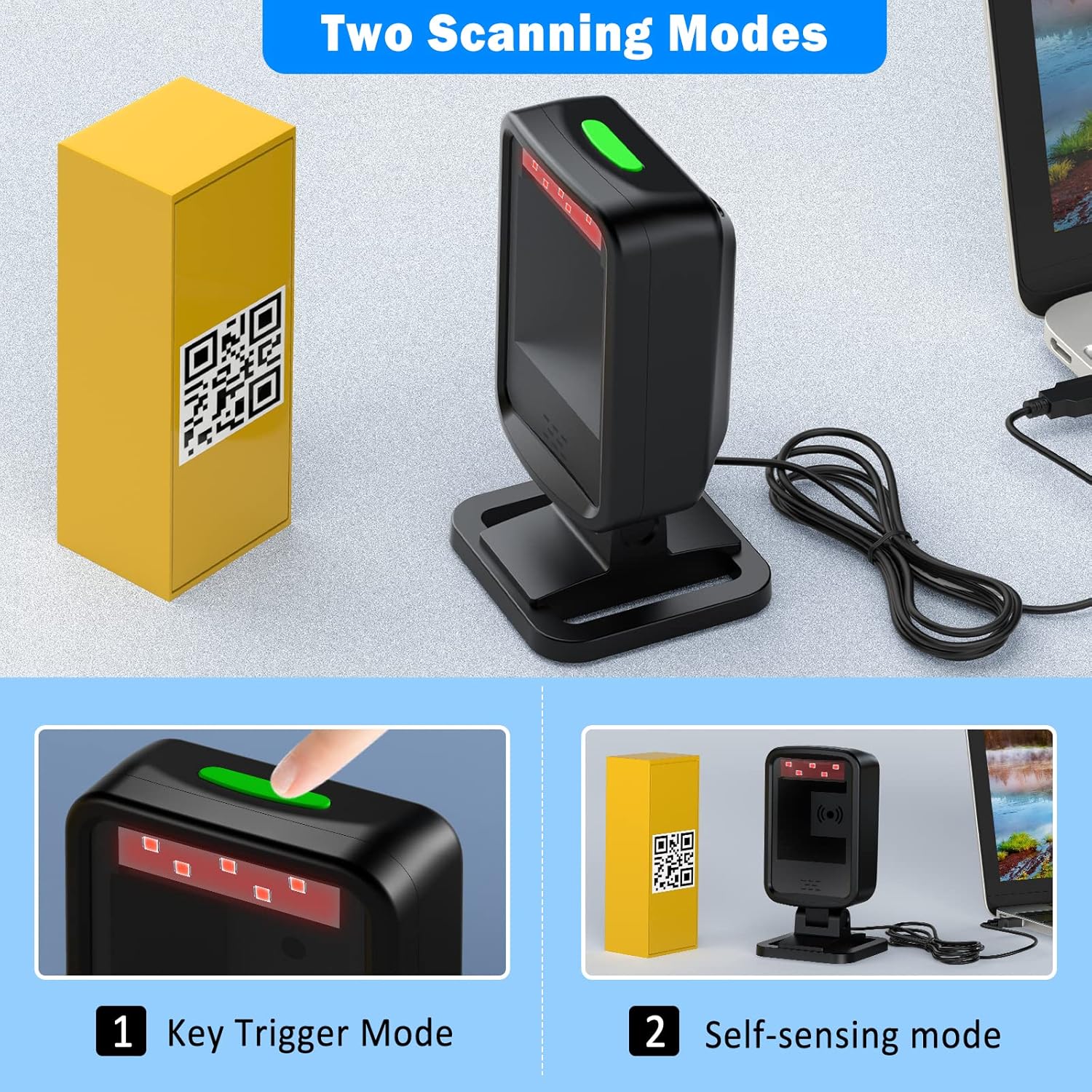
Figura 5: Esamples of barcodes the scanner can decode. This image displays various barcode types like Data Matrix, QR Code, ITF, PDF417, and even damaged or colored barcodes, indicating the scanner's robust decoding capabilities.
3.4 Testa regolabile
The scanner features a 45° adjustable head, allowing users to easily find the optimal scanning angle for different items and setups, enhancing user comfort and scanning efficiency.

Figure 6: Scanner with 45° adjustable head. This image demonstrates the scanner's head tilting forward, illustrating its adjustable feature for ergonomic scanning.
3.5 Applicable Scenes
The symcode HX-6600 is suitable for a wide range of applications due to its versatile design and decoding capabilities. Common usage scenarios include:
- Supermercati e negozi al dettaglio: For quick and efficient checkout processes.
- Biblioteche: For cataloging and checking out books.
- Magazzini: Per la gestione e il monitoraggio dell'inventario.
- Farmacie: For managing pharmaceutical products.
- Uffici: Per la gestione dei documenti e il monitoraggio delle risorse.

Figure 7: Scanner in use at a retail counter. This image shows the scanner positioned on a checkout counter, demonstrating its practical application in a retail environment.

Figure 8: Various applicable scenes for the barcode scanner. This image displays the scanner being used in a library, supermarket, pharmacy, and airport, highlighting its versatility across different sectors.
4. Manutenzione
Proper maintenance ensures the longevity and optimal performance of your symcode HX-6600 barcode scanner.
- Pulizia: Regularly wipe the scanner's exterior and scan window with a soft, dry, lint-free cloth. Avoid using abrasive cleaners or solvents that could damage the surface or optical components.
- Magazzinaggio: Quando non lo si utilizza, conservare lo scanner in un luogo fresco e asciutto, lontano dalla luce solare diretta e da temperature estreme.
- Cura del cavo: Evitare di piegare o torcere eccessivamente il cavo USB per evitare danni interni.
- Durata: The scanner features an anti-shock design, providing protection against accidental drops. It is designed to remain functional after multiple drops from a height of 5ft (1.5m) onto concrete.

Figure 9: Anti-shock design. This image visually represents the scanner's robust construction, indicating its resistance to drops and impacts.
5. Risoluzione Dei Problemi
This section addresses common issues you might encounter with your symcode HX-6600 barcode scanner.
- Lo scanner non risponde:
- Assicurarsi che il cavo USB sia collegato saldamente sia allo scanner che al computer.
- Prova a collegare lo scanner a una porta USB diversa del computer.
- Riavvia il computer e riprova.
- Codice a barre non scansionato:
- Assicurarsi che il codice a barre sia pulito, chiaro e non eccessivamente danneggiato o distorto.
- Adjust the distance and angle between the scanner and the barcode. The adjustable head can help find the optimal position.
- Verify that the barcode type is supported by the scanner (1D: UPC/EAN, Code39, etc.; 2D: QR, Datamatrix, PDF417, etc.).
- Check if the scanner is in the correct scanning mode (Key Trigger or Self-sensing).
- Scanning Too Quickly / Double Scans:
- The scanner may be configured for very rapid scanning. Refer to the included one-sheet manual for specific configuration barcodes to adjust scan speed or add delays.
- No Beep Sound:
- The scanner's buzzer might be disabled. Consult the product's configuration manual to enable the beep sound.
Nota importante: Many advanced settings and configurations for this scanner are controlled by scanning specific barcodes found in the included physical manual. It is highly recommended to keep this manual for future reference.
6. Specifiche
| Caratteristica | Dettaglio |
|---|---|
| Modello | HX-6600 |
| Dimensioni del prodotto | 5.1 x 1.6 x 0.7 pollici |
| Peso dell'articolo | 9.9 once |
| Batterie | 1 batteria ai polimeri di litio richiesta |
| Dispositivi compatibili | Laptop, PC, POS systems |
| Fonte di alimentazione | USB cablato |
| Tecnologia di connettività | Cavo USB |
| Produttore | codice simbolico |
| Paese di origine | Cina |
7. Garanzia e supporto
Specific warranty terms and conditions for the symcode HX-6600 barcode scanner are typically provided with the product packaging or can be found on the official symcode website. For technical support, troubleshooting assistance beyond this manual, or warranty claims, please refer to the contact information provided by the manufacturer at the time of purchase or visit the official symcode support portal.