
1. Introduzione
Grazie per aver scelto FIFINE AmpliGame A6T USB Gaming Microphone. This high-quality condenser microphone is designed for gaming, streaming, recording, and video conferencing, offering clear audio capture and user-friendly features. This manual provides detailed instructions for setting up, operating, and maintaining your microphone to ensure optimal performance.

Immagine: FIFINE AmpliGame A6T USB Gaming Microphone, featuring its sleek design and included boom arm, recognized with an IF Design Award.
2. Contenuto della confezione
Si prega di verificare che tutti i seguenti articoli siano inclusi nel pacchetto:
- FIFINE AmpliGame A6T USB Gaming Microphone
- Adjustable Boom Arm Stand
- Filtro pop
- USB-C to USB-A Cable (approximately 2 meters)
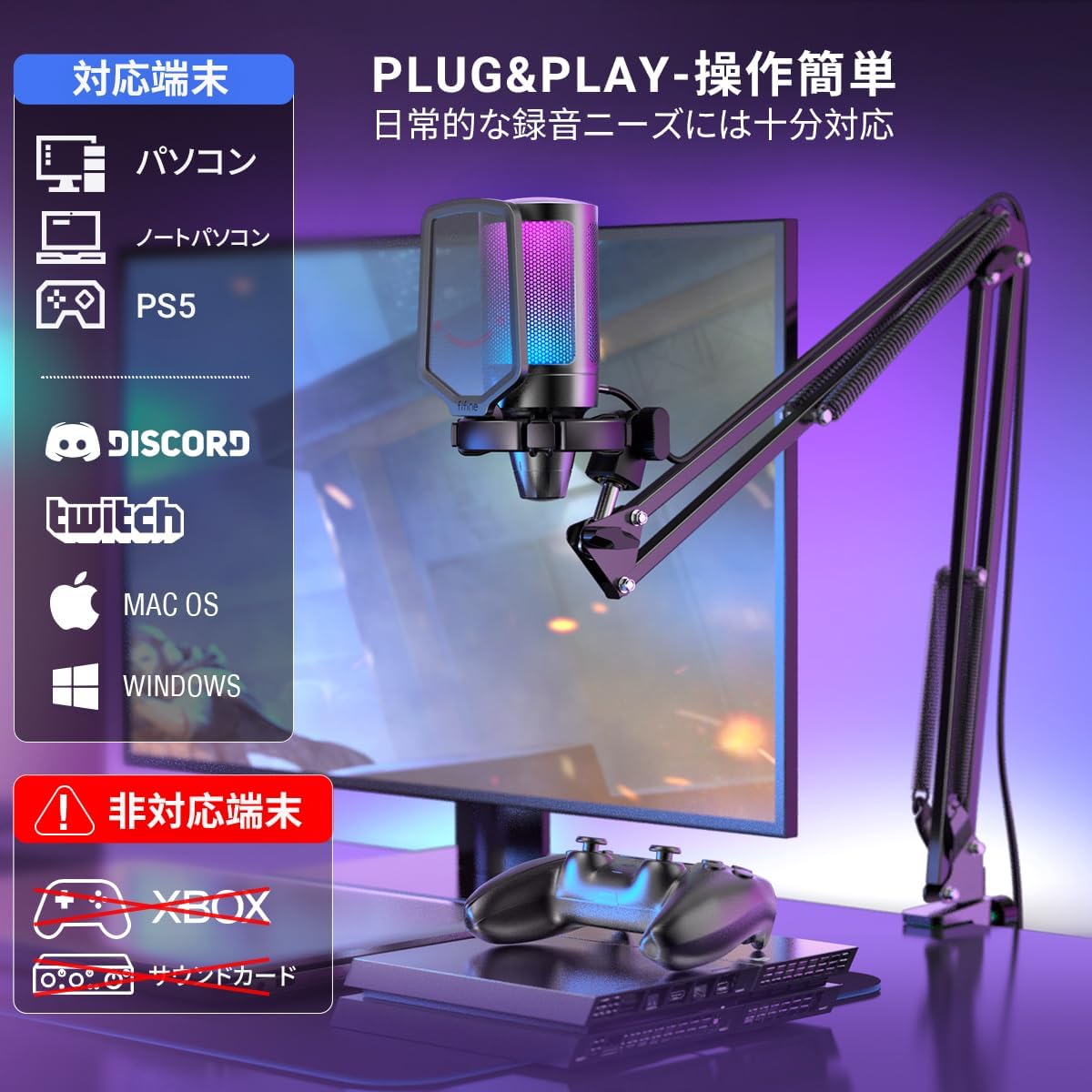
Image: All components included in the FIFINE AmpliGame A6T package, neatly arranged.
3. Istruzioni per l'installazione
- Assemble the Boom Arm: Securely attach the boom arm to your desk using the clamp. Adjust the arm to your desired position. The arm offers a wide range of adjustment to optimize microphone placement and save desk space.
- Collegare il microfono: Mount the FIFINE A6T microphone onto the boom arm. Ensure it is securely fastened.
- Install Pop Filter: Attach the included pop filter to the microphone. This helps to reduce plosive sounds (P, B, T, K) for clearer audio.
- Connetti al dispositivo: Connect the USB-C end of the provided cable to the microphone and the USB-A end to an available USB port on your computer (PC/Mac), PlayStation (PS4/PS5), or other compatible device.
- Riconoscimento del sistema: Your operating system should automatically recognize the microphone. No additional drivers are typically required.
- Seleziona come dispositivo di input: In your device's sound settings or your application's audio settings, select "FIFINE AmpliGame A6T" as your primary audio input device.

Image: The adjustable boom arm, illustrating its range of motion and how it can be positioned for optimal use.

Image: The microphone connected to a setup, highlighting its plug-and-play compatibility with various platforms.
4. Istruzioni per l'uso
4.1. Funzione Mute
The microphone features a touch-sensitive mute button located on the top. Tap it to instantly mute or unmute the microphone. The RGB lighting indicates the microphone's status:
- RGB Lighting ON: Microphone is active and recording.
- RGB Lighting OFF: Il microfono è disattivato.

Image: The touch-sensitive mute button, demonstrating the visual feedback provided by the RGB lighting.
4.2. Ottieni il controllo
A gain control knob is located at the bottom of the microphone. Rotate the knob to adjust the microphone's input sensitivity (gain). Turn clockwise to increase gain and counter-clockwise to decrease it. Adjust the gain to an appropriate level to avoid distortion or excessively low volume.

Image: The gain control knob, allowing for easy adjustment of microphone sensitivity directly on the device.
4.3. Illuminazione RGB
The microphone features dynamic RGB lighting with a 7-color gradient effect, enhancing your gaming or streaming setup. The lighting is active when the microphone is unmuted and turns off when muted.
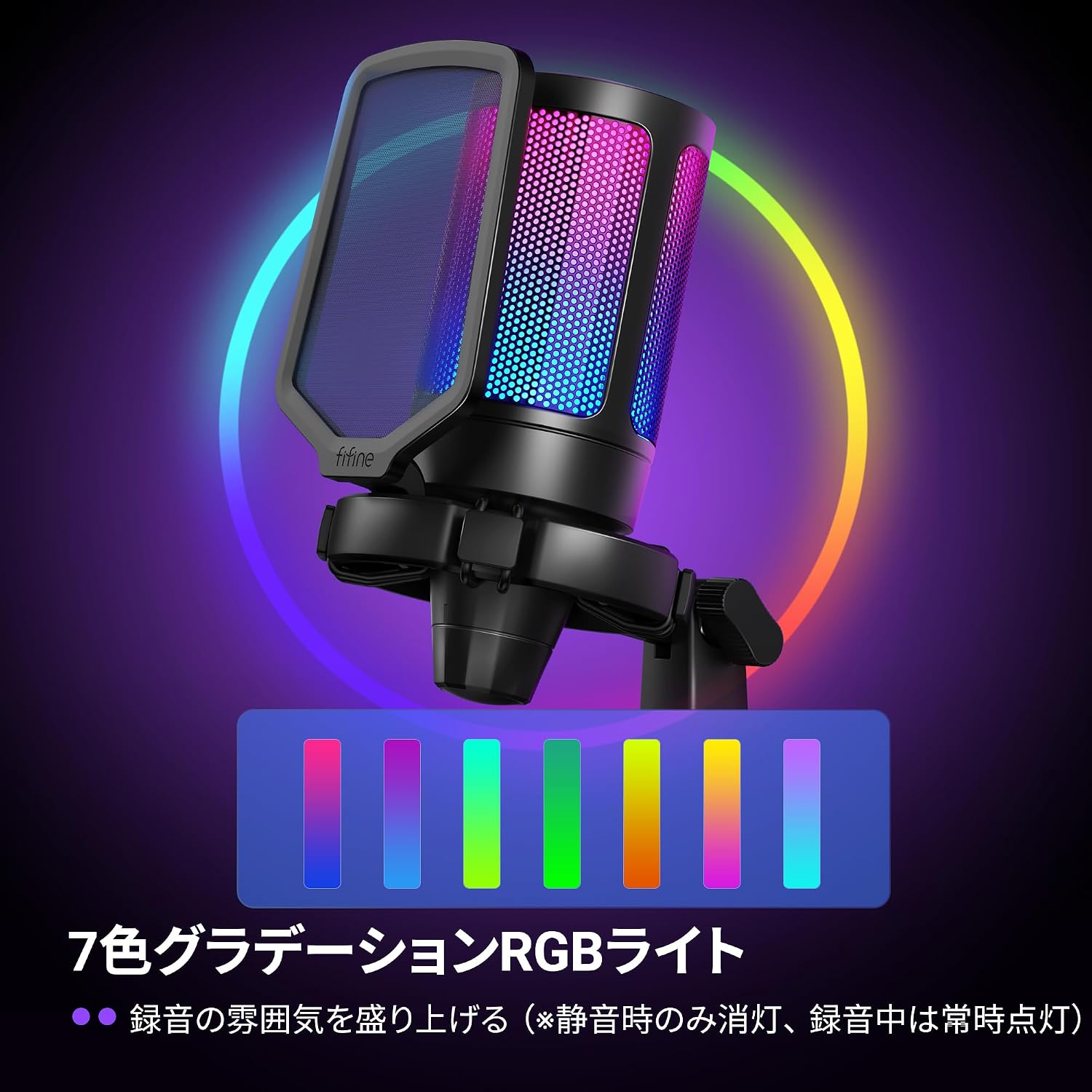
Image: The microphone illuminated with its vibrant 7-color RGB lighting.
4.4. Diagramma polare cardioide
The A6T microphone utilizes a cardioid polar pattern, which primarily picks up sound from the front of the microphone while minimizing sound from the sides and rear. This design is ideal for capturing your voice clearly and reducing unwanted background noise.

Image: A visual representation of the cardioid pickup pattern, demonstrating how the microphone focuses on sound directly in front of it.
5. Manutenzione
- Pulizia: Use a soft, dry cloth to clean the microphone body and stand. Avoid using harsh chemicals or abrasive materials.
- Magazzinaggio: Quando non lo si utilizza, conservare il microfono in un luogo pulito e asciutto, lontano da temperature e umidità estreme.
- Cura del cavo: Evitare di piegare o torcere eccessivamente il cavo USB per evitare danni.
6. Risoluzione Dei Problemi
- Nessuna uscita audio:
- Assicurati che il microfono sia collegato correttamente alla porta USB del tuo dispositivo.
- Check if the microphone is muted (RGB lighting off). Tap the mute button to unmute.
- Verify that "FIFINE AmpliGame A6T" is selected as the input device in your operating system's sound settings and your application's audio settings.
- Adjust the gain control knob on the microphone.
- Try connecting the microphone to a different USB port or another device to rule out port or device issues.
- Poor Audio Quality / Distortion:
- Adjust the gain control knob. If the audio is distorted, decrease the gain. If it's too quiet, increase the gain.
- Assicurarsi che il filtro anti-pop sia posizionato correttamente per ridurre le consonanti esplosive.
- Speak directly into the front of the microphone, utilizing its cardioid pickup pattern.
- Riduci al minimo il rumore di fondo nell'ambiente.
- Illuminazione RGB non funzionante:
- Ensure the microphone is unmuted. The RGB lighting is designed to turn off when muted.
- Controllare la connessione USB.
7. Specifiche
| Caratteristica | Dettaglio |
|---|---|
| Marca | FIFINE |
| Nome del modello | AmpliGame A6T |
| Tecnologia di connettività | USB (USB-A to Type-C) |
| Usi consigliati | Gaming, Streaming, Video Conferencing |
| Caratteristiche speciali | Frequenza 192KHzampling Rate, RGB Light, Arm-type Stand, Mute Function |
| Dispositivi compatibili | Game Consoles (PS4, PS5), Laptops, PCs |
| Colore | Black (Arm Type) |
| Modello polare | Unidirezionale (cardioide) |
| Rapporto segnale/rumore (S/N) | 70 dB |
| Risposta in frequenza | Da 60 Hz a 18 kHz |
| Fonte di alimentazione | Elettrico con filo (alimentato tramite USB) |
| Materiale | Acrilonitrile Butadiene Stirene, Metallo |

Image: Key performance specifications of the microphone, including sensitivity, signal-to-noise ratio, and samptasso di ling.
8. Informazioni sulla garanzia
Il FIFINE AmpliGame A6T USB Gaming Microphone comes with a Garanzia del produttore di 1 anni dalla data di acquisto. La presente garanzia copre i difetti di materiali e fabbricazione in condizioni di normale utilizzo. Si prega di conservare la prova d'acquisto per eventuali reclami in garanzia.
La garanzia non copre:
- Danni causati da incidenti, abusi, usi impropri, inondazioni, incendi, terremoti o altre cause esterne.
- Damage caused by operating the product outside the permitted or intended uses described by FIFINE.
- Damage caused by service (including upgrades and expansions) performed by anyone who is not a representative of FIFINE.
- Products or parts that have been modified to alter functionality or capability without the written permission of FIFINE.
9. Assistenza clienti
For technical assistance, warranty claims, or any questions regarding your FIFINE AmpliGame A6T USB Gaming Microphone, please contact FIFINE customer support.
Informazioni sui contatti:
- Supporto online: Visit the official FIFINE websito per FAQ, driver e risorse di supporto.
- Supporto via e-mail: Fare riferimento alla confezione del prodotto o al sito ufficiale websito per l'indirizzo email di supporto appropriato.
- Operating Hours (FIFINE Japan): Monday - Friday (excluding holidays), 10:00 - 19:00 JST.
When contacting support, please have your product model (A6T) and proof of purchase ready.

Image: Guide on how to contact FIFINE customer support, including steps to find seller information on Amazon.


