
PALOVUE iSound
PALOVUE Wireless Earbuds User Manual
Model: iSound
Your guide to setting up, operating, and maintaining your PALOVUE iSound Wireless Earbuds.
1. Introduzione
The PALOVUE iSound Wireless Earbuds are designed to provide a superior audio experience with advanced features for daily use. Equipped with Qualcomm CSR and Bluetooth 5.0 technology, these earbuds offer a stable and crystal-clear connection, supporting aptX HD sound quality. The CVC 8.0 Noise Cancelling technology with 4 built-in microphones ensures clear calls by effectively reducing ambient noise. Their ergonomic design and multiple ear-tip sizes provide a comfortable and secure fit for extended wear.
The iSound earbuds feature convenient one-step reconnection and intuitive one-touch operation. With up to 24 hours of playtime using the compact charging case, they are ideal for on-the-go listening. Further customization and control are available through the PALOVUE iSound APP.

Image: PALOVUE iSound Wireless Earbuds resting in their open charging case, showcasinil loro elegante design nero.
2. Cosa c'è nella scatola
Upon opening your PALOVUE iSound package, you will find the following components:
- Custodia di ricarica wireless
- PALOVUE iSound Earbuds (Left and Right)
- Ear Tips (multiple sizes for a customizable fit)
- Cavo di ricarica (USB-C)
- cordino
- Scatola di imballaggio
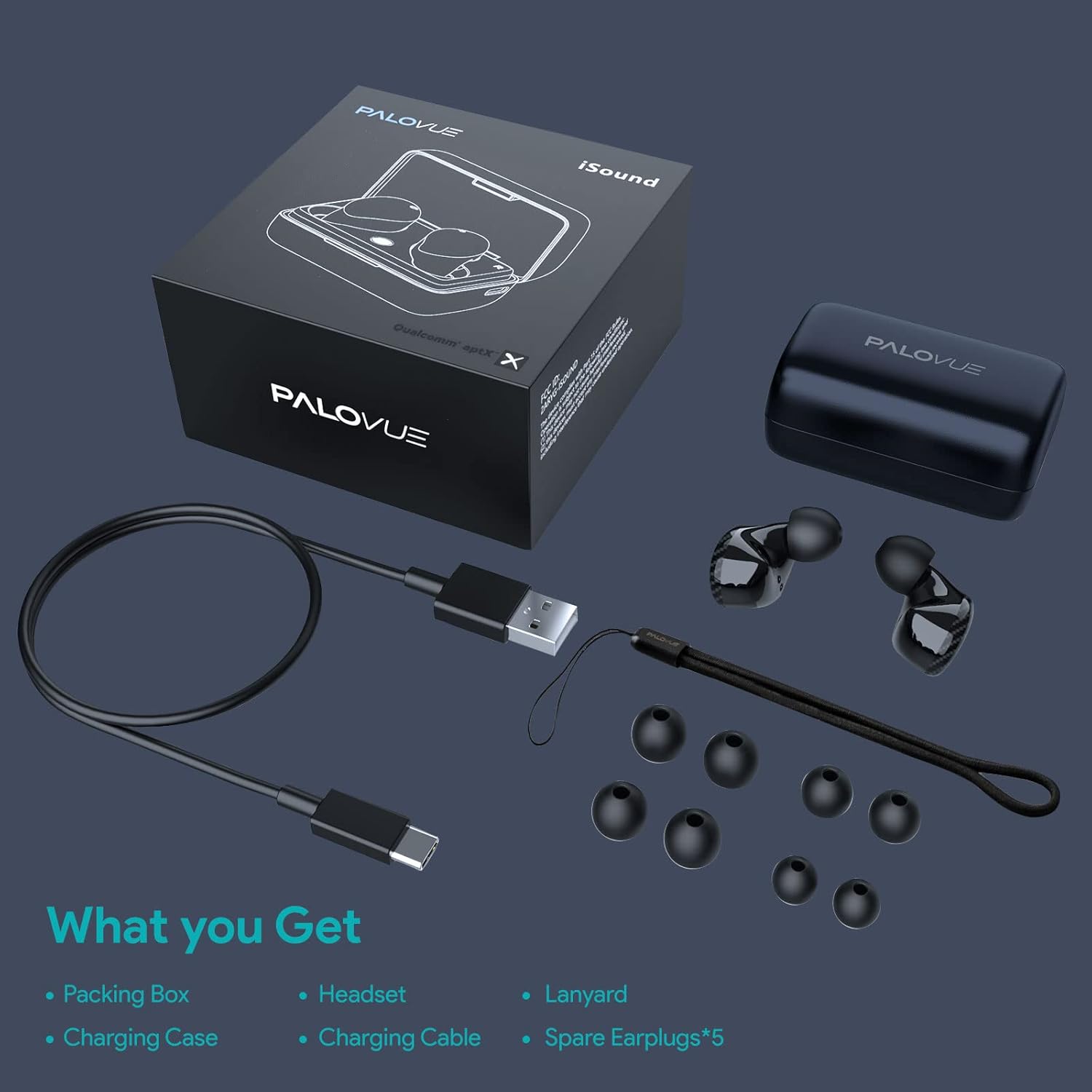
Image: A flat lay showing all items included in the PALOVUE iSound package: the packing box, charging case, earbuds, charging cable, lanyard, and five pairs of spare ear tips.
3. Guida all'installazione
3.1 Carica iniziale
Before first use, ensure both the earbuds and the charging case are fully charged. Place the earbuds into the charging case. Connect the provided USB-C cable to the charging case and a power source. The indicator lights on the case will show charging status. A full charge typically takes approximately 2 hours for the case.
3.2 Associazione con il dispositivo
The PALOVUE iSound earbuds feature one-step reconnection for convenience.
- Aprire la custodia di ricarica. Gli auricolari si accenderanno automaticamente ed entreranno in modalità di associazione.
- Sul tuo smartphone o dispositivo abilitato Bluetooth, vai alle impostazioni Bluetooth.
- Cercare "PALOVUE iSound" in the list of available devices and select it to connect.
- Una volta effettuata la connessione, sentirai un segnale acustico di conferma e gli auricolari saranno pronti per l'uso.
- Per gli utilizzi successivi, basta aprire la custodia di ricarica e gli auricolari si connetteranno automaticamente all'ultimo dispositivo associato.
Video: A detailed guide demonstrating the connection and operation of the PALOVUE iSound earbuds, including initial pairing steps and touch control functions.
4. Utilizzo degli auricolari
4.1 Comandi touch
The PALOVUE iSound earbuds feature intuitive touch controls on each earbud. The specific functions can be customized via the PALOVUE iSound APP.
| Azione | Auricolare sinistro | Auricolare destro |
|---|---|---|
| Singolo tocco | Abbassa il volume | Alza il volume |
| Doppio tocco | Riproduci/Metti in pausa la musica, Rispondi/Termina chiamata | Riproduci/Metti in pausa la musica, Rispondi/Termina chiamata |
| Pressione lunga | Previous Song, Reject Call | Next Song, Reject Call |
Video: A short demonstration of the touch controls for the PALOVUE iSound earbuds, showing how to adjust volume, skip tracks, and manage calls.
4.2 Using the PALOVUE iSound APP
Enhance your experience by downloading the PALOVUE iSound APP. The app allows you to:
- Customize touch control functions (e.g., volume, track control, call management).
- Adjust equalizer (EQ) settings for personalized sound profiles (Male Vocals, Electronic, Jazz, Rock, Classical, Female Vocals, Original, Customize).
- Check battery levels of each earbud.
- Access device information and firmware updates.

Image: A woman wearing PALOVUE iSound earbuds, illustrating their comfortable fit and suitability for daily use.

Immagine: Un esploso view diagram of the PALOVUE iSound earbud, detailing its internal structure and emphasizing Qualcomm AptX and Deep Bass sound capabilities.
5. Manutenzione
To ensure the longevity and optimal performance of your PALOVUE iSound Wireless Earbuds, follow these maintenance guidelines:
- Pulizia: Pulisci regolarmente gli auricolari e la custodia di ricarica con un panno morbido, asciutto e privo di lanugine. Non utilizzare detergenti abrasivi o solventi. Rimuovi delicatamente cerume o detriti dagli inserti auricolari e dalla rete dell'altoparlante utilizzando una piccola spazzola morbida o un cotton fioc.
- Magazzinaggio: Quando non li usi, riponi gli auricolari nella custodia di ricarica per proteggerli da polvere, sporco e danni fisici.
- Cura della batteria: Avoid fully depleting the battery frequently. For long-term storage, charge the earbuds and case to about 50% to preserve battery health.
- Resistenza all'acqua: The earbuds are rated IPX4 for water resistance, meaning they are protected against splashing water from any direction. They are designed for sports and can withstand sweat and light rain, but they are not suitable for swimming or submersion in water. Ensure the earbuds are dry before placing them back in the charging case.
Video: A short promotional video highlighting the compact size and powerful features of the iSound True Wireless Earbuds, including their IPX4 water resistance.
6. Risoluzione Dei Problemi
If you encounter issues with your PALOVUE iSound Wireless Earbuds, try the following solutions:
6.1 Problemi di associazione
- Gli auricolari non si connettono: Ensure Bluetooth is enabled on your device. Place earbuds back in the case, close it, wait a few seconds, then open it again to re-initiate pairing mode.
- Funziona solo un auricolare: Prova a rimettere entrambi gli auricolari nella custodia di ricarica, a chiudere il coperchio e a riaprirlo. Assicurati che entrambi gli auricolari siano sufficientemente carichi.
- Gli auricolari non compaiono nell'elenco Bluetooth: Turn off Bluetooth on your device, then turn it back on. Restart your device if necessary.
6.2 Problemi di qualità del suono
- Volume basso: Increase the volume on both your earbuds (via touch control) and your connected device.
- Suono distorto: Ensure the earbuds are within Bluetooth range of your device. Check for obstructions between the earbuds and your device.
- Scarsa qualità della chiamata: Ensure the microphones are not obstructed. CVC 8.0 Noise Cancelling technology helps, but extreme noise environments can still affect clarity.
6.3 Battery and Charging Issues
- Gli auricolari non si caricano: Ensure the charging contacts on the earbuds and inside the case are clean and dry. Try a different charging cable or power adapter.
- La custodia non si carica: Verificare che il cavo di ricarica e la fonte di alimentazione funzionino correttamente.
6.4 How to Reset Your Earbuds
Se riscontri problemi persistenti, un ripristino delle impostazioni di fabbrica potrebbe risolverli:
- Posiziona entrambi gli auricolari nella custodia di ricarica.
- Press and hold the reset button on the charging case (usually located inside or near the charging port) until the indicator lights on the earbuds flash red and green alternately.
- Release the button and wait until only the green light flashes, indicating the reset is complete.
- Rimuovi gli auricolari dalla custodia e prova ad associarli nuovamente al tuo dispositivo.
Refer to the "PALOVUE iSound Connection operation guide" video in the Setup section for a visual demonstration of the reset process.
7. Specifiche
| Caratteristica | Dettaglio |
|---|---|
| Marca | PALOVO |
| Nome del modello | io suono |
| Tecnologia di connettività | Senza fili (Bluetooth 5.0) |
| Tecnologia di comunicazione wireless | Bluetooth |
| Chipset | Qualcomm CSR QCC3020 |
| Controllo del rumore | Cancellazione del rumore CVC 8.0 (per le chiamate) |
| Microfoni | 4 microfoni |
| Tipo di controllo | Controllo touch |
| Posizionamento dell'orecchio | Nell'orecchio |
| Fattore di forma | Nell'orecchio |
| Durata della batteria (auricolari) | Fino a 6 ore (circa) |
| Tempo di riproduzione totale (con custodia) | Fino a 24 ore |
| Tempo di ricarica (custodia) | 2 ore |
| Portata Bluetooth | Fino a 10 metri (32.8 piedi) |
| Livello di resistenza all'acqua | IPX4 (resistente agli spruzzi d'acqua) |
| Materiale | Silicone (punte auricolari) |
| Peso dell'articolo | 1.76 once |
| Dispositivi compatibili | Smartphone, tablet, laptop, desktop, smart TV, sistemi audio per auto |
8. Garanzia e supporto
PALOVUE products typically come with a manufacturer's warranty. Please refer to the warranty card included in your product packaging for specific terms and conditions, including warranty period and coverage details. For technical support, troubleshooting assistance, or warranty claims, please contact PALOVUE customer service through their official websito o le informazioni di contatto fornite nella documentazione del prodotto.
You can also visit the official PALOVUE store on Amazon for more information and support: PALOVUE Amazon Store.
Ask a question about this manual
Ask about setup, troubleshooting, compatibility, parts, safety, or missing instructions. Manuals+ will review the question and use this page’s manual context to help answer it.