
1. Introduzione
This manual provides essential information for the safe and efficient operation, setup, and maintenance of your CATLINK Self Cleaning Automatic Litter Box. Please read this manual thoroughly before using the product to ensure proper functionality and longevity.

Figure 1: CATLINK Self Cleaning Automatic Litter Box (Model: Young max)
The CATLINK Self Cleaning Automatic Litter Box is designed to simplify pet care by automating the litter cleaning process. It features double odor removal and is suitable for cats weighing between 3.3 to 22 lbs.
2. Impostazione
Follow these steps to set up your CATLINK Self Cleaning Automatic Litter Box:
- Disimballaggio: Rimuovere con attenzione tutti i componenti dalla confezione. Assicurarsi che tutti gli articoli elencati nel contenuto della confezione siano presenti.
- Posizionamento: Place the litter box on a flat, stable surface. Ensure there are no objects leaning against or on top of the unit. Avoid placing it in a corner where the rotation might be obstructed.
- Installazione del sacco dei rifiuti: Open the waste drawer and install a waste bag. Ensure it is properly inserted and secured.
- Collegamento elettrico: Insert the adapter into the power socket on the right rear side of the machine, then plug the adapter into a power outlet. The control panel indicators will flash, and the machine will perform a self-check. Do not touch the machine or buttons during this process.
- Aggiungere lettiera: Pour clumping cat litter into the ball cabin. Do not exceed the "MAX" level line mark inside the cylinder box. The machine is only suitable for clumping cat litter.
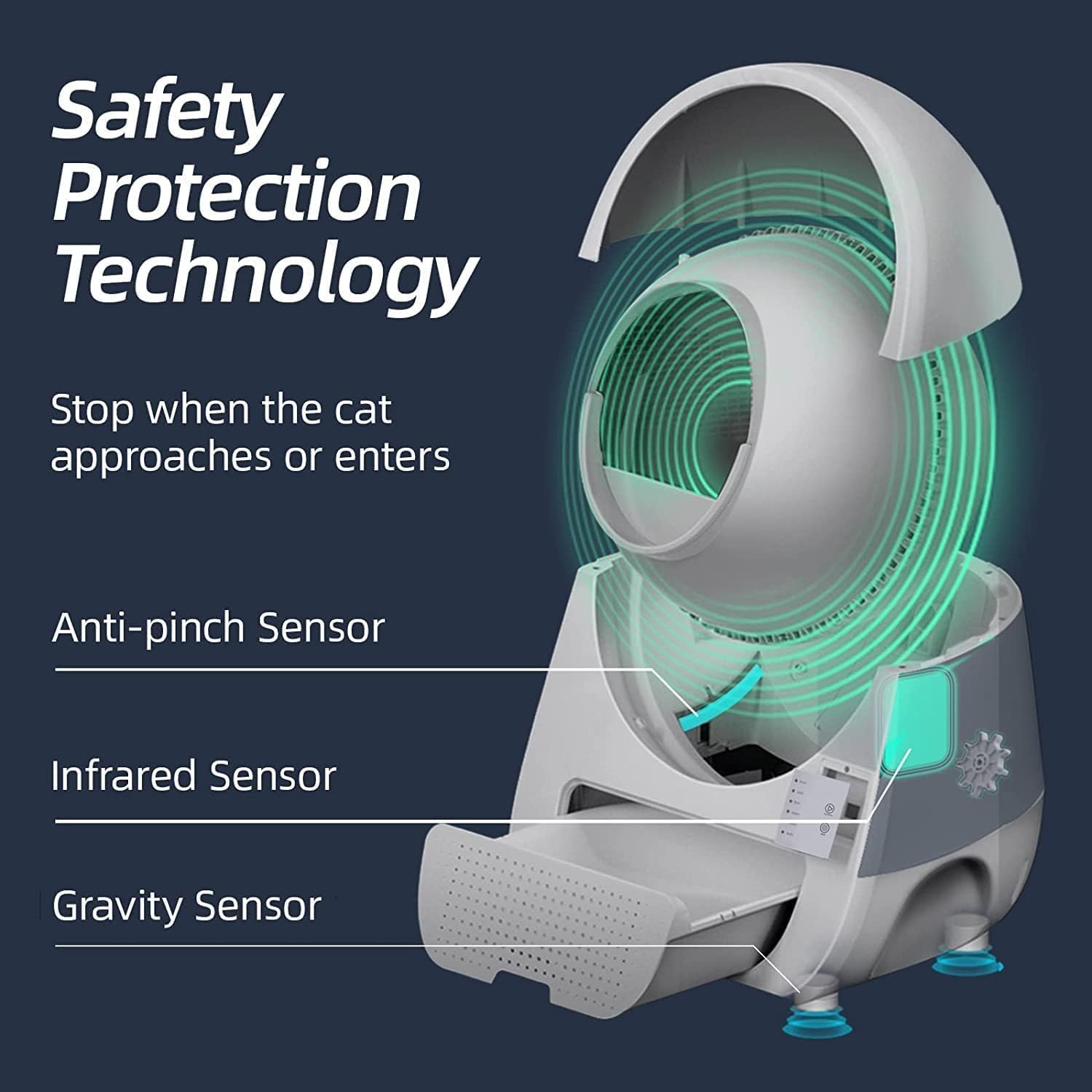
Figure 2: Package Contents (Litter Box, User Manual, Power Supply, Waste Drawer Liners, Odor Removal Filters)
The package includes the fully assembled Catlink Litter Box, one roll of waste drawer liners, a 2A power supply, and two pieces of odor removal filters.
Guida video all'installazione:
Video 1: Detailed instructions on how to set up your CATLINK Self Cleaning Automatic Litter Box (Young model).
3. Modalità operative
The CATLINK litter box offers three operating modes for convenience:
- Modalità automatica: The device automatically initiates the cleaning process 3 minutes after the cat exits the litter box (default wait time). The wait time can be adjusted.
- Modalità manuale: The cleaning process starts only after you press the "Clean/Pause" button on the control panel.
- Modalità vuota: This mode empties all cat litter from the ball cabin into the waste drawer. To add fresh litter after emptying, switch to Manual mode, add litter, press the "Clean/Pause" button, then switch to your desired operating mode.

Figure 3: Control Panel Modes (Auto, Manual, Empty)
The control panel allows easy switching between Auto, Manual, and Empty modes. No Wi-Fi connection is required for basic operation.
Operazione finitaview Video:
Video 2: Un breve riassuntoview of the CATLINK Automatic Cat Litter Box in operation, demonstrating its self-cleaning function.
4. Caratteristiche di sicurezza
The CATLINK litter box incorporates multiple safety features to ensure your cat's well-being:
- Sensori integrati: Equipped with infrared, gravity, and anti-pinch sensors, the device detects your cat's presence. If a cat approaches or enters during operation, the cleaning cycle will immediately stop to prevent injury.
- Ventilated and Stable Structure: The ventilated and inverted triangle stable structure design enhances safety and prevents accidental tipping.
- Blocco pannello: A panel lock feature prevents accidental button presses by cats or children, maintaining the desired settings.

Figure 4: Safety Protection Technology (Anti-pinch, Infrared, and Gravity Sensors)
These sensors work in conjunction to ensure the litter box stops operation if a cat is detected, providing a safe environment.
5. Manutenzione
Regular maintenance ensures optimal performance and hygiene of your CATLINK litter box:
- Waste Drawer Emptying: The 13L ultra-large waste drawer can hold waste for approximately 21 days for one cat. Empty the waste box when the error indicator blinks, signaling that the box is full.
- Rimozione degli odori: The integrated carbon filter effectively eliminates unpleasant odors, formaldehyde, and ammonia, with a removal rate of 90% or more. Replace the carbon filter periodically for best results.
- Pulizia dell'unità:
- Spegnere l'unità e scollegarla prima di pulirla.
- Remove the upper cover and the ball cabin.
- Take out the waste box and the carbon cotton filter.
- Wash the upper cover, and the inside and outside of the ball cabin with mild soap and water.
- Wipe dry all components thoroughly before reassembly.
- Accessori: Consider using CATLINK accessories like the litter box stair to reduce litter tracking and the rechargeable odor purifier for enhanced odor control.

Figure 5: 13L Waste Drawer Capacity
The spacious waste drawer minimizes the frequency of emptying, making maintenance more convenient.

Figure 6: CATLINK Full Range of Supporting Accessories
These accessories are designed to complement your litter box and improve the overall experience.
6. Risoluzione Dei Problemi
If you encounter any issues with your CATLINK Self Cleaning Automatic Litter Box, refer to the following common troubleshooting tips:
| Problema | Possibile causa | Soluzione |
|---|---|---|
| Error Indicator On/Blinking | Cat triggered safe mode; waste box is full. | Confirm cat safety, then press the START button to resume operation. Empty the waste box if full. |
| Machine not cleaning | Incorrect mode selected; power issue; obstruction. | Ensure Auto mode is selected or press "Clean/Pause" in Manual mode. Check power connection. Remove any obstructions. |
| La lettiera non viene setacciata correttamente | Incorrect litter type; litter level too high. | Only use clumping cat litter. Ensure litter does not exceed the MAX line. |
| L'odore persiste | Carbon filter needs replacement; waste drawer full. | Replace the carbon filter. Empty the waste drawer regularly. |
| La macchina si ferma inaspettatamente | Cat entered or touched the unit during operation; external force detected. | This is a safety feature. The unit will resume once the cat leaves or the external force is removed. |
Se i problemi persistono, contattare il servizio clienti per ulteriore assistenza.
7. Specifiche
| Caratteristica | Dettaglio |
|---|---|
| Marca | COLLEGAMENTO CAT |
| Nome del modello | Catlink-Litter Box (Young max) |
| ASIN | B09VPDSQFZ |
| Peso dell'articolo | 26 libbre |
| Dimensioni del prodotto (LxWxH) | 23.62 cm L x 23.62 cm P x 27.95 cm A |
| Materiale | Acrilonitrile Butadiene Stirene (ABS) |
| Colore | Bianco |
| Pubblico di destinazione | House-cats (3.3~22lbs) |
| Tipo di lettiera | Lettiera autopulente automatizzata |
| Prima data disponibile | 16 marzo 2022 |
8. Garanzia e supporto
Garanzia: The CATLINK Self Cleaning Automatic Litter Box comes with a 1-year warranty from the date of purchase.
Assistenza clienti: For any questions, technical assistance, or warranty claims, please contact CATLINK customer service. Refer to the contact information provided in your product packaging or visit the official CATLINK websito per i dettagli del supporto.


