1. Prodotto finitoview
The CNweiken WK-9600 series Variable Frequency Drive (VFD) is designed for precise speed regulation of three-phase AC spindle motors. This inverter converts single-phase 220V input power into three-phase 0-220V output, allowing for variable frequency control from 0-650Hz. It is suitable for various industrial applications requiring adjustable motor speeds.

Figura 1: Oltreview of CNweiken WK-9600 Series Variable Frequency Drives.
2. Specifiche tecniche
The following table details the specifications for the WK-9600 series VFD models:
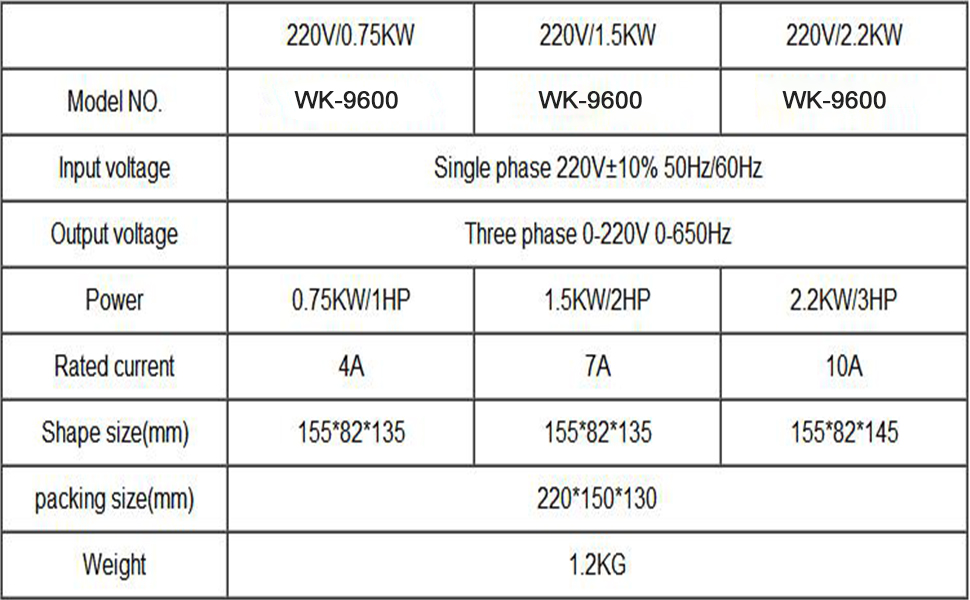
Figure 2: Detailed specifications for various WK-9600 VFD models.
2.1 Dimensioni del prodotto

Figure 3: Physical dimensions of the VFD unit.
3. Contenuto della confezione
Dopo aver aperto il pacco, verificare che tutti gli articoli siano presenti e integri:

Figure 4: Items included in the product package. Note: The external cable length is 2M (78.74 inches).
- Frequency Converter Unit
- Manuale del prodotto (questo documento)
- Carta di certificazione
- External Keyboard (optional, depending on model)
- External Wiring (2M length)
4. Pannello di controllo finitoview
The VFD features an intuitive control panel for operation and parameter settings. Familiarize yourself with the buttons and indicators:

Figure 5: VFD Control Panel and Button Functions.
- PRG/ESC: Program/Escape button. Used to enter/exit menu and return to previous level.
- RD/WT: Read/Write button. Used to confirm selections and save parameters.
- MF.K/REV: Multifunctional Key/Reverse. Function varies based on programming.
- Shift (>>): Used to shift cursor position during parameter editing.
- Up/Down Arrows (▲ ▼): Modify keys for incrementing or decrementing values.
- CORRERE: Avvia il motore.
- ARRESTO/RESET: Arresta il motore o ripristina le condizioni di guasto.
- Potenziometro: Used for manual speed adjustment.
5. Istruzioni per l'installazione e il cablaggio
Proper wiring is crucial for safe and correct operation. Refer to the diagrams and instructions below for connecting the VFD to your motor and power supply.
5.1 Main Power and Motor Connections
Connect the single-phase 220V power grid to the VFD's input terminals (S and T). Connect the three-phase AC motor to the VFD's output terminals (U, V, W).
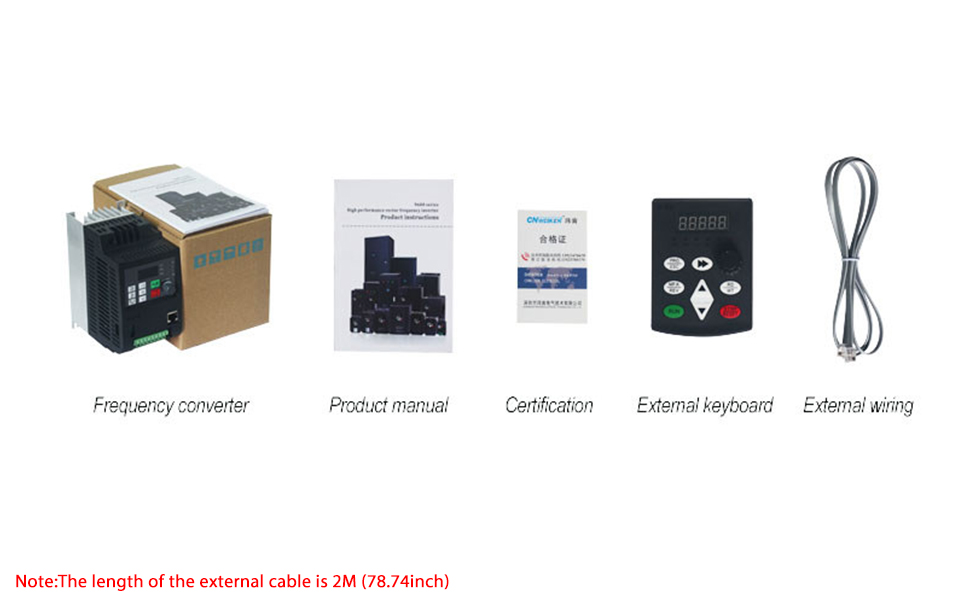
Figure 6: Main wiring diagram for the VFD, motor, and external controls.
5.2 External Control Wiring
The VFD supports external control for start/stop and speed adjustment using switches and potentiometers.

Figure 7: Detailed circuit diagram for VFD connections.
- Forward/Reverse Start-Stop Switch Wiring:
Connect the forward connection to terminal X5. Connect the reverse connection to terminal X6. Connect the zero wire to terminal DOCM. Parameter setting: P7.02=2. - External Potentiometer Wiring:
Connect the intermediate terminal of the potentiometer to AI1. Connect the other two terminals to 10V and ACOM respectively. Ensure jumper J9 is set to select the upper part for external potentiometer control.
6. Funzionamento di base
This section covers the fundamental steps to operate your CNweiken VFD.
6.1 Initial Startup and Speed Adjustment
After ensuring all wiring is correct and secure, power on the VFD. You can adjust the motor speed using the panel potentiometer or an external potentiometer if configured.
Video 1: Demonstration of simple use for the WK600 Series Mini Frequency Converter, including motor connection, power connection, starting the motor, adjusting speed via panel potentiometer, measuring output current, and observing frequency output waveforms during operation and shutdown. This video also shows practical operation with external potentiometer and start/stop switch.
- Accensione: Connect the VFD to a 220V single-phase power source. The display will light up.
- Avviamento del motore: Premere il tasto CORRERE button on the control panel. The motor will start and accelerate to the set frequency.
- Regola la velocità: Rotate the potentiometer knob on the control panel (or external potentiometer) to increase or decrease the output frequency, thereby adjusting the motor speed.
- Arresto motore: Premere il tasto ARRESTO/RIPRISTINO pulsante per arrestare il motore.
6.2 Impostazioni dei parametri
The VFD has various parameters that can be adjusted to customize its operation. Refer to the detailed parameter list in the full manual for specific settings. Use the PRG/ESC button to enter the programming menu, arrow keys to navigate, and RD/WT per confermare le modifiche.
7. Manutenzione
Una manutenzione regolare garantisce la longevità e le prestazioni ottimali del vostro VFD.
- Pulizia: Mantenere il VFD pulito e privo di polvere e detriti. Utilizzare un panno morbido e asciutto per la pulizia. Non utilizzare detergenti liquidi.
- Ventilazione: Assicurare un'adeguata ventilazione attorno al VFD per evitare il surriscaldamento. Mantenere libere le alette di raffreddamento.
- Connessioni: Controllare periodicamente tutti i collegamenti elettrici per verificarne la tenuta e l'assenza di segni di usura o corrosione.
- Ambiente: Operate the VFD within its specified environmental conditions (temperature, humidity, vibration).
8. Risoluzione Dei Problemi
If you encounter issues with your VFD, refer to the following common problems and solutions. For complex issues, contact technical support.
- Il motore non si avvia:
Possibile causa: Incorrect wiring, emergency stop engaged, parameter settings incorrect.
Soluzione: Verify all connections, check emergency stop, review start/stop parameters. - Motor Not Reaching Desired Speed:
Possibile causa: Potentiometer setting incorrect, maximum frequency limit set too low, motor overload.
Soluzione: Adjust potentiometer, check P0.03 (Max Output Frequency) parameter, reduce motor load. - VFD Displays Error Code:
Possibile causa: Sovracorrente, overvoltage, sottovoltage, surriscaldamento.
Soluzione: Refer to the full manual's error code section for specific remedies. Often requires pressing ARRESTO/RIPRISTINO after addressing the cause. - Rumore o vibrazione insoliti:
Possibile causa: Motor imbalance, loose connections, VFD parameter settings.
Soluzione: Check motor mounting, tighten connections, adjust carrier frequency (P0.04) or other motor parameters.
9. Garanzia e supporto
CNweiken products are covered by a standard manufacturer's warranty. Please retain your proof of purchase for warranty claims. For technical assistance, troubleshooting beyond this manual, or warranty service, please contact CNweiken customer support through your retailer or the official CNweiken websito.
Per una protezione aggiuntiva, considera l'acquistoasing un piano di protezione esteso, se disponibile.