
Informazioni importanti sulla sicurezza
Please read the instruction manual carefully before using the product to ensure safe and proper operation. Keep this manual for future reference.
Prodotto finitoview
The iRest A710 Alfine 4D Massage Chair is designed to provide a comprehensive full-body massage experience. It incorporates advanced 4D technology, zero gravity reclining, and various specialized massage techniques to promote relaxation and well-being.
Caratteristiche principali:
- Advanced 4D technology iRest system for precise and deep tissue massage.
- Automatic footrest detection & extension for personalized comfort.
- Full body heating therapy on shoulders, back, waist, and abdomen.
- Calf roller kneading and drainage massage & Foot roller scraping massage.
- Three control methods: AI voice control, TFT touch screen, and quick button access.
- Programme Customization and Memory Function: Create and save personal massage programs.

Immagine: Sopraview of the iRest A710 massage chair highlighting various massage points including shoulder airbags, TFT touch screen, wireless phone charging, quick access buttons, palm magnetic therapy, 4D massage rollers, lower back heating therapy, calf airbags, legs rolling and draining massage, foot roller massager, toe heating therapy, and 360° fully-wrapped foot airbags.
Video: Un video ufficiale del prodotto mostraasing the iRest A710 4D Massage Chair's features, including the 4D AI massage robot, yoga stretch massage, back cushion with independent shawl design for heat therapy, Tai Chi style calf kneading, wireless recharge station, and Bluetooth 3D digital speakers.
Installazione e assemblaggio
The iRest A710 massage chair requires some assembly. Please follow the steps below carefully. It is recommended to have two people for assembly.
Fasi di assemblaggio:
- Disimballare i componenti: Carefully remove all components from the packaging. Identify the main unit, left armrest, right armrest, footrest, and accessories (power cord, touch screen, screws, tools).
- Collegamento elettrico: Plug in the power cord to the main unit and turn on the power switch.
- Connessione touch screen: Align the groove of the touch screen cable terminal and connect it securely. Press the side button of the touch screen to reset the chair.
- Install Right Armrest:
- Connect the air hoses and plug the wires together. Ensure terminals of the same color are connected. Use the provided cloth to cover the connections.
- Agganciare il gancio metallico nero sulla parte anteriore del bracciolo alla scanalatura del telaio del sedile.
- Inserire i due blocchi di plastica nella parte posteriore del bracciolo nella scanalatura bianca sul telaio del sedile.
- Tap the armrest to ensure it is firmly embedded in the seat frame.
- Fasten the front end of the armrest with the seat frame using M5*12 screws.
- Unzip the shoulder airbag on the armrest. Fix the M6*16 screw into the hole and zip it back.
- Snap the cover into the armrest hole.
- Install Left Armrest: Repeat the same steps as for the right armrest.
- Installare il poggiapiedi:
- Remove the ties and protective covers from both sides of the footrest connection points.
- Remove the screws on both sides of the footrest connection.
- Rimuovere le guaine su entrambi i lati e installarle sul telaio di supporto del poggiapiedi.
- Connect the air hose and plug the wires together. Push them inside the chair as much as possible.
- Riporre il coperchio e fissarlo con le viti.
- Fissare saldamente la copertura protettiva su ciascun lato della base di supporto.
- Zip the cloth to secure the footrest.
- Install Touch Screen Support: Insert the base of the touch screen support into the designated hole on the armrest. Fix it with three M4*10 screws. Put the cover and buckle it. Install the touch screen onto the support.
Video: An official assembly video for the iRest A710 4D Health Cloud Massage Chair, demonstrating step-by-step instructions for connecting components, installing armrests, footrest, and the touch screen.
Istruzioni per l'uso
The iRest A710 offers multiple ways to control your massage experience.
Metodi di controllo:
- Schermo tattile TFT: The intuitive touch screen allows you to select massage programs, adjust settings, and customize your experience.
- Controllo vocale AI: Use voice commands for hands-free operation. Simply say "Hi Alice" to activate the voice assistant and issue commands like "Massage on" or "Full-body stretch."
- Quick Button Access: Convenient buttons located on the armrest provide quick access to essential functions like power, heat, and recline adjustments.

Immagine: Avvicinamento view of the iRest A710's control features, including the TFT touch screen interface, quick access buttons on the armrest, Bluetooth speaker, and wireless charging pad.
Massage Programs and Customization:
- The chair features various pre-set automatic massage programs.
- Utilize the program customization and memory function to create and save your personalized massage routines.
- The chair includes an automatic body scanning system to detect shoulder width, weight, and height, adjusting the massage to your body shape.
- Experience Yoga Stretching, a classic and effective massage technique.

Immagine: Diagram illustrating the iRest A710's automatic body scanning system, which detects shoulder width, weight, and height to customize the massage experience.
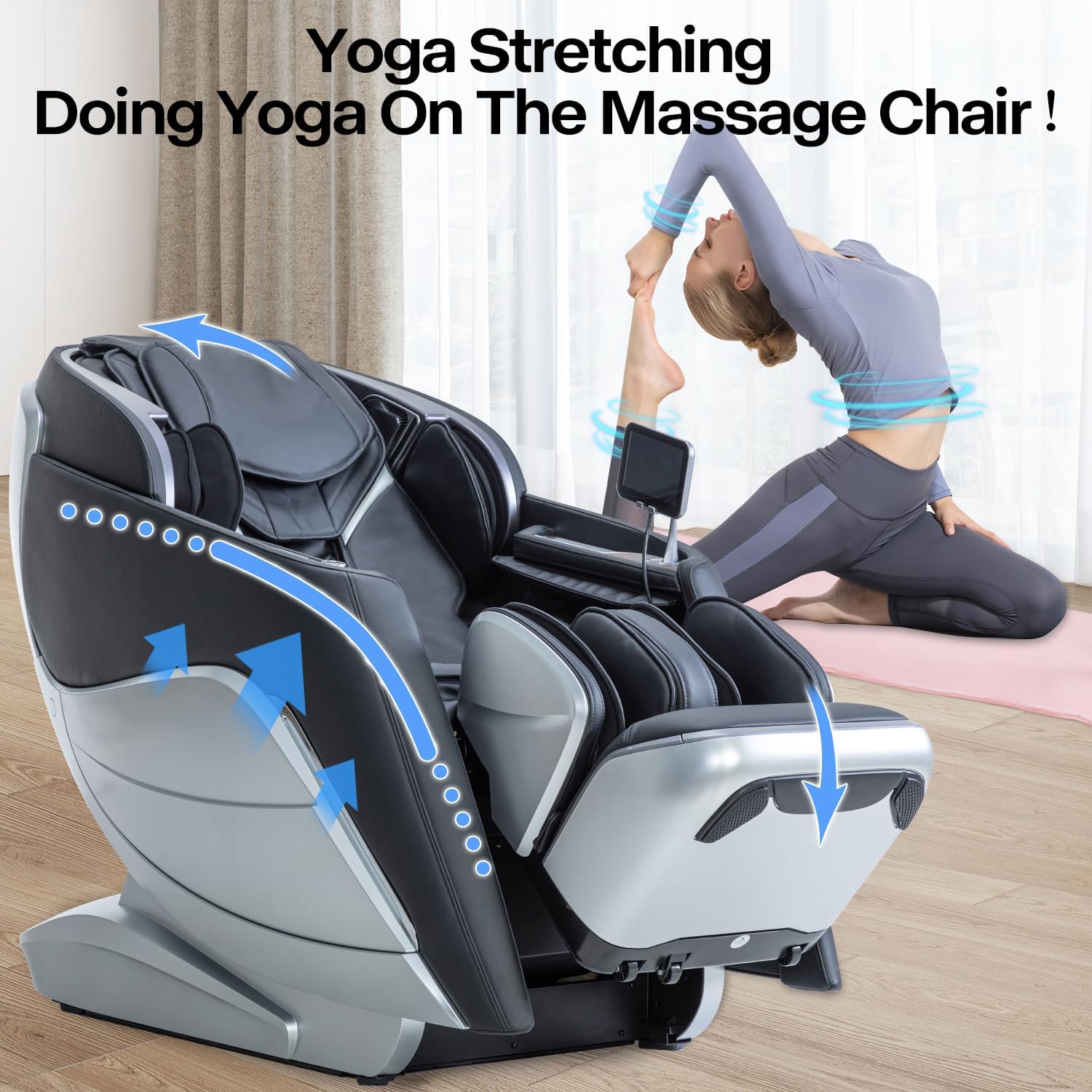
Immagine: The iRest A710 massage chair in a yoga stretching position, demonstrating its capability to provide full-body stretching for enhanced relaxation.
Manutenzione
To ensure the longevity and optimal performance of your iRest A710 massage chair, follow these simple maintenance guidelines:
- Pulizia: Pulisci con un panno morbido, damp panno. Evitare prodotti chimici aggressivi o detergenti abrasivi.
- Magazzinaggio: Quando non viene utilizzata per lunghi periodi, conservare la sedia in un luogo fresco e asciutto, lontano dalla luce solare diretta.
- Controlli regolari: Controllare periodicamente tutti i collegamenti e gli elementi di fissaggio per accertarsi che siano saldi.
Risoluzione dei problemi
If you encounter any issues with your iRest A710 massage chair, please refer to the following common troubleshooting tips:
- La sedia non si accende: Ensure the power cord is securely plugged into both the chair and a working electrical outlet. Check that the main power switch is in the 'on' position.
- I rulli massaggianti non si muovono: Verify that a massage program is selected on the touch screen or via voice control. Ensure no obstructions are present in the roller track.
- Il controllo vocale non risponde: Make sure the voice control feature is activated. Speak clearly and at a moderate volume.
- Rumori insoliti: If you hear any abnormal sounds, immediately turn off the chair and contact customer support.
For more complex issues or if troubleshooting steps do not resolve the problem, please contact iRest customer support.
Specifiche
| Caratteristica | Dettaglio |
|---|---|
| Marca | iRest |
| Nome del modello | SL-A710 |
| Colore | Nero chiaro |
| Dimensioni del prodotto | 58.27"P x 48.03"L x 33.07"A |
| Peso dell'articolo | 292 libbre |
| Peso massimo raccomandato | 330 libbre |
| Materiale | Ecopelle |
| Caratteristica speciale | Arm Rest, Cushion Availability, Ergonomic, Heated, Reclining |
| Metodi di controllo | AI Voice Control, TFT Touch Screen, Quick Button Access |
| Tecnologia del massaggio | 4D, SL Track, Yoga Stretching, Calf Kneading, Foot Scraping |
| Terapia del riscaldamento | Shoulders, Back, Waist, Abdomen |
| Codice UPC | 850037299218 |
| Data prima disponibilità | 24 marzo 2022 |

Immagine: Detailed product dimensions of the iRest A710 massage chair in recline and upright statuses, showing depth, width, and height measurements.
Garanzia e supporto
Your iRest A710 massage chair is backed by a Garanzia di 3 annoPer qualsiasi richiesta, assistenza tecnica o richiesta di garanzia, contattare il nostro Assistenza clienti 24 ore su 7, XNUMX giorni su XNUMX.
You can also visit one of our 50+ showrooms across the states. Contact us to find your nearest location.