
FLEXISPOT EC5S-FR+PR1808-Black
FLEXISPOT Enhanced Standing Desk
Manuale d'uso
Model: EC5S-FR+PR1808-Black
Prodotto finitoview
The FLEXISPOT Enhanced Standing Desk is an electric, motorized, height-adjustable desk designed to promote a healthy work-life balance. It features a robust dual-motor system and a three-section leg design, offering a wide height adjustment range from 62 cm to 127 cm. This desk is suitable for users ranging from 110 cm to 203 cm in height.
Le caratteristiche principali includono:
- Wide Height Adjustment: From 62 cm to 127 cm, accommodating various user heights.
- Potente sistema a doppio motore: Ensures smooth and quick height transitions with a lifting speed of 3.5 cm/s.
- Elevata capacità di carico: Supports up to 160 kg, ideal for multiple monitors and heavy equipment.
- Pannello di controllo intelligente: Features three programmable memory height presets and a timed reminder function for regular movement.
- Sistema anticollisione: Automatically stops and retracts when an obstacle is detected, preventing damage and injury.
- Durable and Certified Materials: FSC-certified desktop meeting E0 environmental standards, ensuring safety and sustainability.

Figure 1: FLEXISPOT Enhanced Standing Desk, highlighting its robust design and 160kg load capacity.
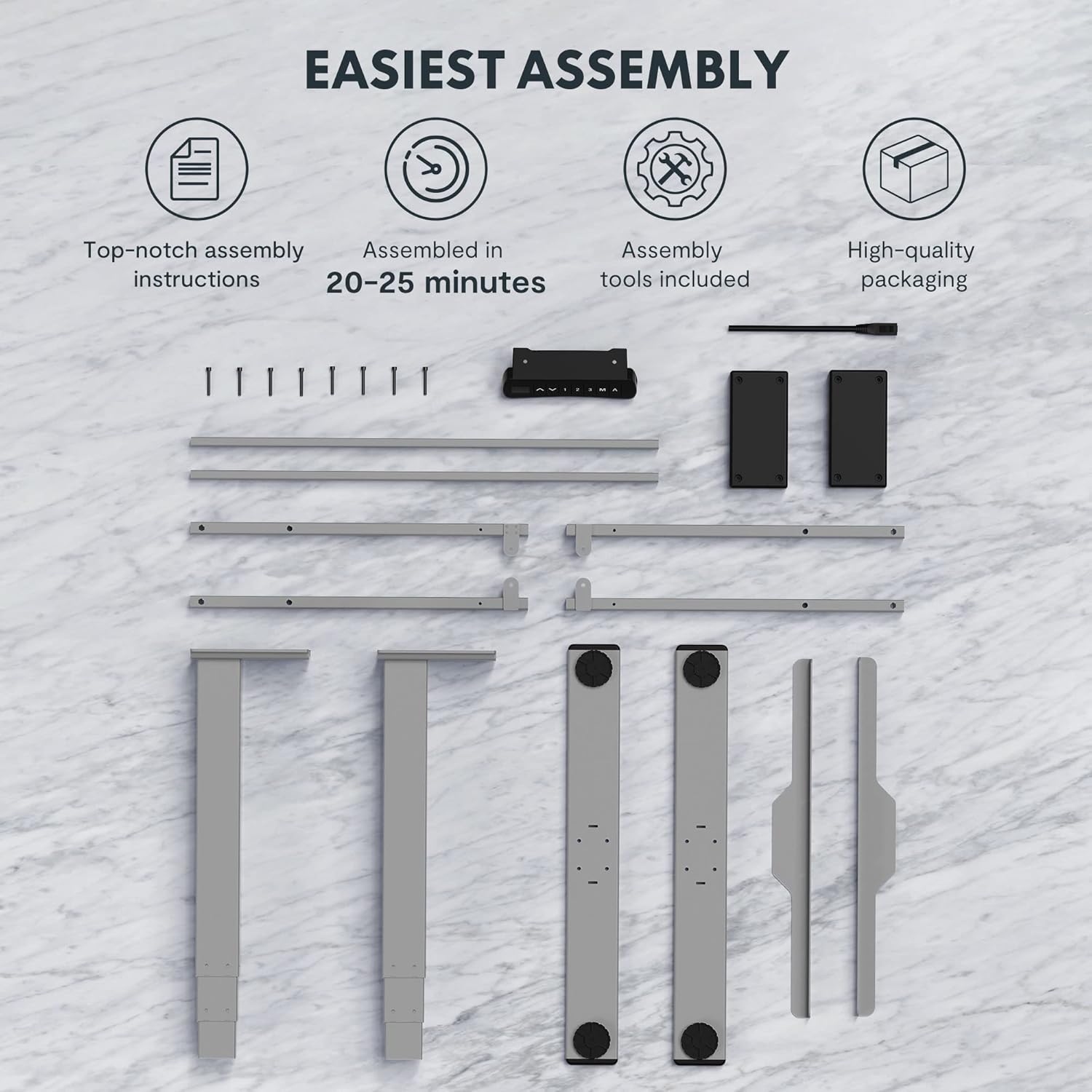
Figure 2: Available desktop options and material certifications, including FSC-certified wood.
Avvertenze di sicurezza
Please read and understand all safety warnings before operating the desk to prevent injury or damage to the product.
- Protezione dalle collisioni: The desk is equipped with an anti-collision system. If an obstacle is detected during movement, the tabletop will stop and retract slightly. Do not intentionally obstruct the desk's movement.
- Avviso di sovraccarico: Do not exceed the maximum load capacity of 160 kg. Overloading can damage the motor and frame.
- Bambini e animali domestici: Keep children and pets away from the desk during operation. Moving parts can cause injury.
- Alimentazione elettrica: Ensure the power cord is properly connected and not damaged. Do not operate the desk with a damaged cord or plug.
- Superficie piana: Always operate the desk on a stable and level surface to prevent tipping.
- Liquidazione: Ensure there is adequate clearance around the desk when adjusting height to avoid pinching or crushing objects or body parts.
Installazione e assemblaggio
The FLEXISPOT Enhanced Standing Desk is designed for easy assembly. All necessary tools and detailed instructions are included in the packaging. Typical assembly time is approximately 20-25 minutes.
- Disimballare i componenti: Estrarre con cautela tutti i componenti dall'imballaggio. Verificare che siano presenti tutti i componenti elencati nelle istruzioni di montaggio.
- Montare il telaio: Follow the step-by-step instructions to assemble the desk frame, including the three-section lifting columns and crossbars.
- Allega Desktop: Securely attach the desktop to the assembled frame using the provided screws.
- Collegare il pannello di controllo e l'alimentazione: Connect the control panel and power supply according to the wiring diagram in the instructions.
- Gestione dei cavi: Use the included cable management accessories to organize and secure all cables.

Figure 3: Desk components laid out for assembly, illustrating the ease of setup with included tools and clear instructions.

Figure 4: Illustration of the desk's stable and durable design, featuring three lifting columns and a wide height adjustment range.
Istruzioni per l'uso
The smart control panel allows for easy and precise height adjustments and includes convenient memory functions.

Figure 5: The smart control panel, featuring a digital display, height adjustment buttons, and memory presets.
- Regolazione dell'altezza: Utilizzare il Su (▲) E Giù (▼) arrow buttons on the control panel to raise or lower the desk to your desired height. The current height will be displayed on the digital screen.
- Impostazione delle preimpostazioni di memoria:
- Adjust the desk to your preferred height (e.g., sitting height).
- Premere il tasto "M" pulsante. Il display mostrerà "S-".
- Premere uno dei pulsanti di memoria numerati ("1", "2", O "3") entro 3 secondi. L'altezza è ora salvata su quella preimpostazione.
- Richiamo delle preimpostazioni di memoria: Press the desired numbered memory button ("1", "2", O "3"). La scrivania si sposterà automaticamente all'altezza salvata.
- Timed Reminder Function: The control panel includes a reminder function to prompt you to change positions. Refer to the detailed assembly manual for instructions on how to activate and set the reminder interval.
- Funzione anticollisione: The desk will automatically stop and reverse slightly if it encounters an obstruction during height adjustment. This feature is designed for safety and cannot be disabled.
Manutenzione
Una manutenzione regolare garantisce la longevità e le prestazioni ottimali della scrivania in piedi FLEXISPOT.
- Pulizia: Pulisci la superficie e la struttura della scrivania con un panno morbido e asciutto.amp panno. Evitare l'uso di prodotti chimici aggressivi o detergenti abrasivi che potrebbero danneggiare la finitura.
- Gestione dei cavi: Controllare periodicamente che tutti i cavi siano ben posizionati e non siano schiacciati o aggrovigliati.
- Elementi di fissaggio: Controllare di tanto in tanto che tutte le viti e i bulloni siano ben serrati. Serrarli nuovamente se necessario.
- Motore e telaio: Keep the motor and lifting columns free from dust and debris. Do not lubricate the lifting columns unless specifically instructed by FLEXISPOT support.
Risoluzione dei problemi
Se riscontri problemi con la tua scrivania, fai riferimento ai seguenti passaggi comuni per la risoluzione dei problemi:
| Problema | Possibile causa | Soluzione |
|---|---|---|
| La scrivania non si muove. | Power cord disconnected, motor error, or overload. | Check power connection. Unplug and replug the desk. Reduce weight on the desk. Refer to the full manual for error codes. |
| La scrivania si muove in modo irregolare. | Uneven load, loose connections, or calibration issue. | Distribute weight evenly. Check all frame connections. Perform a reset/calibration as per the detailed manual. |
| Anti-collision activates frequently. | Obstruction in path, or sensitivity setting. | Ensure clear path for desk movement. Check the detailed manual for anti-collision sensitivity adjustment (if available). |
For more complex issues or error codes not listed, please consult the comprehensive user manual provided with your product or contact FLEXISPOT customer support.
Specifiche
Detailed technical specifications for the FLEXISPOT Enhanced Standing Desk (Model: EC5S-FR+PR1808-Black).
| Caratteristica | Dettaglio |
|---|---|
| Marca | FLESSIBILE |
| Numero di modello | EC5S-FR+PR1808-Black |
| Colore | Grigio + Nero |
| Materiale | Metallo (struttura), legno ingegnerizzato (parte superiore) |
| Progettazione della scrivania | Scrivania in piedi |
| Forma | Rettangolare |
| Gamma di regolazione dell'altezza | 62 centimetri - 127 centimetri |
| Colonne di sollevamento | 3 Sezioni |
| Tipo di motore | Doppio motore |
| Capacità di carico massima | 160 kg |
| Velocità di sollevamento | 3.5 centimetri/secondo |
| Caratteristiche speciali | Electric, Adjustable, Memory Presets, Reminder Function, Anti-Collision |
| Certificazioni | IGR, CE, TÜV, FSC (for desktop) |
| Frame Width Compatibility | 110-170 centimetri |
| Tabletop Compatibility (Width x Depth) | 120-200 cm x 60-80 cm |

Figure 6: Adjustable frame range and compatible tabletop dimensions.

Figure 7: Illustration of the upgraded load capacity, now supporting up to 160 kg.
Garanzia e supporto
FLEXISPOT is committed to providing high-quality products. This desk has undergone extensive testing, including over 20,000 stress tests, and holds European certifications such as IGR, CE, and TÜV, ensuring its safety and durability.
For warranty information, technical support, or any inquiries, please contact FLEXISPOT customer service through their official website or the retailer where you purchased the product. Please have your model number (EC5S-FR+PR1808-Black) and purchase details ready when contacting support.
Ask a question about this manual
Ask about setup, troubleshooting, compatibility, parts, safety, or missing instructions. Manuals+ will review the question and use this page’s manual context to help answer it.