
FLEXISPOT EC5B-EU3+PR1206-Black
FLEXISPOT EC5 Standing Desk User Manual
Model: EC5B-EU3+PR1206-Black
Introduzione
This manual provides comprehensive instructions for the assembly, operation, maintenance, and troubleshooting of your FLEXISPOT EC5 Standing Desk. Please read this manual thoroughly before use to ensure proper setup and safe operation.

Figure 1: FLEXISPOT EC5 Standing Desk with a black tabletop and black frame, set up in an office environment.
The FLEXISPOT EC5 is an electric height-adjustable desk designed to promote a healthier work environment by allowing seamless transitions between sitting and standing positions. It features a robust dual-motor system, a smart control panel with memory presets, and a durable construction.
Caratteristiche principali:
- Three-tier frame for height adjustment from 60.5cm to 125cm.
- Supports heavy loads up to 125kg (or 160kg with upgraded design).
- Smooth and quiet lifting speed of 38mm/second.
- Programmable digital memory with 3 preset options for customized heights.
- Collision protection system for enhanced safety.
- Durable MDF tabletop with scratch-resistant laminate.
Installazione e assemblaggio
The FLEXISPOT EC5 Standing Desk is designed for straightforward assembly. All necessary tools are included, and detailed instructions are provided to guide you through the process, typically taking 20-25 minutes.
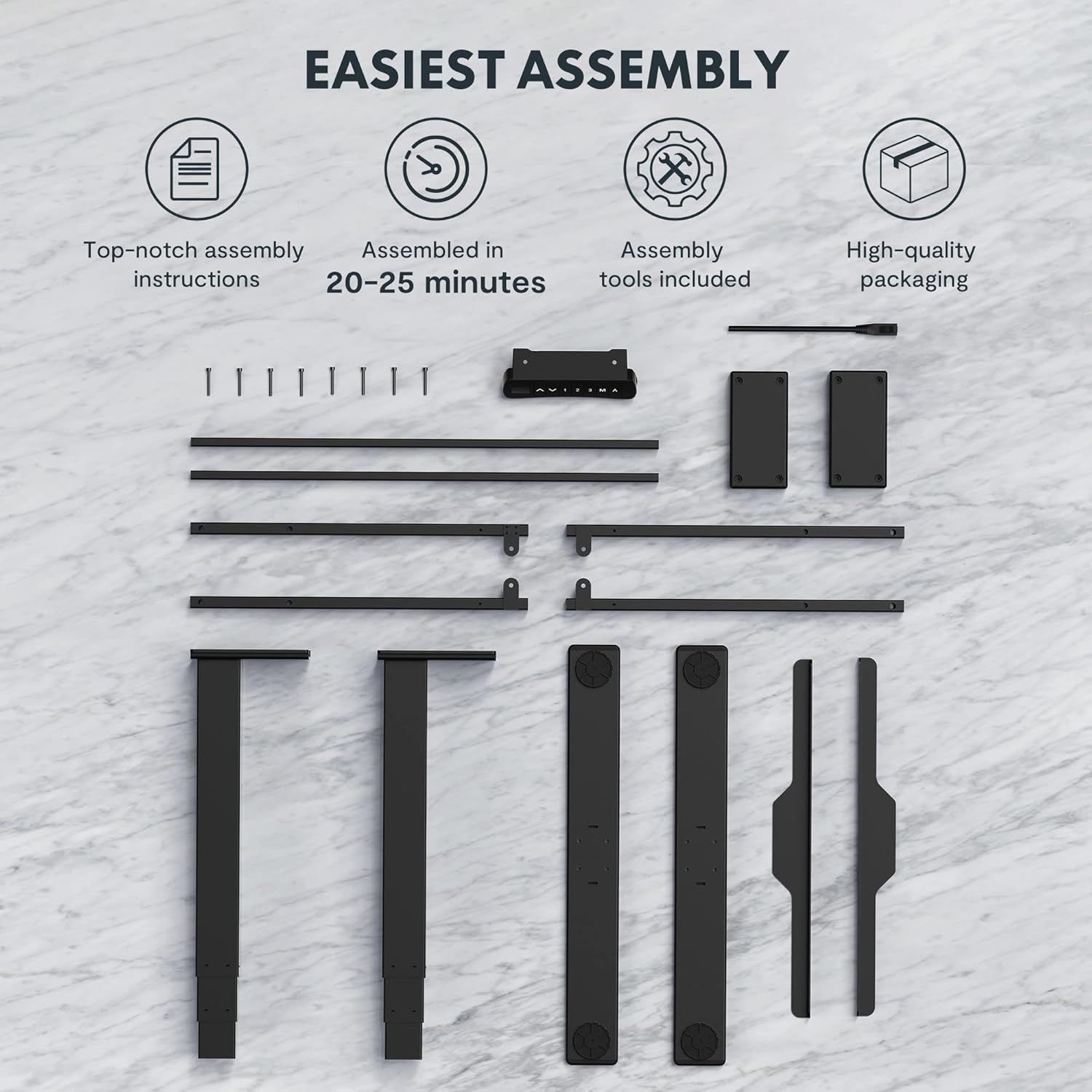
Figure 2: All components and tools required for assembling the FLEXISPOT EC5 Standing Desk.
Contenuto della confezione:
- Desk Frame (legs, crossbars)
- Tabletop (if included in package)
- Control Panel with Cable
- Adattatore di alimentazione e cavo
- Ferramenta di montaggio (viti, bulloni)
- Strumenti di montaggio (ad esempio, chiave a brugola)
- Manuale di istruzioni
Fasi di assemblaggio (generali)view):
- Disimballare tutti i componenti e verificarli rispetto all'elenco delle parti.
- Assemble the desk legs to the crossbars, ensuring all connections are secure.
- Attach the assembled frame to the tabletop using the provided screws.
- Mount the control panel to the underside of the tabletop in an accessible location.
- Connect all cables (motor cables to control box, control panel cable to control box, power cable to control box).
- Ensure all cables are neatly managed and secured to prevent snagging.
- Posizionare la scrivania nella posizione desiderata, assicurandosi che sia su una superficie piana.
For detailed, step-by-step assembly instructions, please refer to the separate assembly guide included in your product packaging.
Istruzioni per l'uso
The FLEXISPOT EC5 Standing Desk features an intuitive control panel for easy height adjustment and memory functions.

Figure 3: The EC5 control panel, featuring height display, up/down buttons, and memory presets.
Funzionamento di base:
- Regolazione dell'altezza: Utilizzare il ▲ E ▼ arrows on the control panel to raise or lower the desk to your desired height. The current height will be displayed on the digital screen.
- Intervallo di altezza: La scrivania può essere regolata da un'altezza minima di 60.5 cm (23.8 pollici) a un'altezza massima di 125 cm (49.2 pollici).
Preimpostazioni di memoria:
The EC5 desk allows you to save up to three preferred height settings for quick adjustments.
- Salvataggio di un preset:
- Regola la scrivania all'altezza desiderata.
- Premere il tasto "M" pulsante. Il display mostrerà "S-".
- Within 3 seconds, press the desired number button ("1", "2", O "3") per salvare l'altezza corrente su quella preimpostazione. Il display mostrerà "S-1", "S-2" o "S-3" per confermare.
- Richiamo di un preset:
- Basta premere il pulsante numerico corrispondente ("1", "2", O "3"). La scrivania si sposterà automaticamente all'altezza salvata.
Funzione anticollisione:
The desk is equipped with an anti-collision system. If the desk encounters an obstacle while moving up or down, it will automatically stop and reverse slightly to prevent damage. Ensure the area around the desk is clear during operation.
Manutenzione
Regular maintenance ensures the longevity and optimal performance of your FLEXISPOT EC5 Standing Desk.
- Pulizia: Pulisci la superficie e la struttura della scrivania con un panno morbido e asciutto.amp panno. Evitare detergenti abrasivi o prodotti chimici aggressivi che potrebbero danneggiare la finitura.
- Gestione dei cavi: Controllare periodicamente che tutti i cavi siano collegati saldamente e ordinatamente, per evitare aggrovigliamenti o danni.
- Elementi di fissaggio: Occasionally check all screws and bolts to ensure they are tight. Retighten if necessary, but do not overtighten.
- Capacità di peso: Do not exceed the maximum weight capacity of 125kg (or 160kg for upgraded models) to prevent damage to the motors and frame.
- Ambiente: Use the desk in a dry indoor environment. Avoid exposure to extreme temperatures or high humidity.
Risoluzione dei problemi
If you encounter issues with your FLEXISPOT EC5 Standing Desk, refer to the following common problems and solutions:
| Problema | Possibile causa | Soluzione |
|---|---|---|
| La scrivania non si muove. | Cavo di alimentazione scollegato, cavo del motore allentato, sovraccarico. | Check all cable connections. Ensure power is supplied. Reduce weight on desk if overloaded. |
| La scrivania si muove in modo irregolare o produce rumori insoliti. | Uneven load, loose fasteners, obstruction. | Distribute weight evenly. Check and tighten all fasteners. Clear any obstructions. |
| Il display digitale mostra un codice di errore. | Malfunzionamento del sistema, problema al sensore. | Refer to the full troubleshooting guide in your product manual for specific error codes. Try unplugging the desk for 10 seconds and plugging it back in to reset. |
| Anti-collision feature is too sensitive or not working. | Sensor calibration needed, obstruction. | Ensure no constant obstructions. Consult the full manual for anti-collision sensitivity adjustment or reset procedures. |
Se il problema persiste dopo aver provato queste soluzioni, contattare l'assistenza clienti FLEXISPOT.
Specifiche del prodotto
Detailed technical specifications for the FLEXISPOT EC5 Standing Desk:
| Caratteristica | Specificazione |
|---|---|
| Marca | FLESSIBILE |
| Numero di modello | EC5B-EU3+PR1206-Black |
| Codice UPC | 810072812643 |
| Gamma di regolazione dell'altezza | 60.5 cm - 125 cm (23.8" - 49.2") |
| Velocità di sollevamento | 38 mm/secondo |
| Capacità massima di peso | 125 kg (275 libbre) - Upgraded models may support up to 160 kg |
| Numero di motori | 2 |
| telaio Stages | 3 |
| Pannello di controllo | Digital display with 3 memory presets |
| Tabletop Dimensions (H x W x D) | 2.5 x 140 x 70 cm (0.98"P x 55.12"L x 27.56"A) |
| Materiale del tavolo | MDF with high pressure scratch resistant laminate |
| Materiale di base | Engineered Wood (for tabletop), Metal (for frame) |
| Colore | Nero |
| Assemblaggio richiesto | SÌ |
| Tipo di garanzia | Limitato |

Figure 4: The EC5 desk frame is designed for stability and can support significant weight, with some models supporting up to 160KG.
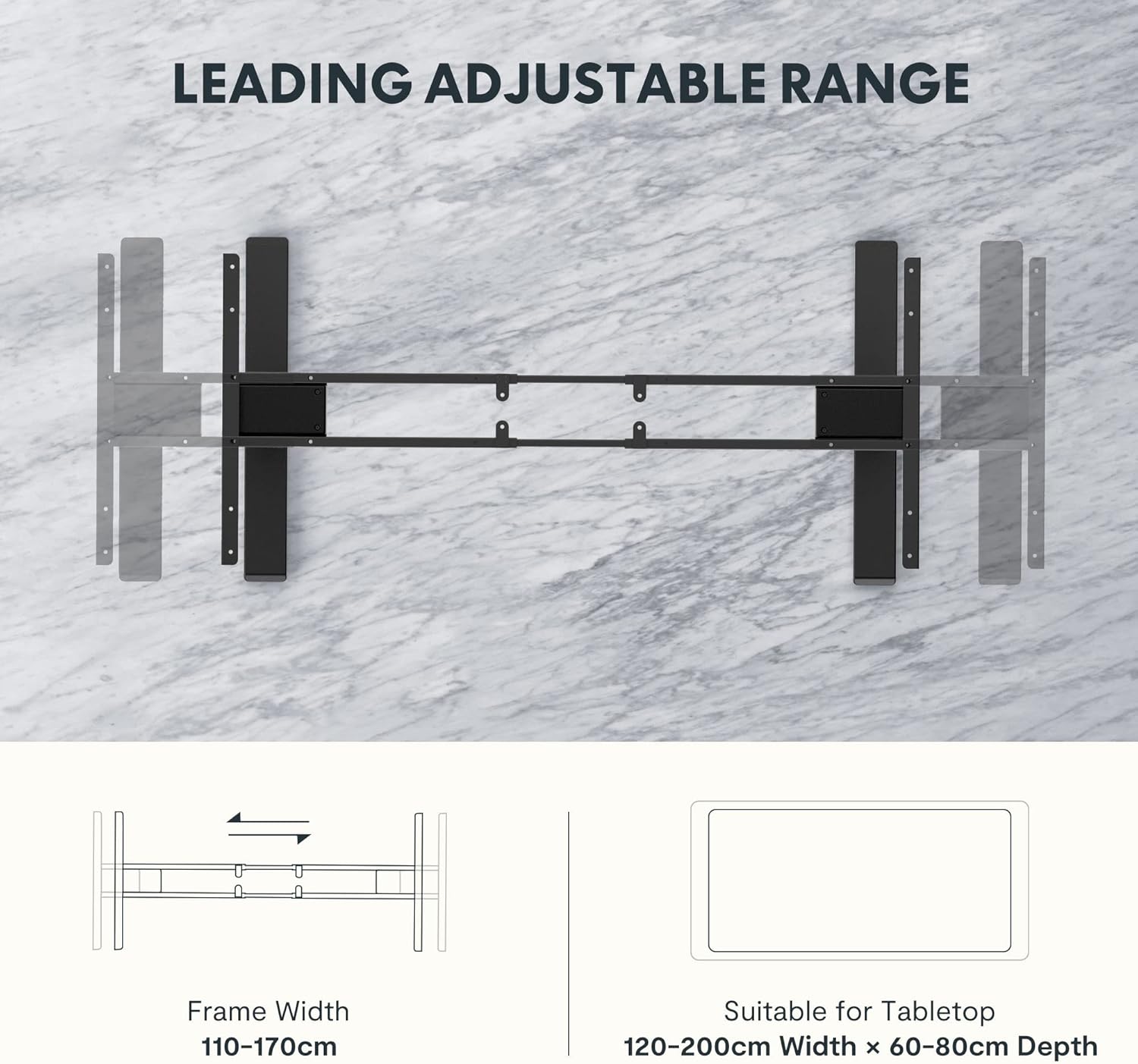
Figure 5: The adjustable frame accommodates various tabletop sizes, offering flexibility for different workspace needs.
Garanzia e supporto
Informazioni sulla garanzia:
The FLEXISPOT EC5 Standing Desk comes with a Garanzia limitata. Please refer to the warranty card included with your product for specific terms, conditions, and duration of coverage. This warranty typically covers manufacturing defects in materials and workmanship under normal use.
Assistenza clienti:
For technical assistance, warranty claims, or any questions regarding your FLEXISPOT EC5 Standing Desk, please contact FLEXISPOT customer support. You can typically find contact information on the FLEXISPOT official websul sito o sulla confezione del prodotto.
When contacting support, please have your model number (EC5B-EU3+PR1206-Black) and proof of purchase readily available.
Ask a question about this manual
Ask about setup, troubleshooting, compatibility, parts, safety, or missing instructions. Manuals+ will review the question and use this page’s manual context to help answer it.