
Informazioni importanti sulla sicurezza
Please read these instructions carefully before installation. If you do not understand these instructions or have doubts about the safety of the installation, please contact a qualified installer. The manufacturer is not liable for damage or injury caused by incorrect assembly or use.
- Capacità di peso: Do not exceed the maximum weight capacity specified for your model. Overloading can result in serious injury or property damage.
- Struttura della parete: The wall mount must be securely attached to a suitable wall structure. Do not install on drywall alone. Ensure the mounting surface can safely support the combined weight of the mount and the television.
- Compatibilità VESA: Verify your TV's VESA mounting pattern (hole spacing) is compatible with this mount.
- Bambini: Tenere i bambini lontani dall'area di installazione. Le piccole parti potrebbero rappresentare un rischio di soffocamento.
- Utensili: Utilizzare strumenti adeguati per l'installazione.
Compatibilità del prodotto
This instruction manual covers two models of PERLESMITH Full Motion TV Wall Mounts, PSMFK7 and PSMFK1. Please identify your model and confirm your television's specifications before proceeding with installation.
Model PSMFK7
- Compatibilità delle dimensioni dello schermo: Most 26-55 inch TVs.
- Capacità di peso: Fino a 70 libbre (31.7 kg).
- Modelli VESA: 100x100mm to 400x400mm.

Figure 1: PSMFK7 Model Compatibility Overview. This image illustrates the supported screen sizes (26-55 inches), maximum weight capacity (70 lbs), and VESA mounting patterns (100x100mm to 400x400mm) for the PSMFK7 TV wall mount.
Model PSMFK1
- Compatibilità delle dimensioni dello schermo: Most 26-60 inch TVs.
- Capacità di peso: Fino a 77 libbre (35 kg).
- Modelli VESA: Up to 400x400mm (16x16 inches).

Figure 2: PSMFK1 Model Compatibility and Wall Types. This image details the wide compatibility of the PSMFK1 model, supporting TVs up to 60 inches and various VESA patterns. It also indicates suitability for single wood stud, brick, and concrete walls.
Confirm Before Purchase
Prima dell'acquistoasing or installing, ensure your TV meets the following criteria:
- Peso del televisore: Your TV's weight is within the mount's capacity (70 lbs for PSMFK7, 77 lbs for PSMFK1).
- Dimensioni TV: Your TV's screen size is within the recommended range (26-55" for PSMFK7, 26-60" for PSMFK1).
- Modello VESA: Your TV's VESA mounting holes match one of the supported patterns.
- Tipo di parete: Your wall is suitable for installation (single wood stud, concrete, or brick).
- Cable Blockage: Ensure the mounting holes on your TV do not block any cables or inputs.

Figure 3: Pre-Purchase Confirmation Checklist. This image provides a visual summary of essential checks to perform before installing the TV mount, including TV weight, size, VESA, wall type, and potential cable interference.
Cosa è incluso
Carefully unpack the box and ensure all parts are present and undamaged. If any parts are missing or damaged, do not attempt to install. Contact customer service for assistance.
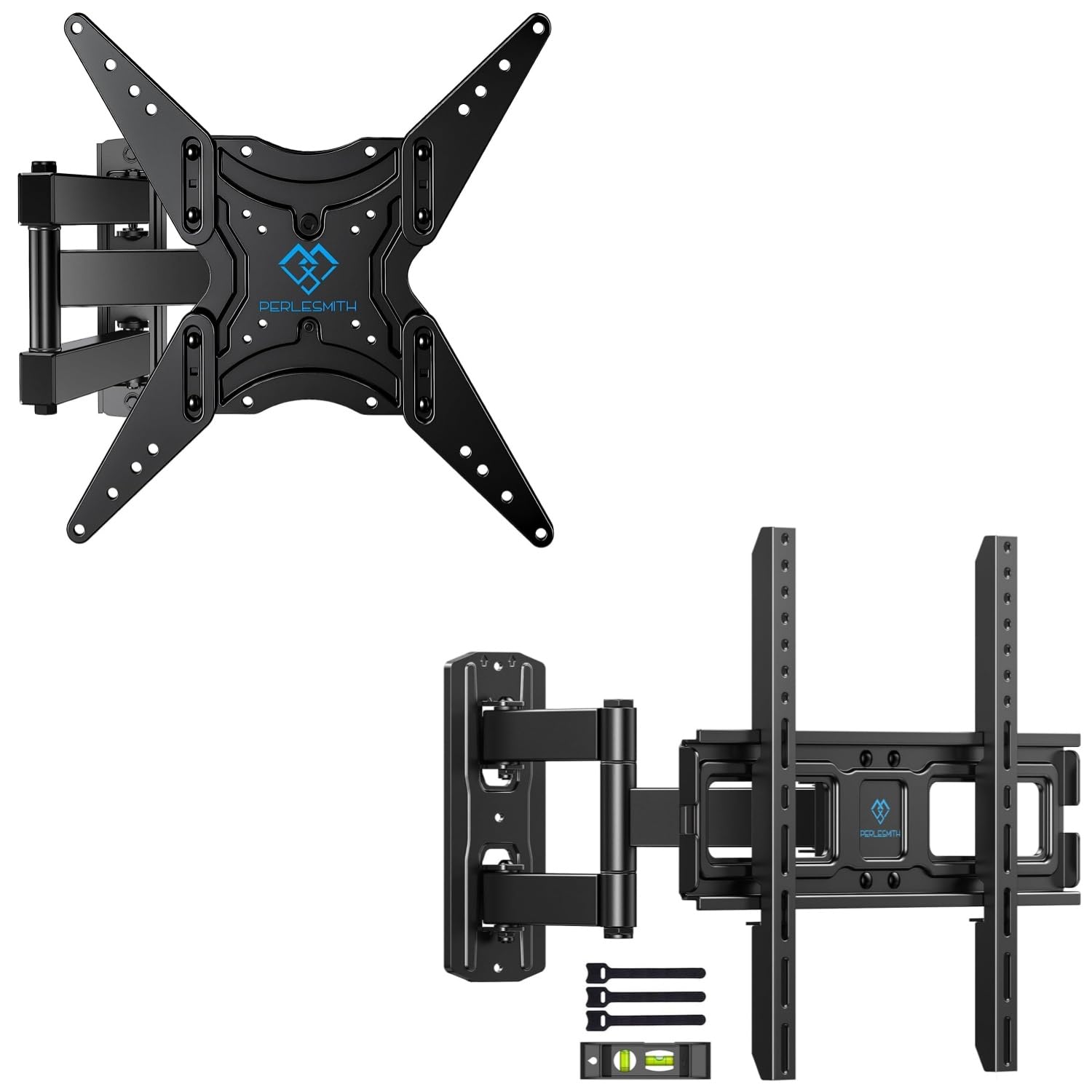
Figure 4: Package Contents. This image displays the main components of the PERLESMITH full motion TV wall mount kit, including the mount assembly, a bubble level for installation, and cable ties for cable management.
Contenuto tipico della confezione:
- Full Motion TV Wall Mount Assembly
- Staffe TV (x2)
- Kit di montaggio (viti varie, rondelle, distanziali, tasselli)
- Livella a bolla
- Fascette (x3)
- Manuale di istruzioni
Configurazione e installazione
Proper installation is crucial for the safety and stability of your TV. Follow these steps carefully.
Prima di iniziare
- Gather all necessary tools (e.g., drill, stud finder, level, screwdriver, tape measure).
- Ensure you have a clear, safe workspace.
- Confirm your TV and wall meet the compatibility requirements.
Wall Type Considerations
Questo supporto è progettato per l'installazione su:
- Single Wood Stud: Locate the center of the wood stud using a stud finder.
- Solid Concrete Wall: Requires a masonry drill bit and concrete anchors.
- Muro di mattoni: Requires a masonry drill bit and brick anchors.
AVVERTIMENTO: Do not install this TV mount on drywall alone. Drywall cannot support the weight of the mount and TV.
Fasi generali di installazione
- Fissare le staffe TV alla TV: Secure the vertical TV brackets to the back of your television using the appropriate screws, washers, and spacers from the hardware kit. Ensure the brackets are centered and level.
- Determinare la posizione della piastra a muro: Tenere la piastra a muro contro il muro nella posizione desiderata viewing height. Use the included bubble level to ensure it is perfectly horizontal. Mark the drilling locations.
- Praticare i fori pilota: Drill pilot holes at the marked locations. For wood studs, drill directly. For concrete or brick, use a masonry bit and insert concrete/brick anchors.
- Piastra di sicurezza a muro: Attach the wall plate to the wall using the lag bolts and washers. Tighten securely, but do not overtighten.
- Appendere la TV alla piastra a muro: Carefully lift the TV (with brackets attached) and hook the brackets onto the wall plate. Ensure the TV is securely seated.
- Fissare la TV al montaggio: Use the safety screws or locking mechanisms on the TV brackets to secure the TV to the wall mount, preventing accidental dislodgement.

Figure 5: Centering Your TV. This image demonstrates a TV mounted centrally on a wall, providing a visual guide for optimal placement above a feature like a fireplace.

Figure 6: Corner Mounting Example. This image illustrates how the full motion design allows for effective TV placement in a room corner, maximizing viewangoli di inclinazione.
Regolazioni operative
The full motion design allows for flexible viewing angles. Adjustments can be made after installation.
- Inclinazione: The TV can be tilted +5° upwards to -15° downwards to reduce glare or optimize viewing from different heights. Loosen the tilt knobs on the TV brackets, adjust to the desired angle, and re-tighten.
- Girevole: The articulating arm allows the TV to swivel up to +/-90° (180° total range) left or right, depending on TV size and wall distance. Gently push or pull the TV to the desired angle.
- Estensione/Retrazione: The mount can extend the TV up to 19.17 inches (48.7 cm) from the wall for optimal viewing or retract it back to 3.2 inches (8.1 cm) for a low-profile Aspetto.
- Livellamento: After installation, the TV can be leveled +/-3° to correct any minor misalignments. Loosen the leveling screws, adjust, and re-tighten.

Figure 7: Full Motion Adjustments. This image visually explains the tilt, extension, swivel, and leveling features of the TV mount, demonstrating the range of motion available for optimal viewing.
Manutenzione
Una manutenzione regolare garantisce la longevità e il funzionamento sicuro del supporto da parete per TV.
- Pulizia: Pulisci il supporto con un panno morbido e asciutto per rimuovere la polvere. Evita detergenti abrasivi o solventi.
- Controllare le connessioni: Controllare periodicamente tutte le viti e i collegamenti per assicurarsi che siano ben serrati e sicuri. Serrare nuovamente se necessario.
- Ispezionare per danni: Ispezionare regolarmente il supporto per verificare la presenza di segni di usura, corrosione o danni. In caso di problemi, interrompere l'uso e contattare l'assistenza clienti.
Risoluzione dei problemi
Se si verificano problemi durante o dopo l'installazione, fare riferimento ai seguenti problemi comuni e alle relative soluzioni.
| Problema | Possibile causa | Soluzione |
|---|---|---|
| La TV non è in piano dopo l'installazione. | Piccolo disallineamento durante l'installazione. | Use the +/-3° leveling adjustment feature. Loosen leveling screws, adjust, and re-tighten. |
| Il supporto sembra allentato o instabile. | Screws not fully tightened; incorrect wall anchors used; wall structure insufficient. | Ensure all mounting screws are securely tightened. Verify correct anchors for your wall type. If the wall is insufficient, consult a professional. |
| Difficoltà nella regolazione dell'inclinazione o della rotazione. | Le manopole/bulloni di regolazione sono troppo stretti. | Loosen the relevant adjustment knobs or bolts slightly, make the adjustment, then re-tighten to hold the position. |
| La TV non è compatibile con il supporto. | Incorrect TV size, weight, or VESA pattern for the mount model. | Verify your TV's specifications against the mount's compatibility (refer to Product Compatibility section). |
Specifiche del prodotto
| Caratteristica | PSMFK7 Model | PSMFK1 Model |
|---|---|---|
| Tipo di montaggio | Montaggio a parete | |
| Tipo di movimento | Articolato, girevole, inclinabile | |
| Dimensioni dello schermo compatibili | 26 - 55 pollici | 26 - 60 pollici |
| Capacità massima di peso | 70 libbre (31.7 kg) | 77 libbre (35 kg) |
| Compatibilità VESA | da 100x100mm a 400x400mm | Fino a 400x400 mm |
| Angolo di inclinazione | +5° / -15° | |
| Angolo di rotazione | +/-90° (up to 180° total, depending on TV size) | |
| Regolazione del livellamento | +/-3° | |
| Estensione da parete | Da 3.2 pollici (retratto) a 19.17 pollici (esteso) | |
| Materiale | Acciaio legato | |
| Tipi di pareti compatibili | Single Wood Stud, Solid Concrete, Brick Wall | |
Garanzia e supporto
For warranty information or technical support, please refer to the product packaging or contact PERLESMITH customer service directly. Keep your purchase receipt for warranty claims.
If you have any questions or require assistance with installation or operation, please do not hesitate to reach out to our support team.