
Ysametp M10
Manuale utente del mini proiettore Ysametp M10
1080P Full HD Supported Portable Video Projector
Introduzione
Grazie per l'acquistoasing the Ysametp Mini Projector M10. This portable video projector is designed to provide a high-quality home theater experience with its 1080P Full HD support and 10000 Lux LED light source. It features dual built-in stereo speakers with an SRS sound system for immersive audio. Its compact size and multi-connection capabilities make it ideal for various entertainment and presentation needs. Please read this manual thoroughly before operating the projector to ensure proper use and maintenance.
Informazioni sulla sicurezza
To ensure safe operation and prolong the lifespan of your projector, please observe the following safety precautions:
- Non ostruire le aperture di ventilazione. Garantire un flusso d'aria adeguato attorno al proiettore per evitare il surriscaldamento.
- Non esporre il proiettore alla pioggia o all'umidità per evitare scosse elettriche o incendi.
- Non aprire il proiettore casing. Affidare tutti gli interventi di assistenza a personale qualificato.
- Utilizzare solo l'adattatore di alimentazione fornito con il proiettore.
- Posizionare il proiettore su una superficie stabile e piana per evitare che cada.
- Evitare l'esposizione diretta degli occhi alla lente del proiettore quando lamp è acceso.
- Scollegare il proiettore dalla presa di corrente durante i temporali o quando non viene utilizzato per lunghi periodi.
Contenuto della confezione
Si prega di controllare il contenuto della confezione dopo averla disimballata:
- 1 x Ysametp Mini Projector M10
- 1 cavo HDMI
- 1 x 3-in-1 AV Line
- 1 x cavo di alimentazione
- 1 x treppiede
- 1 x Drawstring Backpack
- 1 x telecomando (batterie non incluse)
- 1 x Manuale utente

Prodotto finitoview
Familiarizzare con i componenti del proiettore e le porte di connessione.

Porte di ingresso/uscita:
- Porta HDMI: Collegati a dispositivi come chiavette TV, laptop, console di gioco.
- Porta USB: Collegare unità USB per la riproduzione multimediale.
- Slot per schede TF: Insert TF cards for media playback.
- Porta VGA: Connect to computers or laptops.
- Porta AV: Connect to older devices like DVD players using the 3-in-1 AV cable.
- Jack audio da 3.5 mm: Collegare cuffie o altoparlanti esterni.
Impostare
1. Posizionamento e dimensioni dello schermo
Position the projector on a flat, stable surface. The projection size can range from 32 inches to 200 inches, with an optimal projection distance between 3.6 feet and 16.4 feet.

2. Collegamento elettrico
Connect the supplied power cord to the projector's power input and then plug it into a power outlet.
3. Regolazione della messa a fuoco e della distorsione trapezoidale
After powering on, adjust the focus and keystone knobs located on top of the projector to achieve a clear and rectangular image. The focus ring adjusts image sharpness, while the keystone correction corrects trapezoidal distortion if the projector is not perfectly perpendicular to the screen.
Istruzioni per l'uso
1. Accensione/spegnimento
- Per attivare: Premere il pulsante di alimentazione sul proiettore o sul telecomando.
- Per spegnere: Press the power button again. The projector will go through a shutdown sequence.
2. Selezione della sorgente di ingresso
Use the "Source" button on the remote control or the projector's control panel to select the desired input source (HDMI, USB, TF, VGA, AV).
3. Collegamento dei dispositivi
- HDMI: Connect an HDMI cable from your device (e.g., TV Stick, laptop, game console) to the projector's HDMI port.
- Scheda USB/TF: Insert a USB drive or TF card into the respective port. The projector will automatically detect the media or prompt you to select it.
- VGA: Connect a VGA cable from your PC/laptop to the projector's VGA port.
- AV: Use the provided 3-in-1 AV cable to connect to devices with AV output.
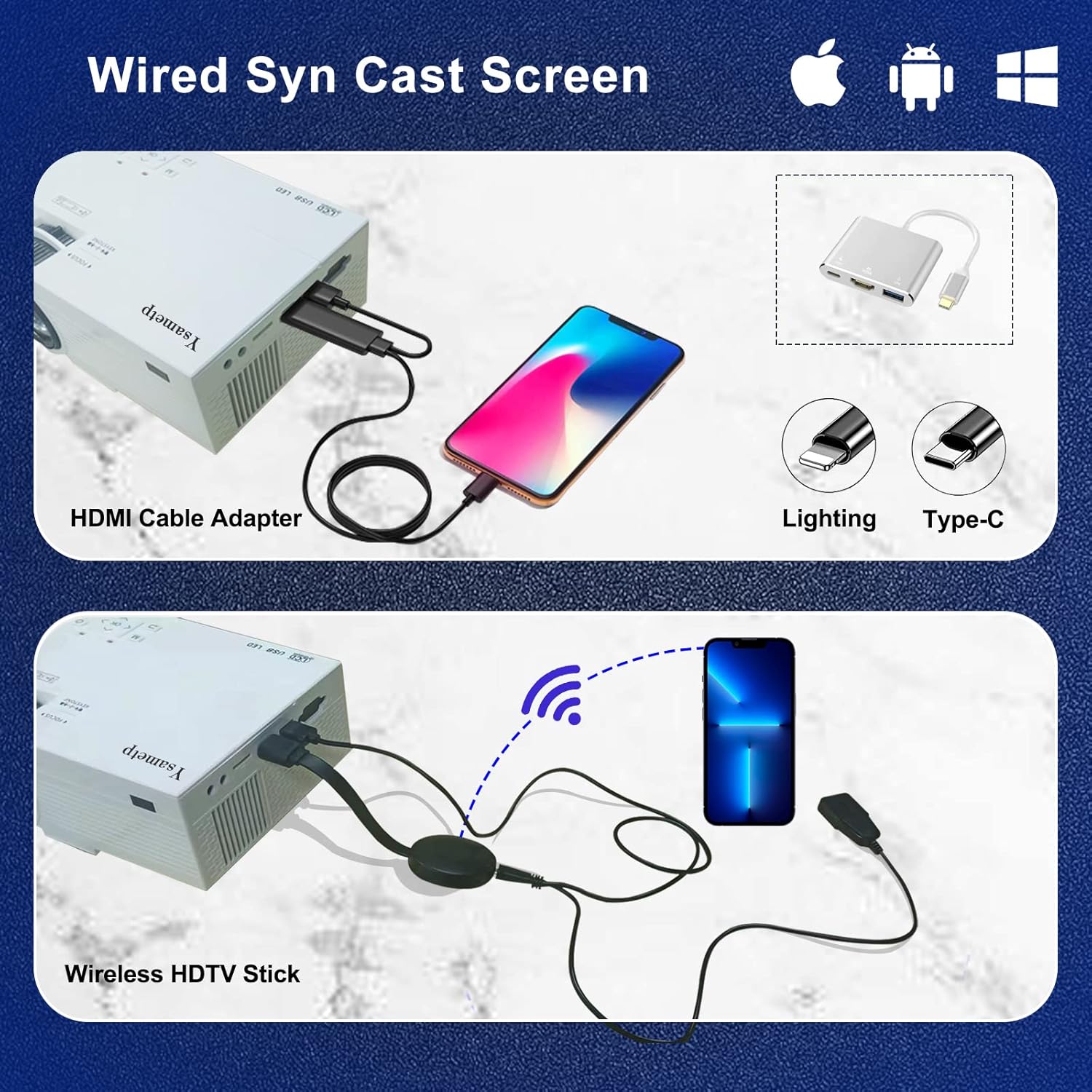
4. Wired Screen Mirroring (for Smartphones)
To mirror your smartphone screen, you will need an HDMI adapter (e.g., Lightning to HDMI for iPhone, USB-C to HDMI for Android) or a Miracast dongle/TV stick (like Roku, Fire TV Stick).

5. Uscita audio
The projector has dual built-in stereo speakers. For external audio, connect headphones or external speakers to the 3.5mm audio jack.

Manutenzione
1. Pulizia
- Lente: Utilizzare un panno morbido e privo di lanugine, specificamente progettato per lenti ottiche. Non utilizzare detergenti abrasivi.
- Casing: Wipe the projector's exterior with a soft, dry cloth. Do not use liquid or aerosol cleaners.
- Ventilazione: Regularly check and clean the ventilation openings to prevent dust buildup, which can affect cooling performance.
2. Conservazione
When not in use, store the projector in a cool, dry place, away from direct sunlight and extreme temperatures. Use the provided drawstring backpack for protection during storage or transport.
3. LED Lifespan
The built-in LED light source is designed to support up to 55,000 hours of use, providing long-lasting performance.
Risoluzione dei problemi
| Problema | Possibile causa/soluzione |
|---|---|
| Nessuna immagine sullo schermo. |
|
| L'immagine è sfocata. |
|
| L'immagine è trapezoidale. |
|
| Nessun suono. |
|
| Telecomando non funzionante. |
|
Specifiche
| Caratteristica | Dettaglio |
|---|---|
| Marca | Ysametp |
| Modello | Numero di modello: M10 |
| Tecnologia di visualizzazione | LCD |
| Risoluzione nativa | 1920 x 1080 Pixels (Full HD Supported) |
| Luminosità dell'immagine | 11000 lux |
| Rapporto di contrasto dell'immagine | 10000:1 |
| Proporzioni | 4:3 |
| Dimensioni della proiezione | 32 - 200 pollici |
| Distanza di proiezione | 3.6 piedi - 16.4 piedi |
| Durata della vita dei LED | 55,000 ore |
| Livello di rumore | 31 dB |
| Cosatage | 60 watt |
| Interfaccia Hardware | VGA, USB, HDMI, 3.5mm Audio, TF Card |
| Dimensioni (L x P x A) | Dimensioni: 23.88 x 15.49 x 8.13 cm |
| Peso | 975.22 g (circa 2.15 libbra) |
Garanzia e supporto
Ysametp provides a Garanzia del prodotto di 3 anni for the Mini Projector M10.
If you encounter any problems or have questions regarding your projector, please do not hesitate to contact our customer support. Refer to the contact information provided on the product packaging or the official Ysametp websito per assistenza.
Ask a question about this manual
Ask about setup, troubleshooting, compatibility, parts, safety, or missing instructions. Manuals+ will review the question and use this page’s manual context to help answer it.