
MeLE Quieter3Q
MeLE Quieter3Q Mini PC User Manual
Model: Quieter3Q
1. Introduzione
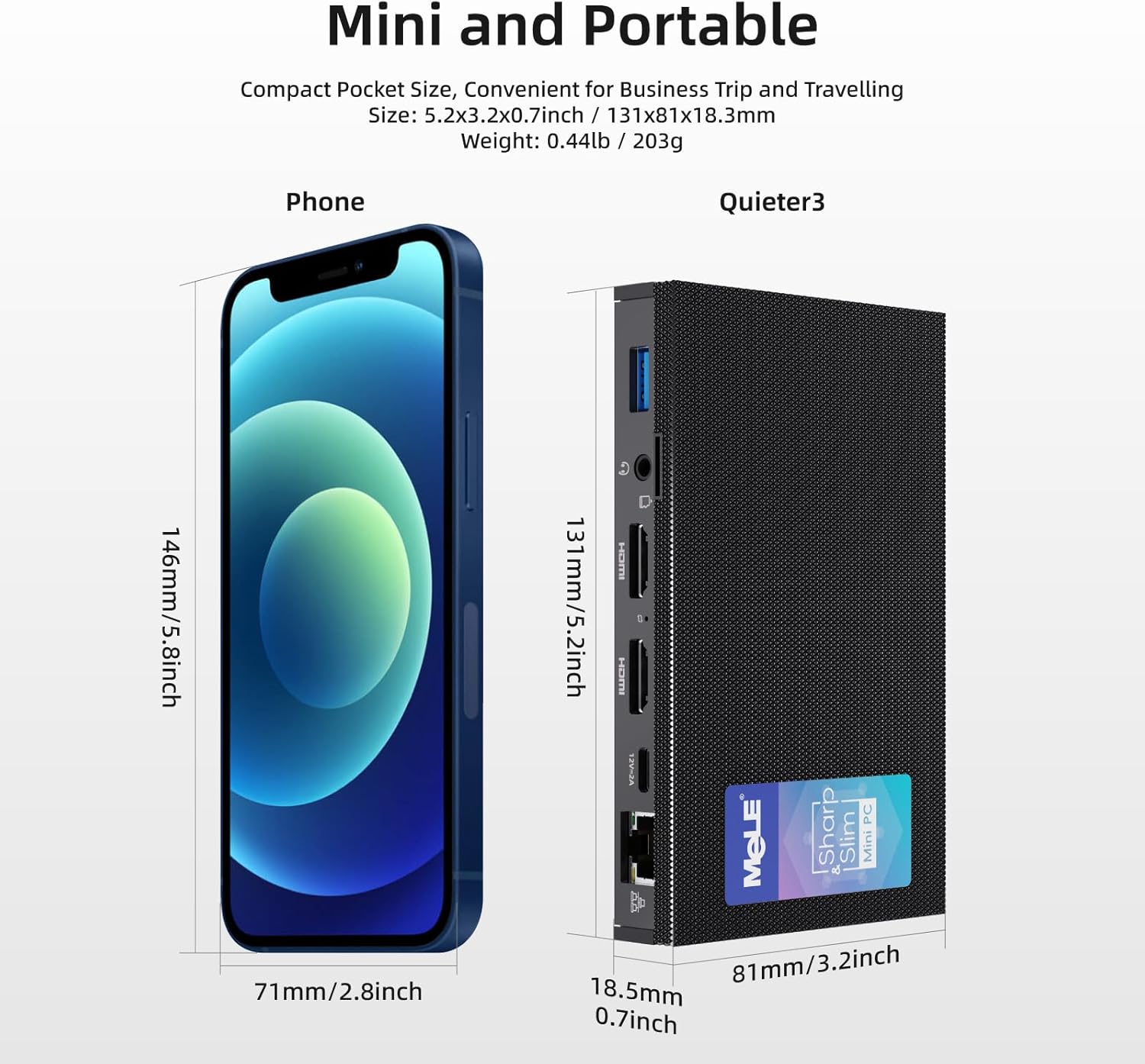
The MeLE Quieter3Q Mini PC is a compact and powerful computing device designed for various applications, including office work, education, home theater, and industrial IoT. This fanless mini PC features an Intel Celeron N5105 processor, 8GB DDR4 RAM, and a 128GB NVMe M.2 2280 SSD, running on Windows 11 Pro. Its small form factor allows for easy portability and flexible installation.
Le caratteristiche principali includono:
- Processore: Intel Celeron N5105 (up to 2.90 GHz) for efficient performance.
- Memoria e archiviazione: 8GB RAM and 128GB ROM, expandable up to 5TB via M.2 SSD (SATA/NVMe 2280).
- Display: Supports 4K UHD @60 Hz output via HDMI 2.0 for high-definition visuals.
- Connettività: Equipped with Wi-Fi 6.0 (802.11ax), Bluetooth 5.2, Gigabit Ethernet, and multiple USB 3.0 ports.
- Progetto: Fanless design for silent operation, Kensington lock slot for security, and support for Wake on LAN, PXE, Auto Power On, and RTC Wake.
2. Contenuto della confezione
Si prega di selezionare la casella per i seguenti elementi:
- 1x MeLE Quieter3Q Mini PC
- 1x Manuale utente
- 1 adattatore di alimentazione 12V 2A
- 1x VESA Mount Bracket
3. Prodotto finitoview (Ports and Components)
Familiarize yourself with the ports and components of your MeLE Quieter3Q Mini PC:
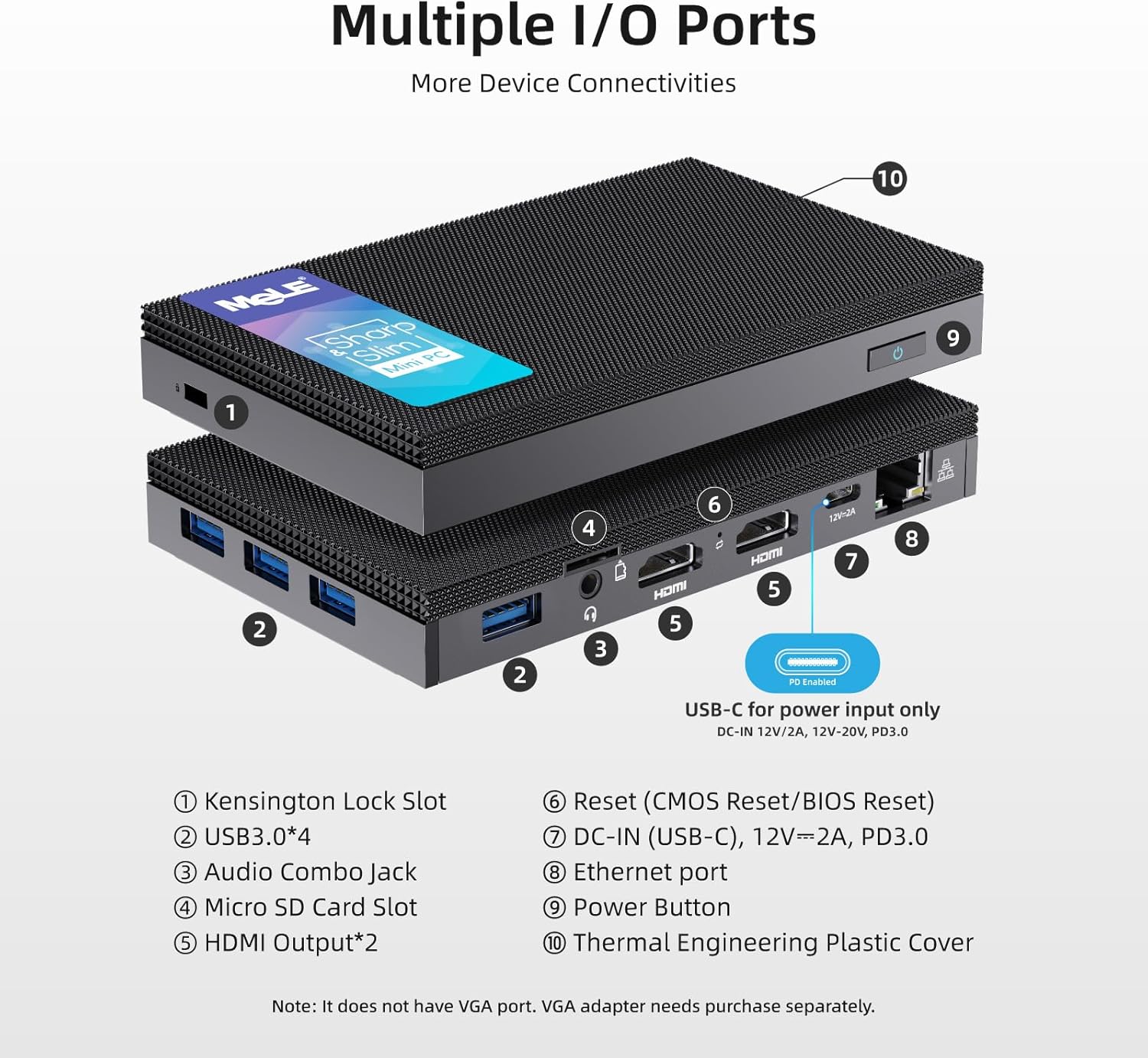
- Slot per blocco Kensington: Per proteggere il dispositivo.
- Porte USB 3.0 (x4): For connecting peripherals such as keyboards, mice, and external storage.
- Jack audio combinato: Per cuffie o microfoni.
- Slot per scheda microSD: Per ulteriore espansione dello spazio di archiviazione.
- Uscita HDMI (x2): Supports dual 4K display output.
- Reset Button (CMOS Reset/BIOS Reset): For system reset or BIOS access.
- DC-IN (USB-C), 12V=2A, PD3.0: Porta di ingresso alimentazione.
- Porta Ethernet: Per la connessione di rete cablata (Gigabit Ethernet).
- Pulsante di accensione: Per accendere/spegnere il dispositivo.
- Thermal Engineering Plastic Cover: The fanless design ensures silent operation.
4. Guida all'installazione
4.1 Connessione iniziale
- Connetti al display: Use an HDMI cable to connect the Mini PC to your monitor or TV. The device supports dual 4K displays.
- Connetti le periferiche: Collega la tastiera e il mouse USB alle porte USB 3.0 disponibili.
- Connetti alimentazione: Connect the 12V 2A power adapter to the DC-IN (USB-C) port on the Mini PC and then to a power outlet.
- Connessione di rete (facoltativa): For a wired connection, plug an Ethernet cable into the Ethernet port. For wireless, ensure your Wi-Fi network is available.
4.2 Installazione con montaggio VESA
The MeLE Quieter3Q Mini PC can be mounted on the back of a VESA-compatible monitor for a clutter-free setup. The included VESA mount supports 70mm, 75mm, 80mm, 85mm, and 100mm mounting hole distances.
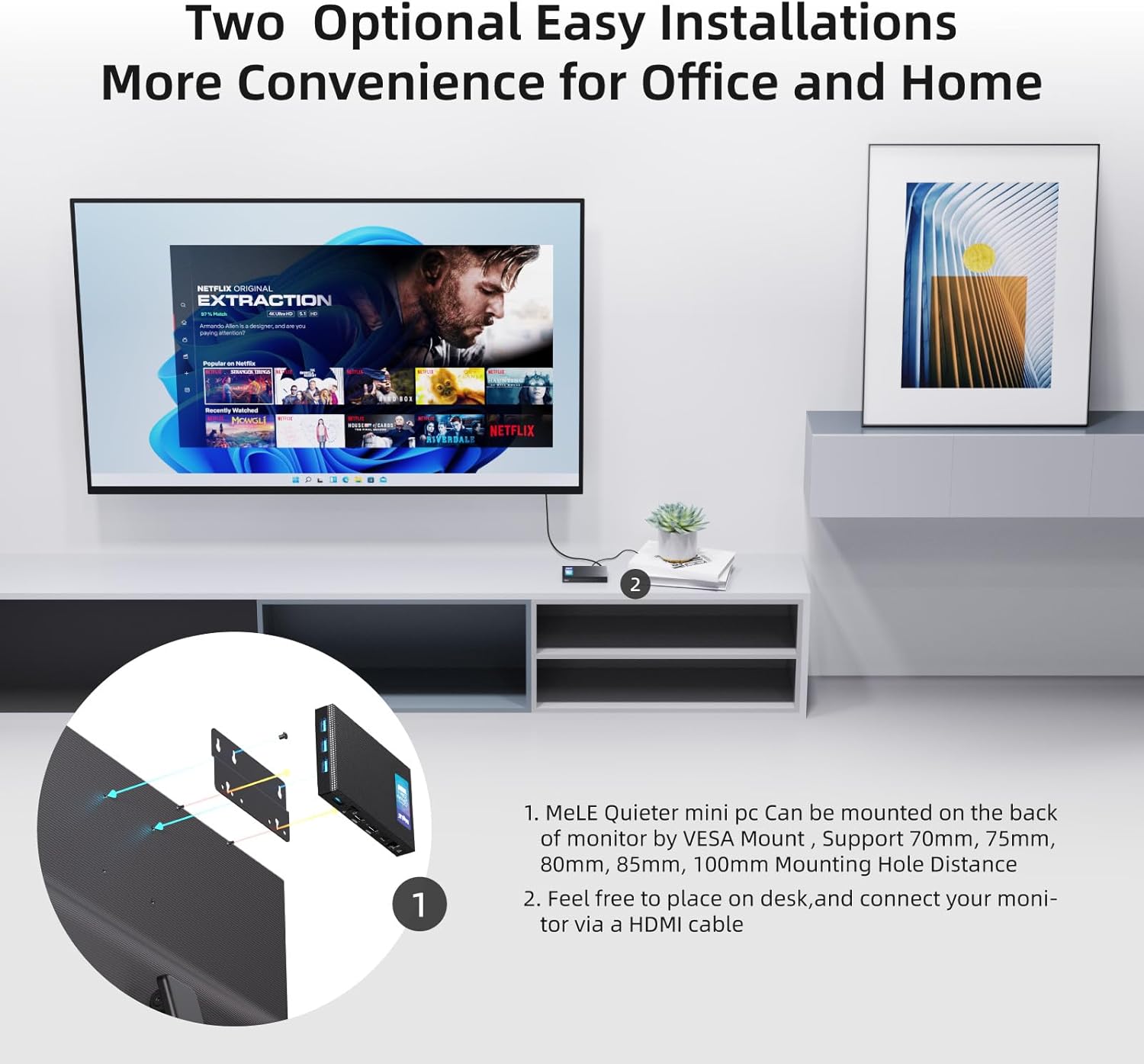
- Attach the VESA mount bracket to the back of your monitor using the appropriate screws.
- Slide the Mini PC onto the VESA mount bracket until it clicks securely into place.
5. Istruzioni per l'uso
5.1 Accensione/spegnimento
- Per accendere: Press the Power Button (9 in Figure 2). The device will boot into Windows 11 Pro.
- Per spegnere: Use the standard Windows shutdown procedure. Alternatively, press and hold the Power Button for a few seconds for a forced shutdown (not recommended for regular use).
5.2 Rete e connettività
The Mini PC supports both wired and wireless network connections, along with Bluetooth for peripheral devices.

- Wi-Fi 6.0 (802.11ax): Connect to your wireless network through the Windows settings. Supports 2.4GHz and 5GHz bands.
- Bluetooth 5.2: Pair Bluetooth-enabled devices like headphones, speakers, or game controllers via Windows Bluetooth settings.
- Gigabit: For a stable and high-speed wired internet connection, plug an Ethernet cable into the RJ45 port.
5.3 Espansione dello storage
The Mini PC comes with 128GB of internal storage and can be expanded significantly.
- Slot SSD M.2: The device includes an M.2 2280 slot for SATA or NVMe SSDs, allowing storage expansion up to 5TB (SSD not included).
- Slot per scheda microSD: Supports Micro SD cards up to 2TB for additional portable storage.

5.4 BIOS Settings and Advanced Features
- Accesso al BIOS: To enter BIOS settings, press the power button and repeatedly press F7 or Eliminare during startup. Select "Enter Setup" and press Entrare.
- Wake on LAN (WoL): Allows the PC to be woken up remotely over a network.
- Avvio PXE: Enables booting from a network server.
- Accensione automatica: Configures the PC to automatically power on after a power outage.
- Riattivazione RTC: Schedules the PC to wake up at a specific time.
- These features can be configured within the BIOS settings.
6. Manutenzione
The MeLE Quieter3Q Mini PC features a fanless design, which reduces dust accumulation and eliminates fan noise, contributing to its longevity and stable operation. To ensure optimal performance and extend the lifespan of your device, follow these general maintenance guidelines:
- Mantenere pulito: Pulire regolarmente l'esterno del Mini PC con un panno morbido e asciutto per rimuovere la polvere. Evitare di utilizzare detergenti liquidi direttamente sul dispositivo.
- Ventilazione: Ensure the device is placed in a well-ventilated area. Although fanless, proper airflow helps dissipate heat. Do not block the ventilation holes.
- Temperatura: Operate the Mini PC within recommended temperature ranges. Avoid extreme heat or cold.
- Aggiornamenti software: Keep your operating system (Windows 11 Pro) and drivers updated to ensure security and optimal performance.
- Backup dei dati: Eseguire regolarmente il backup dei dati importanti su un'unità esterna o su un archivio cloud per evitare la perdita di dati.
7. Risoluzione Dei Problemi
7.1 Problemi comuni e soluzioni
- Storage Capacity Displayed Incorrectly:
Problema: The 128GB eMMC storage may display as approximately 114GB on the computer.
Motivo: This is due to the difference in how computer operating systems (1KB = 1024 bytes) and storage manufacturers (1KB = 1000 bytes) calculate storage capacity. The actual usable capacity is normal.
- 4K Performance Lagging:
Problema: 4K video playback or display performance may experience lag.
Motivo: 4K display performance is influenced by various factors, including network speed, HDMI cable quality, monitor settings, graphics card, video decoding method, and video format/resolution. While the Mini PC features integrated graphics, demanding 4K content might require a more powerful processor and dedicated graphics card for smooth hardware decoding.
Soluzione: If 4K video lags, consider reducing the display resolution to 1080p for smoother video playback. Ensure you are using high-quality HDMI cables.
- Nessuna uscita di visualizzazione:
Problema: The monitor shows no signal after powering on the Mini PC.
Soluzione:
- Verificare che il cavo HDMI sia collegato saldamente sia al Mini PC che al monitor.
- Ensure the monitor is set to the correct input source (HDMI 1, HDMI 2, etc.).
- Se disponibile, provare un altro cavo HDMI o un altro monitor.
- Ensure the power adapter is correctly connected and the power button is pressed.
- Il dispositivo non si accende:
Problema: The Mini PC does not respond when the power button is pressed.
Soluzione:
- Verify the power adapter is firmly connected to both the device and a working power outlet.
- Provare la presa di corrente con un altro dispositivo.
- If possible, try a different compatible 12V 2A power adapter.
8. Specifiche
| Caratteristica | Dettaglio |
|---|---|
| Marca | MELE |
| Numero di modello | Quieter 3Q 81E |
| Sistema operativo | Windows 11 Pro, Linux, Windows 10 |
| Modello CPU | Processore Intel Celeron N5105 |
| Velocità della CPU | 2 GHz (massimo 2.9 GHz) |
| Numero di processori | 4 |
| Coprocessore grafico | Grafica Intel UHD |
| Dimensione della memoria RAM installata | 8 GB LPDDR4 |
| Velocità di memoria | 2933 MHz |
| Capacità di archiviazione | 128 GB (eMMC) |
| Tecnologia del disco rigido | Embedded Multi Media Card (eMMC) |
| Espansione di archiviazione | 1x M.2 2280 SSD slot (SATA/NVMe up to 5TB), Micro SD slot (up to 2TB) |
| Tecnologia senza fili | Wi-Fi 6 (802.11ax), Bluetooth 5.2 |
| Etereo | Ethernet gigabit (RJ45) |
| Porte USB | 4x USB 3.0 |
| Uscita video | 2x HDMI (4K@60Hz max resolution: 4096x2160 Pixels) |
| Uscita audio | Jack combinato audio |
| Consumo energetico | 24 Watt |
| Dimensioni | Dimensioni: 6.4 x 15.5 x 10.9 cm |
| Metodo di raffreddamento | Fanless (Air) |
| Caratteristiche speciali | USB-C function, Unlocked BIOS, Wake On LAN, PXE Boot, RTC Wake, Auto Power On |
9. Garanzia e supporto
9.1 Informazioni sulla garanzia
MeLE provides the following warranty and support for your Quieter3Q Mini PC:
- Sostituzione gratuita: Sostituzione gratuita per 3 mesi.
- Periodo di garanzia: Garanzia di 12 mesi dalla data di acquisto.
- Servizio a vita: MeLE offers lifetime service for its products.
9.2 Assistenza clienti
For technical assistance, service inquiries, or further support, please contact MeLE customer service:
- E-mail: Service@mele.cn
- Tempo di risposta: Customer service typically responds within 24 hours.
- Risorse online: Visita mele.cn for support, drivers, downloads, and community forums.
9.3 Informazioni sulla sicurezza
MeLE has a global partnership agreement with Microsoft, ensuring that Windows 10/11 Pro and Home OS are officially licensed. The manufacturing of MeLE products complies with international standards such as FCC, UL, UKCA, CE, GS, CCC, PSE, Giteki, and RCM.
Ask a question about this manual
Ask about setup, troubleshooting, compatibility, parts, safety, or missing instructions. Manuals+ will review the question and use this page’s manual context to help answer it.