
1. Introduzione
This manual provides detailed instructions for the assembly, usage, and maintenance of your Elephance Large L-Shaped Computer Desk with Shelves. Designed for versatility, this desk is suitable for home offices, gaming setups, and general workstations, offering ample space and integrated storage solutions.

Image: The Elephance Large L-Shaped Computer Desk in Beech, showcasing its spacious design and integrated shelving for a multi-monitor setup.
2. Installazione e assemblaggio
Careful assembly is crucial for the stability and longevity of your desk. Please follow these steps and refer to the provided video for visual guidance.
2.1 Disimballaggio e identificazione dei componenti
- Disimballare con cura tutti i componenti e disporli su una superficie pulita e morbida per evitare graffi.
- Identify each part using the included parts list. Ensure all hardware (screws, hex bolts, adjustable leg pads) and panels are present.
2.2 Assemblaggio del telaio
- Attach the adjustable leg pads to the bottom of the desk frames.
- Assemble the metal frames using the provided hex bolts and hex key. Insert all screws loosely at first.
- Connect the frame sections, ensuring proper alignment.
- Once all frame components are in place, gradually tighten all hex bolts. Avoid over-tightening until the entire frame is assembled to allow for minor adjustments.
2.3 Desktop Panel Installation
- Place the middle desktop panel onto the assembled frame, aligning the pre-drilled holes.
- Insert the wooden dowels into the corresponding holes to secure the middle panel.
- Place the two side desktop panels onto the frame, ensuring they align with the middle panel and the frame.
- Secure the desktop panels to the frame using the remaining screws. Fully tighten all screws once all panels are correctly positioned and flush.
2.4 Installazione dello scaffale
- Install the two-tier open shelves on both sides of the desk. These shelves offer flexible storage.
- The middle shelf on each side can be removed to accommodate larger items, such as a computer tower.
Video: Desk Installation Instructions. This video provides a visual guide for assembling your Elephance L-Shaped Computer Desk, demonstrating each step from unpacking to final tightening.
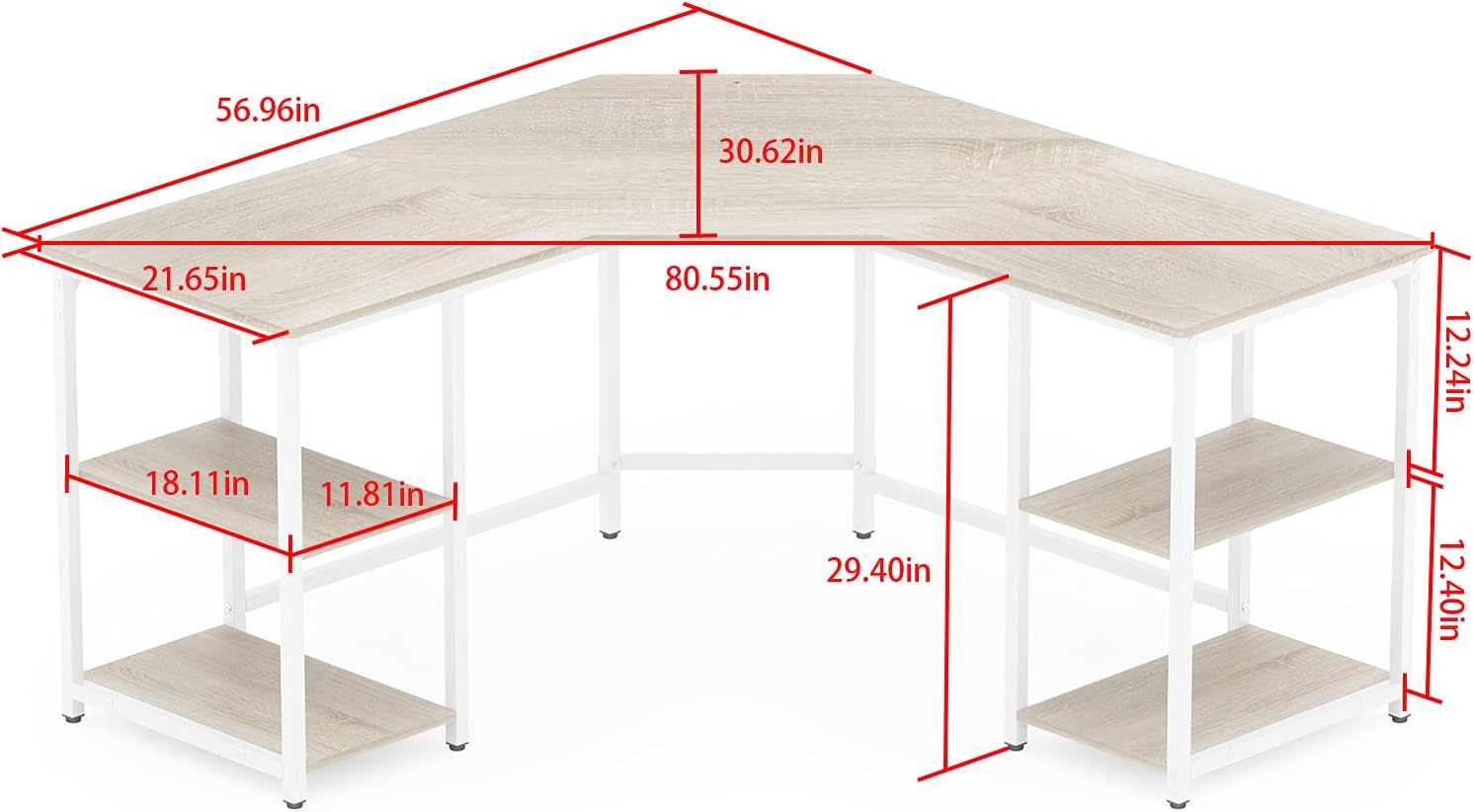
Image: A detailed diagram illustrating the dimensions of the Elephance L-Shaped Computer Desk, including the desktop and shelf measurements.
3. Utilizzo
The Elephance L-Shaped Computer Desk is designed to maximize your workspace and enhance productivity, whether for work, study, or gaming.
3.1 Spacious Workstation
The full L-shape design fits snugly into corners, providing an expansive surface for multiple monitors, laptops, and other office essentials. The beveled edge in the middle offers additional working space, promoting comfort and efficiency.

Image: The L-shaped desk configured in an office environment, demonstrating its capacity for a computer setup and various work materials.
3.2 Archiviazione integrata
Two 2-tier open shelves are located on each side of the desk, perfect for organizing books, documents, and other supplies. The middle shelf on either side can be easily removed to create space for a large computer chassis or other tall items.

Image: A visual representation of the desk's removable two-tier shelves, highlighting their flexibility for storing various items, including a PC tower.
3.3 Monitor Mount Compatibility
The desk includes a pre-drilled hole (Diameter 0.39'') for convenient installation of a monitor mount, allowing for ergonomic screen positioning and freeing up desktop space.
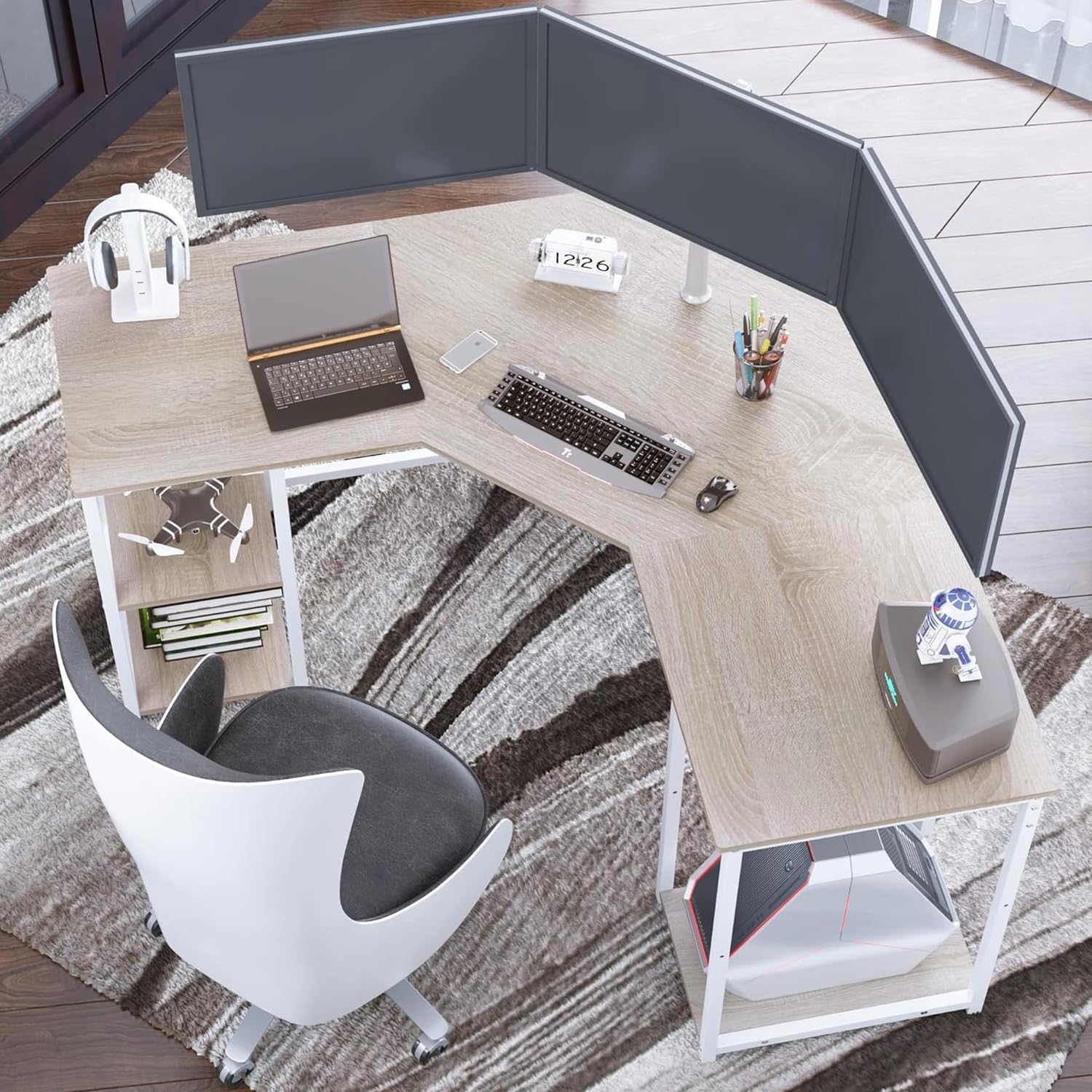
Image: The L-shaped desk featuring a monitor mount, illustrating how the pre-drilled hole facilitates a clean and organized setup.
4. Manutenzione
To ensure your Elephance desk remains in excellent condition, follow these simple maintenance guidelines:
- Pulizia: Pulisci la superficie della scrivania con un panno morbido eamp cloth. Avoid harsh chemicals or abrasive cleaners that could damage the finish. The desk surface is designed to be waterproof and easy to clean.
- Fuoriuscite: Promptly clean up any spills to prevent staining or damage to the engineered wood surface.
- Protezione: Utilizzare sottobicchieri per le bevande e cuscinetti protettivi sotto gli oggetti caldi o appuntiti per evitare segni e graffi.
- Controllo di stabilità: Controllare periodicamente tutte le viti e i bulloni per assicurarsi che siano ben serrati. Serrarli nuovamente se necessario per mantenere la stabilità della scrivania.
- Distribuzione del peso: Distribute weight evenly across the desktop and shelves. Avoid placing excessively heavy items on one section.

Immagine: un primo piano view highlighting the quality of the CARB P2 Class particle board and the sturdy metal frame, indicating the desk's robust construction.
5. Risoluzione Dei Problemi
Se si riscontrano problemi durante il montaggio o l'uso, fare riferimento alle seguenti soluzioni comuni:
5.1 Problemi di assemblaggio
- Parts not fitting/Gaps between boards: Ensure all screws are only hand-tightened during initial assembly. This allows for flexibility to adjust components. Once all parts are in place and aligned, then fully tighten all screws. If there are still gaps, slightly loosen screws, adjust the position, and re-tighten.
- Hardware mancante: Double-check the packaging and parts list. If any hardware is genuinely missing, contact customer support.
5.2 Problemi di stabilità
- Scrivania traballante: Ensure all assembly screws are securely tightened. Verify that the adjustable leg pads are properly installed and adjusted to compensate for uneven floor surfaces.
- Sovraccarico: Do not exceed the recommended weight capacity of the desk (450 lbs). Distribute heavy items evenly.
5.3 Sicurezza generale
Always follow the assembly instructions carefully. This desk is large and sturdy, so ensure it is properly assembled and stable. Do not place heavy objects on the desk that could cause it to tip over.
6. Specifiche
| Caratteristica | Dettaglio |
|---|---|
| Marca | Elephance |
| Dimensioni del prodotto | 21.65"P x 56.96"L x 29.5"A |
| Colore | Faggio |
| Stile | Gioco d'azzardo |
| Materiale di base | Legno ingegnerizzato |
| Tipo di materiale superiore | Legno ingegnerizzato |
| Tipo di finitura | Di legno |
| Caratteristica speciale | Regolabile (cuscinetti per le gambe) |
| Tipologia di camera | Ufficio |
| Peso dell'articolo | 65 libbre |
| Numero di ripiani | 4 (2 two-tier open shelves) |
| Assemblaggio richiesto | SÌ |
| Altezza massima | 29.5 pollici |
| Lunghezza diagonale della superficie di lavoro | 61.9 pollici |
7. Garanzia e supporto
For customer support regarding your Elephance L-Shaped Computer Desk, please refer to the seller's contact information on the platform where the purchase was made. Specific warranty details may vary by retailer; please consult your purchase documentation for more information.
The product is generally returnable within a specified period, typically until January 31, 2026, for purchases made during the holiday season. Always check the current return policy with your retailer.