
Sharp DR-P420(BK)
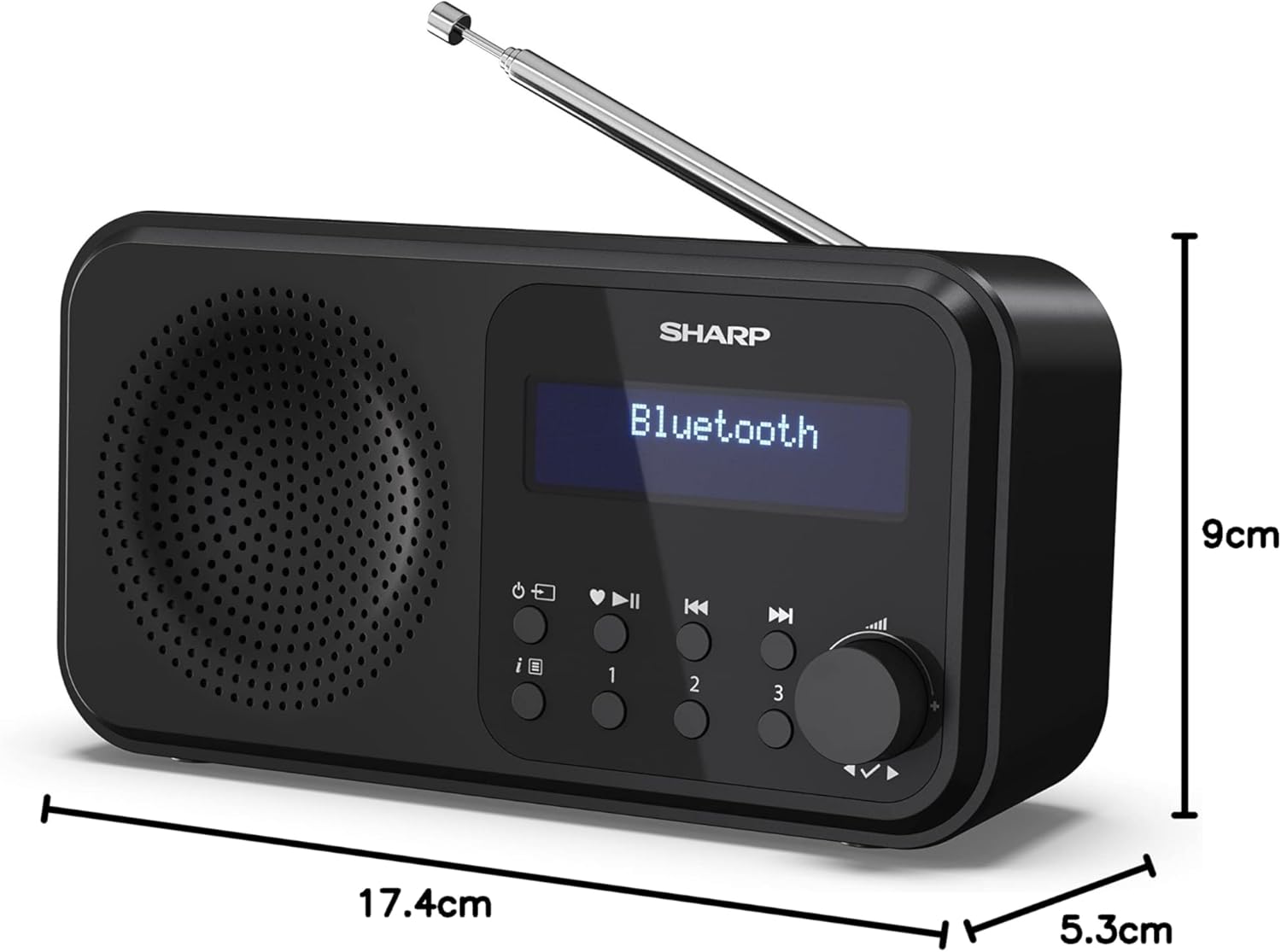
SHARP DR-P420(BK) Tokyo Portable Digital Radio
Manuale di istruzioni per l'utente
Introduzione
The SHARP DR-P420(BK) Tokyo Portable Digital Radio offers a versatile listening experience with its DAB+ and FM radio capabilities, alongside Bluetooth 5.0 for wireless streaming. Designed for portability, it can be powered via USB or batteries, making it suitable for various environments. This manual provides detailed instructions for setting up, operating, and maintaining your radio.
Cosa c'è nella scatola
- Main unit (SHARP DR-P420(BK) Radio)
- USB to Micro USB power cable
- Documentazione utente

Impostare
Accensione del dispositivo
The DR-P420(BK) radio offers flexible power options:
- Alimentazione USB: Connect the supplied USB to Micro USB cable to the radio's Micro USB port and plug the other end into a compatible USB power adapter (not supplied) or a powered USB port.
- Potenza della batteria: For portable use, insert four AA batteries (not supplied) into the battery compartment located on the back of the unit. Ensure correct polarity.
Configurazione iniziale e messa a punto
Upon first power-on, the radio will typically perform an automatic scan for available DAB+ and FM stations. Ensure the telescopic antenna is fully extended for optimal reception.
- Estendere l'antenna telescopica.
- Premere il pulsante di accensione per accendere la radio.
- The radio will automatically scan for DAB+ stations. Once complete, it will display the first available station.
- To switch between DAB+ and FM modes, press the 'Mode' button.
- For manual tuning or rescanning, refer to the 'Operating Instructions' section.

Istruzioni per l'uso
DAB+/FM Radio Operation
- Modalità di commutazione: Press the 'Mode' button to toggle between DAB+ and FM radio.
- Selezione della stazione: In DAB+ mode, use the navigation buttons to browse available stations. In FM mode, use the tuning knob or seek function to find stations.
- Salvataggio delle preimpostazioni: The radio supports up to 40 presets. Tune to your desired station, then press and hold one of the preset number buttons (1, 2, 3) or follow the manual's instructions for saving to other memory slots.
Connettività Bluetooth
The radio can connect wirelessly to your smartphone or tablet via Bluetooth 5.0.
- Press the 'Mode' button until 'Bluetooth' is displayed on the screen. The radio will enter pairing mode.
- On your device, enable Bluetooth and search for 'SHARP DR-P420(BK)'.
- Seleziona la radio dall'elenco per associarla. Una volta connessa, potrai riprodurre in streaming l'audio dal tuo dispositivo.

Dual Alarm and Sleep Timer
- Impostazione degli allarmi: Access the alarm settings through the menu to set up to two independent alarms. You can choose to wake up to a buzzer or your preferred radio station.
- Sveglia: The sleep timer allows you to set a duration after which the radio will automatically turn off, perfect for falling asleep to music or talk radio.
Uso delle cuffie
For private listening, plug any standard 3.5mm headphones into the headphone jack located on the side of the radio. The built-in speaker will automatically mute when headphones are connected.
Manutenzione
- Pulizia: Per pulire l'esterno della radio, utilizzare un panno morbido e asciutto. Non utilizzare detergenti abrasivi o solventi.
- Magazzinaggio: When not in use for extended periods, remove the batteries to prevent leakage and store the radio in a cool, dry place.
- Cura della batteria: Sostituire le batterie quando appare l'indicatore di batteria scarica. Smaltire le batterie usate in modo responsabile, nel rispetto delle normative locali.
Risoluzione dei problemi
| Problema | Possibile causa | Soluzione |
|---|---|---|
| La radio non si accende. | No power supply; batteries depleted or incorrectly inserted. | Check USB cable connection; replace batteries or ensure correct polarity. |
| Ricezione radiofonica scadente. | Antenna non estesa; area con segnale debole; interferenza. | Fully extend antenna; reposition radio; move away from other electronic devices. |
| Il dispositivo Bluetooth non si associa. | Radio not in pairing mode; device too far; Bluetooth already connected to another device. | Ensure radio is in Bluetooth pairing mode; bring devices closer; disconnect from other devices. |
| L'allarme non suona. | Sveglia non impostata correttamente; volume troppo basso. | Verify alarm settings (time, source, active); increase volume. |
Specifiche
| Caratteristica | Dettaglio |
|---|---|
| Numero di modello | DR-P420(BK) |
| Dimensioni del prodotto | 17.4L x 5.3W x 9H centimetri |
| Peso | 400 grammi |
| Tecnologia di connettività | Bluetooth 5.0 |
| Tecnologia sintonizzatore | DAB+, FM |
| Fonte di alimentazione | USB or Battery Powered (4x AA) |
| Caratteristiche speciali | Portable, Lightweight, Dual Alarm, 40 Presets, 3.5mm Jack |
Garanzia e supporto
This SHARP product is covered by a manufacturer's warranty. Please refer to the included user documentation for specific warranty terms and conditions applicable to your region. For technical support, troubleshooting assistance, or warranty claims, please contact Sharp Customer Service.
You can find more information and support resources on the official Sharp websito o visitando il Sharp Store su Amazon.
Ask a question about this manual
Ask about setup, troubleshooting, compatibility, parts, safety, or missing instructions. Manuals+ will review the question and use this page’s manual context to help answer it.