
1. Introduzione
This manual provides essential instructions for the installation, operation, and maintenance of your Chieftec Scorpion 3 White ATX Case (Model GL-03W-OP). Please read this manual thoroughly before beginning assembly to ensure proper setup and to maximize the lifespan of your product.
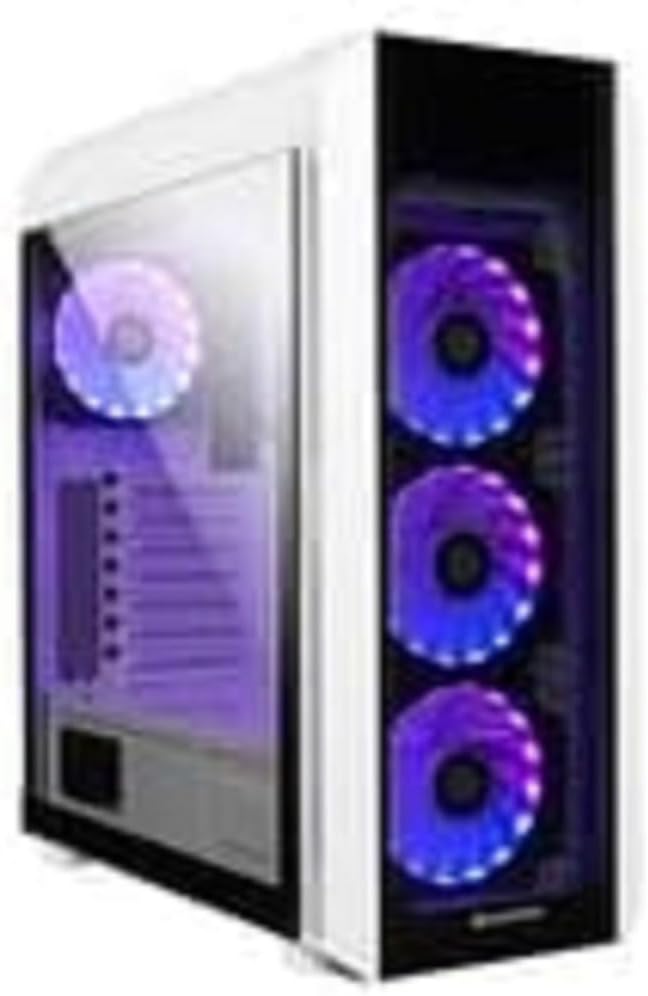
Figura 1: The Chieftec Scorpion 3 White ATX Case, showcasing its white exterior, tempered glass side panel, and three front-mounted, illuminated cooling fans. A single illuminated fan is visible at the rear.
2. Configurazione e installazione dei componenti
This section guides you through the process of installing your computer components into the Chieftec Scorpion 3 White ATX Case.
2.1. Preparazione
- Ensure you have all necessary components: motherboard, CPU, RAM, graphics card, storage drives, and power supply unit (PSU).
- Gather tools: Phillips head screwdriver, zip ties for cable management.
- Lavorare su una superficie pulita e priva di elettricità statica. Si consiglia di utilizzare un braccialetto antistatico.
2.2. Apertura della custodia
- Carefully remove the side panels. Typically, the tempered glass side panel is secured with thumbscrews at the rear.
- Set the panels aside on a soft, non-abrasive surface to prevent scratches.
2.3. Installazione dell'unità di alimentazione (PSU)
- The Chieftec Scorpion 3 supports rear-mount PSUs.
- Inserire l'alimentatore nell'apposito alloggiamento nella parte inferiore posteriore del case.
- Secure the PSU with screws from the exterior rear of the case.
2.4. Installazione della scheda madre
- Installare la schermatura I/O nel ritaglio sul retro del case.
- Align your ATX motherboard with the pre-installed standoffs.
- Carefully place the motherboard onto the standoffs and secure it with screws.
2.5. Installazione dell'unità di archiviazione
- Locate the drive bays for 2.5" SSDs and 3.5" HDDs.
- Install your storage drives into the appropriate bays and secure them.
2.6. Scheda grafica e schede di espansione
- Rimuovere le coperture degli slot PCIe necessari dalla parte posteriore del case.
- Insert your graphics card or other expansion cards into the motherboard's PCIe slots and secure them with screws.
2.7. Gestione dei cavi
- Route all cables (PSU, data, front panel) through the designated cutouts to the rear of the motherboard tray.
- Use zip ties or Velcro straps to bundle and secure cables for improved airflow and aesthetics.
2.8. Chiusura del caso
- Once all components are installed and cables managed, reattach the side panels.
- Secure the tempered glass panel with its thumbscrews.
3. Funzionamento del caso
The Chieftec Scorpion 3 White ATX Case provides the housing and cooling for your PC components. Its operation primarily involves the use of the front panel controls and integrated cooling system.
3.1. Controlli del pannello frontale
- Pulsante di accensione: Press to turn on or off your computer.
- Pulsante di reset: Press to restart your computer.
- Porte USB: Collega i dispositivi USB.
- Jack audio: Collegare cuffie e microfoni.
3.2. Sistema di raffreddamento
The case is equipped with multiple fan mounts and pre-installed 120mm fans to ensure optimal airflow.
- Ensure all fans are properly connected to your motherboard or a fan controller.
- Monitor system temperatures using software to ensure adequate cooling.
- The illuminated fans provide aesthetic appeal and can often be controlled via motherboard software for RGB lighting effects.
4. Manutenzione
Regular maintenance helps ensure optimal performance and longevity of your Chieftec Scorpion 3 White ATX Case and its components.
4.1. Pulizia della polvere
- Frequenza: Clean dust filters and interior components every 3-6 months, or more frequently in dusty environments.
- Filtri antipolvere: The case features removable dust filters (e.g., top, front, bottom). Gently remove and clean them with water and mild soap, or use a vacuum cleaner. Ensure they are completely dry before reinstallation.
- Interno: Use compressed air to blow dust out of fans, heatsinks, and other components. Hold fan blades gently to prevent over-spinning.
4.2. Pulizia esterna
- Pulire le superfici esterne con un panno morbido, damp panno. Evitare detergenti abrasivi o solventi.
- Per il pannello in vetro temperato, utilizzare un detergente per vetri e un panno in microfibra per evitare la formazione di aloni.
5. Risoluzione Dei Problemi
This section addresses common issues you might encounter with your PC build within the Chieftec Scorpion 3 White ATX Case.
5.1. Il sistema non si accende
- Controllare i collegamenti di alimentazione: Ensure the PSU is switched on and all power cables (24-pin ATX, 8-pin CPU, PCIe power) are securely connected to the motherboard and components.
- Connettori del pannello frontale: Verify that the front panel power switch cable is correctly connected to the motherboard's front panel header. Refer to your motherboard manual for the correct pinout.
- Funzionalità dell'alimentatore: Se possibile, testare l'alimentatore in modo indipendente oppure provare un alimentatore sicuramente funzionante.
5.2. Fans Not Spinning or RGB Not Lighting Up
- Collegamenti della ventola: Assicurarsi che tutti i cavi di alimentazione delle ventole siano collegati saldamente ai connettori delle ventole della scheda madre o a un controller delle ventole.
- Connessioni RGB: If applicable, verify that RGB cables are connected to the correct RGB headers on the motherboard or a dedicated RGB controller.
- Controllo software: Check your motherboard's BIOS/UEFI settings or dedicated fan/RGB control software for fan speed and lighting settings.
5.3. Scarso flusso d'aria o temperature elevate
- Accumulo di polvere: Pulire i filtri antipolvere e i componenti interni come descritto nella sezione Manutenzione.
- Orientamento della ventola: Ensure fans are oriented correctly for optimal airflow (e.g., front fans as intake, rear/top fans as exhaust).
- Gestione dei cavi: Migliorare la gestione dei cavi per ridurre gli ostacoli al flusso d'aria.
6. Specifiche
Detailed technical specifications for the Chieftec Scorpion 3 White ATX Case (Model GL-03W-OP).
| Caratteristica | Dettaglio |
|---|---|
| Marca | Capotecnico |
| Serie | Scorpion 3 White |
| Numero di modello | GL-03W-OP |
| Tipo di caso | Mid Tower |
| Compatibilità della scheda madre | ATX |
| Materiale | Plastica acrilonitrile butadiene stirene (ABS). |
| Colore | Black (Note: Product name indicates White, but specification lists Black. Please verify product color upon receipt.) |
| Peso dell'articolo | 2.2 libbre |
| Dimensioni del prodotto (LxWxH) | 19.69 x 19.69 x 11.02 pollici |
| Tipo di montaggio dell'alimentatore | Montaggio posteriore |
| Metodo di raffreddamento | Aria |
| Dimensioni della ventola | 120 Millimeters (pre-installed fans) |
Note: Specifications are subject to change without prior notice. Please refer to the manufacturer's official websito per le informazioni più aggiornate.
7. Informazioni sulla garanzia
Chieftec products are manufactured to high-quality standards. For specific warranty terms and conditions applicable to your Chieftec Scorpion 3 White ATX Case (Model GL-03W-OP), please refer to the warranty card included with your product or visit the official Chieftec websito.
Typically, product warranties cover defects in materials and workmanship under normal use. Damage resulting from improper installation, accident, abuse, modification, or unauthorized repair is generally not covered.
8. Assistenza clienti
Should you encounter any issues or have questions regarding your Chieftec Scorpion 3 White ATX Case, please contact Chieftec customer support.
- Supporto online: Visit the official Chieftec websito per FAQ, download di driver e risorse di supporto.
- Informazioni sui contatti: Refer to the product packaging or Chieftec's official websito per i dettagli di contatto regionali (telefono, e-mail).
When contacting support, please have your product model (GL-03W-OP) and purchase information readily available.