
Introduzione
This manual provides detailed instructions for the MODESLAB 2 Pack 2.4 GHz Wireless USB SNES Controller Gamepad. It covers setup, operation, compatibility, and maintenance to ensure optimal performance and longevity of your controllers. Please read this manual thoroughly before first use.
Contenuto della confezione
The MODESLAB Wireless SNES Controller Gamepad package includes the following items:
- 2 x Wireless SNES-style Gamepads
- 2 x USB Receivers
- 2 x SNES Receivers

Image: Contents of the MODESLAB Wireless SNES Controller Gamepad package.
Compatibilità
The MODESLAB Wireless SNES Controller Gamepad is designed for broad compatibility with various systems. Please review le informazioni sulla compatibilità di seguito:
Sistemi supportati:
- PC Windows
- Apple Mac (iOS)
- Linux
- Lampone Pi
- Original Super Nintendo Entertainment System (SNES) / Super Famicom / Super Comboy / Super Nintendo
Sistemi non supportati:
- Scatola TV Android
- Commodore 64 (C64)
- Google Chromebook
- TV di fuoco di Amazon
- Steam (as a standalone platform)
- Modello Tesla
- Super NES Classic Edition (also known as Nintendo Classic Mini, Super Nintendo Classic Mini)

Image: Visual guide to system compatibility.
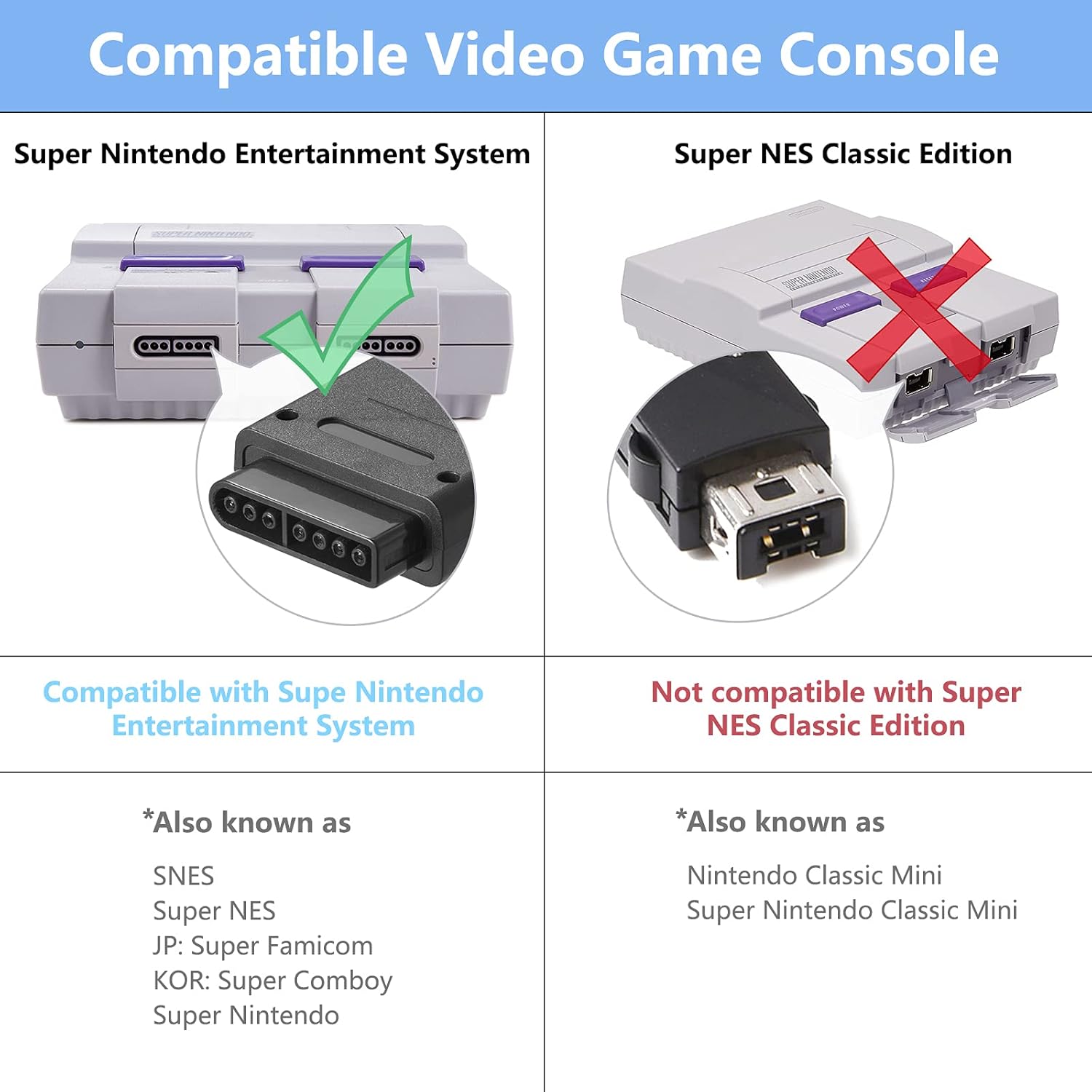
Image: Compatibility details for SNES consoles.
Impostare
Follow these steps to set up your MODESLAB Wireless SNES Controller Gamepad:
- Initial Controller Reset (Recommended for First Use or Pairing Issues): Before the first use, or if you encounter pairing difficulties, perform a controller reset. Simultaneously press and hold the SELEZIONARE, INIZIO, E D-PAD DOWN buttons on the controller for a few seconds. This action resets the controller's internal state.
- Connetti il ricevitore:
- For PC, Mac, Linux, or Raspberry Pi: Insert the Ricevitore USB into an available USB port on your device.
- For Original SNES Console: Insert the Ricevitore SNES into a controller port on your SNES console.
- Controller di accensione: Premere il tasto INIZIO button on the controller to power it on. The controller will automatically attempt to pair with the connected receiver.
- Conferma dell'associazione: Once successfully paired, the LED indicator on the controller will typically show a solid light, indicating a stable connection.

Image: Controller buttons for the reset procedure.
Istruzioni per l'uso
After successful setup, your MODESLAB Wireless SNES Controller Gamepad is ready for use.
- Accensione/spegnimento: Premere il tasto INIZIO button to power on the controller. To power off, hold the INIZIO button for a few seconds until the LED indicator turns off, or the controller will automatically power off after a period of inactivity to conserve battery.
- Modalità di gioco: Use the D-Pad for movement, and the A, B, X, Y, L, R, SELECT, and START buttons for in-game actions as defined by the game you are playing.
- Più controller: If using two controllers, ensure both receivers are connected to the system and each controller is paired individually.

Immagine: Example of two controllers in use with a SNES console.

Image: Controller in use during gameplay.
Informazioni sulla batteria
The MODESLAB Wireless SNES Controller Gamepad is equipped with a high-capacity rechargeable battery for extended gameplay.
- Capacità della batteria: 500mAh
- Tempo di gioco: Circa 16 ore con una carica completa.
- Ricarica: Connect the controller to a USB power source using a compatible charging cable (not explicitly listed in package contents, but implied for rechargeable devices). The LED indicator will typically show charging status and turn off or change color when fully charged.
- Risparmio energetico: The controller features intelligent power-saving technology to maximize battery life during periods of inactivity.

Image: Battery specifications and estimated playing time.
Manutenzione
Proper maintenance ensures the longevity and performance of your controllers:
- Pulizia: Use a soft, dry cloth to clean the surface of the controllers. Avoid using harsh chemicals or abrasive materials.
- Magazzinaggio: Conservare i controller in un luogo fresco e asciutto, lontano dalla luce solare diretta e da temperature estreme.
- Evitare gocce: Protect the controllers from drops and impacts, which can damage internal components.
- Ricarica: Non sovraccaricare la batteria. Scollegare il cavo di ricarica quando la batteria è completamente carica.
Risoluzione dei problemi
If you encounter issues with your MODESLAB Wireless SNES Controller Gamepad, refer to the following common solutions:
- Il controller non si associa:
- Ensure the receiver is securely plugged into the correct port (USB for PC/Mac/Linux/Raspberry Pi, SNES port for SNES console).
- Perform the controller reset procedure: Press and hold SELECT + START + D-PAD DOWN simultaneamente.
- Ensure the controller is charged. Connect it to a power source and try again.
- Try a different USB port or SNES port.
- Input Lag o disconnessioni:
- Ensure the controller is within range of the receiver (typically up to 10 meters, but can be affected by obstacles).
- Ridurre al minimo le interferenze provenienti da altri dispositivi wireless a 2.4 GHz.
- Assicurarsi che la batteria del controller sia sufficientemente carica.
- I pulsanti non rispondono:
- Perform the controller reset.
- Verificare che il controller sia associato correttamente.
- Assicurati che il gioco o l'applicazione supporti l'input del controller.
Specifiche
| Caratteristica | Dettaglio |
|---|---|
| Numero di modello | B09YYB7DQW |
| Connettività | Wireless a 2.4 GHz |
| Capacità della batteria | 500mAh |
| Tempo di gioco stimato | 16 ore |
| Dimensioni del pacco | 6.38 x 6.22 x 2.52 pollici |
| Peso dell'articolo | 10.5 once |
| Prima data disponibile | 27 aprile 2022 |
Garanzia e supporto
MODESLAB products are designed for reliability and performance. For any questions, technical support, or warranty inquiries, please refer to the seller's contact information or the platform where the product was purchased. Please retain your proof of purchase for warranty claims.