
1. Introduzione
Grazie per l'acquistoasing the ZEBRONICS Sound Bomb 7 True Wireless Stereo (TWS) Earbuds. This manual provides detailed instructions for setting up, operating, and maintaining your earbuds to ensure optimal performance and longevity. Please read this manual carefully before use.
2. Contenuto della confezione
Il pacchetto include i seguenti articoli:
- Earbuds - 2 Units (Left and Right)
- Charging Case - 1 Unit
- Eartips - 4 Units (various sizes)
- Type-C Charging Cable - 1 Unit
- QR User Guide (digital access)
3. Prodotto finitoview
The ZEBRONICS Sound Bomb 7 earbuds are designed for a comfortable fit and high-quality audio experience. They feature touch controls, a portable charging case, and support for voice assistants.

Image: The ZEBRONICS Sound Bomb 7 TWS earbuds shown with their open charging case.

Image: A collage highlighting key features: Touch Control, 13mm Drivers, Splash Proof design, Portable Charging Case, Voice Assistant support, and Bluetooth v5.2 with Flash Connect.
4. Impostazione
4.1 Carica iniziale
Before first use, ensure both the earbuds and the charging case are fully charged. Remove any protective stickers from the earbud charging contacts.
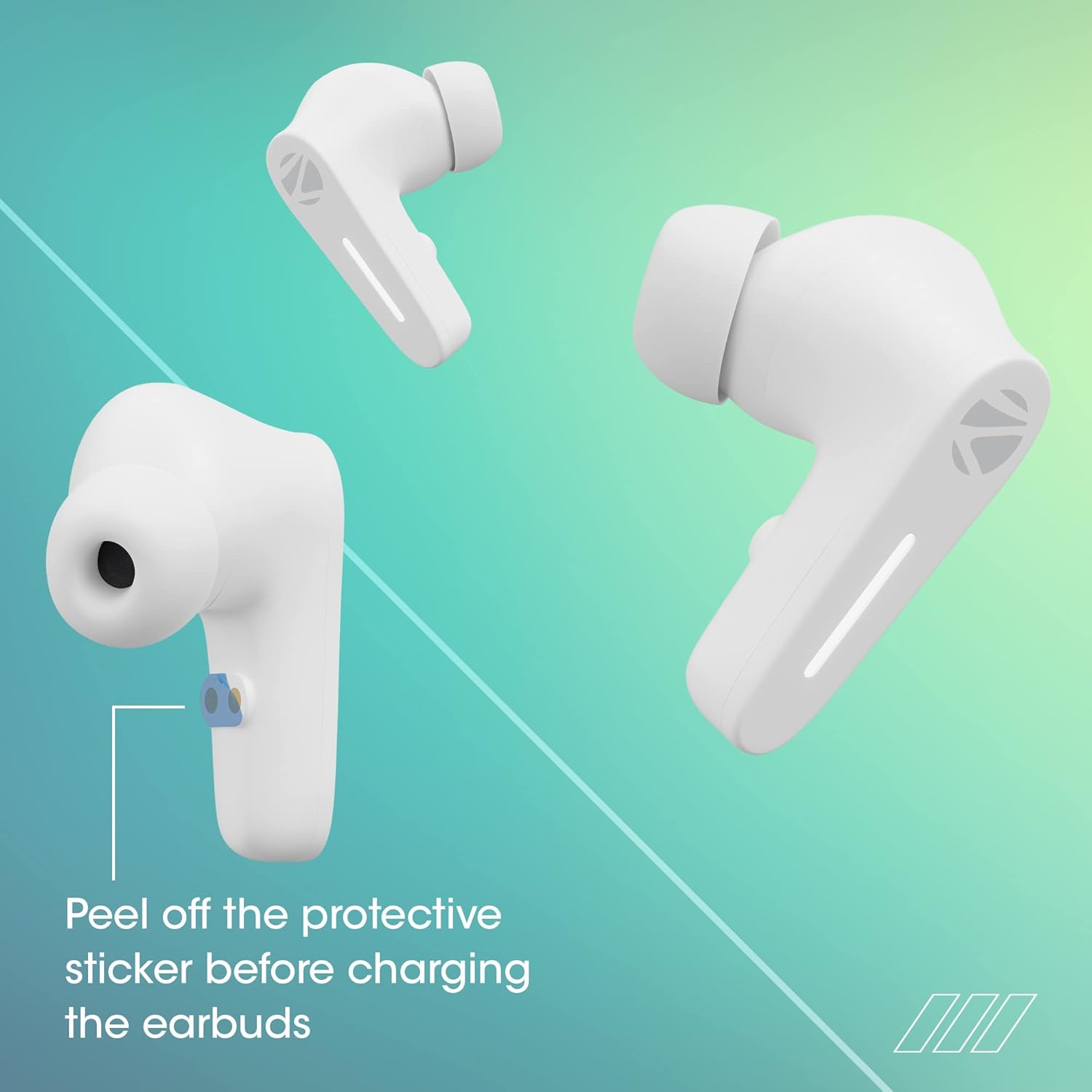
Image: Illustration showing the protective sticker on the earbud charging contacts that needs to be removed before charging.
- Posiziona entrambi gli auricolari nella custodia di ricarica.
- Collegare il cavo di ricarica Type-C alla porta di ricarica sulla custodia e a una fonte di alimentazione USB.
- Gli indicatori LED sulla custodia mostreranno lo stato di carica.
- A full charge typically takes approximately 1 hour for the case and earbuds.
The Sound Bomb 7 features Carica rapida, providing up to 180 minutes of playback with just 10 minutes of charging.

Image: A visual representation of the rapid charge feature and the Type-C charging port on the earbud case.
4.2 Associazione Bluetooth
Associa gli auricolari al tuo dispositivo per ottenere l'audio wireless.
- Open the charging case. The earbuds will automatically power on and enter pairing mode (Flash Connect feature).
- Sul tuo smartphone o dispositivo abilitato Bluetooth, vai alle impostazioni Bluetooth.
- Cercare available devices and select "ZEB-SOUND BOMB 7" from the list.
- Una volta effettuata la connessione, sentirai un tono di conferma.
- Se il Bluetooth è abilitato sul dispositivo, gli auricolari si riconnetteranno automaticamente all'ultimo dispositivo associato quando vengono estratti dalla custodia.

Image: An illustration demonstrating the Flash Connect feature, where opening the case initiates quick pairing with a smartphone.
5. Istruzioni per l'uso
5.1 Comandi touch
Gli auricolari sono dotati di comandi touch intuitivi per varie funzioni:
- Singolo tocco: Riproduci/Metti in pausa la musica, rispondi/termina le chiamate.
- Doppio tocco (auricolare sinistro): Traccia precedente.
- Doppio tocco (auricolare destro): Traccia successiva.
- Triple Tap (Left/Right Earbud): Attiva l'assistente vocale.
- Long Press (Left/Right Earbud for 2 seconds): Rifiuta chiamata in arrivo.
- Long Press (Left/Right Earbud for 3 seconds): Toggle Gaming Mode (Low Latency).
5.2 Modalità di gioco (bassa latenza)
Activate Gaming Mode for a low-latency audio experience, ideal for gaming. Long press either earbud for 3 seconds to toggle this mode on or off.

Image: A visual depicting the earbuds in Gaming Mode, emphasizing low latency and the 13mm audio drivers.
5.3 Assistente vocale
Access your smartphone's voice assistant (Siri or Google Assistant) by triple-tapping either earbud. This allows for hands-free control of your device.

Image: Icons for "Hey Siri" and "Google Assistant" indicating support for voice assistant functionality.
5.4 Cancellazione del rumore ambientale (ENC)
The earbuds feature Environmental Noise Cancellation (ENC) for clearer call quality by reducing ambient noise during conversations.

Image: A graphic illustrating the Environmental Noise Cancellation feature, showing sound waves being reduced around an earbud.
6. Manutenzione
Una cura adeguata garantisce la longevità degli auricolari.
- Pulizia: Utilizzare un panno morbido e asciutto per pulire gli auricolari e la custodia di ricarica. Non utilizzare prodotti chimici aggressivi o materiali abrasivi.
- Resistenza all'acqua: The earbuds are splash-proof/sweat-proof. Avoid submerging them in water or exposing them to heavy rain.
- Magazzinaggio: Quando non li usi, riponi gli auricolari nella custodia di ricarica per proteggerli e mantenerli carichi.
- Temperatura: Evitare di esporre gli auricolari a temperature estreme (calde o fredde).

Image: An earbud being splashed with water, illustrating its splash-proof design.
7. Risoluzione Dei Problemi
Se riscontri problemi, prova le seguenti soluzioni:
| Problema | Soluzione |
|---|---|
| Gli auricolari non si accoppiano |
|
| Un solo auricolare funzionante |
|
| Volume basso o scarsa qualità del suono |
|
| La custodia di ricarica non si ricarica |
|
8. Specifiche
| Caratteristica | Dettaglio |
|---|---|
| Nome del modello | ZEB-BOMBA SUONO 7 |
| Tecnologia di connettività | Bluetooth 5.2 |
| Tecnologia di comunicazione wireless | Bluetooth |
| Posizionamento dell'orecchio | Nell'orecchio |
| Fattore di forma | Nell'orecchio |
| Tipo di controllo | Controllo vocale, controllo touch |
| Metodo di controllo | Tocco |
| Controllo del rumore | Cancellazione del rumore ambientale (ENC) |
| Dimensioni del conducente | 13mm |
| Tempo di ricarica | Circa 1 ora (auricolari e custodia) |
| Tempo di gioco | Fino a 60 ore (con custodia di ricarica, al 50% del volume) |
| Carica rapida | 10 min charge for 180 min use |
| Modalità di gioco | Bassa latenza di 50 ms |
| Livello di resistenza all'acqua | Water Resistant (Splash Proof/Sweat Proof) |
| Connettore | USB tipo C |
| Peso dell'articolo | 47 grammi |
| Dimensioni del prodotto | Dimensioni: 5.5 x 5.5 x 3.2 cm |
| Dispositivi compatibili | Laptops, Mobile Phones, Tablets, PC, Smart TVs, All Bluetooth Devices, iOS, Android |
9. Garanzia e supporto
Your ZEBRONICS Sound Bomb 7 TWS Earbuds come with a Garanzia di 1 anno dalla data di acquisto. La presente garanzia copre i difetti di fabbricazione in condizioni di normale utilizzo.
For warranty claims, technical support, or any product-related inquiries, please contact ZEBRONICS customer service. Keep your purchase receipt as proof of purchase.
You can find more information and support on the official ZEBRONICS websito: www.zebronics.com