
AIMILAR AB024
Manuale utente della bilancia da cucina digitale AIMILAR AB024
1. Introduzione
This manual provides instructions for the AIMILAR AB024 Digital Kitchen Food Scale. This scale is designed for precise measurement of food ingredients for cooking and baking. It features a maximum capacity of 22 pounds (10 kg) and measures in increments of 1 gram or 0.05 ounces. The scale includes a tare function, multiple unit conversions, an easy-to-read LED display, a tempered glass platform for simple cleaning, and a USB-C rechargeable battery.

Image 1: AIMILAR AB024 Digital Kitchen Food Scale. This image displays the top view of the scale, highlighting its sleek design, LED display, and 'UNIT' and 'ON/TARE' buttons. A USB-A to USB-C charging cable is shown alongside the scale.
2. Impostazione
- Disimballare la bilancia: Estrarre con cautela la bilancia e tutti gli accessori dalla confezione.
- Carica iniziale: Before first use, fully charge the scale using the provided USB-C cable. Connect the USB-C end to the scale's charging port and the USB-A end to a compatible power adapter (not included). The charging time is approximately 2.5 to 3 hours.
- Posizionamento: Place the scale on a hard, flat, and stable surface to ensure accurate readings. Avoid placing it on soft or uneven surfaces, or near sources of vibration or drafts.
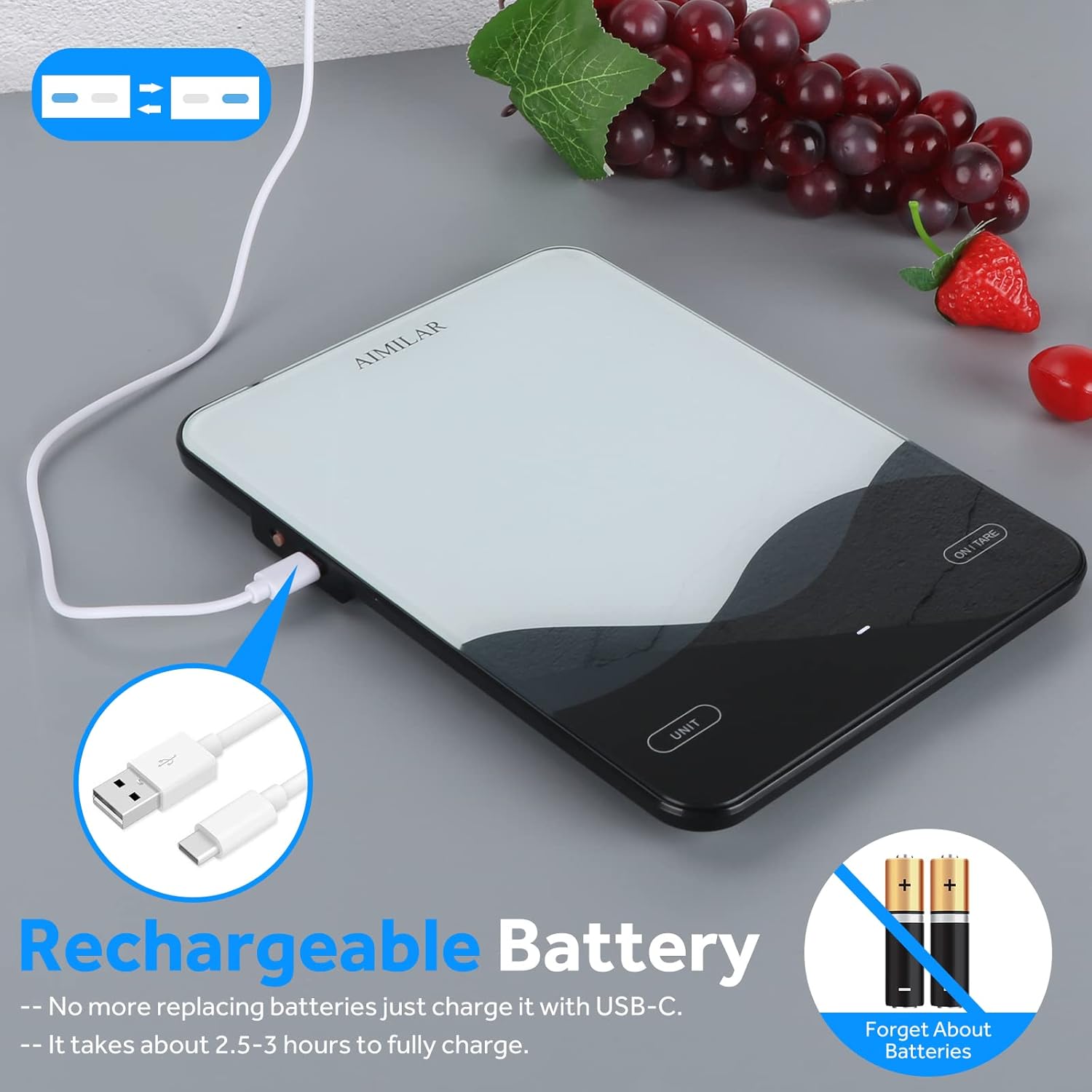
Image 2: AIMILAR Food Scale USB-C Charging. This image shows the scale connected to a USB-C charging cable, illustrating the charging process.
3. Funzionamento
3.1 Accensione/spegnimento
- Accensione: Locate the main power switch on the side of the scale. Slide it to the 'ON' position. The LED display will illuminate.
- Spegnimento automatico: The scale will automatically turn off after 120 seconds (2 minutes) of inactivity to conserve battery life.
- Spegnimento manuale: To manually turn off the scale, slide the main power switch to the 'OFF' position.
3.2 Conversione unità
- Press the 'UNIT' button located on the left side of the display to cycle through the available measurement units: grams (g), pounds:ounces (lb:oz), ounces (oz), and milliliters (ml).

Image 3: AIMILAR Food Scale Unit Conversion. A hand is shown pressing the 'UNIT' button, with visual representations of the four available units (g, lb:oz, oz, ml) on the display.
3.3 Funzione di tara
The tare function allows you to subtract the weight of a container or previous ingredients, enabling you to measure multiple items in the same bowl.
- Posizionare un contenitore vuoto sulla bilancia. Il display ne mostrerà il peso.
- Press the 'ON/TARE' button. The display will reset to zero.
- Add the item(s) you wish to weigh into the container. The display will show only the net weight of the added item(s).

Image 4: AIMILAR Food Scale Tare Function Steps. This image illustrates the three steps of using the tare function: placing a container, taring the scale to zero, and then adding ingredients to measure their net weight.
3.4 Pesatura degli articoli
- Ensure the scale is on and set to your desired unit.
- Place the item(s) directly onto the tempered glass platform or into a tared container.
- Read the weight displayed on the LED screen. The scale provides stable and accurate readings quickly due to its four highly sensitive sensors.

Image 5: AIMILAR Food Scale Accurate Measurements. This image demonstrates the scale's accuracy by showing measurements of 200g and 5g with small weights and blueberries.

Image 6: AIMILAR Food Scale Large Capacity. A roasted chicken on a plate is shown on the scale, illustrating its 22lb (10kg) maximum capacity.

Image 7: AIMILAR Food Scale Versatile Applications. This image displays various uses for the scale, including weighing jewelry, medicinal materials, pet food, and ingredients for cooking.
4. Manutenzione
- Pulizia: The tempered glass platform is easy to clean. Wipe the surface with a damp cloth. Avoid using abrasive cleaners or submerging the scale in water. Ensure no liquids enter the internal components.
- Magazzinaggio: Conservare la bilancia in un luogo asciutto e lontano da temperature estreme.

Image 8: AIMILAR Food Scale Easy to Clean. A hand is shown wiping the tempered glass surface of the scale with a cloth, demonstrating its ease of cleaning.
5. Risoluzione Dei Problemi
- Letture imprecise: Ensure the scale is placed on a hard, flat, and stable surface. Avoid placing it near air vents or in areas with drafts. Recalibrate if necessary (refer to manufacturer's specific recalibration instructions if available, not detailed in product data).
- La bilancia non si accende: Check if the main power switch is in the 'ON' position. Ensure the battery is charged; connect the USB-C cable to charge if the battery is low.
- Display Errors (e.g., "EEEE"): Di solito questo indica un sovraccarico. Rimuovere immediatamente gli oggetti dalla bilancia per evitare danni.
- Difficulty Changing Units: Press the 'UNIT' button firmly. If the issue persists, ensure the scale is on a stable surface and try again.
6. Specifiche
| Numero di modello | Numero di modello: AB024 |
| Marca | AIMILAR |
| Capacità | 22 libbre (10 kg) |
| Incrementi di misura | 1 g / 0.05 once |
| Unità di misura | g, lb:oz, oz, ml |
| Tipo di visualizzazione | GUIDATO |
| Fonte di alimentazione | Ricaricabile tramite USB-C (1 batteria ai polimeri di litio inclusa) |
| Tempo di ricarica | Circa 2.5-3 ore |
| Durata stimata della batteria | Up to 45 days (based on 3 uses/day, 1 minute/use) |
| Spegnimento automatico | 120 secondi (2 minuti) |
| Materiale della piattaforma | Vetro temperato |
| Dimensioni del prodotto | 8.78 x 6.42 x 0.71 pollici |
| Peso dell'articolo | 14.46 once |

Image 9: AIMILAR Food Scale Dimensions and Side ViewQuesta immagine fornisce una vista dall'alto verso il basso view with measurements (8.78in x 6.42in) and a side profile showing the slim design, main power switch, and USB-C port.
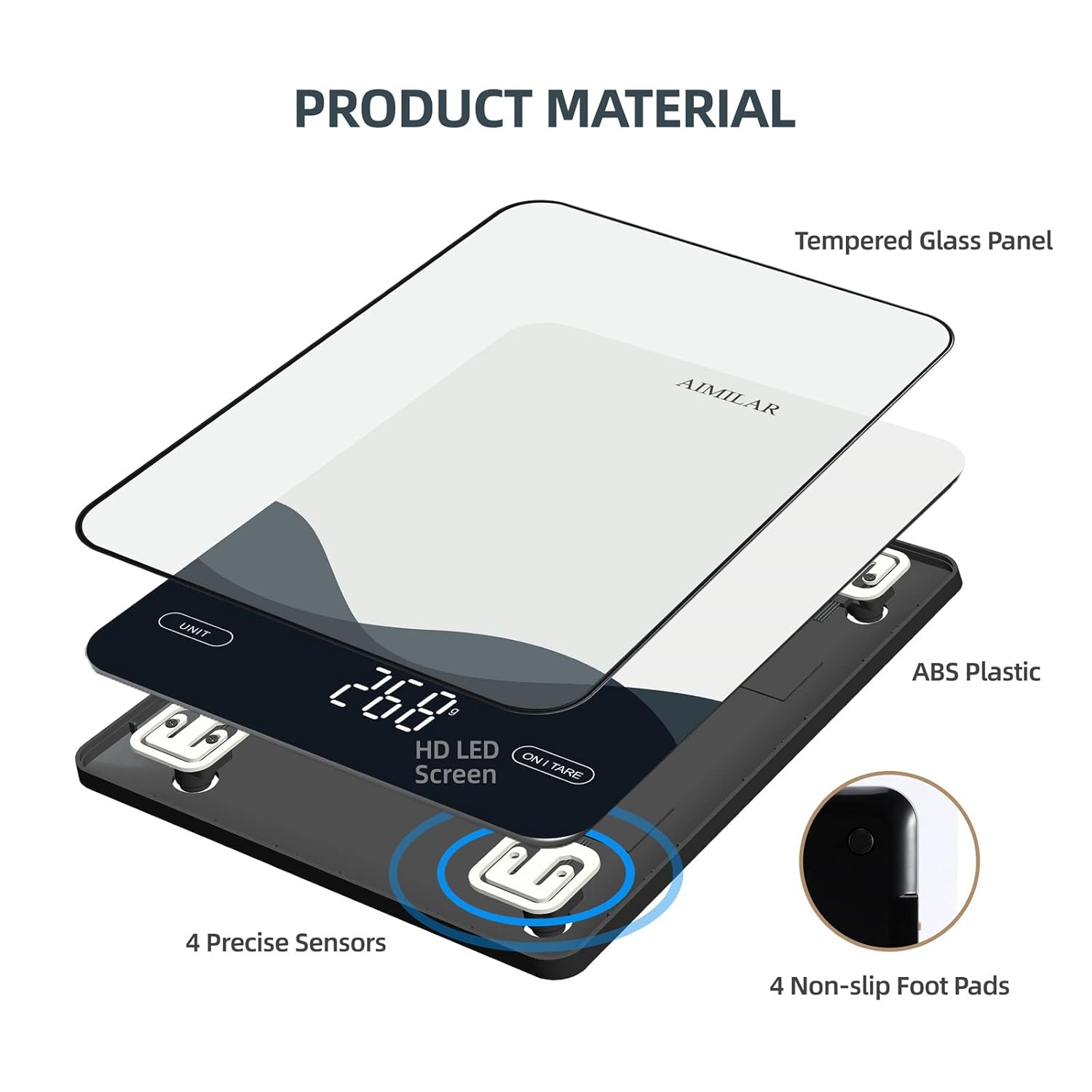
Image 10: AIMILAR Food Scale Product Material Components. An exploded view illustrates the internal components, including the tempered glass panel, ABS plastic body, HD LED screen, precise sensors, and non-slip foot pads.
7. Garanzia e supporto
For warranty information or technical support, please refer to the product packaging or contact AIMILAR customer service directly. Contact details can typically be found on the manufacturer's official websito o tramite la tua piattaforma di acquisto.
Ask a question about this manual
Ask about setup, troubleshooting, compatibility, parts, safety, or missing instructions. Manuals+ will review the question and use this page’s manual context to help answer it.