
Introduzione
This manual provides comprehensive instructions for the Deltaco Gaming DK430 Mechanical Mini Gaming Keyboard. It covers setup, operation, maintenance, and troubleshooting to ensure optimal performance and longevity of your device. The DK430 features a compact 60% US layout, RGB lighting, and responsive red mechanical switches. The spacebar is designed to register presses consistently, regardless of where it is pressed.

Immagine 1: Dall'alto verso il basso view of the Deltaco Gaming DK430 Mechanical Mini Gaming Keyboard, showcasingrazie al suo layout compatto al 60% e alla vivace retroilluminazione RGB.
Contenuto della confezione
Verificare che tutti gli articoli siano presenti nel pacco:
- Deltaco Gaming DK430 Mechanical Mini Gaming Keyboard
- 1.5m USB-MicroB to USB-A Cable
- Manuale dell'utente (questo documento)
Istruzioni di installazione
Collegare la tastiera: Locate the USB port on the back of the DK430 keyboard. Insert the smaller end of the provided USB cable into this port.

Immagine 2: Primo piano view of the USB port on the Deltaco Gaming DK430 keyboard, with the cable being inserted.
Connessione al computer: Insert the standard USB-A end of the cable into an available USB port on your computer (PC or laptop).
Installazione del driver: The keyboard is plug-and-play. Your operating system will automatically detect and install the necessary drivers. No additional software installation is required for basic functionality and RGB control.
Posizionamento: Position the keyboard comfortably on your desk. The compact 60% layout is designed to save space while providing essential keys.
Istruzioni per l'uso
Layout e tasti della tastiera
The DK430 features a 60% US layout with 62 keys. Due to its compact design, some functions are accessed via the Function (FN) key combination.
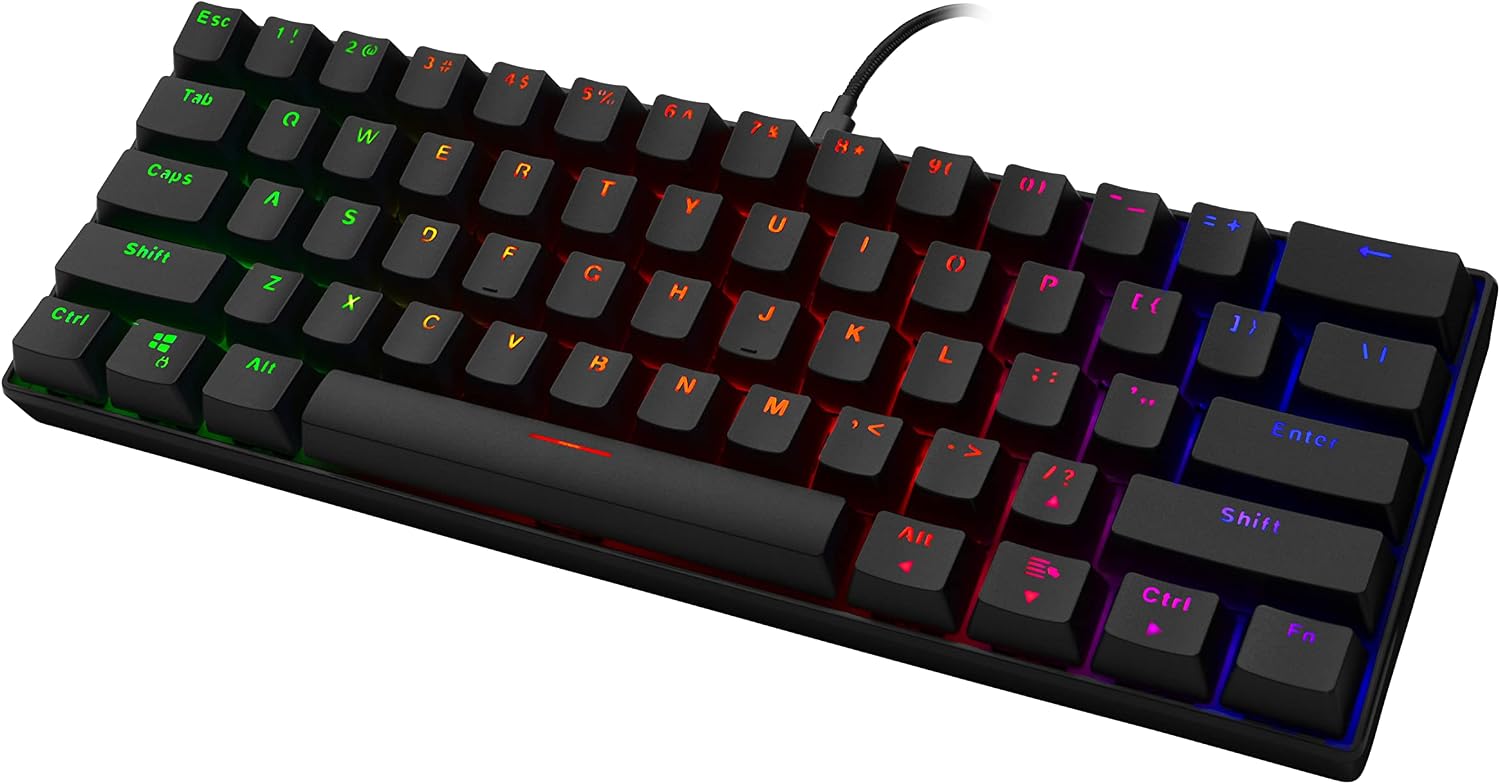
Immagine 3: Angolata view of the Deltaco Gaming DK430 Mechanical Mini Gaming Keyboard, highlighting its compact form factor and keycap design.
Controllo dell'illuminazione RGB
The keyboard offers 19 distinct RGB lighting modes. You can customize the lighting effects directly from the keyboard without additional software.
- Cambia modalità di illuminazione: Premere FN + . (period key) per scorrere le 19 modalità di illuminazione disponibili.
- Regola la velocità dell'illuminazione: Premere FN + tasto freccia sinistra to decrease lighting speed, and FN + tasto freccia destra to increase lighting speed. When the minimum or maximum speed is reached, the Caps Lock and Windows keys will flash as an indicator.
- Regola la luminosità dell'illuminazione: Premere FN + tasto freccia giù per diminuire la luminosità e FN + tasto freccia su to increase brightness. When the minimum or maximum brightness is reached, the Caps Lock and Windows keys will flash as an indicator.
- Cambia colore dell'illuminazione: For modes that support multiple colors, the color may change automatically with the mode, or you might be able to cycle through colors within a mode using FN + Invio (common for some keyboards, but not explicitly stated for this model).
The keyboard features Red RGB mechanical switches, providing a smooth and linear keystroke experience with a 45g ± 10g actuation force.
Manutenzione e cura
- Pulizia: Use a soft, dry cloth to wipe the surface of the keyboard. For dust and debris between keycaps, use compressed air. Avoid using liquid cleaners directly on the keyboard.
- Rimozione dei tasti: The DK430 features double injection keycaps. If you need to remove keycaps for deeper cleaning, use a keycap puller to avoid damage.
- Cura del cavo: Evitare di piegare o torcere eccessivamente il cavo USB per evitare danni interni.
- Magazzinaggio: Quando non viene utilizzata per lunghi periodi, conservare la tastiera in un ambiente pulito e asciutto, lontano dalla luce solare diretta e da temperature estreme.
Risoluzione dei problemi
| Problema | Possibile causa | Soluzione |
|---|---|---|
| La tastiera non risponde. | Connessione USB allentata, porta USB difettosa, problema con il driver. |
|
| L'illuminazione RGB non funziona o è bloccata. | Lighting mode issue, power issue. |
|
| Alcune chiavi non vengono registrate. | Detriti sotto il tasto, interruttore difettoso. |
|
Specifiche
| Nome del modello | Mini tastiera da gioco meccanica DK430 |
| Marca | DELTACO Gaming |
| Numero di chiavi | 62 |
| Disposizione | US 60% |
| Tipo di interruttore | Red RGB Mechanical Switches |
| Forza di attuazione | 45 g ± 10 g |
| keycaps | Doppia iniezione |
| Connettività | Wired USB (1.5m USB-MicroB to USB-A Cable) |
| Durata | 50 milioni di battute |
| Dimensioni (L x P x A) | 290 x 100 x 30 mm - 42 mm |
| Peso | Circa 600 g |
| Dispositivi compatibili | Computer portatile, PC |
| Caratteristiche speciali | RGB Backlit, N-Key Rollover |
Garanzia e supporto
The Deltaco Gaming DK430 Mechanical Mini Gaming Keyboard comes with a Garanzia di 5 anno, ensuring peace of mind regarding its quality and durability. For technical support, warranty claims, or further assistance, please contact your retailer or visit the official Deltaco Gaming websito.

Immagine 4: Passoview image of the DK430 keyboard, detailing key features such as US layout, N-key rollover, double injection keycaps, 60% layout, content red switches, 16 million colors RGB, and a 5-year warranty.
Si prega di conservare la prova d'acquisto ai fini della garanzia.


