
Introduzione
This manual provides detailed instructions for the safe and efficient use of your Westcott Compact Electric Pencil Sharpener. Please read this manual thoroughly before operating the device and retain it for future reference.

Figura 1: Fronte view of the Westcott Compact Electric Pencil Sharpener.
Informazioni sulla sicurezza
Per garantire un funzionamento sicuro ed evitare danni, osservare le seguenti precauzioni di sicurezza:
- Keep the sharpener away from water or other liquids.
- Non inserire dita o oggetti estranei nei fori di affilatura.
- Unplug the sharpener before cleaning or when not in use.
- Ensure the shavings reservoir is properly closed during operation.
- Questo apparecchio non è destinato all'uso da parte di persone (bambini compresi) con ridotte capacità fisiche, sensoriali o mentali, o prive di esperienza e conoscenza, a meno che non siano supervisionate o abbiano ricevuto istruzioni riguardanti l'uso dell'apparecchio da una persona responsabile della loro sicurezza.
Contenuto della confezione
Verificare che tutti gli articoli siano presenti nel pacco:
- Westcott Compact Electric Multi-Hole Horizontal Pencil Sharpener
- Adattatore di alimentazione
Caratteristiche del prodotto
The Westcott Compact Electric Pencil Sharpener offers several features for efficient pencil sharpening:
- Multi-Hole Dial: Accommodates pencils of various diameters.
- Alimentato elettricamente: Ensures consistent sharpening without battery concerns.
- Contenitore per trucioli grande: Riduce la frequenza di svuotamento.
- Costruzione resistente: Designed for durability and long-lasting performance.
- 8-Tooth Stainless Steel Helical Blade: Provides a sharp, precise point.
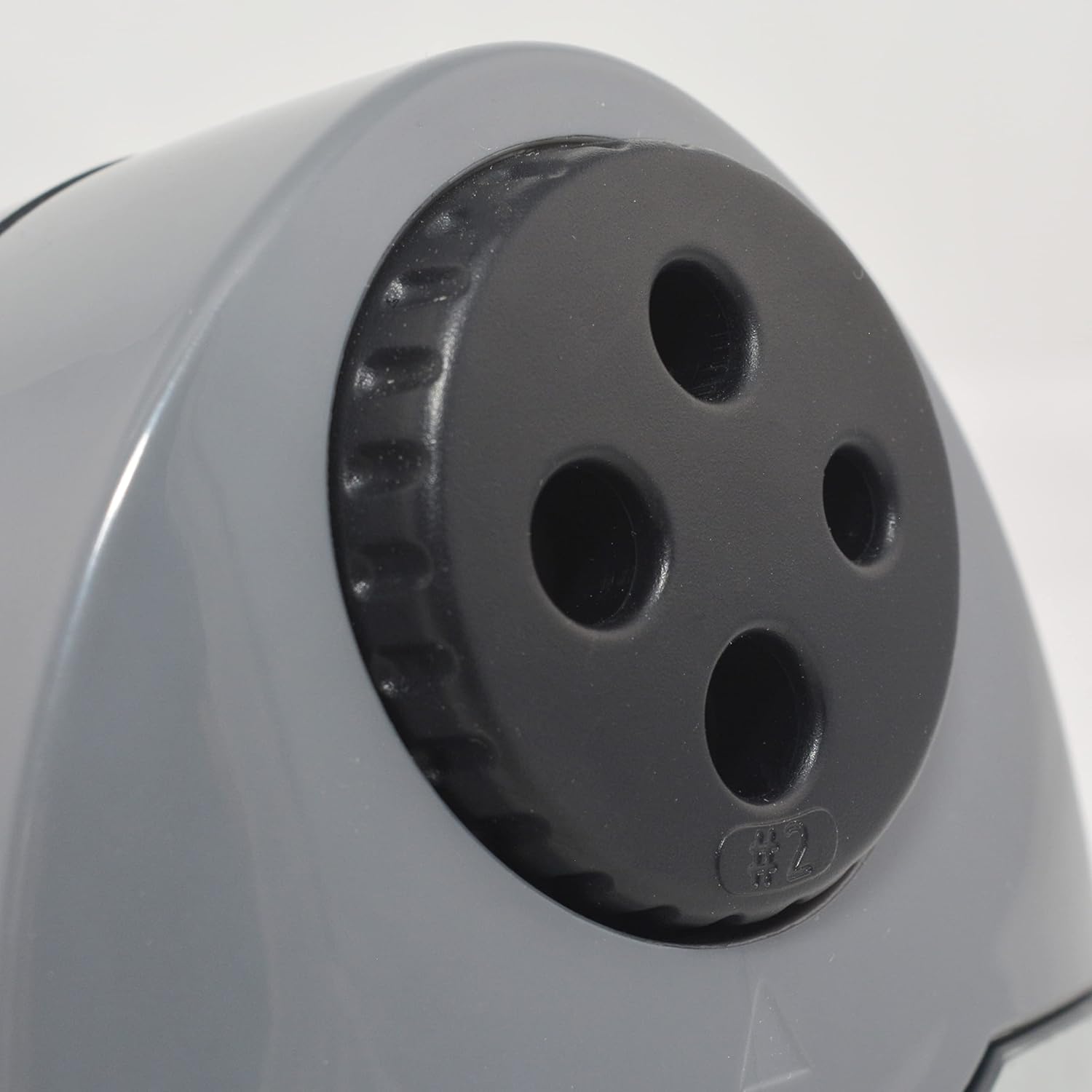
Figure 2: Multi-hole dial for different pencil sizes.
Video 1: Oltreview of the Westcott Compact Electric Horizontal Pencil Sharpener, demonstrating its features and design.
Impostare
- Unpack the Sharpener: Carefully remove all packaging materials from the sharpener.
- Posizionare su una superficie stabile: Position the sharpener on a flat, stable surface to prevent movement during use.
- Connetti alimentazione: Insert the power adapter into the designated port on the sharpener, then plug the adapter into a standard electrical outlet.

Figure 3: Connecting the power adapter to the sharpener.
Istruzioni per l'uso
- Select the Correct Hole: Rotate the multi-hole dial on the top of the sharpener to align the appropriate size opening with the pencil you intend to sharpen. The sharpener can accommodate various pencil diameters.
- Inserisci la matita: Gently insert the pencil into the selected sharpening hole. The sharpener will automatically activate when the pencil is inserted correctly.
- Sharpen the Pencil: Apply light pressure to the pencil while the sharpener is running. The sharpener will stop automatically or reduce motor speed when the pencil reaches an optimal point, indicated by the #2 pencil sharpening indicator for standard pencils.
- Remove the Pencil: Once sharpened, carefully remove the pencil.

Figure 4: Inserting a pencil for sharpening.
Video 2: Demonstration of the Westcott Compact Pencil Sharpener in action, showing the sharpening process.
Manutenzione
- Emptying Shavings Reservoir: Regularly check and empty the shavings reservoir to maintain optimal performance and prevent blockages. To empty, gently pull the transparent reservoir away from the main unit. Dispose of shavings and reattach the reservoir securely.

Figure 5: Emptying the shavings reservoir.
- Pulizia delle lame: If sharpening performance decreases, the blades may need cleaning. Unplug the sharpener. Use a soft brush or cotton swab to carefully remove any graphite or wood residue from the blades. Exercise caution as blades are sharp.
Risoluzione dei problemi
Se riscontri problemi con l'affilatrice, fai riferimento ai seguenti problemi comuni e alle relative soluzioni:
- Sharpener not turning on:
- Ensure the power adapter is securely plugged into both the sharpener and the electrical outlet.
- Verificare che la presa elettrica funzioni collegandovi un altro dispositivo.
- Verify the shavings reservoir is correctly installed and closed. The sharpener may have a safety switch that prevents operation if the reservoir is open.
- Pencil not sharpening properly (uneven or blunt point):
- Ensure you have selected the correct hole size for your pencil.
- Check the blades for any debris or damage. Clean as per the maintenance section.
- Avoid applying excessive pressure, which can cause uneven sharpening or lead breakage.
- Pencil breaking frequently:
- This can be a sign of dull blades or excessive pressure. Refer to cleaning instructions or consider blade replacement if available.
- Ensure the pencil is inserted straight and not at an angle.
Specifiche
| Attributo | Valore |
|---|---|
| Marca | Westcott |
| Numero di modello | 00406 |
| Usi specifici per il prodotto | Matita di grafite |
| Colore | Nero |
| Fonte di alimentazione | Elettrico con cavo |
| Materiale | Metallo |
| Pubblico di destinazione | Artist, Student |
| Peso dell'articolo | 11.52 once |
| Caratteristiche aggiuntive | Servizio pesante |
Informazioni sulla garanzia
This Westcott product comes with a Garanzia di 7 anni. For warranty claims or detailed information, please refer to the official Westcott websito o contattare l'assistenza clienti.
Assistenza clienti
If you require further assistance or have questions not covered in this manual, please contact Westcott customer support through their official websito o le informazioni di contatto fornite con l'acquisto.