
Introduzione
This manual provides detailed instructions for the installation, operation, and maintenance of your MYPIN Solar Wireless PTZ Security Camera. Please read this manual thoroughly before using the product to ensure proper function and safety. Keep this manual for future reference.
Prodotto finitoview
Cosa è incluso
- MYPIN PTZ Security Camera
- Pannello solare
- Batteria ricaricabile agli ioni di litio (preinstallata o inclusa separatamente)
- Staffa di montaggio e viti
- Cavo di ricarica USB
- Manuale d'uso
Caratteristiche principali
- Video Full HD 1080p: Fornisce video chiari e dettagliatitage.
- Visione notturna a colori: Equipped with infrared LEDs and white light for clear night vision, including full-color options.
- Batteria ricaricabile e alimentata a energia solare: Continuous power supply through the solar panel, with a built-in rechargeable battery for uninterrupted operation.
- AI Smart Recognition & PIR Motion Detection: Advanced AI technology distinguishes between humans, pets, and vehicles, reducing false alarms.
- Audio bidirezionale: Built-in speaker and anti-noise microphone allow for real-time two-way communication.
- Funzionalità PTZ: Pan 335°, Tilt 90°, and 4x digital zoom for flexible viewangoli di inclinazione.
- IP65 resistente alle intemperie: Designed to withstand various weather conditions, suitable for outdoor use.
- Connettività wireless: Supports 2.4 GHz Wi-Fi for easy installation (5 GHz Wi-Fi not supported).
- Molteplici opzioni di archiviazione: Supports cloud storage (7-day free playback, max 1GB) and local storage via Micro SD card (up to 128GB, not included).
- Integrazione della casa intelligente: Compatibile con Amazon Alexa per il controllo vocale e live view.

Image: MYPIN Solar Wireless PTZ Security Camera with its solar panel.
Impostare
1. Ricarica iniziale
Before first use, fully charge the camera's built-in battery using the provided USB cable and a 5V/2A power adapter (not included). A full charge ensures optimal performance, especially during initial setup and periods of low sunlight.
2. Installazione dell'app e creazione dell'account
- Scarica il VicoHome app dall'app store del tuo smartphone (iOS o Android).
- Apri l'app e segui le istruzioni sullo schermo per creare un nuovo account o per effettuare l'accesso se ne hai già uno.
3. Camera Pairing with App
- Assicurati che la fotocamera sia accesa.
- In the VicoHome app, tap the "+" icon to add a new device.
- Seleziona il modello della tua fotocamera dall'elenco.
- Follow the app's instructions to connect the camera to your 2.4 GHz Wi-Fi network. You may need to scan a QR code displayed on your phone with the camera lens.
- Una volta effettuata la connessione, assegna un nome alla tua telecamera e completa la procedura di configurazione.
4. Solar Panel and Camera Mounting
The camera and solar panel can be installed in two ways: integrated or separated. Choose a location that provides optimal sunlight exposure for the solar panel and a clear view per la macchina fotografica.
- Posizionamento del pannello solare: Mount the solar panel in a location that receives direct sunlight for several hours daily. Ensure the cable can reach the camera.
- Posizionamento della fotocamera: Use the provided mounting bracket and screws to securely attach the camera to a wall or other stable surface. Adjust the camera angle for optimal surveillance coverage.

Image: Illustration of two installation methods for the solar panel and camera, showing both integrated and separate mounting options.
Istruzioni per l'uso
1. Vivere View e riproduzione
- Open the VicoHome app and select your camera to view il feed dal vivo.
- Accedi a foo registratotage tramite la funzione di riproduzione nell'app.
2. Controllo PTZ
Nella vita reale view interface, use the on-screen controls to pan (335° horizontally) and tilt (90° vertically) the camera lens. You can also use the digital zoom feature to get a closer look.
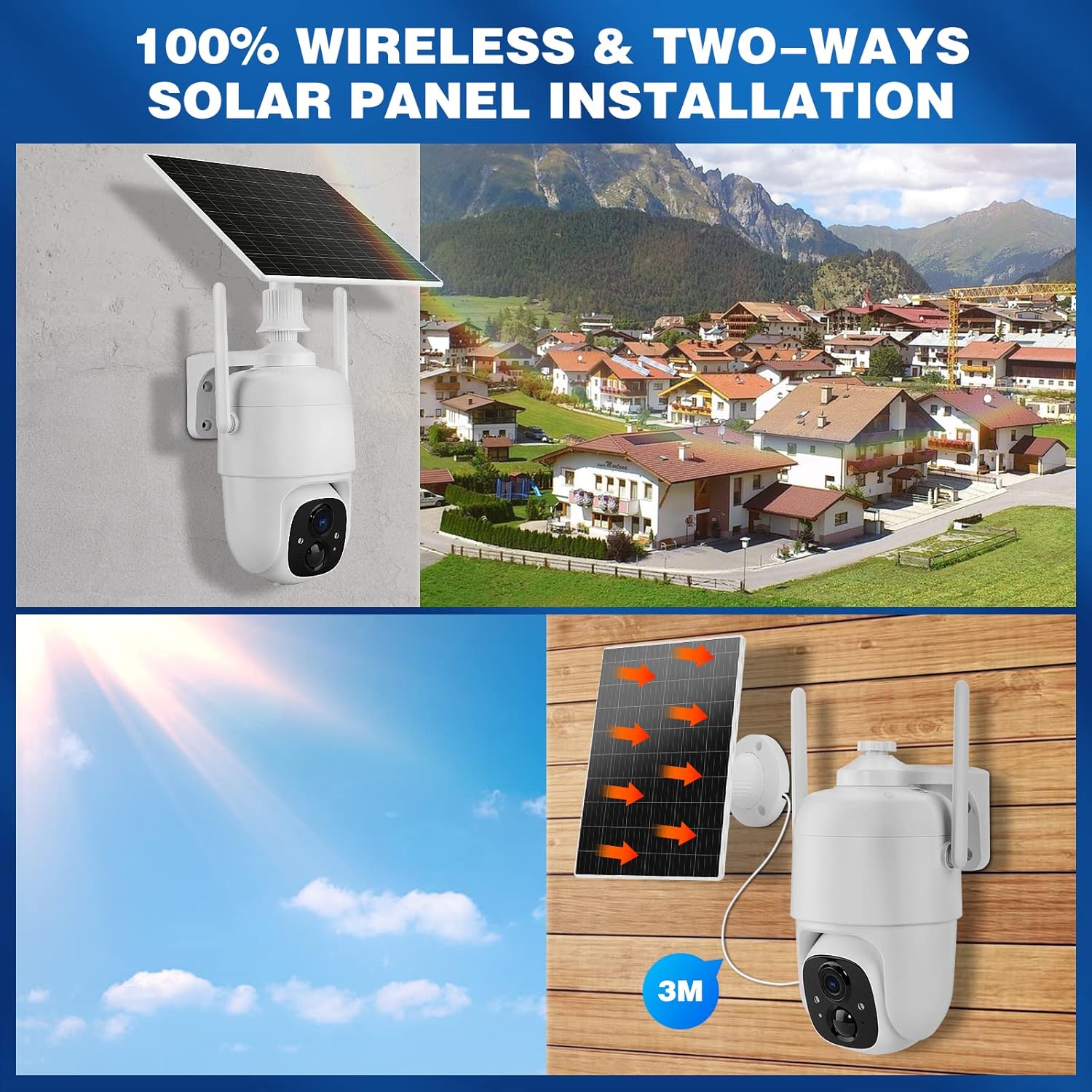
Immagine: mostra come controllare le funzioni di panoramica e inclinazione della telecamera tramite un'app per smartphone.
3. Audio bidirezionale
Tocca l'icona del microfono nella schermata live dell'app view to speak through the camera's speaker. The camera's built-in microphone will capture audio from the camera's vicinity, allowing for two-way communication.

Image: A person speaking through the camera to a delivery person, demonstrating the two-way audio feature.
4 Rilevamento del movimento e avvisi
- Configure motion detection sensitivity and activity zones within the VicoHome app.
- Enable AI Smart Recognition to differentiate between humans, pets, and vehicles for more accurate alerts.
- Ricevi notifiche istantanee sul tuo smartphone quando viene rilevato un movimento.

Image: A person walking past a gate, triggering a PIR human detection alert on a smartphone.
5. Modalità di visione notturna
The camera offers both infrared (IR) night vision and full-color night vision. You can switch between these modes in the app settings based on your preference and lighting conditions.

Immagine: Una divisione view showing the difference between color night vision and standard IR night vision at night.
6. Opzioni di archiviazione
- Archiviazione cloud: The camera offers 7 days of free cloud playback (up to 1GB). Additional cloud plans may be available through the app.
- Micro SD Card: Inserire una scheda Micro SD (fino a 128 GB, non inclusa) nello slot designato per l'archiviazione locale dei video.
7. Integrazione con Amazon Alexa
To integrate with Amazon Alexa, enable the VicoHome skill in the Alexa app and link your VicoHome account. You can then use voice commands to view your camera's live feed on compatible Alexa-enabled devices.

Image: A MYPIN camera and an Amazon Echo Show displaying the camera's live feed, illustrating Alexa integration.
Manutenzione
1. Pulizia
- Pulisci regolarmente l'obiettivo della fotocamera e il pannello solare con un panno morbido e asciutto.amp panno per rimuovere polvere e detriti.
- Non utilizzare prodotti chimici aggressivi o detergenti abrasivi.
2. Cura della batteria
- Ensure the solar panel is free from obstructions to maximize charging efficiency.
- If the camera is stored for an extended period, charge the battery periodically to prevent deep discharge.
3. Aggiornamenti del firmware
Check the VicoHome app regularly for firmware updates. Keeping your camera's firmware updated ensures optimal performance, security, and access to new features.
Risoluzione dei problemi
| Problema | Soluzione |
|---|---|
| La fotocamera non si connette al Wi-Fi | Ensure your Wi-Fi is 2.4 GHz. Check Wi-Fi signal strength. Restart your router and camera. Re-pair the camera in the app. |
| Scarsa qualità video | Check your Wi-Fi connection speed. Clean the camera lens. Ensure adequate lighting for optimal image capture. |
| Batteria non in carica | Ensure the solar panel is clean and receives direct sunlight. Check the connection cable between the solar panel and camera. Charge directly via USB if necessary. |
| Avvisi di movimento falsi | Adjust motion detection sensitivity in the app. Utilize AI Smart Recognition to filter out non-human movements. Define specific activity zones. |
| L'audio bidirezionale non funziona | Controlla le impostazioni del microfono e dell'altoparlante nell'app. Assicurati che il volume del telefono sia alto. Verifica la stabilità della connessione di rete. |
Specifiche
- Modello: HS0366
- Risoluzione video: 1080p Full HD
- Angolo di panoramica: 335°
- Angolo di inclinazione: 90°
- Zoom digitale: 4x
- Visione notturna: Visione notturna a infrarossi e a colori
- Connettività wireless: Wi-Fi 2.4 GHz (IEEE 802.11b/g/n)
- Fonte di energia: Solar Powered, Rechargeable Lithium-ion Battery (5 Watt-hours)
- Resistenza alle intemperie: Grado di protezione IP65
- Temperatura di esercizio: da -10°C a 45°C (da 14°F a 113°F)
- Magazzinaggio: Cloud Storage (up to 1GB free for 7 days), Micro SD Card (up to 128GB, not included)
- Audio: Audio bidirezionale (microfono e altoparlante integrati)
- Rilevamento del movimento: PIR with AI Human/Pet/Vehicle Recognition
- Materiale: Metallo
- Dimensioni: Circa 20.2 x 19.7 x 13.9 cm
- Peso: Circa 1.27 kg

Image: The MYPIN camera and solar panel installed outdoors during winter, highlighting its IP65 waterproof rating and operating temperature range.
Garanzia e supporto
Per informazioni sulla garanzia e supporto tecnico, fare riferimento ai dettagli di contatto forniti con l'acquisto o visitare il sito ufficiale MYPIN websito. Conservare la ricevuta d'acquisto come prova d'acquisto per eventuali reclami in garanzia.