
Mesqool MQL-CR1019
Manuale utente della sveglia digitale Mesqool
Modello: MQL-CR1019
Prodotto finitoview
The Mesqool Digital Alarm Clock is a versatile device designed to enhance your living space with its multi-functional display and convenient features. It provides accurate time, date, temperature, and humidity readings, along with dual alarm capabilities and charging ports for your electronic devices.

Figure 1: Mesqool Digital Alarm Clock with charging capabilities.
Cosa c'è nella scatola
- Sveglia digitale in legno
- US AC Power Adapter
- Cavo di ricarica
- Manuale cartaceo

Figura 2: Contenuto della confezione.
Caratteristiche principali
- Ampio display: An 8.7-inch screen clearly displays time, date, and day of the week.
- Monitoraggio della temperatura e dell'umidità: Assists in monitoring indoor environment conditions.
- Loud Alarm with Snooze: Adjustable alarm volume from 65dB to 120dB with a 9-minute snooze function.
- Multiple Alarm Settings: Four alarm modes available: Every day, Weekend, Weekdays, or One Time Alarm. Supports dual alarm settings.
- Porte di ricarica USB e Type-C: Equipped with both USB and Type-C ports to charge two electronic devices simultaneously.
- 5 Levels Dimmer: Easily adjust display brightness with five levels to suit various lighting conditions.
- Design elegante: Features a wood grain pattern and metal buttons for a modern aesthetic.
- Power Cord Operated with Battery Backup: Primarily AC powered, with 2x AAA batteries (not included) for memory backup during power outages.
Video 1: Oltreview of Mesqool Digital Alarm Clock features, including dual alarm, adjustable brightness, charging ports, and environmental monitoring.
Impostare
1. Collegamento elettrico
Connect the provided AC power adapter to the clock's power input port and plug it into a standard wall outlet. The clock is primarily AC powered.

Figura 3: Collegamento dell'alimentazione e batteria di backup.
2. Installazione della batteria di backup
Per il backup della memoria durante lo spegnimentotages, install 2x AAA batteries (not included) into the battery compartment located at the back of the clock. This ensures that time and alarm settings are retained.
Istruzioni per l'uso
1. Impostazione di ora e data
- Premere il tasto DATA button to cycle through date display modes (e.g., MM-DD-YYYY).
- Premere il tasto TIME 12/24H pulsante per passare dal formato orario a 12 ore a quello a 24 ore.
- Per impostare l'ora, tenere premuto il tasto TIME 12/24H button until the hour digits flash. Use the +HOUR E -MIN pulsanti per regolare l'ora e i minuti. Premere SNOOZE/OK per confermare ogni impostazione.
- To set the date, press and hold the DATA button until the year digits flash. Use the +HOUR E -MIN buttons to adjust the year, month, and day. Press SNOOZE/OK per confermare ogni impostazione.

Figure 4: Multiple display styles and unit switching.
2. Impostazione degli allarmi
The clock supports dual alarms (ALM1 and ALM2).
- Premere il tasto ALM1 or ALM2 button to select the alarm you wish to set.
- Press and hold the selected alarm button (e.g., ALM1) until the alarm time flashes. Use +HOUR E -MIN per impostare l'orario desiderato della sveglia. Premere SNOOZE/OK per confermare.
- After setting the time, the alarm mode will flash. Use +HOUR or -MIN to select one of the four alarm modes:
- Lun-Dom: La sveglia suona ogni giorno.
- Lun-Ven: Alarm sounds on weekdays only.
- Sab-Dom: Alarm sounds on weekends only.
- Una volta: Alarm sounds once.
- To turn an alarm ON/OFF, short press the corresponding ALM1 or ALM2 pulsante. Un'icona di allarme apparirà/scomparirà sul display.

Figure 5: Dual alarm settings and modes.
3. Adjusting Brightness (Dimmer)
Premere il tasto DIMENSIONATORE button to cycle through 5 levels of display brightness. Select the level that best suits your environment and preference.

Figura 6: Regolazione della luminosità del display.
4. Regolazione del volume della sveglia
Premere il tasto VOL DST button to adjust the alarm volume. The volume can be set between 65dB and 120dB across 5 levels.

Figure 7: Alarm volume adjustment and snooze button.
5. Funzione snooze
Quando suona la sveglia, premere il tasto grande SNOOZE/OK pulsante sulla parte superiore dell'orologio per attivare la funzione snooze. La sveglia si metterà in pausa per 9 minuti e poi suonerà di nuovo.
6. Visualizzazione della temperatura e dell'umidità
The clock displays indoor temperature and humidity. Press the °F/°C pulsante per passare dalle unità di temperatura Fahrenheit a quelle Celsius e viceversa.
7. Ricarica dei dispositivi elettronici
Utilize the USB and Type-C charging ports located at the back of the clock to charge your smartphones, tablets, or other compatible electronic devices.

Figure 8: USB and Type-C charging ports in use.
Manutenzione
- Pulire l'orologio con un panno morbido e asciutto. Non utilizzare detergenti abrasivi o solventi.
- Evitare di esporre l'orologio a temperature estreme, alla luce solare diretta o a elevata umidità.
- Ensure proper ventilation around the clock, especially if using the charging ports for extended periods.
Risoluzione dei problemi
| Problema | Possibile causa | Soluzione |
|---|---|---|
| Il display è vuoto o poco luminoso. | Nessuna potenza, potenza spentatage, oppure la luminosità è impostata su un livello troppo basso. | Check power adapter connection. Ensure batteries are installed for backup. Press the DIMENSIONATORE pulsante per aumentare la luminosità. |
| L'allarme non suona. | Alarm is off, volume is too low, or incorrect alarm mode. | Ensure the alarm is activated (icon visible). Increase alarm volume using VOL DST. Verify the alarm mode (Mon-Sun, Mon-Fri, etc.) is correctly set. |
| L'ora/data non è corretta. | Not set correctly or power interruption without battery backup. | Follow the "Setting Time and Date" instructions to reset. Install fresh AAA batteries for backup. |
| Dispositivi non in carica. | Incorrect cable, device not compatible, or clock not powered. | Ensure correct USB/Type-C cable is used. Verify the clock is powered on. Check device compatibility. |
Specifiche
- Marca: Mesqol
- Numero modello: MQL-CR1019
- Tipo di visualizzazione: Digitale
- Dimensioni del prodotto: 8.07"L x 3.62"A
- Fonte di energia: Elettrico con cavo (adattatore CA incluso)
- Batteria di backup: 2 batterie AAA (non incluse)
- Volume allarme: 65dB - 120dB (5 levels)
- Luminosità dello schermo: 5 livelli regolabili
- Porte di ricarica: 1 x USB, 1 x Tipo-C
- Materiale: Plastic (wood grain finish)
- Caratteristiche speciali: Calendar Display, Temperature Display, Humidity Display, Dual Alarm, Large Screen Display, Snooze
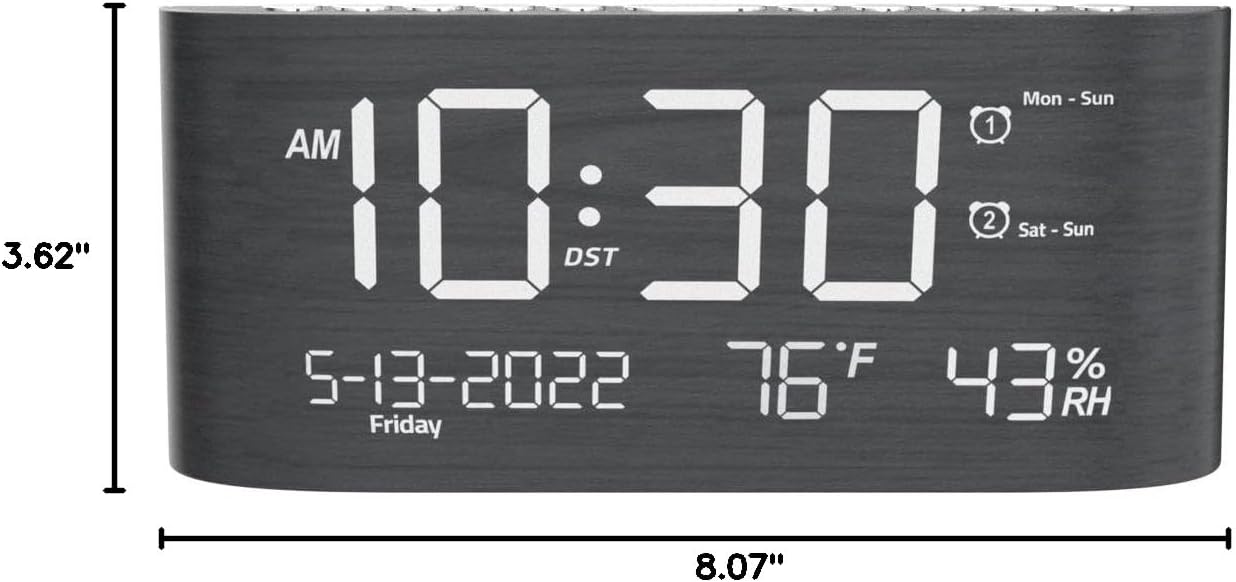
Figura 9: Dimensioni del prodotto.
Garanzia e supporto
This Mesqool product comes with a 2 Years Exchange Warranty. For any support inquiries, troubleshooting assistance, or warranty claims, please refer to the official Mesqool websito o contattare direttamente il servizio clienti.
È possibile scaricare la versione elettronica di questo manuale utente: Scarica il manuale utente (PDF)
Ask a question about this manual
Ask about setup, troubleshooting, compatibility, parts, safety, or missing instructions. Manuals+ will review the question and use this page’s manual context to help answer it.