
1. Introduzione
Grazie per l'acquistoasing the YOUTHINK Portable Shortwave Radio. This manual provides essential information for the safe and efficient operation of your device. Please read it thoroughly before use and retain it for future reference.
This portable radio offers AM/FM tuning, MP3 playback, and multiple power options, making it suitable for various listening environments.
2. Informazioni sulla sicurezza
- Non esporre la radio a temperature estreme, alla luce solare diretta o a elevata umidità.
- Evitare di far cadere o sottoporre il dispositivo a forti impatti.
- Non tentare di smontare o modificare la radio. Ciò invaliderà la garanzia e potrebbe causare danni.
- Use only the specified battery type and charging methods.
- Tenere il dispositivo lontano dall'acqua e da altri liquidi.
- Pulire la radio con un panno morbido e asciutto. Non utilizzare detergenti abrasivi o solventi.
3. Contenuto della confezione
Verifica che tutti gli articoli siano presenti nel tuo pacco:
- YOUTHINK Portable Shortwave Radio
- Cavo di ricarica USB
- Power Cord (if applicable, please check your product packaging)
- Manuale dell'utente (questo documento)
Note: The 18650 lithium battery is typically included or sold separately. Please check your product packaging for confirmation.
4. Prodotto finitoview
Familiarizzare con i componenti e i comandi della radio.

Figura 4.1: Fronte view of the YOUTHINK Portable Shortwave Radio with antenna extended, showing the speaker, LCD display, and control buttons.

Figura 4.2: dettagliata view of the radio's control panel. Labels indicate: On/Off/Pause button, Previous Song button, Next Song button, Numeric keys (0-9), Volume Down (V-), Volume Up (V+), and Mode/Circulation (M) button.
Pulsanti di controllo:
- On/Off/Pause Button: Press to power on/off the radio. During playback, press to pause/resume.
- Tasti numerici (0-9): Used for direct frequency input or track selection in MP3 mode.
- Prev Song Button: Skips to the previous track in MP3 mode or tunes to the previous station.
- Pulsante Canzone successiva: Skips to the next track in MP3 mode or tunes to the next station.
- Volume giù (V-): Diminuisce il volume dell'audio.
- Aumenta il volume (V+): Aumenta il volume dell'audio.
- Mode/Circulation (M) Button: Switches between radio modes (AM/FM) and MP3 playback. May also control playback circulation (repeat modes).
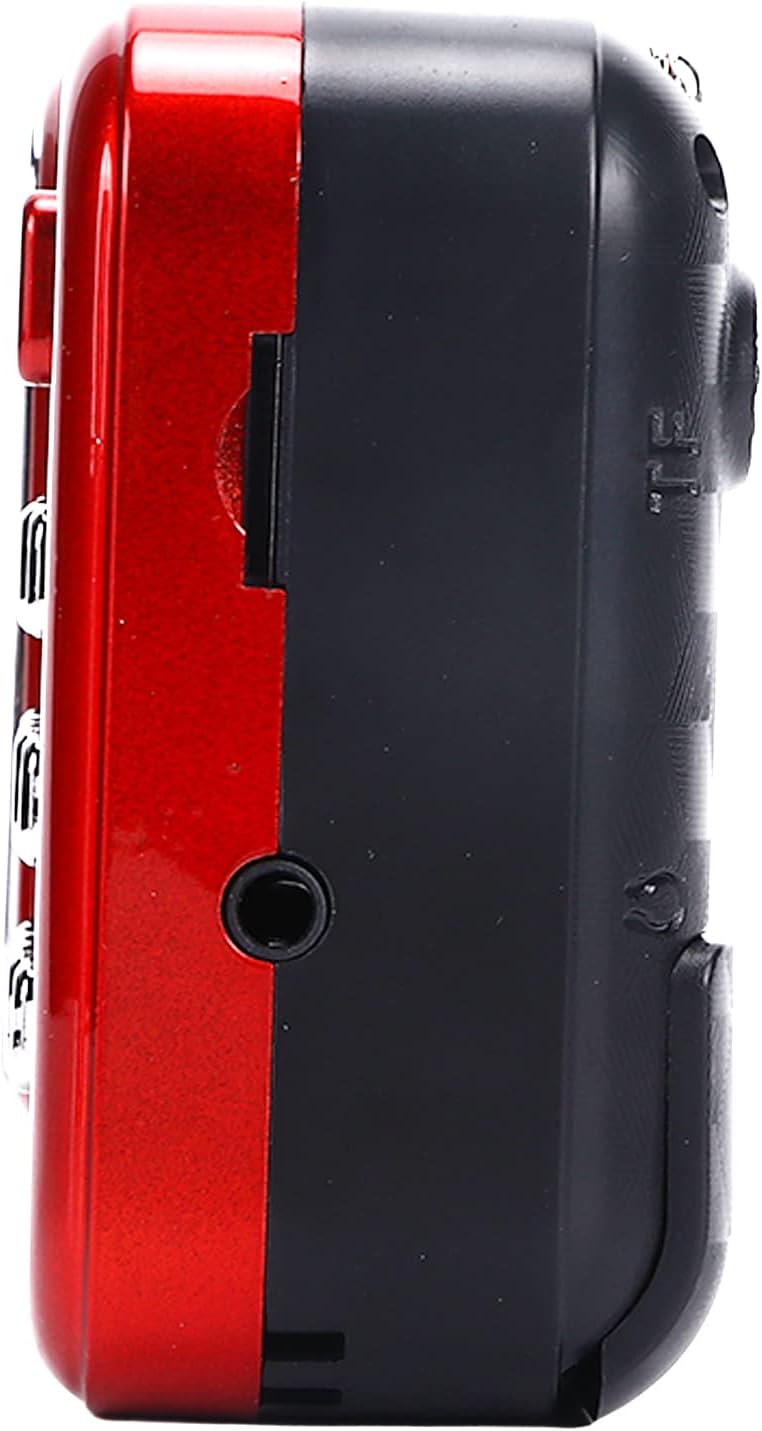
Figura 4.3: lato view of the radio, highlighting the headphone jack for private listening.
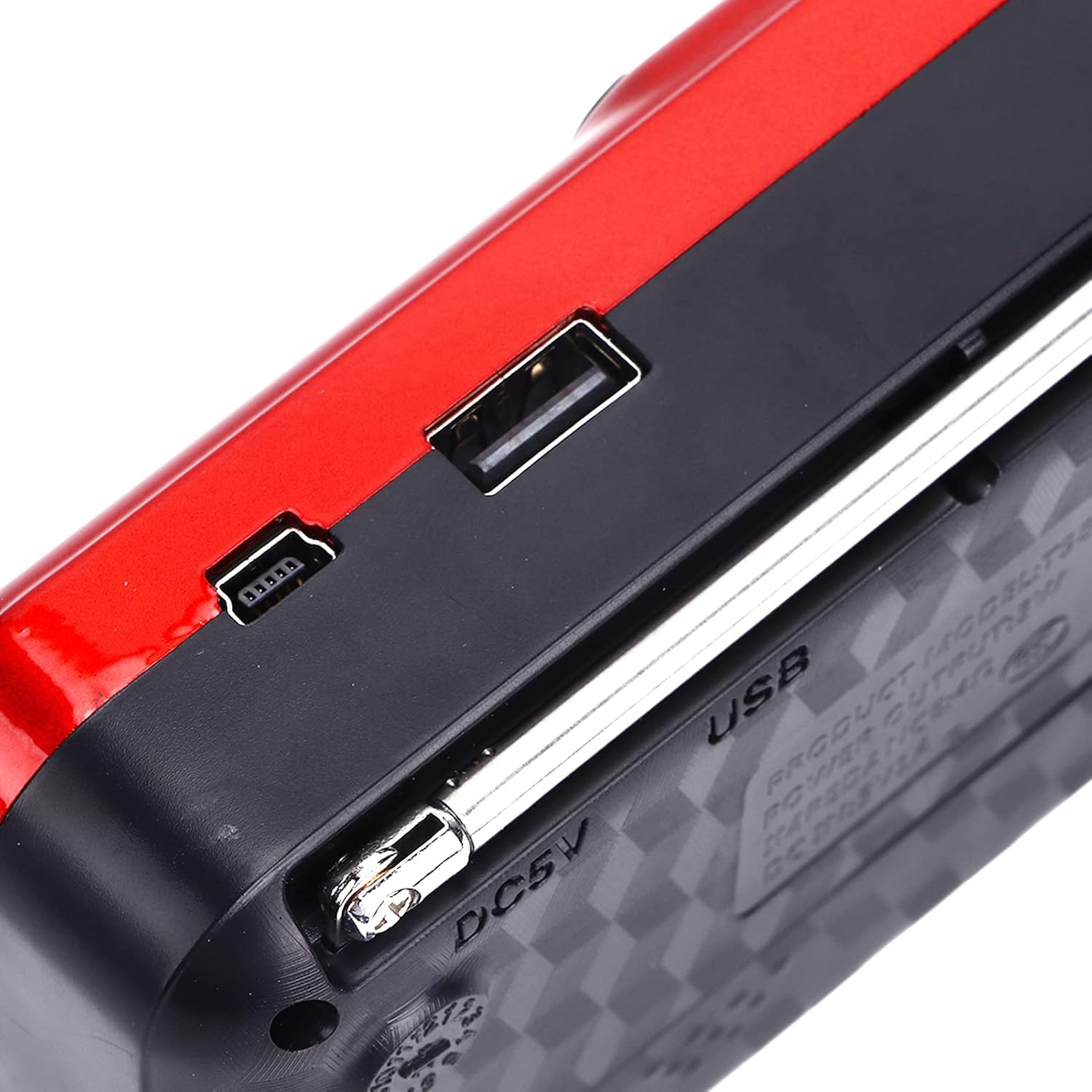
Figura 4.4: in alto view of the radio, showing the USB port and DC 5V charging port.
5. Impostazione
5.1 Installazione della batteria
- Individuare il coperchio del vano batteria sul retro della radio.
- Per aprire il vano, far scorrere o sollevare il coperchio.
- Insert one 18650 lithium battery, ensuring correct polarity (+/-) as indicated inside the compartment.
- Chiudere saldamente il coperchio del vano batterie.

Figure 5.1: Open battery compartment showing the insertion of an 18650 lithium battery.
The radio can operate for approximately 6-8 hours on a fully charged 18650 lithium battery.
5.2 Caricamento della batteria
- Connect the provided USB charging cable to the DC 5V port on the radio.
- Connect the other end of the USB cable to a compatible USB power source (e.g., computer, USB wall adapter, power bank, car charger).
- The LCD display may indicate charging status. Disconnect the charger once the battery is fully charged.
Volume di caricatage: CC 5 V 1 A.
6. Istruzioni per l'uso
6.1 Accensione/spegnimento
- Premere e tenere premuto il tasto On/Off/Pausa pulsante per accendere la radio.
- Press and hold the same button again to power off.
6.2 Regolazione del volume
- Premere il tasto V+ pulsante per aumentare il volume.
- Premere il tasto V- pulsante per diminuire il volume.
6.3 Radio Mode (AM/FM)
- Per una migliore ricezione, estendere l'antenna telescopica.
- Premere il tasto Modalità (M) button to switch to FM or AM radio mode. The current mode will be displayed on the LCD screen.
- Scansione automatica: In modalità radio, tieni premuto il tasto Riproduci/Pausa button (often doubles as scan) to automatically scan and save available stations.
- Sintonizzazione manuale: Utilizzare il Canzone precedente or Prossima canzone pulsanti per sintonizzarsi manualmente sulla frequenza desiderata.
- Ingresso di frequenza diretto: Use the numeric keys (0-9) to directly enter a radio frequency.
6.4 Riproduzione MP3
The radio supports MP3 format playback from a USB drive or TF (MicroSD) card (not included).
- Inserire un'unità USB nella porta USB o una scheda TF nello slot per schede TF.
- Premere il tasto Modalità (M) button to switch to MP3 playback mode. The radio will automatically detect and begin playing MP3 files.
- Utilizzare il Canzone precedente E Prossima canzone pulsanti per navigare tra le tracce.
- Premere il tasto On/Off/Pausa per mettere in pausa o riprendere la riproduzione.
- Use the numeric keys (0-9) to directly select a track number.
6.5 Utilizzo della torcia

Figure 6.1: The radio's integrated LED flashlight illuminating a dark area, useful for emergencies or low-light conditions.
The radio includes an integrated LED flashlight. To activate or deactivate the flashlight, locate the dedicated flashlight button or switch, usually on the side of the device.
6.6 Uso delle cuffie
For private listening, plug standard 3.5mm headphones into the headphone jack located on the side of the radio.
7. Manutenzione
- Pulizia: Wipe the radio with a soft, dry cloth. Do not use liquid cleaners or aerosols.
- Magazzinaggio: When not in use for extended periods, store the radio in a cool, dry place. If using a removable battery, consider removing it to prevent leakage.
- Cura della batteria: Ricaricare regolarmente la batteria, anche se non in uso, per preservarne la durata. Evitare di scaricarla completamente frequentemente.
8. Risoluzione Dei Problemi
| Problema | Possibile causa | Soluzione |
|---|---|---|
| La radio non si accende. | La batteria è scarica o non è installata correttamente. | Caricare la batteria o assicurarsi che sia installata con la polarità corretta. |
| Ricezione radiofonica scadente. | Antenna non estesa o segnale debole. | Estendere completamente l'antenna telescopica. Provare a riposizionare la radio. |
| Nessun suono dall'altoparlante. | Volume is too low or headphones are connected. | Aumenta il volume. Scollega le cuffie se non lo desideri. |
| MP3 filenon sta giocando. | Modalità errata, non supportata file format, or faulty USB/TF card. | Ensure radio is in MP3 mode. Verify filesono in formato MP3. Prova una chiavetta USB o una scheda TF diversa. |
9. Specifiche
- Modello: YOUTHINKmxkn0ugipz
- Marca: SI PENSA
- Tecnologia del sintonizzatore: AM, FM
- Bande radio supportate: AM, FM
- Tecnologia di connettività: USB
- Fonte di energia: Battery Powered (18650 Lithium Battery)
- Volume di caricatage: Corrente continua 5V 1A
- Potenza di uscita: 3W
- Frequenza di risposta: Da 100 Hz a 18 kHz
- Rapporto segnale/rumore: ≤70 dB
- Riproduzione musicale: Supports MP3 Format
- Dimensioni del prodotto: 4.65"L x 2.76"W x 1.38"H (Approx. 11.8 x 7 x 3.5 cm)
- Peso dell'articolo: 5.9 once (circa 167 g)
- Caratteristica speciale: Portable, LCD Display, MP3 Player, Flashlight
10. Garanzia e supporto
For warranty information or technical support, please refer to the documentation provided with your purchase or contact YOUTHINK customer service through the retailer where the product was purchased.
Conservare la prova d'acquisto per eventuali richieste di garanzia.