
1. Introduzione
This manual provides comprehensive instructions for the DEKCO DC4L 2K Outdoor Security Camera. It covers product features, installation procedures, operational guidelines, maintenance tips, troubleshooting solutions, and detailed technical specifications. Please read this manual thoroughly before using the camera to ensure proper setup and optimal performance.

Image 1.1: DEKCO DC4L Outdoor Security Cameras.
2. Prodotto finitoview
The DEKCO DC4L is a wired outdoor security camera designed for robust surveillance. It features 2K resolution, color night vision, and a 180° pan capability to cover wide areas. Key functionalities include dual-band WiFi connectivity, AI human detection, and flexible storage options.
Caratteristiche principali:
- 2K Ultra-Clear Spotlight Color Night Vision: Captures clear, vibrant color images even in low-light conditions.
- Stable Dual-Band WiFi Connection: Supports both 2.4GHz and 5GHz networks for reliable connectivity.
- Opzioni di archiviazione flessibili: Offers local storage via Micro SD card (8-128GB) and cloud storage services for 24/7 continuous recording.
- Rilevamento umano tramite intelligenza artificiale intelligente: Advanced algorithms accurately identify human figures, reducing false alarms from other movements.
- 180° Horizontal Pan: Fornisce un ampio angolo di 270° viewing angle for comprehensive area coverage.
- Grado di impermeabilità IP65: Progettato per l'uso esterno, resistente alla polvere e all'acqua.
- Audio bidirezionale: Enables communication through the camera via the mobile application.
- Integrazione della casa intelligente: Compatible with Amazon Alexa and Google Home devices.

Immagine 2.1: Passoview of DEKCO DC4L Camera Features.
3. Impostazione
3.1 Installazione fisica
The DEKCO DC4L camera is designed for wall mounting. Ensure the installation location provides a clear view of the desired monitoring area and is within range of your WiFi network and a power source. The camera is wired and requires a continuous power supply; it is not battery-powered or solar-powered.
- Scegli una posizione: Select a suitable outdoor location for mounting, considering coverage, power access, and WiFi signal strength.
- Montare la fotocamera: Use the provided mounting hardware to securely attach the camera to a wall. Adjust the bracket to achieve the desired initial angle.
- Connetti alimentazione: Connect the camera to a 5V DC power source using the included adapter.

Image 3.1: Camera Installation.

Image 3.2: Wired Camera Installation Overview.
3.2 Installazione dell'app e creazione dell'account
The DEKCO DC4L camera operates with a dedicated mobile application, often referred to as the CloudEdge app. Download the app from your device's app store (iOS or Android) and follow the on-screen instructions to create an account.
3.3 Connessione Wi-Fi
The camera supports both 2.4GHz and 5GHz WiFi networks for flexible and stable connectivity.
- Accensione: Ensure the camera is powered on and in pairing mode (refer to app instructions for specific indicator lights).
- Aggiungi dispositivo: Open the app, select 'Add Device', and follow the prompts to connect your camera to your home WiFi network.
- Seleziona rete: Choose your 2.4GHz or 5GHz WiFi network and enter the password.

Image 3.3: 2.4GHz WiFi Connection.
3.4 Installazione della scheda Micro SD
For local storage, install a Micro SD card (8GB to 128GB, Class 10 or higher recommended) into the designated slot on the camera.
- Trova slot: Identify the Micro SD card slot on the camera body.
- Inserisci carta: Inserire delicatamente la scheda Micro SD nello slot finché non scatta in posizione.
- Formato scheda: Within the app settings, navigate to storage options and format the newly inserted SD card.

Image 3.4: Micro SD Card Installation.
4. Istruzioni per l'uso
4.1 Vivere View
Access the live video feed from your camera through the mobile application.
- Apri l'app: Launch the DEKCO app on your smartphone.
- Seleziona la fotocamera: Tap on the desired camera from your device list to view il suo feed live.

Immagine 4.1: Live View on Smartphone.
4.2 Controllo panoramica
The camera offers a 180° horizontal pan function, providing a 270° viewangolo di ing.
- Controlli di accesso: Mentre in diretta view, use the on-screen controls to pan the camera horizontally.
- Auto Cruise: Enable the 'Auto Cruise' feature in the app settings for the camera to automatically pan across a predefined area at 60-minute intervals.

Image 4.2: 270° Viewing Angle with 180° Horizontal Pan.

Image 4.3: Auto Cruise Functionality.
4.3 Visione notturna
The camera features 2K Ultra-Clear Spotlight Color Night Vision, providing clear and detailed images even in complete darkness.
- Attivazione automatica: In genere la visione notturna si attiva automaticamente in condizioni di scarsa illuminazione.
- Modalità riflettore: The integrated spotlight can be activated to provide full-color night vision.

Image 4.4: 2K QHD Color Night Vision.
4.4 Rilevamento e avvisi umani tramite IA
The camera uses advanced AI algorithms to accurately detect human figures, minimizing false alarms from other moving objects.
- Abilita rilevamento: In the app's 'Alarm Management' settings, enable 'Motion Detection' and set the sensitivity (Low, Medium, High).
- Ricevi avvisi: The app will send push notifications to your smartphone when human motion is detected.
- Deterrenza: The camera can be configured to activate a spotlight and siren upon detection to deter unwanted activity.

Image 4.5: AI Human Detection for Fewer False Positives.

Image 4.6: Alarm Management Settings.

Image 4.7: Deterrence Features (Spotlight, Push, Siren).
4.5 Registrazione
The camera supports 24/7 continuous recording and motion-activated recording, with options for local Micro SD card storage or cloud storage.
- Registrazione continua: Records continuously to the Micro SD card or cloud service.
- Registrazione dell'evento: Registra solo quando viene rilevato un movimento, risparmiando spazio di archiviazione.
- Riproduzione: Accedi a foo registratotage through the app's playback feature, with a timeline for easy navigation.

Image 4.8: 24/7 Continuous Recording and Micro SD Storage.
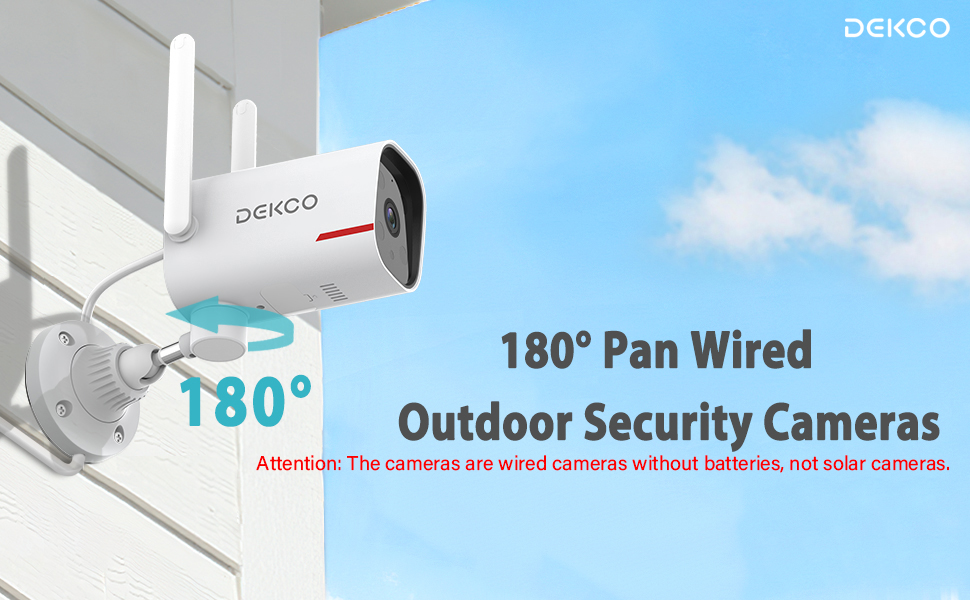
Image 4.9: 24/7 Home Monitoring.
4.6 Audio bidirezionale
Utilize the built-in microphone and speaker for two-way communication through the camera.
- Attiva Interfono: Nella vita reale view, tocca l'icona del microfono per parlare attraverso la telecamera.
- Ascoltare: Il microfono della telecamera capterà l'audio dall'area monitorata.
4.7 Integrazione della casa intelligente
The DEKCO DC4L camera is compatible with Amazon Alexa and Google Home smart devices.
- Collega account: Follow the instructions in your Alexa or Google Home app to link your DEKCO account.
- Controllo vocale: Usa i comandi vocali per view il feed della telecamera sui display intelligenti compatibili.
4.8 Condivisione dell'accesso alla telecamera
You can share access to your camera with family members or trusted individuals through the app.
- Accedi alle impostazioni di condivisione: In the app, navigate to the camera settings and find the 'Share Device' option.
- Invita utenti: Follow the prompts to invite other users to view il feed della tua telecamera.
4.9 ONVIF/RTSP Support (Advanced Users)
For advanced users, the camera supports ONVIF/RTSP protocols, allowing integration with Network Video Recorders (NVRs) or other surveillance software.
- Abilita nell'app: Enable ONVIF/RTSP functionality within the camera's settings in the mobile app.
- Configurare NVR: Refer to your NVR or software documentation for instructions on adding an ONVIF/RTSP camera.
5. Manutenzione
5.1 Pulizia
Una pulizia regolare aiuta a mantenere una qualità dell'immagine ottimale e prolunga la durata della fotocamera.
- Lente: Gently wipe the camera lens with a soft, lint-free cloth. Avoid abrasive cleaners.
- Corpo: Pulisci il corpo della fotocamera con un pannoamp panno per rimuovere polvere e sporco.
5.2 Aggiornamenti firmware
Periodically check for and install firmware updates through the mobile application to ensure your camera has the latest features and security enhancements.
5.3 Gestione scheda SD
To ensure continuous recording, regularly check the status of your Micro SD card in the app. Format the card periodically or replace it if it becomes corrupted or reaches its end of life.
6. Risoluzione Dei Problemi
If you encounter issues with your DEKCO DC4L camera, refer to the following common troubleshooting steps:
- Fotocamera non in linea: Check the power connection and WiFi signal strength. Restart the camera and your router. Ensure the camera is connected to the correct 2.4GHz or 5GHz WiFi network.
- Scheda SD non riconosciuta: Ensure the SD card is correctly inserted and formatted within the app. Try a different compatible SD card if the issue persists.
- Scarsa qualità dell'immagine: Clean the camera lens. Check your network connection speed.
- Falsi allarmi: Adjust the AI Human Detection sensitivity settings in the app.
- Rosa View: If the camera displays a pink image, try restarting the camera. If the issue persists, contact customer support as it may indicate a hardware fault.
- Pan Control Not Working: Ensure the camera has a stable network connection. For ONVIF/RTSP users, ensure the camera firmware is up to date, as this can resolve compatibility issues.
If these steps do not resolve your issue, please contact DEKCO customer support for further assistance.
7. Specifiche
| Caratteristica | Specificazione |
|---|---|
| Nome del modello | Modello DC4L |
| Tipo di montaggio | Montaggio a parete |
| Risoluzione di acquisizione video | 2K |
| Number of Items (in pack) | 1 (for this model variant) |
| Componenti inclusi | Adattatore |
| Tecnologia di comunicazione wireless | Wi-Fi (2.4 GHz e 5 GHz) |
| Fattore di forma | Cupola |
| Viewangolo di ing | 270 Degrees (180° Pan) |
| Gamma di visione notturna | 32 piedi |
| Frequenza dei fotogrammi | 30 fotogrammi al secondo |
| Materiale | Metallo |
| Voltage | 5 Volt (CC) |
| Dimensioni del prodotto (L x P x A) | Dimensioni: 20.5 x 9.98 x 9.98 cm |
| Peso dell'articolo | 1.99 kg |
| Tipo di lampadina | Infrarossi |
| Caratteristiche speciali | Night Vision, AI Human Detection, Two-Way Audio |
| Uso interno/esterno | All'aperto |
| Fonte di alimentazione | Elettrico con cavo |
| Dispositivi compatibili | Smartphone (Android, iPhone), Amazon Alexa, Google Home |
8. Garanzia
The DEKCO DC4L camera comes with a Garanzia di 1 anno from the date of purchase. Please retain your proof of purchase for warranty claims. The warranty covers manufacturing defects and malfunctions under normal use. It does not cover damage caused by misuse, accidents, unauthorized modifications, or natural disasters.
9. Supporto
For technical assistance, product inquiries, or warranty claims, please contact DEKCO customer support. Refer to the contact information provided with your product packaging or visit the official DEKCO websito per le risorse di supporto.