
1. Finitaview
The NETVUE Birdfy AI Smart Bird Feeder with Camera offers an advanced way to observe and interact with backyard birds. Equipped with a 1080p HD camera and AI bird species identification, it provides real-time alerts and captures high-quality video and images of your feathered visitors. Its IP65 weatherproof design ensures durability in various outdoor conditions, making it suitable for year-round use.
Le caratteristiche principali includono:
- 1080p HD Camera with Night Vision: Cattura video nitidi sia di giorno che di notte.
- AI Bird Species Identification: Automatically detects and identifies over 6000 bird species.
- 2.4GHz Wi-Fi & Bluetooth Connectivity: Ensures stable connection and easy setup.
- IP65 resistente alle intemperie: Designed to withstand rain, snow, and sun.
- Manual Squirrel Control: Features flashing lights, warning sounds, and a microphone to deter squirrels.
- Archiviazione cloud sicura: Utilizes Amazon Web Services for encrypted data storage.
2. Cosa c'è nella scatola
Upon unboxing your NETVUE Birdfy AI Smart Bird Feeder, verify that all components are present:
- Birdfy AI Smart Bird Feeder unit
- Integrated 1080p HD Camera
- Mounting bracket (for pole, tree, or wall installation)
- Viti e tasselli di montaggio
- Cavo di ricarica USB
- Manuale dell'utente (questo documento)
- Note: Solar panel is sold separately.
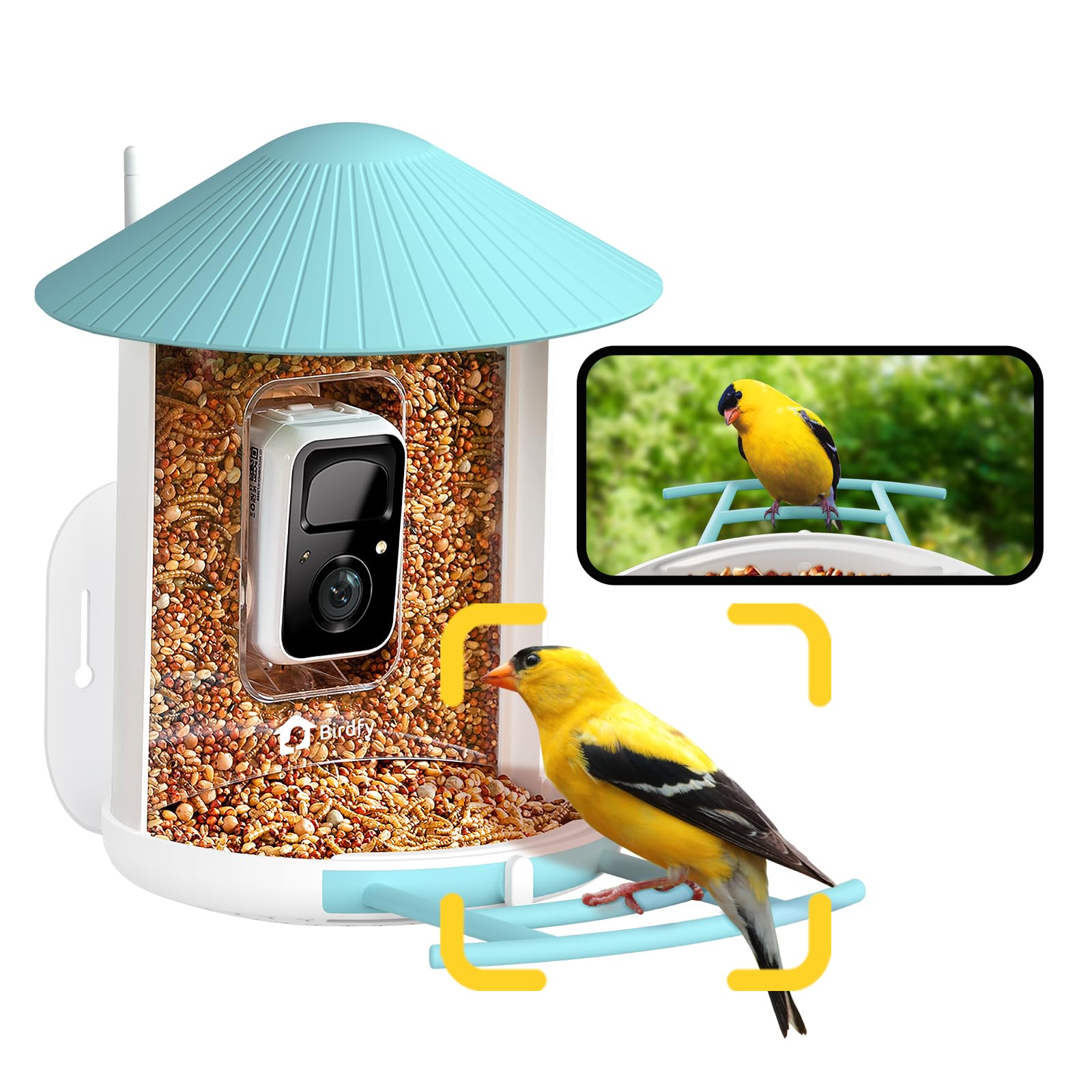
Image: The NETVUE Birdfy AI Smart Bird Feeder with its integrated camera.
3. Istruzioni per l'installazione
3.1 Caricamento della fotocamera
Before initial use, fully charge the camera's built-in battery using the provided USB cable. The charging port is typically located on the camera module itself, often protected by a rubber seal to maintain its weatherproof rating. A full charge can last several months depending on activity.
3.2 Installazione e associazione dell'app
- Scarica il Birdfy App dall'app store del tuo smartphone (iOS o Android).
- Crea un account o accedi se ne hai già uno.
- Follow the in-app instructions to add a new device. This typically involves scanning a QR code located on the camera module. You may need to temporarily remove the camera from the feeder housing to access the QR code.
- Connect the device to your 2.4GHz Wi-Fi network. Ensure your Wi-Fi signal is strong at the intended installation location.

Image: Visual guide for connecting the Birdfy feeder to the mobile application.
3.3 Montaggio dell'alimentatore
The Birdfy feeder offers versatile mounting options:
- Montaggio a parete: Use the provided bracket, screws, and anchors to secure the feeder to a wall.
- Montato su palo: Attach the feeder to a pole using the appropriate bracket.
- Tree-Mounted: Secure the feeder to a tree trunk or sturdy branch.
Scegli una posizione che fornisca una visione chiara view of the feeder for the camera, is easily accessible for refilling and cleaning, and is away from potential squirrel jumping points. Ensure the camera's field of view (129° horizontal, 67° vertical) captures both the seed tray and the perch.

Image: Various installation methods for the Birdfy feeder.
4. Istruzioni per l'uso
4.1 Riempimento dell'alimentatore
The feeder has a 1.5-liter capacity. To fill:
- Turn the antenna away from the top.
- Open the roof of the feeder.
- Pour bird seed into the main compartment until full.
- Close the roof securely.

Image: Instructions for refilling the Birdfy feeder.
4.2 Using the Birdfy App
The Birdfy app is your primary interface for the smart feeder:
- Vivere View: Accedi allo streaming video in tempo reale dalla telecamera.
- AI Alerts: Receive instant notifications when a bird visits, with AI identifying the species.
- Riproduzione dell'evento: Review recorded videos and snapshots of bird activity.
- Visione notturna: In condizioni di scarsa illuminazione, la telecamera passa automaticamente alla visione notturna a infrarossi.
- Squirrel Deterrence: If a squirrel is detected, use the app to activate flashing lights, warning sounds, or speak through the two-way microphone.
- Condivisione: Share captured bird moments with friends and family through the app.

Immagine: Example of a smart alert notification on the Birdfy app.

Image: The Birdfy app allows users to capture and share bird videos and photos.
5. Manutenzione
5.1 Pulizia dell'alimentatore
Regular cleaning is essential to prevent the spread of disease among birds and to ensure the feeder functions correctly. The feeder is designed for easy cleaning:
- Remove the camera module from the feeder housing.
- Empty any remaining bird seed.
- Disassemble the feeder components (roof, seed tray, etc.) as needed.
- Wash all parts with warm, soapy water. Use a brush to remove stubborn debris.
- Rinse thoroughly and allow all parts to dry completely before reassembling and refilling.

Image: A visual representation of the cleaning process for the Birdfy feeder.
5.2 Gestione della batteria
Monitor the battery level through the Birdfy app. Recharge the camera when the battery is low. If you have a compatible solar panel (sold separately), ensure it is positioned to receive adequate sunlight for continuous charging.
6. Risoluzione Dei Problemi
- Nessuna connessione Wi-Fi:
- Ensure the feeder is within range of your 2.4GHz Wi-Fi network.
- Riavvia il router Wi-Fi.
- Riassocia la fotocamera all'app.
- Scarsa qualità video:
- Controlla la potenza del segnale Wi-Fi.
- Pulisci l'obiettivo della fotocamera.
- Assicurarsi che non vi siano ostacoli davanti all'obiettivo.
- No Bird Detections/False Alarms:
- Regola la sensibilità del rilevamento del movimento nell'app.
- Assicurare il campo di azione della telecamera view is correctly positioned to capture the feeder area.
- Check for moving objects like tree branches or shadows that might trigger false alarms.
- Durata breve della batteria:
- Reduce the frequency of recordings or live view sessioni.
- Assicurarsi che la fotocamera sia completamente carica.
- Considera l'acquistoasing a compatible solar panel for continuous power.
7. Specifiche
| Caratteristica | Dettaglio |
|---|---|
| Marca | RETE |
| Modello | Birdfy AI |
| Risoluzione della fotocamera | Risoluzione 1080p |
| Visione notturna | Infrarossi |
| Connettività | Wi-Fi a 2.4 GHz, Bluetooth |
| Valutazione resistente alle intemperie | Grado di protezione IP65 |
| Materiale | Acrilonitrile-butadiene-stirene (ABS), Policarbonato (PC) |
| Capacità | 1.5 Liters (Bird Seed) |
| Dimensioni (L x P x A) | 8 cm L x 7 cm P x 11 cm A |
| Peso dell'articolo | 2.09 chilogrammi |
| Fonte di alimentazione | Rechargeable Battery (Solar Powered option available separately) |
8. Garanzia e supporto
For warranty information, technical support, or customer service inquiries, please refer to the official NETVUE website or contact their customer support directly. Details are typically available in the product packaging or on the manufacturer's online resources.
NETVUE is committed to providing reliable products and support. If you encounter any issues, please reach out to their dedicated support team for assistance.