
HAPPYMODEL M47439-D1/D2 Mobula7 1S HD
HAPPYMODEL Mobula7 1S HD Micro FPV Whoop Drone User Manual
Model: M47439-D1/D2 Mobula7 1S HD (Frsky Version)
Introduzione
The HAPPYMODEL Mobula7 1S HD is a lightweight and efficient 75mm brushless FPV whoop drone designed for high-definition video recording. It features a highly integrated X12 5-IN-1 AIO flight controller with a built-in Frsky receiver, capable of 1080P HD video capture, and includes an external blackbox for Gyroflow stabilization. This manual provides essential information for the safe and effective operation of your Mobula7 1S HD drone.

Figura 1: in alto view of the HAPPYMODEL Mobula7 1S HD Micro FPV Whoop Drone.
Informazioni sulla sicurezza
Always prioritize safety when operating FPV drones. Failure to follow these guidelines may result in injury or damage to property.
- Operare in aree aperte, lontano da persone, animali e ostacoli.
- Mantenere una distanza di sicurezza dal drone durante il funzionamento.
- Ensure propellers are clear before connecting the battery.
- Non utilizzare in prossimità di acqua o in condizioni di bagnato.
- Always disconnect the battery after use and before handling the drone for maintenance.
- Use only recommended 1S LiPo/LiHV batteries (not included).
- Per gli utenti di età inferiore ai 18 anni si raccomanda la supervisione di un adulto.
Contenuto della confezione
Verifica che tutti i componenti siano presenti nel tuo pacchetto:
- HAPPYMODEL Mobula7 1S HD Micro FPV Whoop Drone (Frsky Version)
- RunCam Split3-Lite Camera (pre-installed)
- 1 inch PC Material Propellers (pre-installed, with spares)
- External Blackbox module
Note: Batteries are not included with this product. Recommended batteries are 1S 450mAh/550mAh/650mAh LiPo/LiHV.
Impostare
1. Ispezione iniziale
Carefully unbox the drone and inspect it for any visible damage. Ensure all propellers are securely attached and free from bends or cracks. Check all wiring connections for proper seating.
2. Collegamento della batteria
Connect a fully charged 1S LiPo/LiHV battery to the drone's power connector. Ensure the polarity is correct. The drone will power on and initiate its boot sequence.
3. Binding with Frsky Transmitter
The Mobula7 1S HD (Frsky version) features a built-in SPI Frsky 2.4G receiver. Refer to your Frsky transmitter's manual for specific binding procedures. Typically, you will put your transmitter into binding mode, then power on the drone while holding the bind button (if applicable, consult the flight controller diagram for location) or initiate binding via Betaflight configurator.
4. Flight Controller Configuration (Betaflight)
The drone uses an X12 Frsky V1.0 flight controller (Target: CRAZYBEEF4FR). For advanced configuration, connect the drone to a computer via USB and use the Betaflight Configurator software. This allows for PID tuning, OSD customization, mode setup, and more.
5. External Blackbox Setup
The external blackbox module allows for flight data recording, essential for Gyroflow stabilization.
- Insert a Micro SD card (up to 32GB, formatted to FAT32) into the blackbox module. Be careful when inserting the card to avoid damage.
- Do not pull out the SD card while the battery is connected or the drone is powered on.
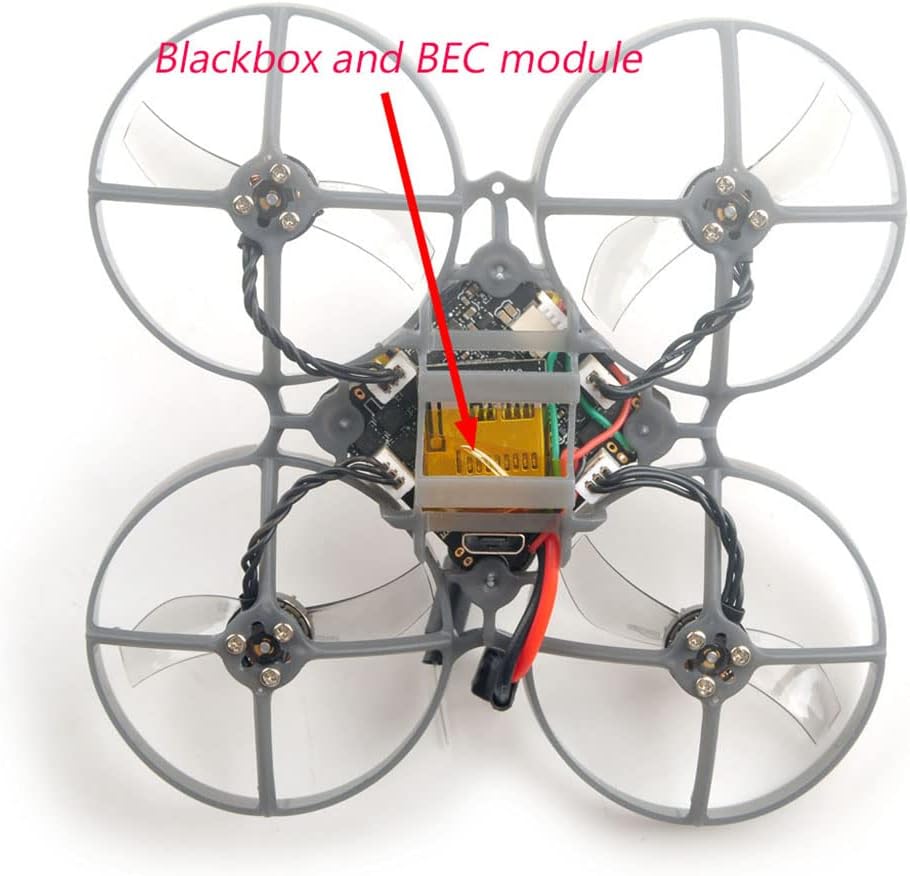
Figure 2: Location of the external blackbox and BEC module on the Mobula7 1S HD.
6. RunCam Split3-Lite Power
The RunCam Split3-Lite camera requires an external voltage booster module for stable power, as the onboard 5V DC module may not handle it optimally. Ensure this connection is secure as per the wiring diagram.
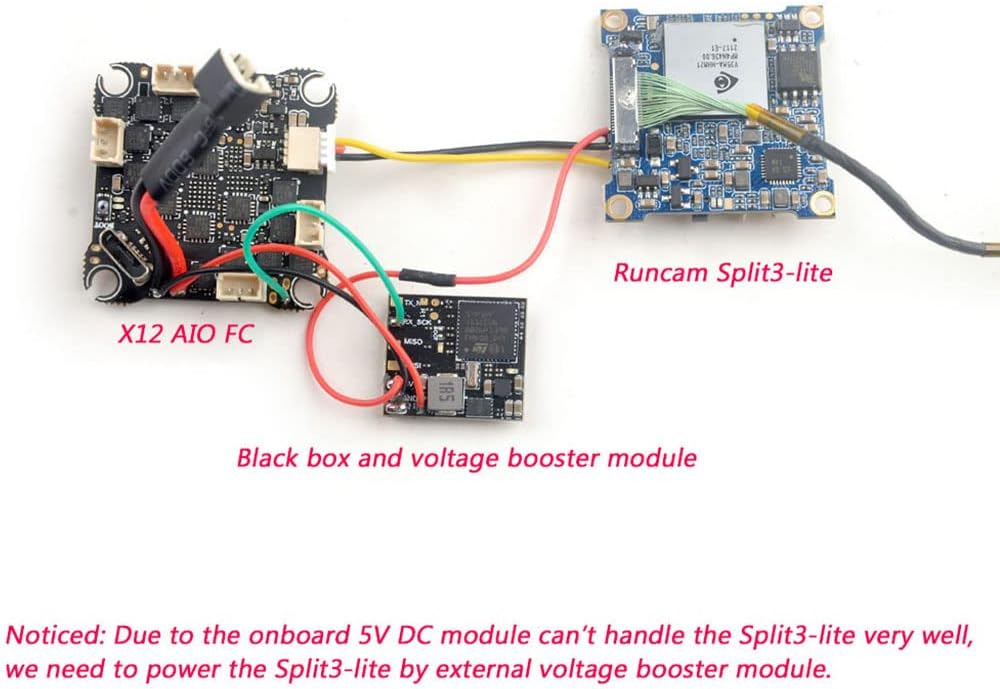
Figure 3: Wiring diagram illustrating connections between the X12 AIO FC, RunCam Split3-Lite, and the external blackbox with voltage booster module.
Istruzioni per l'uso
1. Controlli pre-volo
- Ensure your transmitter is powered on and bound to the drone.
- Controllare il volume della batteriatage on both the drone and transmitter.
- Verify propellers are free from obstructions and damage.
- Confirm FPV video feed is clear and stable.
2. Inserimento e disinserimento
Arming and disarming procedures are typically configured in Betaflight. Common methods include a stick command (e.g., throttle down and yaw right) or a dedicated switch on your transmitter. Ensure you are in a safe area before arming.
3. Comandi di volo di base
The Mobula7 1S HD is an intermediate-level drone. Familiarize yourself with standard FPV flight controls:
- Throttle: Controlla l'altitudine.
- roll: Tilts the drone left or right.
- Pece: Tilts the drone forward or backward.
- Imbardata: Rotates the drone left or right on its vertical axis.
4. Registrazione video HD
The RunCam Split3-Lite records 1080P HD video. Recording is typically initiated via a switch on your transmitter, configured in Betaflight. Ensure an SD card is inserted into the external blackbox for flight data logging, which is crucial for post-processing with Gyroflow for smooth footage.

Figura 4: primo piano view of the RunCam Split3-Lite camera module.
Manutenzione
Una manutenzione regolare garantisce la longevità e le prestazioni del tuo drone.
- Pulizia: After each flight, especially outdoors, gently clean the drone to remove dust, dirt, or debris from the frame, motors, and camera lens. Use a soft brush or compressed air.
- Sostituzione dell'elica: Inspect propellers before and after each flight for cracks, bends, or chips. Damaged propellers can cause vibrations and affect flight performance. Replace them immediately if damaged.
- Ispezione del motore: Check motors for any signs of damage, loose wires, or excessive play in the bearings. Ensure they spin freely.
- Aggiornamenti del firmware: Periodically check the HAPPYMODEL website or Betaflight resources for firmware updates for the flight controller. Updating firmware can improve performance and add new features.

Figura 5: primo piano view of the RS0802 KV20000 motor and 1-inch PC material propeller.
Risoluzione dei problemi
| Problema | Possibile causa | Soluzione |
|---|---|---|
| Il drone non si accende | Batteria non collegata, batteria scarica, collegamento difettoso. | Ensure battery is fully charged and securely connected. Check power lead for damage. |
| Nessun feed video FPV | VTX not powered, camera disconnected, incorrect VTX channel. | Check camera and VTX connections. Verify VTX channel matches goggles. Ensure external voltage booster for RunCam Split3-Lite is working. |
| Drone not binding to transmitter | Incorrect binding procedure, receiver issue, transmitter not in bind mode. | Review binding steps in this manual and your transmitter's manual. Ensure correct receiver protocol (Frsky D8/D16). |
| Unstable flight/excessive vibrations | Damaged propellers, loose motors, incorrect PID tuning. | Inspect and replace damaged propellers. Check motor screws. Adjust PID settings in Betaflight if necessary. |
| HD recording issues | SD card full/corrupt, incorrect format, card not inserted correctly. | Format SD card to FAT32. Ensure card is fully inserted. Try a different SD card. |
Specifiche
| Caratteristica | Dettaglio |
|---|---|
| Marca | HAPPYMODEL |
| Nome del modello | Mobula7 1S HD |
| Passo | 75mm |
| Dimensioni (L x P x A) | 99 mm x 99 mm x 45.5 mm (3.9"L x 3.9"W x 1.79"H) |
| Controllore di volo | X12 Frsky V1.0 AIO (CRAZYBEEF4FR) |
| MCU | STM32F411CEU6 (100MHZ, 512K FLASH) |
| Sensore | ICM20689 (SPI connection) |
| Opzione ricevitore | SPI Frsky D8/D16 |
| ESC | Built-in 12A (each) Blheli_S 4in1 ESC (Peak 15A for 3s) |
| Motori | RS0802 KV20000 (9N12P) |
| Eliche | 1 inch PC Material Propellers |
| Telecamera | RunCam Split3-Lite (1080P HD video record) |
| Risoluzione di acquisizione video | 1080p (1920x1080 pixel) |
| Formato di acquisizione video | MP4 |
| VTX | Built-in 5.8G OpenVTX 0mw~400mw |
| Scatola nera | External, supports Micro SD card (max 32GB, FAT32) |
| Alimentazione elettrica | 1S battery input (DC 2.9V-4.35V) |
| Batteria consigliata | 1S 450mAh/550mAh/650mAh (not included) |
| Livello di abilità | Intermedio |
| Materiale | PC |
| Codice UPC | 086972526571 |
Informazioni sulla garanzia
Specific warranty details for the HAPPYMODEL Mobula7 1S HD Micro FPV Whoop Drone are not provided within this manual. Please refer to the product packaging, the seller's website, or contact HAPPYMODEL directly for warranty terms and conditions.
Supporto
For technical support, troubleshooting beyond this manual, or inquiries regarding your HAPPYMODEL Mobula7 1S HD drone, please contact the seller or visit the official HAPPYMODEL website. Online communities and forums dedicated to FPV drones can also be valuable resources for assistance.
Ask a question about this manual
Ask about setup, troubleshooting, compatibility, parts, safety, or missing instructions. Manuals+ will review the question and use this page’s manual context to help answer it.