
1. Introduzione
Thank you for choosing the EVERCROSS EV10K PRO App-Enabled Electric Scooter. This manual provides essential information for the safe operation, assembly, maintenance, and troubleshooting of your new electric scooter. Please read this manual thoroughly before your first ride to ensure optimal performance and safety.
Safety First: Always wear a helmet and appropriate safety gear when riding. Familiarize yourself with local regulations regarding electric scooter usage.
2. Prodotto finitoview
The EVERCROSS EV10K PRO is a high-performance electric scooter designed for urban commuting and recreational use. Key features include a powerful 500W brushless motor, a long-range battery, 10-inch honeycomb solid tires, and an intuitive LED digital display. It also features a dual braking system and dual shock absorption for a smooth and secure ride.
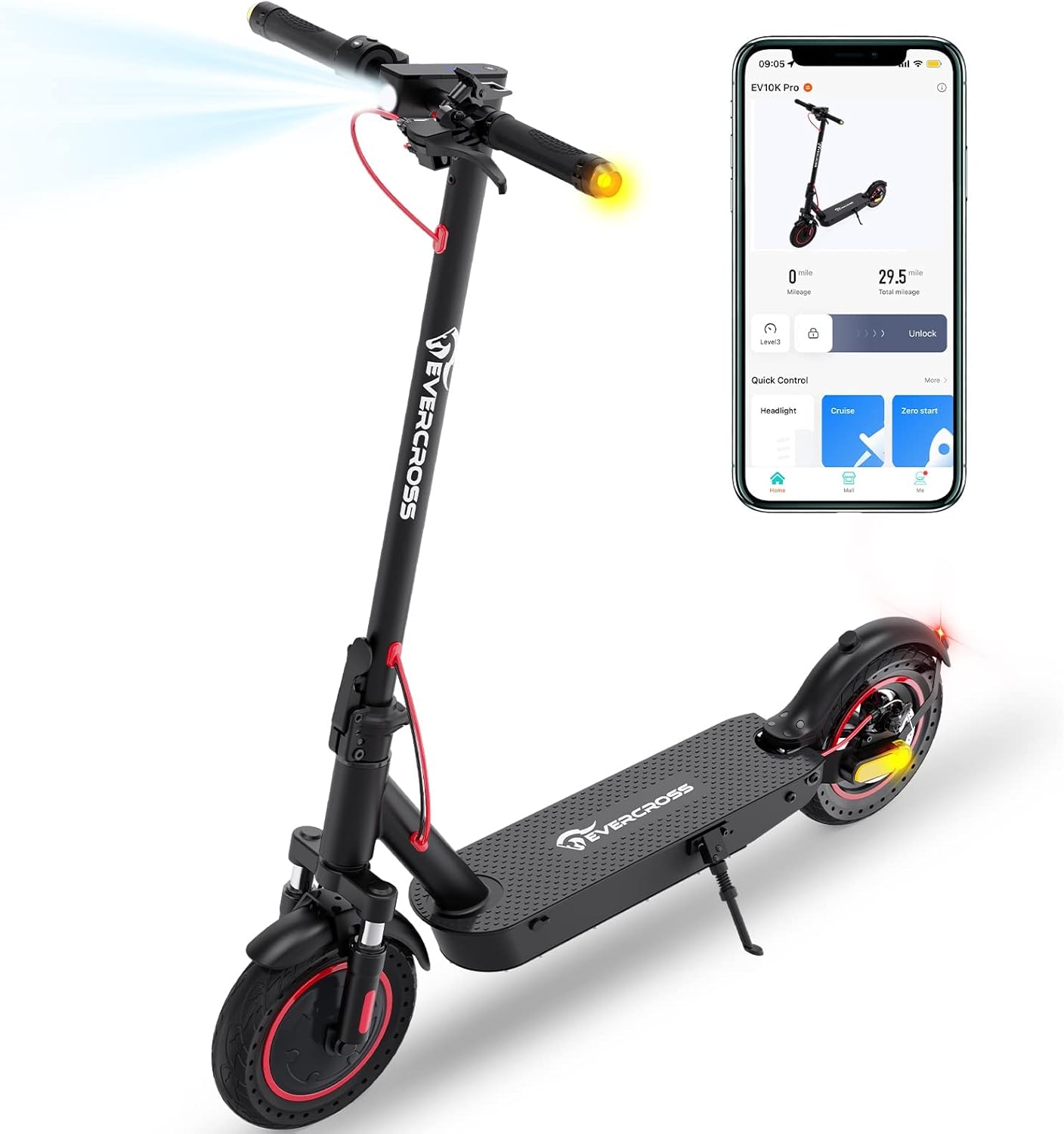
Figure 2.1: The EVERCROSS EV10K PRO Electric Scooter, showcasing its sleek design and integrated app connectivity.

Figure 2.2: Product identification label, showing model number, specifications, and certifications.
3. Installazione e assemblaggio
The EV10K PRO comes mostly pre-assembled. Follow these steps for quick setup:
- Aprire lo scooter: Sollevare con cautela lo stelo finché non si blocca in posizione. Assicurarsi che il meccanismo di piegatura sia saldamente agganciato.
- Fissare il manubrio: Connect the wires from the handlebar to the stem. Align the handlebar with the stem and secure it using the provided screws and tools.
- Carica iniziale: Before first use, fully charge the scooter's battery. Connect the charger to the charging port and plug it into a power outlet. The indicator light on the charger will change when fully charged.
- Scarica l'App: Cercare the "EVERCROSS PRO" app on your smartphone's app store (iOS or Android). Install and open the app.
- Connessione tramite Bluetooth: Turn on the scooter and enable Bluetooth on your phone. Follow the in-app instructions to pair your scooter with the app. This allows for features like locking/unlocking, cruise control, and monitoring speed/mileage.

Figure 3.1: The EVERCROSS PRO app interface, showing connectivity and control options.
4. Istruzioni per l'uso
4.1 Accensione/spegnimento e visualizzazione
Press and hold the power button on the LED digital dashboard to turn the scooter on or off. The display shows current mode, speed, cruise control status, Bluetooth connection, and headlight status. A single button press can control various riding operations.

Figura 4.1: dettagliata view of the LED Digital Dashboard and handlebar controls.
4.2 modalità di velocità
The scooter features multiple speed modes to suit different riding conditions and preferences. You can switch between modes using the controls on the dashboard or via the EVERCROSS PRO app.
- Modalità ecologica: Modalità di risparmio energetico per autonomia estesa e velocità ridotte.
- Modalità D: Standard drive mode for balanced performance.
- Modalità S: Sport mode for maximum speed and acceleration.
The maximum speed of 19 MPH can be achieved by connecting to the mobile app to remove the speed limit, or by pressing the power button 6 times in a row to upgrade the top speed from 15 MPH to 19 MPH.

Figure 4.2: Illustration of the three available speed modes and their typical speeds.
4.3 Sistema frenante
The EV10K PRO is equipped with an Electronic Brake (E-ABS) and a Disc Brake for reliable stopping power. Apply the brake lever gently to slow down, and firmly for emergency stops. Always maintain a safe braking distance.

Figura 4.3: Oltreview of the dual braking system for enhanced safety.
4.4 Pieghevole e trasportabile
The scooter features a lightweight and foldable design for easy storage and transport. To fold, locate the folding buckle mechanism on the stem, release it, and carefully fold the stem downwards until it latches. The folded dimensions are approximately 43.3 x 20.1 x 21.3 inches, and it weighs 35.3 lbs.

Figure 4.4: The scooter's lightweight and foldable design for convenient carrying.

Figure 4.5: Dimensions of the scooter, highlighting its compact folded size.
5. Manutenzione
Una manutenzione regolare garantisce la longevità e il funzionamento sicuro del tuo scooter.
- Pulizia: Pulisci lo scooter con un pannoamp cloth after use. Avoid using high-pressure water jets or harsh chemicals.
- Cura della batteria: Caricare regolarmente la batteria, anche se non in uso, per mantenerla in buone condizioni. Evitare di scaricarla completamente. Conservare lo scooter in un luogo fresco e asciutto quando non in uso.
- Ispezione degli pneumatici: The scooter uses 10-inch honeycomb solid tires, which are puncture-resistant. Regularly inspect them for wear and tear.
- Controllo dei freni: Periodically check the responsiveness of both the electronic and disc brakes. Adjust if necessary or consult a professional.
- Ispezione generale: Before each ride, check all screws, bolts, and quick-release mechanisms to ensure they are tight and secure.
6. Risoluzione Dei Problemi
Questa sezione affronta i problemi più comuni che potresti incontrare.
| Problema | Possibile causa | Soluzione |
|---|---|---|
| Lo scooter non si accende | Batteria scarica; Collegamenti allentati | Caricare completamente la batteria; controllare tutti i collegamenti dei cavi. |
| Autonomia o velocità ridotte | Low battery; Overload; Riding conditions | Ensure battery is fully charged; Do not exceed maximum weight capacity; Range and speed vary with terrain, rider weight, and temperature. |
| Throttle malfunction (e.g., stuck at max speed) | Damaged throttle unit; Loose connection | Immediately apply brakes. Avoid putting pressure on the throttle when going over bumps. Contact customer support for a replacement throttle if damaged. Repair should be done by those comfortable with electronics. |
| Problemi di connessione dell'app | Bluetooth disattivato; App non aggiornata; Scooter non acceso | Ensure Bluetooth is enabled on phone; Update app to latest version; Turn scooter on before attempting to connect. |
7. Specifiche
| Caratteristica | Specificazione |
|---|---|
| Numero di modello | EV10K PRO |
| Potenza del motore | 500W (senza spazzole) |
| Velocità massima | Fino a 19 MPH (30.5 km/h) |
| Gamma massima | Fino a 22 miglia (35.4 km) |
| Batteria | 36V/11.4AH Lithium Ion |
| Pneumatici | Pneumatici pieni a nido d'ape da 10 pollici |
| Sistema frenante | Electronic Brake (E-ABS) + Disc Brake |
| Sospensione | Doppia sospensione |
| Capacità di carico massima | 330 libbre (150 kg) |
| Peso dell'articolo | 35.3 libbre (16 kg) |
| Dimensioni piegate | 43.3 x 20.1 x 21.3 pollici (109.98 x 51.05 x 53.59 cm) |
| Numero di certificazione ISED | 29099-EV10KPRO |
| HVIN | EV10K PRO |
| Intervalli di frequenza operativa | Da 2402 MHz a 2480 MHz |
Note: The above data may vary depending on riding conditions, rider weight, climate, and proper maintenance.
8. Garanzia e supporto
Your EVERCROSS EV10K PRO Electric Scooter is covered by a return policy that allows for refund or replacement within 30 days of purchase. For any product-related inquiries, technical support, or warranty claims, please contact the seller directly.
- Venditore: EVERCROSS Direct
- Produttore: ZHEJIANG KUANTU INDUSTRY AND TRADE CO.,LTD
Si prega di conservare la prova d'acquisto ai fini della garanzia.