
1. Prodotto finitoview
The Nutale AirPro Key Finder Tag (Model F11XD) is a Bluetooth-enabled item locator designed to help you find misplaced items such as keys, wallets, backpacks, and tablets. It integrates seamlessly with the Apple Find My app, leveraging the global Find My network for location tracking. This device is compatible exclusively with iOS devices.

Figure 1: Nutale AirPro Key Finder Tag features and Find My App integration.
2. Istruzioni per l'installazione
2.1. Important iOS System Requirement
To ensure proper functionality and binding of the Nutale AirPro Key Finder Tag, your iOS device must be running iOS 18.0.1 o successivo. Please update your device's operating system if necessary before proceeding with the setup.

Figure 2: iOS system version requirement for tag legame.
2.2. Accensione del dispositivo
- Locate the button on your Nutale AirPro Key Finder Tag.
- Tenere premuto il pulsante per circa 5 secondi.
- The device will emit a beep sound and a light will flash, indicating it has powered on and is ready for pairing.
2.3. Pairing with the Apple Find My App
Follow these steps to pair your Nutale AirPro Key Finder Tag with your iOS device using the Find My app:
- Aprire il Trova la mia app sul tuo iPhone o iPad.
- Vai a Elementi scheda.
- Tocca il + icon (Add Item).
- Selezionare Altro elemento supportato dalle opzioni.
- The app will search for nearby devices. Once your Nutale AirPro Tag is detected (e.g., "NUTALE-F11X"), tap Collegare.
- Segui le istruzioni sullo schermo per Name your item and choose an emoji to represent it.
- Accetta di collegare il dispositivo al tuo ID Apple.
- Rubinetto Fine per completare il processo di associazione.
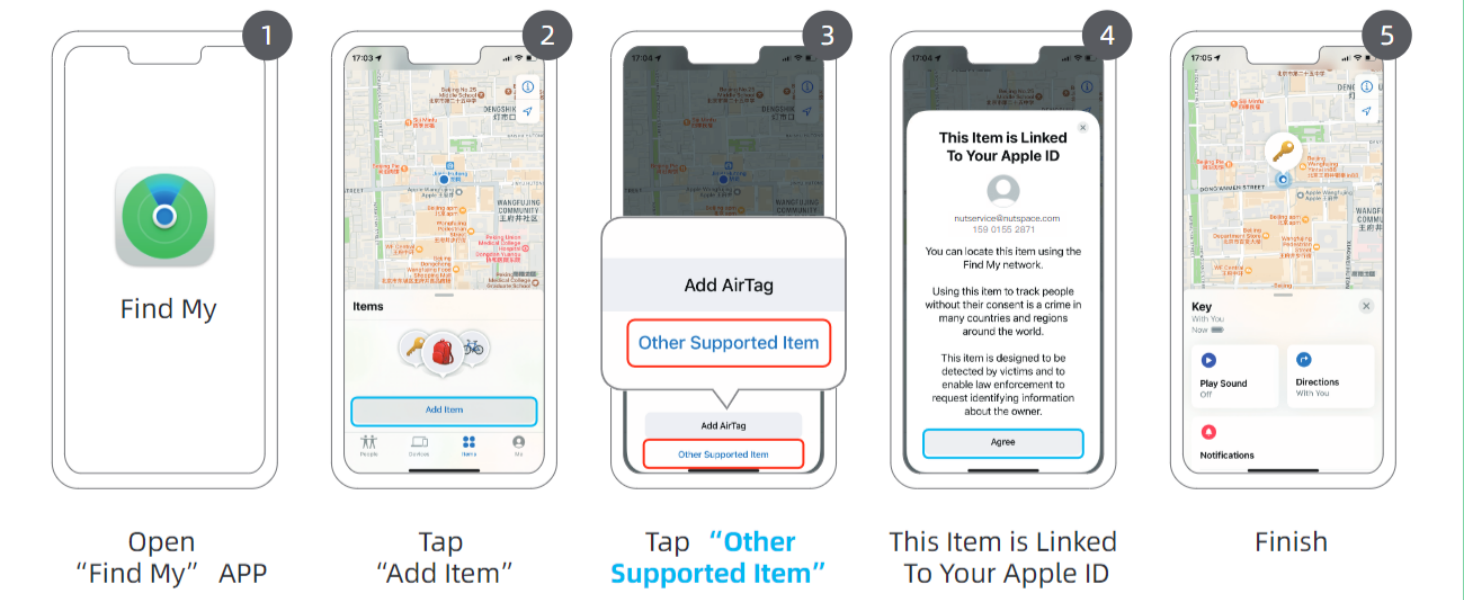
Figure 3: Visual guide for connecting your Nutale AirPro Tag all'app Dov'è.
3. Istruzioni per l'uso
3.1. Individuazione dell'oggetto
The Nutale AirPro Key Finder Tag utilizes the Apple Find My network to help you locate your items. This network consists of millions of Apple devices worldwide that can anonymously detect your tag and report its location to you.
- Long-Distance Locating: If your item is far away, the Find My app will display its last known location on a map, updated by the Find My network. You will receive notifications if your item is detected by other Apple devices.
- Nearby Locating (Play Sound): When your item is within Bluetooth range (approximately 20 to 50 meters), you can use the Find My app to play a sound on your Nutale AirPro Tag to pinpoint its exact location.

Figure 4: Global positioning and sound features via Find My App and Siri.
3.2. Usare Siri
You can also ask Siri to help you find your item. Simply say, "Hey Siri, find my [item name]" (e.g., "Hey Siri, find my keys"), and your Nutale AirPro Tag suonerà un suono.
3.3. Notifiche di elementi lasciati indietro
The Find My app can alert you if you leave your Nutale AirPro Tag behind at an unfamiliar location. You can customize these notifications within the app settings.
3.4. Modalità smarrita
If your item is lost, you can enable Lost Mode in the Find My app. This allows you to display a message and contact information to anyone who finds your tagQuando qualcuno trova il tuo tag and scans it with an NFC-enabled smartphone, they will see your message and contact details.
Video 1: Official demonstration of Nutale AirPro Key Finder Tag setup and functionality with iOS Find My App.
4. Manutenzione
4.1. Informazioni sulla batteria
- The Nutale AirPro Key Finder Tag usa un Batteria a bottone CR2032.
- The battery life is approximately 10 mesi in normali condizioni d'uso.
- Il pacchetto del prodotto include 4 batterie CR2032 (one pre-installed, three spares).
4.2. Sostituzione della batteria
Per sostituire la batteria:
- Individuare il vano batteria sul retro del tag.
- Sollevare delicatamente il coperchio della batteria.
- Rimuovere la vecchia batteria CR2032.
- Inserire una nuova batteria CR2032 con il lato positivo (+) rivolto verso l'alto.
- Chiudere saldamente il coperchio della batteria.

Figure 5: Independent battery compartment for easy replacement.
5. Risoluzione Dei Problemi
- Dispositivo non associato: Ensure your iOS device is updated to iOS 18.0.1 or later. Make sure Bluetooth is enabled on your device. Press and hold the tagper 5 secondi finché non emette un segnale acustico per assicurarsi che sia in modalità di associazione.
- Nessun suono da tag: Controllare se il tag's battery needs replacement. Ensure the tag si trova nel raggio d'azione del Bluetooth del tuo dispositivo iOS.
- Posizione imprecisa: La precisione della posizione dipende dalla densità dei dispositivi Apple nella rete Dov'è. Nelle aree con meno dispositivi Apple, gli aggiornamenti della posizione potrebbero essere meno frequenti o precisi.
- Il pulsante non risponde: Apply firm pressure to the button. If the issue persists, try replacing the battery.
6. Specifiche
| Caratteristica | Dettaglio |
|---|---|
| Numero di modello | Modello F11XD |
| Dimensioni | 4.24 cm x 4.24 cm x 0.79 cm (1.67"L x 1.67"W x 0.31"S) |
| Peso dell'articolo | 3.2 once (90.7 grammi) |
| Materiale | Acrilonitrile Butadiene Stirene (ABS), Plastica |
| Tipo di batteria | CR2032 (incluso) |
| Numero di batterie | 4 (1 pre-installed, 3 spares) |
| Durata della batteria | Circa 10 mesi |
| Compatibilità | iOS devices only (iPhone, iPad) with Find My app |
7. Garanzia e supporto
7.1. Garanzia del prodotto
The Nutale AirPro Key Finder Tag viene fornito con un Garanzia di 1 anno dalla data di acquisto. La presente garanzia copre difetti di fabbricazione e malfunzionamenti in condizioni di normale utilizzo. Si prega di conservare la prova d'acquisto per eventuali reclami in garanzia.
7.2. Supporto tecnico
Nutale offers lifetime technical support for the AirPro Key Finder Tag. If you encounter any issues or have questions regarding the product, please contact our customer care team. Contact information can typically be found on the product packaging or the official Nutale websito.