
1. Introduzione
Welcome to the user manual for your new Avtex W195TS Smart TV. This television is specifically designed for mobile living, offering versatile power options (12V, 24V, and 240V) and a range of smart features, including Wi-Fi, Bluetooth, and an integrated Freesat satellite decoder. This manual provides essential information for setting up, operating, maintaining, and troubleshooting your device to ensure optimal performance and enjoyment.
2. Informazioni sulla sicurezza
Si prega di leggere attentamente tutte le istruzioni di sicurezza prima di utilizzare il televisore. Conservare il presente manuale per riferimento futuro.
- Alimentazione elettrica: Garantire il corretto voltage is used (12V, 24V DC or 240V AC). Do not overload power outlets.
- Ventilazione: Non ostruire le aperture di ventilazione. Lasciare spazio sufficiente attorno al televisore per un corretto flusso d'aria.
- Acqua e umidità: Non esporre il televisore a pioggia o umidità. Non posizionare oggetti contenenti liquidi sul televisore.
- Pulizia: Scollegare il televisore prima di pulirlo. Utilizzare un panno morbido e asciutto. Non utilizzare detergenti liquidi o spray.
- Posizionamento: Place the TV on a stable, flat surface or mount securely to a wall/bracket. Avoid direct sunlight or heat sources.
- Manutenzione: Non tentare di riparare questo prodotto da soli. Affidare tutte le operazioni di manutenzione a personale di assistenza qualificato.
3. Contenuto della confezione
Before setup, please check that all items are present in the box:
- Avtex W195TSSmart TV
- Telecomando con batterie
- Cavo di alimentazione 12V/24V CC
- Adattatore di alimentazione CA da 240 V
- Supporto da tavolo (se applicabile)
- Manuale dell'utente (questo documento)
4. Prodotto finitoview
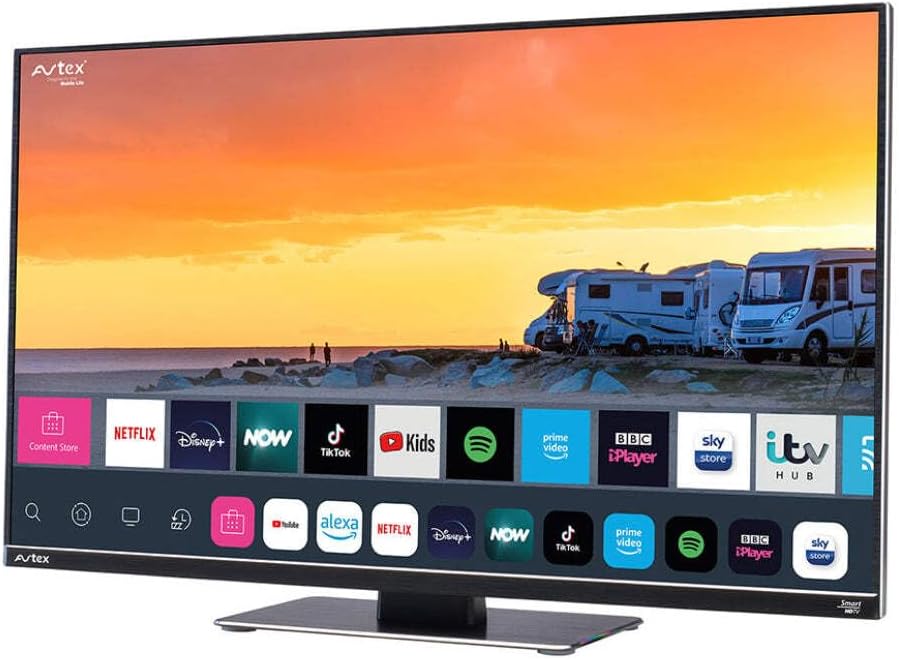
Figure 4.1: Avtex W195TS Smart TV Front View
This image shows the Avtex W195TS Smart TV from a slight angle, highlighting its slim design and the vibrant display. The screen shows a user interface with icons for popular streaming services like Netflix, Disney+, Now, TikTok, Kids, Spotify, Prime Video, BBC iPlayer, Sky Store, and ITV Hub. The background on the screen depicts a scenic view of motorhomes parked near a beach at sunset. The Avtex logo is visible on the top left and bottom left of the TV frame.
4.1. Porte e connessioni
- Porte HDMI: Per collegare dispositivi esterni come lettori Blu-ray, console di gioco o decoder.
- Porte USB (2): For media playback from USB drives or connecting USB accessories.
- Ingresso antenna: For connecting a terrestrial TV antenna.
- Ingresso satellitare: For connecting a satellite dish for Freesat or other satellite services.
- Ingresso alimentazione CC: For 12V/24V DC power connection.
- Ingresso alimentazione CA: For 240V AC power connection via adapter.
- Porta Ethernet: Per la connessione di rete cablata.
- Uscita audio: Per collegare sistemi audio esterni o cuffie.
5. Impostazione
5.1. Installing the Stand (Optional)
- Posizionare con cautela il televisore a faccia in giù su una superficie morbida e pulita per evitare di danneggiare lo schermo.
- Allineare il supporto con i fori di montaggio nella parte inferiore del televisore.
- Fissare il supporto utilizzando le viti in dotazione.
5.2. Collegamento elettrico
The Avtex W195TS supports multiple power inputs:
- 12V/24V CC: Connect the supplied 12V/24V DC power cable to the DC input on the TV and to your vehicle's 12V or 24V power outlet.
- 240 V CA: Connect the supplied 240V AC power adapter to the AC input on the TV, then plug the adapter into a standard 240V AC wall socket.
Nota: Do not connect both DC and AC power simultaneously.
5.3. Antenna/Satellite Connection
- Terrestrial TV: Connect your aerial cable to the 'ANTENNA IN' port.
- Satellite TV (Freesat): Connect your satellite dish cable to the 'SATELLITE IN' port.
5.4. Accensione iniziale e configurazione iniziale
- Connect the TV to power and press the power button on the remote control or TV.
- The First-Time Setup Wizard will appear. Follow the on-screen prompts to select your language, country, and time zone.
- Perform an automatic channel scan for both terrestrial and satellite channels.
- Connettiti alla tua rete Wi-Fi selezionando il nome della rete e inserendo la password.
6. Operativo
6.1. Funzioni di controllo remoto
Prendi familiarità con i pulsanti del telecomando per navigare e controllare facilmente le funzioni del tuo televisore.
- Pulsante di accensione: Accende/spegne la TV.
- Pulsante sorgente: Selects input sources (HDMI, USB, TV, Satellite).
- Volume +/-: Regola il livello del volume.
- Canale +/-: Cambia canale TV.
- Pulsanti di navigazione (Su/Giù/Sinistra/Destra/OK): Per la navigazione e la selezione del menu.
- Smart Hub/Home Button: Accede all'interfaccia Smart TV.
- Pulsanti dell'app: Dedicated buttons for popular streaming apps (if available).
6.2. Funzionalità della Smart TV
Your Avtex W195TS is equipped with smart TV capabilities:
- App Store: Download and install various applications for streaming, news, and entertainment.
- Servizi di streaming: Access pre-installed or downloaded apps like Netflix, Disney+, Prime Video, BBC iPlayer, etc. (subscription may be required).
- Web Navigatore: Naviga in Internet direttamente sulla tua TV.
- Clonazione schermo: Connect your smartphone or tablet to display content on the TV screen (compatibility may vary).
6.3. Connettività Bluetooth
Pair Bluetooth devices such as headphones or external speakers for enhanced audio experience.
- Vai al menu delle impostazioni della TV.
- Select 'Bluetooth' or 'Connected Devices'.
- Enable Bluetooth and put your device into pairing mode.
- Seleziona il dispositivo dall'elenco per associarlo.
6.4. Riproduzione multimediale tramite USB
Insert a USB drive into one of the USB ports to view foto, riprodurre video o ascoltare musica.
- The TV will usually prompt you to open the media player.
- Naviga attraverso il tuo fileutilizzando il telecomando.
7. Manutenzione
7.1. Pulizia della TV
- Schermo: Pulire delicatamente lo schermo con un panno morbido e privo di lanugine. Per macchie ostinate, strofinare leggermenteampPulire il panno con acqua o con una soluzione detergente specifica per schermi (non spruzzare direttamente sullo schermo).
- Casing: Utilizzare un panno morbido e asciutto per pulire la TV casing. Evitare detergenti abrasivi o solventi.
7.2. Aggiornamenti software
Periodically check for software updates to ensure your TV has the latest features and bug fixes. Updates can usually be found in the TV's settings menu under 'System' or 'Software Update'.
8. Risoluzione Dei Problemi
If you encounter issues with your Avtex W195TS, refer to the following common problems and solutions:
| Problema | Possibile causa | Soluzione |
|---|---|---|
| Nessun potere | Cavo di alimentazione non collegato; nessuna corrente dalla presa. | Check power cable connection; test outlet with another device; ensure correct voltage (12 V/24 V/240 V). |
| Nessuna immagine, ma l'audio è presente | È stata selezionata una sorgente di ingresso errata; cavo difettoso. | Press the 'Source' button on the remote to select the correct input; check HDMI/antenna cables. |
| Nessun suono, ma l'immagine è presente | Volume disattivato o troppo basso; problema con il sistema audio esterno. | Disattivare il volume o aumentarne il livello; controllare i collegamenti ai dispositivi audio esterni. |
| Impossibile connettersi al Wi-Fi | Password errata; problema con il router; TV troppo lontana dal router. | Re-enter Wi-Fi password; restart router; move TV closer to router or use an extender. |
| Il telecomando non funziona | Batterie scariche; ostruzione; problema di associazione. | Sostituisci le batterie; rimuovi gli ostacoli; riassocia il telecomando se è un telecomando Bluetooth. |
9. Specifiche
| Caratteristica | Specificazione |
|---|---|
| Marca | Avtex |
| Numero di modello | AVTEX W195TS |
| Dimensioni dello schermo | 19.5 pollici |
| Risoluzione | 1080p (Full HD) |
| Proporzioni | 16:9 |
| Tecnologia di connettività | Bluetooth, HDMI, Wi-Fi |
| Porte USB totali | 2 |
| Voltage | 12 Volts, 24 Volts, 240 Volts |
| Peso dell'articolo | 2.5 chilogrammi |
| Anno del modello | 2018 |
10. Garanzia e supporto
Your Avtex W195TS Smart TV comes with a manufacturer's warranty. Please refer to the warranty card included in your product packaging for specific terms and conditions, including warranty period and coverage details. Keep your proof of purchase for warranty claims.
For technical support, troubleshooting assistance beyond this manual, or warranty inquiries, please contact Avtex customer service through their official website or the contact information provided with your product. When contacting support, please have your model number (AVTEX W195TS) and serial number ready.