
Prodotto finitoview
This document provides instructions for the ZdalaMit 0212-62622-00R replacement remote control. This remote is designed to function with various Polaroid TV/DVD Combo models, offering a direct replacement without requiring complex programming. Simply install batteries, and the remote is ready for use.

Davanti view of the ZdalaMit 0212-62622-00R replacement remote control, showing all buttons and layout.
Impostare
1. Installazione delle batterie
The remote control requires two (2) 1.5V AAA Alkaline batteries (not included). Ensure correct polarity when inserting the batteries.
- Individuare il vano batterie sul retro del telecomando.
- Per aprire il coperchio del vano batteria, farlo scorrere verso il basso o nella direzione indicata dalla freccia.
- Insert two AAA batteries, matching the positive (+) and negative (-) terminals as shown inside the compartment.
- Richiudere il coperchio del vano batteria, assicurandosi che scatti saldamente in posizione.
Nota: No programming is required for this replacement remote. Once batteries are installed, it is ready for use with compatible Polaroid TV/DVD Combo models.
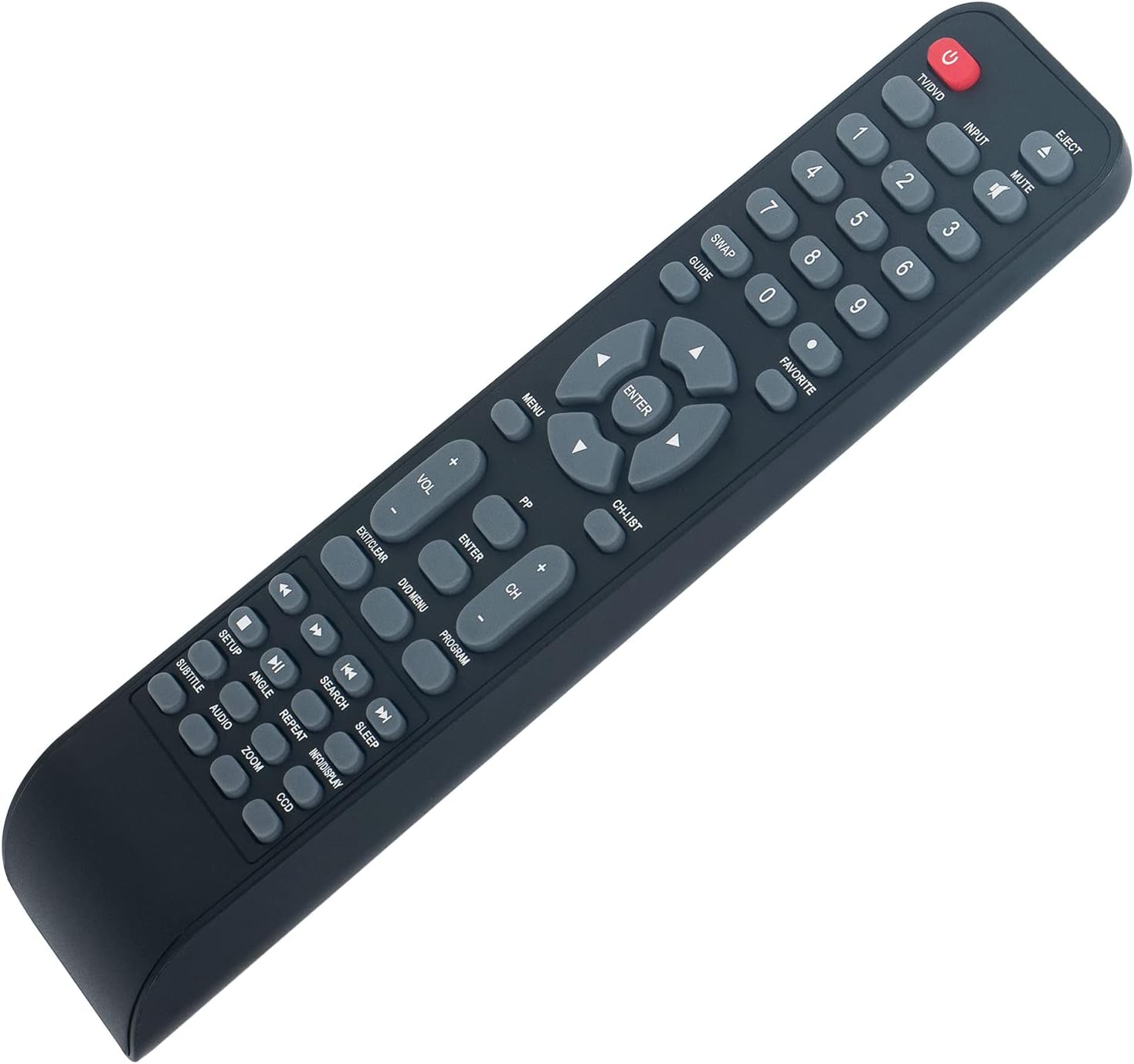
Angolato view of the remote control, illustrating its ergonomic design and button layout for easy handling during battery installation.
Istruzioni per l'uso
Point the remote control directly at the infrared sensor on your Polaroid TV/DVD Combo unit for optimal performance. Ensure there are no obstructions between the remote and the unit.
Funzioni di base
- TV/DVD (Power): Press to turn the TV/DVD Combo unit on or off.
- INGRESSO: Selects the input source (e.g., TV, DVD, HDMI if applicable).
- MUTO: Disattiva o riattiva l'audio.
- Tasti numerici (0-9): Used for direct channel selection or entering numerical values.
- VOL +/-: Regola il livello del volume.
- CH +/-: Cambia il canale televisivo in su o in giù.
- MENU: Accede al menu principale del televisore o del lettore DVD.
- Pulsanti freccia (su, giù, sinistra, destra): Consente di navigare tra le opzioni del menu.
- ACCEDERE: Conferma una selezione nel menu.
- EXIT/CLEAR: Exits a menu or clears an entry.
DVD/Media Playback Functions
- ESPELLERE: Ejects the DVD from the player.
- MENÙ DVD: Accede al menu del disco DVD.
- RIPRODUCI/PAUSA (►/❚❚): Avvia o mette in pausa la riproduzione.
- FERMARE): Interrompe la riproduzione.
- RIAVVOLGI (◀◀): Riavvolge la riproduzione.
- AVANTI VELOCE (►►): Riproduzione in avanti veloce.
- PREVIOUS (◀❚): Skips to the beginning of the current track/chapter or the previous one.
- NEXT (❚►): Passa alla traccia/capitolo successivo.
- RIPETERE: Ripete una traccia, un capitolo o l'intero disco.
- RICERCA: Initiates a search function within media.
- SOTTOTITOLO: Attiva/disattiva la visualizzazione dei sottotitoli.
- AUDIO: Cambia le tracce audio o le lingue.
- ANGOLO: Cambia l'angolazione della telecamera sui DVD compatibili.
- ZOOM: Ingrandisce o rimpicciolisce l'immagine.
- INFORMAZIONI/ESPOSIZIONE: Visualizza le informazioni sul programma o sul supporto corrente.
Manutenzione
- Pulizia: To clean the remote control, wipe it with a soft, dry cloth. Do not use liquid cleaners or abrasive materials, as these can damage the surface or internal components.
- Sostituzione della batteria: Sostituisci le batterie quando la risposta del telecomando diventa lenta o smette di funzionare. Sostituisci sempre entrambe le batterie contemporaneamente con batterie alcaline AAA nuove. Non mischiare batterie vecchie e nuove o tipi diversi di batterie.
- Magazzinaggio: Se il telecomando non viene utilizzato per un periodo prolungato, rimuovere le batterie per evitare perdite che potrebbero danneggiarlo. Conservare il telecomando in un luogo fresco e asciutto, lontano dalla luce solare diretta e da temperature estreme.
Risoluzione dei problemi
| Problema | Possibile causa | Soluzione |
|---|---|---|
| Il telecomando non risponde | Dead or incorrectly installed batteries. Obstruction between remote and TV/DVD Combo. Remote is too far from the unit. | Replace batteries with new AAA Alkaline batteries, ensuring correct polarity. Remove any objects blocking the line of sight to the TV/DVD Combo's IR sensor. Move closer to the unit (within 33 feet). |
| Alcune funzioni non funzionano | The specific function may not be supported by your particular Polaroid TV/DVD Combo model. | This remote is a replacement designed for a range of Polaroid TV/DVD Combo models. While it offers broad compatibility, some advanced or model-specific functions may not be fully supported on all units. Refer to your original TV/DVD Combo manual for specific feature compatibility. |
| I pulsanti sono bloccati o non rispondono | Sporcizia o detriti sotto i pulsanti. | Gently clean the remote control surface with a soft, dry cloth. Avoid pressing buttons excessively hard. |
Specifiche
- Modello: 0212-62622-00R
- Marca: Zdala Mit
- Compatibilità: Polaroid TV/DVD Combo models (TDAC-01933, TDAC-02212, TLAC-03212, 4641-TLXB, TDAC-03212B, TDAC-03212W, TLAC-02255, TDAC01933, TDAC02212, TLAC02255, TDAC03212B, TDAC03212W, TLAC03212, 4641TLXB)
- Alimentazione elettrica: 2 batterie alcaline AAA da 1.5 V (non incluse)
- Tecnologia di connettività: Infrarossi (IR)
- Portata massima: Circa 33 piedi (10 metri)
- Quantità di pulsanti: 18
- Colore: Nero
- Dimensioni (L x P x A): 8.34" x 1.99" x 0.55" (21.18 cm x 5.05 cm x 1.4 cm)
- Peso dell'articolo: 40 Grams (without batteries)
Garanzia e supporto
This ZdalaMit remote control comes with a Garanzia di 1 anno from the date of purchase. This warranty covers manufacturing defects under normal use. It does not cover damage caused by misuse, accidents, unauthorized modifications, or battery leakage.
For technical support, warranty claims, or any questions regarding your remote control, please contact the seller directly through the platform where the purchase was made. Please have your order number ready when contacting support.