
1. Introduzione
This manual provides detailed instructions for the safe and effective use of your AMIRO 9-inch Lighted Makeup Mirror, Model AML009. Please read this manual thoroughly before operating the device and retain it for future reference.

Figure 1: AMIRO 9-inch Lighted Makeup Mirror (Model AML009) and packaging.
2. Informazioni importanti sulla sicurezza
Per evitare lesioni o danni al prodotto, osservare le seguenti precauzioni di sicurezza:
- Maneggiare lo specchio con cura per evitare rotture.
- Be cautious of sharp edges if the mirror glass is broken.
- Ensure proper placement on a stable, flat surface to prevent tipping.
- Do not use the mirror while sleeping or in a location where it could fall and cause injury.
- Tenere fuori dalla portata dei bambini.
- Do not expose the mirror to excessive moisture or immerse it in water.
- Per la ricarica utilizzare solo il cavo USB-C in dotazione.
3. Contenuto della confezione
Verificare che tutti gli articoli siano presenti nel pacco:
- AMIRO 9-inch Lighted Makeup Mirror (Model AML009)
- 10X Magnifying Mirror (detachable)
- Cavo di ricarica USB-C
- Manuale d'uso
4. Caratteristiche del prodotto
The AMIRO 9-inch Lighted Makeup Mirror offers advanced features for an enhanced grooming experience:
- Specchio HD da 9 pollici: Provides a clear, wide view per l'applicazione del trucco.
- Specchio ingranditore 10X: A small, detachable mirror for detailed tasks like eyebrow tweezing or contact lens application.
- Illuminazione LED integrata: Premium bright LEDs provide natural and soft illumination without glare.
- 3 modalità di illuminazione a colori: Switch between warm, natural, and cold white light to simulate various environments.
- 6 livelli di luminosità: Adjust light intensity from 0% to 100% for optimal visibility.
- Controlli touch intelligenti: Intuitive touch buttons for power, color mode, and brightness adjustments.
- Smart Sensor (Induction Mode): Automatically turns the light on when human movement is detected within 30cm and off when no movement is detected for 50cm outside the mirror surface for 10 seconds.
- Funzione di memoria: The mirror remembers your last used brightness and color settings.
- Ricaricabile e senza fili: Equipped with a built-in 2200 mAh lithium battery, offering 3-5 hours of continuous use on a full charge.
- Ricarica USB-C: Convenient charging via USB-C cable from various power sources.
- Rotazione libera di 50°: Allows adjustment of the mirror angle for optimal viewing.
- Base stabile: Features soft, non-slip rubber for secure tabletop placement.

Figura 2: Oltreview of AMIRO Lighted Makeup Mirror features.
5. Impostazione
5.1 Carica iniziale
Before first use, fully charge the mirror. Connect the provided USB-C cable to the charging port located at the back of the mirror's base and plug the other end into a USB power source (e.g., wall adapter, power bank, computer).
- The indicator light will blink green during charging.
- Quando la carica è completa, la spia luminosa diventerà verde fissa.

Figure 3: USB-C Charging Port and Indicator Light.
5.2 Attaching the 10X Magnifying Mirror
The 10X magnifying mirror attaches magnetically to the main mirror surface. Simply place it onto the desired area of the main mirror. Ensure it is securely attached before use.
5.3 Posizionamento
Place the mirror on a flat, stable surface. The non-slip rubber base provides stability. Avoid placing it near edges where it could fall.

Figure 4: Stable silicone base.
6. Istruzioni per l'uso
The mirror features intuitive touch controls located on the front of the mirror's base.

Figure 5: Smart Touch Controls.
6.1 Power On/Off and Color Mode Selection
- Accensione/spegnimento: Short press the center touch button (power icon) to turn the light on or off.
- Cambia modalità colore: While the light is on, short press the center touch button to cycle through the three color modes: Warm Light, Natural Light, and Cold White Light.

Figure 6: 3 Color Temperature and 6 Brightness Levels.
6.2 Regolazione della luminosità
- Aumenta la luminosità: Long press the right touch button (+ icon).
- Diminuisci luminosità: Long press the left touch button (- icon).
- The brightness can be adjusted from 0% to 100%.
6.3 Smart Sensor (Induction Mode)
The mirror can automatically turn on or off based on human presence.
- To activate Induction Mode: Long press the center touch button until the indicator light turns blue. The light will turn on when you are within 30cm of the mirror surface.
- To deactivate Induction Mode (Constant On Mode): Long press the center touch button until the indicator light turns red. The light will remain on until manually turned off.
- When in Induction Mode, the light will automatically turn off approximately 10 seconds after you move 50cm away from the mirror surface.
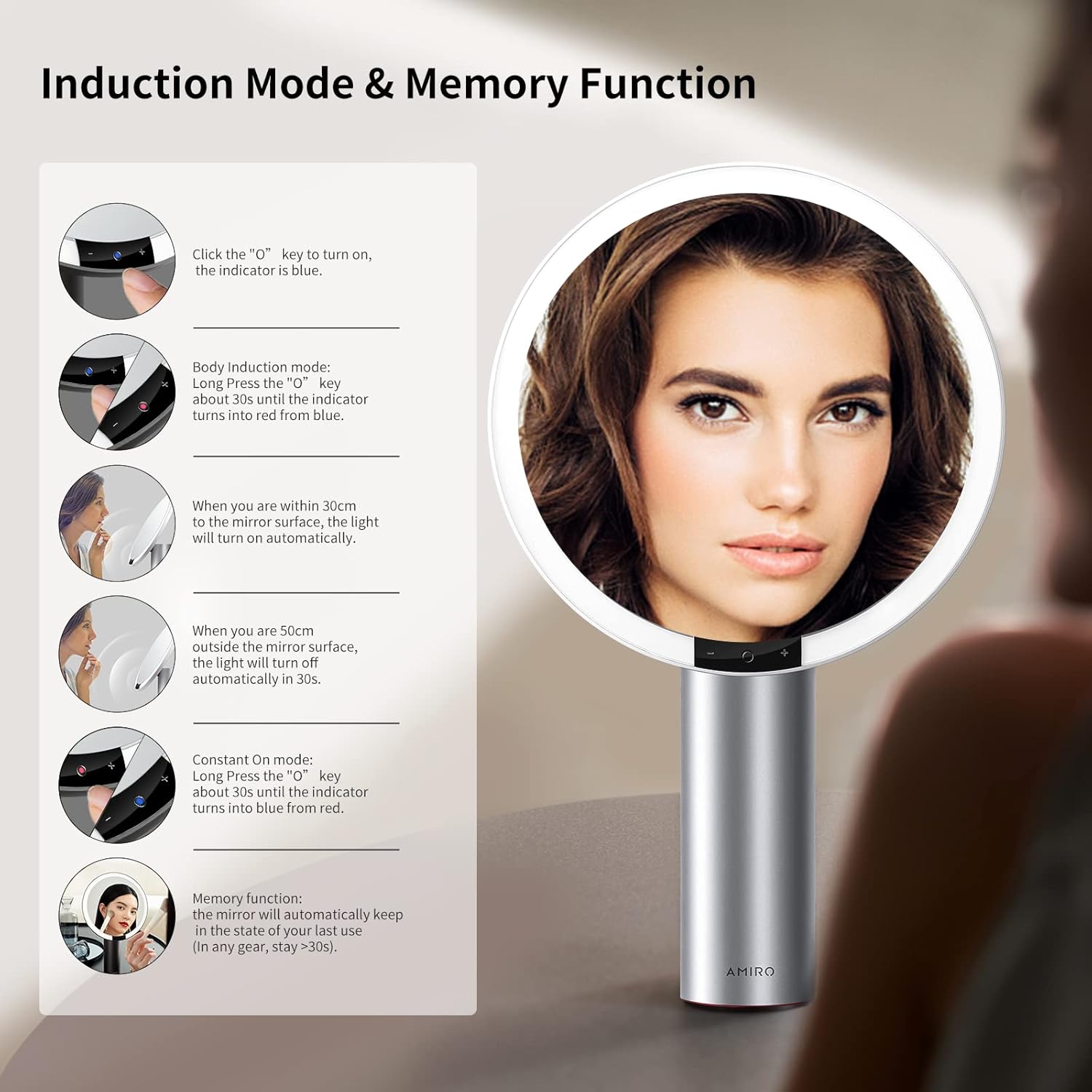
Figure 7: Induction Mode and Memory Function.
6.4 Funzione di memoria
The mirror is designed with a memory function. It will automatically recall the last used brightness and color mode settings when turned on again, provided the mirror was used for more than 10 seconds in the previous session.
6.5 Mirror Rotation
The mirror head can be freely rotated up to 50 degrees to adjust the viewangolo di ingaggio secondo necessità.

Figure 8: Free Rotation feature.
7. Manutenzione
7.1 Pulizia
- To clean the mirror surface, gently wipe with a soft, lint-free cloth. For stubborn spots, a small amount of glass cleaner can be applied to the cloth (not directly to the mirror).
- Do not use abrasive cleaners or harsh chemicals, as these may damage the mirror or its finish.
- Wipe the body of the mirror with a dry or slightly damp panno morbido.
7.2 Conservazione
Store the mirror in a cool, dry place away from direct sunlight and extreme temperatures when not in use for extended periods.
8. Risoluzione Dei Problemi
If you encounter issues with your AMIRO Lighted Makeup Mirror, refer to the following common problems and solutions:
| Problema | Possibile causa | Soluzione |
|---|---|---|
| La luce dello specchio non si accende. | Battery is depleted; Mirror is in Induction Mode and no movement is detected; Power button not pressed correctly. | Charge the mirror fully. Ensure the mirror is in Constant On Mode or activate Induction Mode by approaching the mirror. Short press the center touch button to turn on. |
| La luce è troppo fioca o troppo intensa. | Il livello di luminosità necessita di regolazione. | Long press the '+' or '-' touch buttons to adjust brightness to your preference. |
| Cannot change light color. | Color mode not selected. | Short press the center touch button repeatedly to cycle through Warm, Natural, and Cold White light modes. |
| 10X magnifying mirror does not stay attached. | Weak magnetic connection; Surface not clean. | Ensure both the main mirror surface and the back of the magnifying mirror are clean and dry. Reattach firmly. If the issue persists, contact customer support. |
| Mirror feels unstable or tips easily. | Not placed on a flat, stable surface; Base suction not engaged (if applicable). | Relocate the mirror to a completely flat and stable surface. Ensure the non-slip base is making full contact. |
| La durata della batteria è più breve del previsto. | Frequent use at maximum brightness; Battery degradation over time. | Reduce brightness settings for longer battery life. Ensure the mirror is fully charged before each use. If battery life significantly degrades, contact customer support. |
9. Specifiche
Detailed technical specifications for the AMIRO 9-inch Lighted Makeup Mirror (Model AML009):
- Modello: AML009
- Marca: AMICO
- Dimensioni dello specchio: 9 pollici
- Ingrandimento: 10X (specchio staccabile)
- Dimensioni del prodotto: 10.7"L x 17"W
- Peso dell'articolo: 2.93 libbre (1.33 kg)
- Materiale del telaio: Metallo
- Materiale del corpo: Alluminio
- Colore: Bianco
- Tipo di montaggio: Supporto da tavolo
- Illuminazione: LED integrato
- Modalità colore: 3 (Warm, Natural, Cold White)
- Livelli di luminosità: 6 (0%-100% adjustable)
- Caratteristiche speciali: Smart Sensor, Touch Control, Memory Function, 50° Free Rotation, Cordless, USB Charging
- Batteria: 2200 mAh agli ioni di litio (inclusi)
- Porta di ricarica: USB-C
- Assemblaggio richiesto: NO
- Utilizzi consigliati: Makeup application, Personal grooming, Home use

Figure 9: Mirror dimensions and key specifications.
10. Garanzia e supporto
For warranty information, please refer to the documentation included with your purchase or contact AMIRO customer support directly. If you require assistance with your product, have questions, or need to report an issue, please contact AMIRO customer service through their official channels.
Contact information can typically be found on the product packaging or the official AMIRO websito.