
Introduzione
This manual provides comprehensive instructions for the installation, operation, maintenance, and troubleshooting of your Amazon Basics Keyless Entry Door Lock Deadbolt. Designed for convenience and security, this electronic keypad deadbolt offers keyless access with customizable security codes and an automatic locking feature. Please read this manual thoroughly before installation and use to ensure proper functionality and safety.
Contenuto della confezione
Verificare che tutti i componenti siano presenti prima di iniziare l'installazione:
- Electronic Keypad Deadbolt Assembly (Exterior and Interior Units)
- Meccanismo di chiusura
- Piastra d'urto
- Confezione di viti
- Keys (for traditional key option)
- Modello di installazione

The image above displays the complete set of parts you should find in your product package, including the electronic keypad unit, the interior deadbolt assembly, the latch, strike plate, screws, and traditional keys.
Impostare
Prima dell'installazione
- Ensure your door thickness is between 1-3/8 to 1-3/4 inches (35mm to 44mm).
- Verify the backset (distance from door edge to center of bore hole) is either 2-3/8 inches (60mm) or 2-3/4 inches (70mm).
- Prepare the necessary tools: Phillips head screwdriver, tape measure, pencil.
- The lock requires 4 AA batteries (not included). Install fresh batteries before final assembly.
Fasi di installazione
Follow these general steps for installation. For detailed, step-by-step instructions, refer to the included printed manual or the official Garanzia (PDF) document which often contains installation guides.
- Prepara la porta: Use the provided installation template to mark and drill holes if your door is not pre-drilled. Ensure the correct backset is selected.
- Installa il fermo: Insert the latch into the door edge, ensuring the correct orientation for your door swing. Secure it with screws.
- Installare il gruppo esterno: Posizionare il gruppo tastiera esterno sulla porta, allineando il perno attraverso il fermo.
- Installare la piastra di montaggio interna: Secure the interior mounting plate to the exterior assembly using screws, ensuring it is flush against the door.
- Installare il gruppo interno: Connect the cable from the exterior assembly to the interior assembly. Attach the interior assembly to the mounting plate.
- Installa le batterie: Remove the battery cover on the interior assembly and insert 4 new AA batteries, observing polarity. Replace the cover.
- Eseguire il processo di consegna delle porte: This step calibrates the lock to your door's orientation. Follow the specific instructions in your printed manual for this crucial step.

The template provides clear markings for drilling holes, ensuring proper alignment for the deadbolt mechanism and keypad. It supports both 60mm and 70mm backsets.
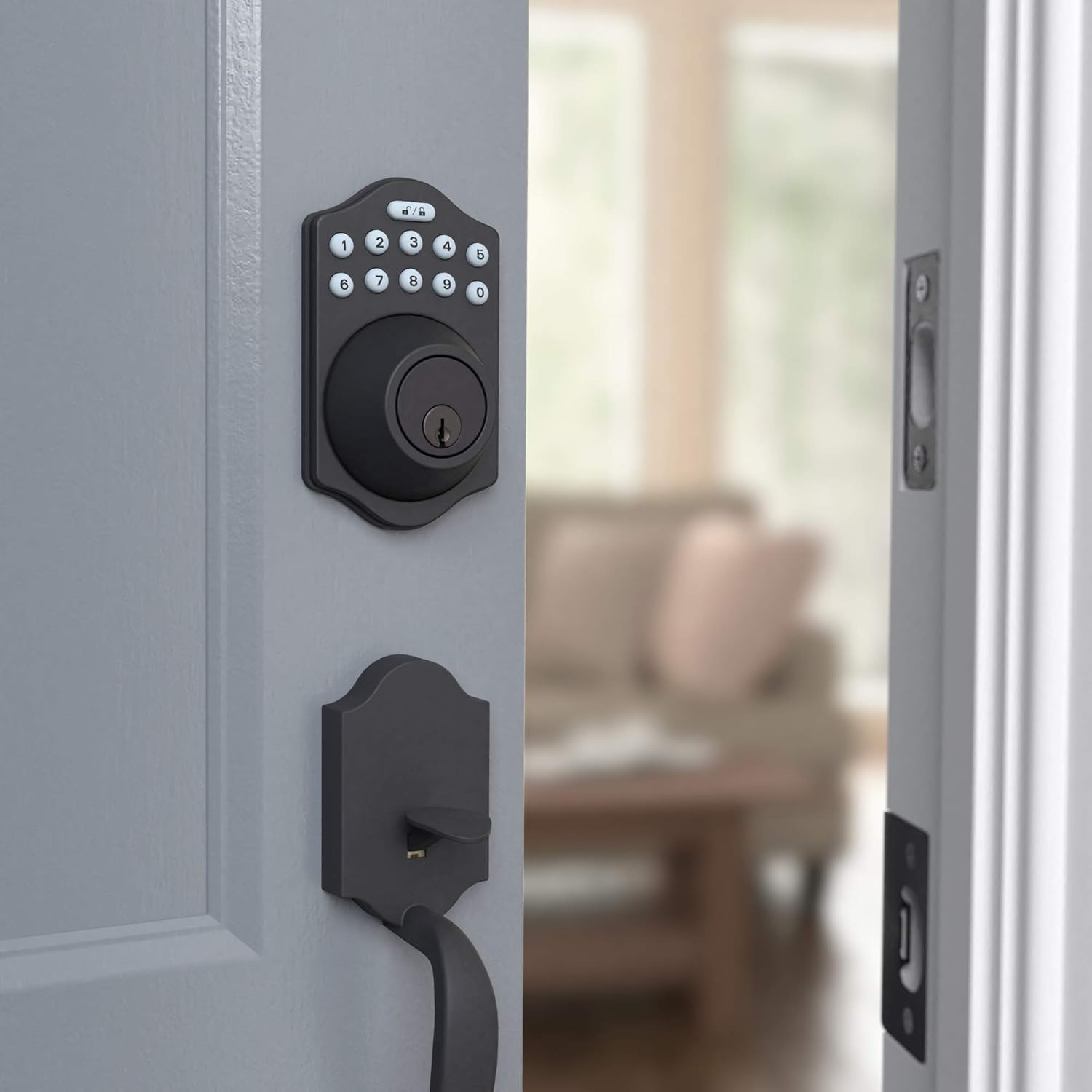
This image shows the electronic keypad deadbolt installed on the exterior side of a door, ready for operation. The matte black finish blends seamlessly with the door.

Il lato view illustrates how the deadbolt integrates with the door frame, providing a secure locking mechanism. The internal components are neatly concealed.
Istruzioni per l'uso
Programmazione dei codici utente
Your deadbolt comes with a default programming code. You will use this code to set up to 6 unique user codes for family members or temporary single-use codes for guests. Refer to your printed manual for the exact sequence of button presses to add, delete, or modify user codes.
Blocco e sblocco
The lock can be operated using the keypad or a traditional key.
- Chiudere a chiave: Premere il tasto Serratura button (top right button with lock icon) on the keypad. The deadbolt will extend.
- Per sbloccare: Enter your valid user code, then press the Sbloccare button (top left button with unlock icon). The deadbolt will retract.
- Bloccaggio automatico: The deadbolt features an automatic locking function, which can be set to engage 10 to 99 seconds after entry. This provides added peace of mind, ensuring your door is always secured.
- Funzionamento manuale: From the interior, the deadbolt can be manually locked or unlocked using the thumb turn. From the exterior, a traditional key can be used as a backup.

The keypad features illuminated numbers for easy visibility in low light conditions, along with dedicated lock and unlock buttons at the top. The traditional keyhole is located below the keypad.
Manutenzione
Sostituzione della batteria
The electronic deadbolt is powered by 4 AA batteries. When the batteries are low, the lock may emit a warning sound or the keypad lights may flash. To replace the batteries:
- Remove the battery cover located on the interior side of the deadbolt assembly. This cover typically slides upwards or detaches with a gentle pull.
- Rimuovere con attenzione le vecchie batterie.
- Inserire 4 batterie AA nuove, assicurandosi della corretta polarità (+/-).
- Riposizionare il coperchio della batteria, assicurandosi che scatti saldamente in posizione.
Regularly check battery levels to ensure uninterrupted operation. High usage may require more frequent battery changes.
Pulizia
Pulisci la tastiera e il corpo della serratura con un panno morbido eamp panno. Evitare l'uso di detergenti abrasivi o solventi, poiché potrebbero danneggiare la finitura e i componenti elettronici.
Risoluzione dei problemi
If you encounter issues with your Amazon Basics Keyless Entry Door Lock Deadbolt, refer to the following common problems and solutions:
| Problema | Possibile causa/soluzione |
|---|---|
| Lock does not respond to keypad input. |
|
| Il catenaccio non si estende o non si ritrae completamente. |
|
| Impossibile programmare nuovi codici utente. |
|
| Automatic locking feature not working. |
|
If these solutions do not resolve the issue, please contact Amazon Basics customer support for further assistance.
Specifiche
| Caratteristica | Dettaglio |
|---|---|
| Marca | Nozioni di base di Amazon |
| Nome del modello | PL14910_6B |
| Numero di parte | PL14910 |
| Codice UPC | 840095890281 |
| Tipo di blocco | Key Lock, Keypad |
| Caratteristica speciale | Senza chiave |
| Colore | Nero opaco |
| Stile | Traditional Electronic Keypad Deadbolt (Pack of 6) |
| Numero di pezzi | 6 |
| Tipo di finitura | Raso |
| Peso dell'articolo | 2.71 libbre |
| Metodo di controllo | Tocco |
| Usi consigliati | Residential door locking, commercial door locking |
| Compatibilità dello spessore della porta | 1-3/8 a 1-3/4 pollici |
| Batterie richieste | Sì (4 batterie AA) |
| Paese di origine | Taiwan |
Garanzia e supporto
For warranty information regarding your Amazon Basics Keyless Entry Door Lock Deadbolt, please refer to the official warranty document provided with your product or available online:
For additional support, troubleshooting assistance, or to inquire about replacement parts, please visit the Negozio Amazon Basics or contact Amazon customer service directly.